43 of 48
questions without a handover to a person
measured on a single assistant on our own knowledge base, not on customer projects; a figure from live operation is not yet available
The XICBOT assistant for service providers answers questions about your services from your website content, qualifies enquiries and quotes with targeted follow-up questions, takes appointment requests, takes callbacks and hands structured leads to your inbox or, in the Custom package, to your CRM.
This page is for service providers. The assistant answers questions about your services. The answers come from the texts on your website. It also names the place where it says so. It asks short questions about need, scope and time. So a complete request reaches your inbox. It also takes requests for a call back. It only names prices and deadlines if you have stored them.
Request a demo with your services View pricing and packages
A conversation instead of form, phone and callback kept separate — around the clock, GDPR-compliant, hosted in Germany.
Assistant:Hello. I know our services, the usual procedures and can name free times for a first call. What is it about?
Visitor:We would need support with bookkeeping, about ten hours a month.
Assistant:Thank you, that helps. Two questions: when should it start, and do you work with a particular software?
Visitor:From next quarter, the software is already in place.
Assistant:I have recorded this as a request and handed it over. You will get a reply with proposed dates.
Ask it yourself, Assistant of this website
Automated assistantService providers live on enquiries — and lose most of them not at the quote but before it. Prospects call outside office hours, ask the same questions about service, process, area and price in the contact form, or drop off before they even send an enquiry. At the same time, every appointment negotiation costs phone time, and callback requests end up as notes at reception. The XICBOT assistant for service providers steps in exactly here: it answers the recurring service questions right in the chat from your website content, qualifies the enquiry in conversation, offers an appointment or callback and hands over a structured lead at the end. So what reaches you is not an anonymous message but a complete, prepared enquiry.
Whether consulting, cleaning, coaching, driving school, energy advice or care service — at their core, service providers always face the same five tasks: answer questions, qualify enquiries, arrange appointments, organize callbacks and capture contacts. The assistant takes on exactly these tasks and is trained on your offer. Each function can be tailored individually, for example with mandatory details, responsibilities by region or an initial assessment of the request.
Questions about services, process, service area, price ranges and availability are answered by the assistant around the clock from your website content — in the chat and in the customer's language. If the answer is not in your content, it says exactly that — instead of guessing.
Instead of an empty enquiry, the assistant asks targeted follow-up questions about need, scope and timeframe and hands over a prepared enquiry. More on this at the lead assistant.
The assistant names free times from your appointment types and takes the chosen appointment as a request. Once you confirm it, the prospect receives a confirmation email and a timely reminder, if an email address was given. Details at the booking assistant.
Those who prefer to call leave a callback request with a preferred time and request. Your team calls back prepared instead of deciphering handwritten phone notes.
Name, request and contact details are captured in the flow of conversation and handed over as a structured lead to your inbox or, in the Custom package, to your CRM — with full conversation context for a fitting reply.
If an enquiry becomes complex, urgent or sensitive, the assistant is meant to pass it to a team member with full context — live, by email or, in the Custom package, as a ticket. It replaces no one, it prepares the ground.
What the assistant does not do is laid down just as firmly. It answers from the stored excerpts, and sourced statements carry the number of the excerpt they rest on. If the search finds nothing suitable, it usually does not guess but says that there is nothing on this in the stored knowledge base. For you that is not a failure but a pointer: every unsourced answer is recorded as a gap, and from the Pro package the gap list shows after a few weeks of operation which service question is missing from your website.
Hard blocks take precedence over every role and every topic boundary you set: no legal advice, no medical information, no binding financing offer. If a conversation points to a danger to life or health, the assistant is instructed to refer to the emergency services before everything else; this rule cannot be switched off. The assistant must also not claim to be human, and it is instructed not to invent contact details, file numbers or appointments.
43 of 48
questions without a handover to a person
measured on a single assistant on our own knowledge base, not on customer projects; a figure from live operation is not yet available
For the assistant to truly qualify rather than just collect contact details, it needs to do two things: read the context of your services from your content and then perform real actions such as appointment requests and lead handover. XICBOT combines both in one continuous conversation, without the prospect having to leave the page or hunt for a separate form.
Before the assistant qualifies, it understands what the matter is about. It reads your service descriptions, price ranges, service areas, FAQ, opening and consultation hours and answers the open question first. Only then does it ask the follow-up questions that fit this specific enquiry — different ones for a quote request than for an appointment question. This makes the conversation feel like helpful advice rather than an interrogation.
A concrete next step grows out of the conversation. The assistant captures the contact details, offers an appointment request for a free time or a callback and hands the structured lead to your inbox or, in the Custom package, to your CRM — writing actions only after the visitor has confirmed in the conversation. How the connection to calendar, CRM and other systems works is covered under tool control.
The line between reading and acting is not a turn of phrase but a lock: without confirmation, only what reads and is explicitly set to automatic will run. Everything else — appointment, callback, lead, handover — first ends as a proposal and executes nothing. What is about to happen is shown to the visitor in plain words beforehand: for a lead the name, email, phone and request, for a handover the reason. This preview text is stored and not regenerated later, so that the log holds what the visitor actually had in front of them when they clicked Confirm.
If a connected system does not respond in time, the call ends after eight seconds as a timeout and is not retried in the background — there is no second attempt. The model is then shown an error block, not an empty result that could read as success. That difference decides whether the visitor hears that the request did not go through, or is told about an appointment that does not exist.
An assistant that answers service questions is only as solid as the material it answers from. At XICBOT that is not a training round on a model but a traceable path from your website into a knowledge base that you see and release before any visitor gets to read it.
Four kinds of source are possible: free text, an uploaded file, a website and a maintained collection of question-and-answer pairs. For service providers the website is usually the start, and the question-and-answer collection grows afterwards — that is where you store the sentences that are meant to go out exactly as written, a price range or your cancellation rule, for instance.
You enter the address of your website, nothing else. Before anything is read, a guard resolves the host name into its addresses and requires each of them to be public: whatever points into a private network is refused with a reason instead of being skipped in silence. The run itself is queued as a job rather than handled inside the web request — with an external server and up to 25 pages it would otherwise be cut off at the first timeout.
The fetcher identifies itself under its own name and honours your robots.txt in line with RFC 9309 — the section for its own name, not the wildcard section on top. It reads at most 25 pages per run, follows only real links in the text and does not leave your origin. A page marked as not to be indexed yields not a single section: what is not published carries no answer either. Your own exclusion patterns take precedence over robots.txt.
The text that was read is split into sections of 800 characters with 120 characters of overlap, so that a sentence is not lost at the cut. Searching later runs along two paths at once — full text and a word-feature profile — and the two hit lists are merged. This is explicitly not a neural method, and we do not describe it as one: no external service takes part in the search.
What has been read becomes a proposal: role, topic boundaries, first building blocks. Every proposed statement has to carry a source that belongs to an address actually read — anything without one drops out before it is shown. Promotional wording that amounts to a promise sits on a block list and does not make it out of the proposal. If the run finds no readable text on your website, it ends with exactly that statement, not with an assistant that merely sounds plausible.
Before the first visitor comes the test set: questions with an expected answer, run down the same path as a real conversation, each in a conversation of its own. Judging happens without a model, on three recomputable feet — required terms, forbidden terms and the literal overlap with the sample answer. A question that produced no answer does not count as passed: such rows count as errors and are not booked as success.
A new assistant starts out as a draft. Going live takes two separate switches: the active state and the enabled widget. You flip both of them, not us — the operator side has no function at all for activating an account, an assistant or a widget.
If your offering changes, nothing is overwritten — it is rebuilt: every run writes into a new version and only switches over at the very end. If it fails, the previous state keeps answering, and several older versions remain retrievable. If your website serves nothing but a maintenance page one day, the run does not clear the knowledge base — a pass without findings deletes nothing.
A maintained question-and-answer pair takes a different route from the rest: when it matches, its wording goes out without any model call. Whoever stores a price range or a cancellation rule in exactly that form gets it back in exactly that form — not a paraphrase of it.
42 of 48
answers carrying a source reference
questions whose answer is in the knowledge base; six carried no source reference
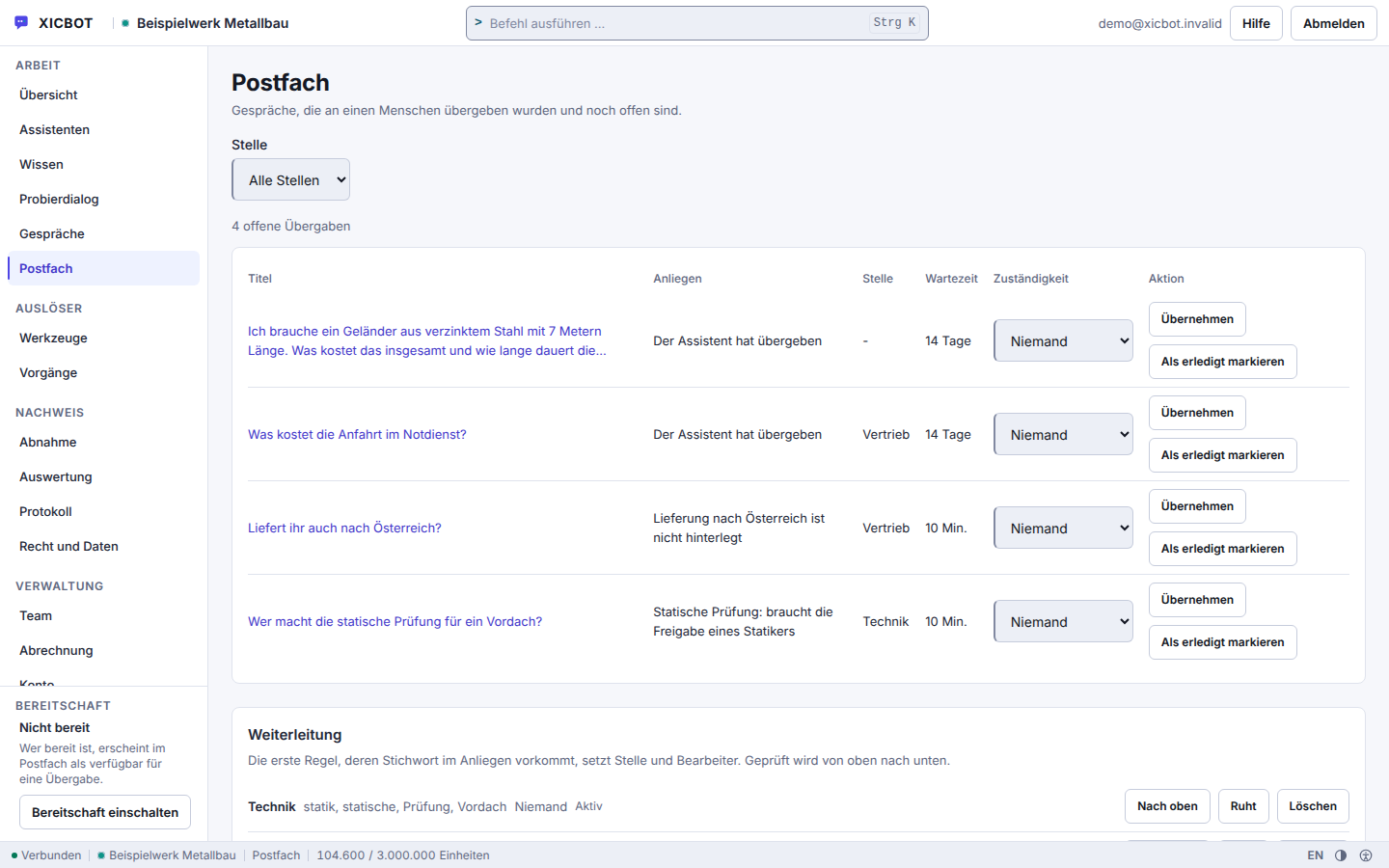
Every handover sits in one row with title, request, queue and waiting time.
Taking over and resolving are two buttons in that same row, not a second tool.
The routing rules below decide which queue a request goes to.
The path from the first click to a prepared enquiry runs in five natural steps. For the prospect it feels like a short, helpful conversation. Behind it, a complete lead with an appointment or callback grows for you that can be handled without any follow-up chasing.
A prospect opens the chat because they want to know something — about a service, the process, the service area or the rough price. The assistant greets them in line with the page they opened and answers the question in the chat from your content, instead of pointing them to a form or your office hours.
Once the first question is clarified, the assistant understands the need: what is it about, what scope, what timeframe, does it fit the service area and your service profile? These follow-up questions are tailored to your business, so the result is an enquiry your team can genuinely place.
If the enquiry fits, the assistant offers the next step: a free time from your appointment types as an appointment request that your business confirms, or a callback request with a preferred time. The prospect decides which they prefer — both without a phone queue.
Before the request is created, the step sits in the conversation as a proposal: appointment, time and request in plain words, two buttons below. Only the click on Confirm creates the request, and the buttons lock themselves afterwards so that a second click triggers nothing. If the prospect declines, that is not an error but a recorded state — the conversation carries on, just without a request.
The finished, structured lead goes to your inbox or, in the Custom package, straight into the CRM — including conversation context, request, requested appointment or callback wish. The prospect gets a receipt in the conversation and knows when and how things continue; a confirmation email for the appointment follows once your business confirms it, if an email address was given. In urgent cases the assistant hands over to a human.
The path has limits, and we would rather name them than pass over them. One answer carries at most five tool calls; once more than four fifths of your monthly quota is used up, only one. A call into a connected system has eight seconds, twenty at the very most, and does not keep running in the background afterwards. There is no second attempt: a failed call ends as an error or as a timeout.
What follows from that is unspectacular and important: a request that did not come about is not narrated as received. The visitor sees the state of the call in the same card that held the proposal before.
Prospect:Would Thursday morning work for an initial consultation? We are based in Peine — is that still your area?
Assistant:Peine is inside the stored service area. For an initial consultation, Thursday 9:30 and 14:00 are free.
Prospect:9:30 would be good.
Assistant:I am putting the appointment to you as a proposal — please confirm once and I will take it as a request.
Prospect:Confirmed.
Assistant:Received as a request. Your request and the appointment wish sit together in the inbox — your contact sees both in a single case, and the appointment becomes binding with their confirmation.
The Assistant Does Not Replace a Conversation — It Prepares OnePersonal advice remains your strength. The assistant takes the recurring questions, the appointment organization and the sorting of enquiries off your plate, so you can use your time for the cases that need a human. Because an AI assistant can be wrong, its answers stay bound to your own content, and when uncertain it is meant to hand over to a team member.
from 149 € per month net
Minimum term: none, cancellable monthly
All prices net, plus VAT Source: XICBOT price list, as of 11 September 2026
For service providers with appointment booking, callback and enquiry qualification, the Pro package fits: operation from 149 € per month net plus a one-time setup from 2,900 € net (individual training and integration). Those who initially only need service FAQs and lead capture often start with the Start package from 49 € per month net, setup from 990 € net. Individual connection to a CRM or scheduling system from 4,900 € net setup. Every project begins with a free initial consultation and a free demo for your website. Ongoing services are booked individually and can be cancelled monthly; there is no minimum term.
The expectation of quick availability has risen, while phone time and reception stay limited. More than half of website visits now come from mobile devices (Statcounter) — where a long form is especially off-putting, and a call during office hours rarely fits a prospect's day. An assistant that answers without a hold queue and offers the next step right away lowers exactly these hurdles. From our project experience, this produces more and at the same time better-prepared enquiries from the same stream of visitors.
We would rather advertise what the assistant can do than with invented success stories. The following journeys are anonymized and illustrative and show how the assistant can be used across different service areas.
Concrete Results on RequestWould you like to know which enquiries an assistant can realistically answer and qualify for your service area? In the free initial consultation we look at your website and your enquiry process and show relevant examples from practice, without sales pressure and without empty promises.
„We do not promise a fixed number of enquiries. We build an assistant that takes on the recurring questions, qualifies in conversation and hands over every enquiry with an appointment or callback in a structured way — transparently and step by step.“ — Our approach
Further reading: AI chat assistant for service providers describes how enquiries can be pre-sorted, and qualifying leads via chat shows which follow-up questions turn a vague enquiry into a usable job.
In an initial conversation the questions almost always come in the same order: first whether one's own business fits at all, then the appointment question, then where the assistant takes its knowledge from — and lastly the price. The answers here are the same ones we give on the phone.
For businesses whose enquiries begin with questions about service, process, area and price — consulting, agency and coaching, cleaning and facility, energy advice, driving schools or care services. Nothing is trained in the process: your service pages, price lists and information sheets go into the knowledge base as text, a file, a website or a maintained question-and-answer pair, and the answer is searched there at runtime. A maintained pair goes out verbatim, without a model call — the right place for a call-out charge or a notice period. Requests for appointments are taken by the appointment tool type, enquiries by the lead type. More under assistant for service providers.
It asks follow-up questions tailored to your business, for example about need, scope, timeframe and, where it fits, budget. Which fields it collects you determine on the tool itself; a custom schema takes up to twenty fields, and a call with missing required fields is not executed at all. So you do not receive an empty enquiry but a lead with context in the mailbox of the business. Outward, an event is created in addition that your own systems can pick up. The bar against the double click sits in the database and not in the interface, and a second attempt reports the duplicate instead of an error. More under lead assistant.
Directly and bindingly only with a calendar connection set up in the Custom package; without it, the assistant takes appointment requests that your business confirms. Creating the request is a write operation and therefore never runs through unconfirmed: the proposal states kind of appointment, day and time in plain text in the chat, only the visitor's click creates it, and it becomes an appointment once you confirm it in your view; if the visitor gave an email address, they then receive a confirmation email. On request the assistant names free times from your stored kinds of appointment — time windows, duration, lead time and buffer — minus the appointments already requested or confirmed in XICBOT; it does not compare them with an external calendar, and a time it names remains a suggestion. With a calendar connection, the calendar_availability adapter reads the free times from your calendar, and calendar_booking enters the appointment after the visitor's click. A request is only possible if its kind is known to your business, the lead time fits and the moment falls into an approved window; occupancy is checked under a lock, and a double click creates no second appointment. An hourly run sends the reminder for the confirmed appointment by email, if an address is on file. Anyone who would rather use the phone leaves a callback note with a preferred time. More at the booking assistant.
The assistant checks occupancy under a lock: the check and the entry happen in one go, so a time slot is not given out twice. Against a double click there is a bolt in the database rather than in the program flow — the same request submitted twice does not create a second request. An appointment request becomes an appointment when your business confirms it. Without a calendar connection the assistant counts the appointments already requested or confirmed in XICBOT; what is only in an external calendar it does not see. With a calendar connection set up in the Custom package it reads free times through the calendar-availability form and writes the entry through the calendar-booking form; then the free times offered follow your calendar — including appointments that came in by phone or email. The check under a lock does not apply on this path: whether a slot taken in the meantime is rejected at booking is decided by your calendar. XICBOT sends each booking with an idempotency key by which your calendar can recognise a booking submitted twice.
It is trained on your own content: website, service descriptions, price ranges, FAQ, opening and consultation hours. Its answers are bound to these sources so it does not guess into the blue. Every source carries the time at which it was last read; once it counts as stale, it is re-read in the background without holding up the answer in progress. If a question does not fit the stored profile, it is meant to hand over to a human instead of constructing an answer — and the question is recorded as a gap. How the training and source binding work is shown by the website assistant.
The assistant is not tied to opening hours: it answers as soon as somebody writes, in the evening and at weekends too. If a question goes beyond plain information, the enquiry tool records name, email, phone and request and attaches files uploaded beforehand. It is only sent once the visitor has confirmed the summary in the window — they see in plain text what will be transmitted. The entry lands in your mailbox and at the same time triggers an event that a connected system can pick up in the Custom package. A one-time key made of conversation, tool and sorted input makes sure the same enquiry does not arrive twice. On the next working day a complete case is waiting for you. More at the lead assistant.
The assistant answers from the sources you deposited. If it finds nothing suitable there, it is instructed to say so openly instead of guessing. At the same time the question is recorded as a knowledge gap and an event goes out; from the Pro package you see in conversation analytics what was asked and what was missing. On request it hands over: the conversation moves into the handed-over state, an entry appears in your mailbox and a message with the transcript so far reaches the responsible place in your business — the assignment is fixed before the message leaves. If a ticket system is connected in the Custom package, the assistant opens a case there once you confirm. When someone from your team takes over the conversation, the visitor sees that in the window.
Wherever you want: to an email inbox, to several responsible people or, in the Custom package, straight into your CRM. The lead is handed over in a structured way, including conversation context and request. Behind it sits a tool with its own kind and its own approval mode; for CRM there is an additional adapter that writes and therefore asks for confirmation. Every handover carries a one-time key made from conversation, tool and input: if the same request is triggered a second time, the system reports the duplicate instead of sending again. How the connection to your CRM and other systems works through defined actions is covered under tool control.
Yes. The assistant is set up GDPR-compliant from the ground up: hosting in Germany, a data processing agreement, data sovereignty and a deletion concept; the answers are generated by a specialised model provider, also outside the EU on the basis of standard contractual clauses. Contact details are only captured when the prospect provides them in the conversation and only handed to the destinations you have defined. Before sending, they read in plain text what will be handed over and confirm it themselves; submitted twice, no second enquiry is created. A tool only ever sees the fields of its own schema — tenant and account identifiers are blocked as field names. Details under privacy and hosting.
We work nationwide via video call, phone and email. We are based in Söhlde between Hildesheim and Hanover, and we also look after businesses in the region with on-site meetings. Distance plays no role for the setup: you create the account and the assistant yourself in the admin area, knowledge is added as a website, a file, free text or a maintained question-and-answer pair, and the integration is a single script line in the head or theme of your page. There is no step where we would first have to unlock something. The initial consultation and the demo with a test assistant are free of charge; what comes after that is listed under pricing.
With appointment requests, callback and enquiry qualification the assistant is part of the Pro package from 149 € per month net, plus a one-time setup from 2,900 € net. It contains ten seats, five assistants, 50 knowledge sources and 2,000 documents as well as the conversation analytics, which shows which enquiries actually arrive and how many of them were handed over. Those who initially need only service FAQs and lead capture start with the Start package from 49 € per month net and 990 € net setup; a move upwards is possible later. All service scopes are listed under pricing. All services can be cancelled monthly; there is no minimum term.
If your question is not among them, the frequently asked questions hold the full set and the documentation covers the setup step by step. Whatever can only be settled against your own enquiry process, we settle in an initial conversation — it costs nothing and does not necessarily end in a quote.
Free Demo
In a free initial consultation we look at your website and your enquiry process and show how an assistant for service providers answers questions, qualifies and takes appointment requests. On request with a demo that is trained on your own content.
Tell us briefly about your enquiry process — which service questions your prospects ask, whether appointments or callbacks should arise and where the leads should go. You receive a clear assessment and, on request, a free demo with a test assistant for your website. You can reach us by phone at +49 5123 9579000.