1.3 s
to the first character of the answer, median
64 questions to our own assistant, not to customer projects
XICBOT reads your website, your price lists and your documents, and answers your visitors' questions from them. Sourced answers name the passage they came from. What is not in there, the assistant usually does not answer.
XICBOT is an assistant for your website. It reads your website, your price lists and your documents. It uses them to answer the questions of your visitors. If an answer comes from your texts, it names the place. If it finds nothing on it, it says so. You can create an account or ask for a demo.
Set up an assistant How it works
Visitor:Do you stock sealing rings for compressors in 32 millimetres?
Assistant:Yes. As of this morning's catalogue, 32 mm are in stock: 46 units at 4.80 EUR net each.
Visitor:I would need 200 of them.
Assistant:From 100 units the price is 4.15 EUR net. 200 units are not in stock; the recorded restocking time is five to seven working days. I can prepare a quote for 200 units — for that I need your company and an email address.
Visitor:Yes, please do that.
Ask it yourself, Assistant of this website
Automated assistant1.3 s
to the first character of the answer, median
64 questions to our own assistant, not to customer projects
Overview
XICBOT builds individually trained assistants rather than kit-built bots. The basis is your own material: the website with all its subpages, documents and price lists, and on request the shop catalogue with prices and availability.
The assistant does not stop at giving information. It shows products, puts together a cart, takes appointment requests and, in the Custom package, operates connected systems through tool control. Its answers are tied to your own sources; on sensitive or unclear matters it is meant to hand over to a person.
Hosting in Germany, a data processing agreement and a deletion policy are part of operation and are set out under privacy and hosting. What set-up and operation cost, and the minimum term that goes with it, is on the pricing page. The initial consultation and the demo are free of charge.
Knowledge base
There is no hand-maintained list of questions at the start — there is the material you already have: your website with all its subpages, documents and PDFs, price lists, frequent questions and, on request, the shop catalogue with prices and availability. That becomes the knowledge base.
Answers are formed from that knowledge base, and sourced answers carry the passage they came from. Anyone who doubts an answer can open the source — inside the conversation, without going through the operator.
When something changes, the affected source is read in again. The assistant does not gain a second body of knowledge that someone has to maintain in parallel; it stays with the material you keep current anyway.
The eight points below are not upgrade tiers but everyday operation; they apply whatever the package. What goes beyond them — catalogue, cart, your own tools — depends on which systems are connected.
Sourced statements name their indexed passage and can be looked up inside the conversation.
What is not in the material is usually not answered — the assistant says so and points onwards.
On request, the conversation and its history go to your inbox; on sensitive topics the assistant is meant to hand it there.
Name, contact details and request are captured inside the conversation, not in a separate form.
With a connected shop, product search re-reads price, availability and delivery time at the time of the answer; stock and volume prices come from your system through tools.
Appointments, availability, an order status from your connected inventory system: anything with an interface can be added as a tool in the Custom package.
Questions arrive in many languages; answers rest on the same basis.
Every conversation is linked to the version that was in force when the answer was given.
Where a capability depends on a prerequisite, the prerequisite is named alongside it: no shop prices without a connected catalogue, no handover by email without a recorded address. The assistant can do nothing for which nobody has provided a source or an interface.
42 of 48
answers carrying a source reference
questions whose answer is in the knowledge base; six carried no source reference
Six steps lie between the question in the chat window and the first character of the answer. They are set out here because the difference between an assistant that answers and one that guesses lies in exactly these steps. The route is described in full under knowledge base.
The language of the question is detected in our own code from function words and characteristic letters, with no model call and no external service. Where the result is not unambiguous, the language stays open rather than being guessed as German.
Two routes run separately: a term search using BM25 and a feature vector with 256 buckets. Both hit lists are merged by reciprocal rank fusion. The vector is expressly neither a semantic nor a neural method — it finds spellings, not meanings.
A hit in a heading counts for more than one in body text, a hit in the keywords for more than either; the weights are adjustable per tenant and are clamped rather than discarded. A matching language lifts the rank — it never opens a threshold.
The five best hits become numbered extracts carrying document title and heading. Markers inside the foreign text are defused first: indexed text is material and never becomes an instruction.
Every statement is meant to carry the number of its extract. Hard figures are then checked once more against the source material; anything that appears nowhere in it is replaced, and the visitor is shown the correction as an event of its own.
Where an answer stays uncited, it is recorded as a gap, together with a callback to your systems. From the Pro package that becomes the work list for the next round of maintenance: you see what was asked and what nothing is held on.
Where no source material existed for a question at all, the answer text is left untouched: calling it uncovered would be a statement about an empty shelf. That distinction is why the coverage of a conversation can stay empty instead of reading zero.
2,670
sections from 70 documents in our own knowledge base
the corpus of the assistant answering on this site
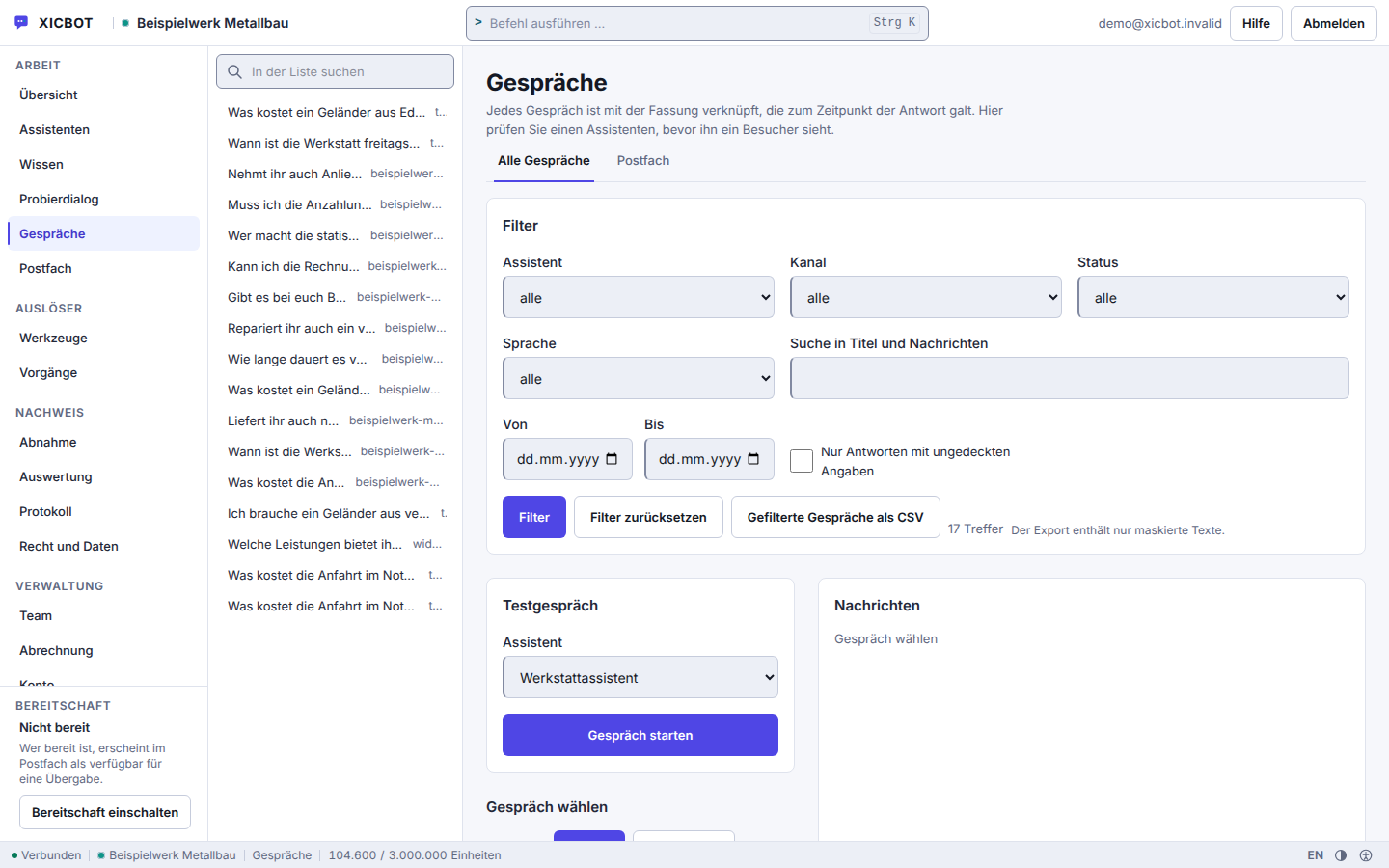
Every conversation can be opened, with the sources behind sourced answers and the version in force at the time.
Knowledge sources, tools and handover rules live in one place, not across three applications.
Answers without cover can be filtered out — that is the work list for the next round of maintenance.
The difference does not show up on a data sheet but on a Tuesday evening, when nobody at the company is at their desk any more. The left-hand column is the state most websites are in today.
The right-hand column applies to questions your own material answers. Everything else still ends with a person — only now with the conversation history, a timestamp and the question in the visitor's own words, instead of an empty form field.
43 of 48
questions without a handover to a person
measured on a single assistant on our own knowledge base, not on customer projects; a figure from live operation is not yet available
Positioning
There are three typical routes to a chat on a website. They differ less in appearance than in where the answer comes from and what happens next.
Standard chatbot. Works with fixed menu trees and answer paths typed in beforehand. On a question nobody anticipated it runs into a dead end, and it carries out no real actions in your systems.
Kit widget. Brings modern language technology but knows nothing about your particular business and can only be connected superficially. Whatever is not in the general language model is missing from the conversation, and cannot be added.
Individually trained assistant. Is trained on your material and acts inside your systems: showing products, putting together a cart, taking appointment requests, calling tools. Which capabilities belong to it is set out under features.
Visitor:Your competitor delivers within three days. Can you do that too, and what does express shipping to Austria cost?
Assistant:There is nothing in the available material about delivery times to Austria or express costs. I will not invent any. I do not rate competitors.
Assistant:I am passing the question to the sales team. If you give me your company and email address, the conversation history goes with it — then nobody has to ask what it was about.
Visitor:Good. Write it down — I would rather wait for an answer that holds.
8 of 8
questions without a basis declined instead of guessed
eight questions deliberately outside the material; the wording of every answer is in the measurement file
Acting
An assistant that only gives information still costs the visitor a change of medium: they read the answer and then fill in a form. XICBOT carries out the task inside the conversation — taking an enquiry or an appointment request, putting together a cart, in the Custom package also raising a ticket or calling one of your own interfaces.
Seventeen build forms are available for that: seven at the core and ten as adapters for stock management, calendars, catalogues, customer records and ticket systems; the ten adapters and calling an interface of your own come in the Custom package. Which of them are active is your decision per assistant; what a build form requires of itself cannot be switched off in the interface. How your own interfaces are added is set out under tool control and custom functions.
What separates this from an automation that simply runs is the confirmation. Anything beyond pure reading first ends as a proposal and executes nothing. The visitor reads the exact wording of what is to happen, and that text is stored rather than rebuilt later: anyone looking back reads precisely what stood on the button at the time.
Visitor:Can you service a heat pump next week? Thursday or Friday would suit.
Assistant:Thursday is taken. On Friday, 8:30 and 13:00 are free, both inside the area the company covers.
Visitor:Friday, 8:30.
Assistant:Before I take the request, please read what is about to happen: heat pump service, Friday 8:30, 90 minutes allowed for, at the address you gave. Only your confirmation creates the appointment request; the appointment becomes binding once the company confirms it.
Visitor:Confirmed.
Assistant:Requested, the appointment request is with the company for confirmation. If it confirms, you receive a confirmation email, provided you gave an email address. A second click on the same button does not create a second request.
What an assistant is used for day to day depends less on the industry than on the task. Each of the following tasks has its own page covering structure, limits and prerequisites.
Answers visitor questions from the contents of your website and points to the passage the answer came from.
Reads catalogue, prices and availability from your shop system and advises inside the conversation rather than from a copy of the data.
Shows matching items with image, price and delivery time inside the chat instead of merely naming a link.
Puts together a cart, changes quantities and leads on into the shop with “Continue” — the cart is held by XICBOT, the order itself stays with your shop.
Captures enquiries in conversation, asks for what is missing, pre-fills forms once the visitor confirms and files them in your inbox in structured form.
Names free times from your appointment types, takes appointment requests and cancels — including at times when nobody is on the phone.
Answers recurring questions from the knowledge base and question catalogue and hands over to a person as soon as that is needed.
Calls your own interfaces so the assistant is not merely able to inform but able to act.
Which scenarios are common in your trade is set out under industries. How conversations can be analysed is under conversation analytics; what multilingual operation delivers and where it ends is under multilingual. Where the data sits is under privacy and hosting.
The model has two parts: a one-off set-up and monthly operation. Set-up covers gathering the sources, building the knowledge base, settling tools and handover rules, and fitting the assistant into your site. Operation covers hosting, maintenance, keeping the sources current and analysing the conversations.
from 49 €/month net
Minimum term: none, cancellable monthly
from 149 €/month net
Minimum term: none, cancellable monthly
by scope
Minimum term: none, cancellable monthly
All prices net, plus VAT Source: XICBOT price list, as of 11 September 2026
All amounts are net, plus VAT. There is no minimum term; operation can be cancelled monthly. The initial consultation and the demo cost nothing. What each package contains and which items are billed by effort is set out under pricing.
There is no wall of logos here. We would rather talk about what an assistant can do and how it comes about than advertise with success stories nobody can verify. The route is the same in every project.
We look at the website, the material and, where present, the shop, and clarify which tasks the assistant is to take on. On request we show it beforehand using your own material. Neither costs anything.
Your sources are indexed and split into searchable passages. Whatever is missing or contradictory shows up in the process and is settled before launch, not later in a conversation with a customer.
Together we decide what the assistant may do: which tools are active, what may run without asking and what the visitor has to confirm first, where handovers go and which subjects stay blocked. Those decisions then live in the interface, not in a proposal document.
The finished assistant goes into your page with a single line. No rebuild and no change of system is required; the embedding is described step by step under integration.
Before launch, a set of real questions is run against the assistant, including some whose answers are deliberately not held — there it has to abstain. The assistant stands as a draft throughout; it goes live on your approval, not automatically on a good test result.
In operation the analysis shows what was actually asked and where the material is thin. Those gaps get filled — with every addition the assistant finds more, without anyone maintaining answers by hand.
Instead of a wall of logos, this page carries evidence: whatever was measured is shown with its method, its scope and its date — measured on our own assistant, not on customer projects. We do not pass on figures from customers' live operation, not even anonymised.
The questions that come up most often in initial consultations, with the same answers we give there. The full catalogue is under frequent questions.
An ordinary chatbot works with predefined menu trees or with general world knowledge. A XICBOT assistant answers from your own content: sourced statements carry the excerpt they rest on, and an answer without a used citation is recorded as a gap. On top of that come tools that actually do something — show product cards from your catalogue, assemble a cart in the chat, take appointments, record enquiries and, in the Custom package, query a connected system. Every tool has a kind and an approval mode: reading may run without asking, anything that writes shows the visitor in plain text beforehand what will be sent. What the assistant cannot support with a source it is meant to say openly, and it can hand over to a human. Which functions are included is shown in the overview of functions.
From your own material: website and subpages, documents and PDFs, price lists, frequent questions and, on request, the shop catalogue with prices and availability. This becomes the knowledge base every answer rests on: each source is split into sections that keep their heading and origin, and these are combined into one state. A new state is built to completion first and then switched over in one go, so that answers are not half old and half new; older states stay alongside it for a while. If a run yields not a single section, it is discarded rather than switched in. What is not in there, the assistant is instructed not to answer on its own initiative.
It usually says so and offers a handover to a person — carrying the conversation so far, so that nobody has to ask twice. The model phrases that sentence under a fixed instruction; at the same time the question is recorded as a knowledge gap, and from the Pro package the list of knowledge gaps shows you which source is missing. For complaints and for legal or medical topics it hands over instead of advising: four protective rules stand above role, topic scope and handover rule and cannot be deselected. A language model can be wrong, which is why the handover is built in — and the detection behind it runs without a language model, so it still works when something is currently stuck at the model.
It leads into the shop; the selling happens there. The product_search tool type knows four forms — search, compare, bundle and also bought — returns at most six hits and only from the catalogue of your account; a stated article number beats the search term. The cart tool type knows six kinds of change, coupon among them, with at most 99 units per position. The cart is drawn as a card with line items, total and a shipping line. Price and stock come from the shop: the assistant assembles the cart in the chat, and “Continue” leads to the shop address you have stored, with a one-time pickup key attached; for the items to sit in the cart there, your shop needs an integration of its own. More under assistant for online shops and product cards.
Operation is in Germany; the answers are generated by a specialised model provider, also outside the EU on the basis of standard contractual clauses. There is a data processing agreement, a deletion concept and full data sovereignty on your side. Content and conversation data are neither passed on nor sold. The subprocessor register lists the self-operated language model gateway in Germany; what is passed to it is the conversation history and the excerpts found for it in your knowledge base, and behind it the answers are generated by a specialised model provider, also outside the EU on the basis of standard contractual clauses. A visitor's address is never stored in clear text but as a salted fingerprint per account. How long which data stays is up to you through retention periods per kind of object. Details under privacy and hosting.
With one line in your source code. The loader is the only file that runs on your page, and it never calls the network itself: everything that fetches data runs inside the isolated frame. A page with a strict content policy therefore does not have to weaken anything for the embed. The frame is built only once your page has finished loading, and it carries exactly one permission, namely to execute scripts, without access to your page's origin. Its two parts carry version names derived from the content together with a checksum. This works with common content management systems and with Shopware Community Edition. More under integration.
In the language it is written to in. That language is detected in our own code through function words and characteristic characters, with no external service and no extra model call; word lists exist for nine languages: German, English, French, Spanish, Italian, Dutch, Polish, Portuguese and Turkish. If a sentence is not clear-cut, the field stays empty instead of guessing German. Detection happens per sentence, which is why a switch mid-conversation is carried too. You do not have to maintain your content several times over: the knowledge base is not filtered by language, language acts as a ranking bonus. More under multilingual assistant.
Yes. Every project begins with a free initial consultation, and on request we set up a free demo with a test assistant for your own website. The demo is its own, leaner package: one assistant, one knowledge source and a small monthly allowance — enough to see how the assistant reads your content and answers questions before you choose a plan. An AI assistant can make mistakes, which is why we bind its answers to your own sources: sourced answers name their source, an answer without a used citation is recorded as a gap, and handover to a human is available on request.
The website assistant starts at 49 € per month net, the shop assistant at 149 € net, plus a one-off setup from 990 € and from 2,900 € net respectively. Included are hosting in Germany, maintenance of the knowledge base, security and model updates, and the data processing agreement. Operation comes with a monthly allowance: 500,000 tokens in the Start package, 3,000,000 in Pro. Consumption is shown in the administration under Billing next to the allowance, so a rise becomes visible before it is noticed elsewhere. The Custom package bills operation by scope, because there the connected systems determine the effort. All services can be cancelled monthly; there is no minimum term.
You do, if you want to: the interface shows sources, documents and conversations, and a changed source is read in again. Every source has its own refresh interval — preset to 7 days, adjustable between 1 and 365, and the value 0 explicitly means: not automatically. A run in the early morning works through the sources that are due; a source only counts as stale once more than twice its interval has passed since the last check, and at least 14 days. Unchanged pages are skipped, and a run that wrote nothing deletes nothing — otherwise a maintenance page would clear out your knowledge base. The analytics show which questions come up often and where an answer is missing. If you would rather not do it yourself, you hand it to us.
If your question is not among them, that is the more interesting case. Send it to us: the answer that the product cannot do it today is also an answer, and one you should have before the decision rather than after it.
We look at your website and your material and tell you what an assistant could answer from it — and what it could not.