24.1 KB
loader on your page, compressed
only the file that runs on the host page, measured with the compression the web server actually sends; the chat window lives in its own frame and loads only once your page has finished loading
XICBOT builds individual AI chat assistants with a simple pricing model: a one-time setup for training and integration, then a fixed monthly fee for hosting in Germany, operation, maintenance and updates.
XICBOT has a simple pricing model. At the start you pay once for the setup. After that you pay a fixed amount each month. This pays for hosting in Germany, operation, care and updates. There are three plans. The price depends on the monthly allowance and on the number of systems and sources. This page also says what happens when the allowance runs low. The exact amounts are further down the page.
Request a free consultation View features
Three plans, from the website assistant to individual tool control. This page breaks down what moves the price: the monthly allowance, the number of connected systems and the number of sources the assistant is meant to read. And it says what happens when the allowance runs low towards the end of the month.
Visitor:What does the smallest plan cost?
Assistant:Start is from 49 € per month net, with no minimum term and cancellable monthly. On top of that comes the setup from 990 € net, one-time.
Visitor:And what is included?
Assistant:The assistant reads website and knowledge base, answers questions, captures contacts and hands over to a human. Multilingual answers are included at no extra cost.
Ask it yourself, Assistant of this website
Automated assistantAn AI chat assistant from XICBOT is not off-the-shelf software but is trained on your business. That is why the price has two parts: a one-time setup for the individual training and integration into your website or shop, and a monthly operation fee for hosting in Germany, ongoing maintenance, updates and data protection. So you pay once for the build and then only for reliable continued operation. On this page you will find all three plans, what each includes and which factors determine the price. Detailed descriptions of every feature are available under features.
The three plans differ mainly in how much your assistant should read and do. Start is the entry point for websites: the assistant reads your content and knowledge base, answers visitor questions, guides to relevant pages, captures contacts and hands over to a human when needed. Pro adds sales: a connection to your online shop based on Shopware Community Edition, product cards and a cart directly in the chat, booking and lead functions and conversation analytics. Custom is for companies that want to control their own systems: tool and API connection as well as tailored actions and workflows; European or self-hosted language models are possible as a separate project by arrangement and are not included in standard operation. All prices are net plus VAT. The monthly operation is deliberately kept predictable: it covers hosting in German data centers, ongoing maintenance of the knowledge base, security and model updates and data protection with a data processing agreement. Because the assistant answers around the clock, qualifies enquiries and handles recurring questions from your own content, it noticeably relieves support and phone lines (project experience) and accompanies visitors up to the enquiry or purchase. As a rule, every function of a smaller plan is also included in the larger ones, so moving up is possible without losing anything.
A one-time setup plus monthly operation, all prices net plus VAT. Every project begins with a free initial consultation and, on request, a free demo with a test assistant for your website.
from 49 € per month net
Minimum term: none, cancellable monthly
from 149 € per month net
Minimum term: none, cancellable monthly
by scope, setup from 4,900 € net
Minimum term: none, cancellable monthly
All prices net, plus VAT Source: XICBOT price list, as of 11 September 2026
Prices net plus VAT. The setup covers the individual training on your content and the integration. Operation covers hosting in Germany, maintenance, updates and data protection. You receive a binding quote for your specific project after the free initial consultation.
Website assistant in the Start plan with a one-time setup from 990 € net. The shop assistant (Pro) starts at 149 € per month net (setup from 2,900 € net), and the Custom plan with tool and API control starts at a setup from 4,900 € net. Every project begins with a free initial consultation. Ongoing services are booked individually and can be cancelled monthly; there is no minimum term.
Because every assistant is trained and integrated individually, the exact price depends on your project. Six factors are decisive, and they act differently: four of them determine the effort of the setup, one the ongoing operation, one both. A website assistant in the Start package is set up faster than an assistant with a shop connection, several data sources or connected systems — how much faster depends on how cleanly the sources are available. We therefore do not name a deadline in advance, but a date as soon as the scope is settled. In the free initial consultation we clarify these points and then name a fixed price for setup and operation, so you can plan without an open hourly bill.
How many pages, FAQs and topics the assistant should cover and how deeply it needs to advise. A compact website assistant is set up faster than an assistant with an extensive knowledge base.
Whether the assistant is connected to an online shop based on Shopware Community Edition, shows product cards and fills the cart in the chat. The sales channel is the biggest step from Start to Pro.
How many systems the assistant should read and control, such as calendar, CRM, inventory or ticketing, via defined actions (function calling). Each connection belongs to the Custom package and increases the setup effort.
The assistant answers multilingually at no extra cost. Extensive multilingual knowledge bases or country-specific content can increase the effort during setup.
Website, PDFs, data sheets, price lists and internal knowledge bases are connected as sources. More and more complex sources mean more preparation during training.
Tailored processes such as configurators, calculations or custom cases are implemented in the Custom package. Your logic determines the effort, which is why we bill this by scope.
Of these six factors exactly one keeps acting after launch: the monthly allowance. The others determine the effort of the setup and are then done. That is why further down this page you will find what happens when the allowance runs low during the month — it is the only figure that changes a running operation from the inside.
24.1 KB
loader on your page, compressed
only the file that runs on the host page, measured with the compression the web server actually sends; the chat window lives in its own frame and loads only once your page has finished loading
Billed units, billed answers and the remaining allowance are shown for the current month.
The warning threshold speaks up before the allowance runs out.
The plan limits stand as a table below, not inside an invoice.
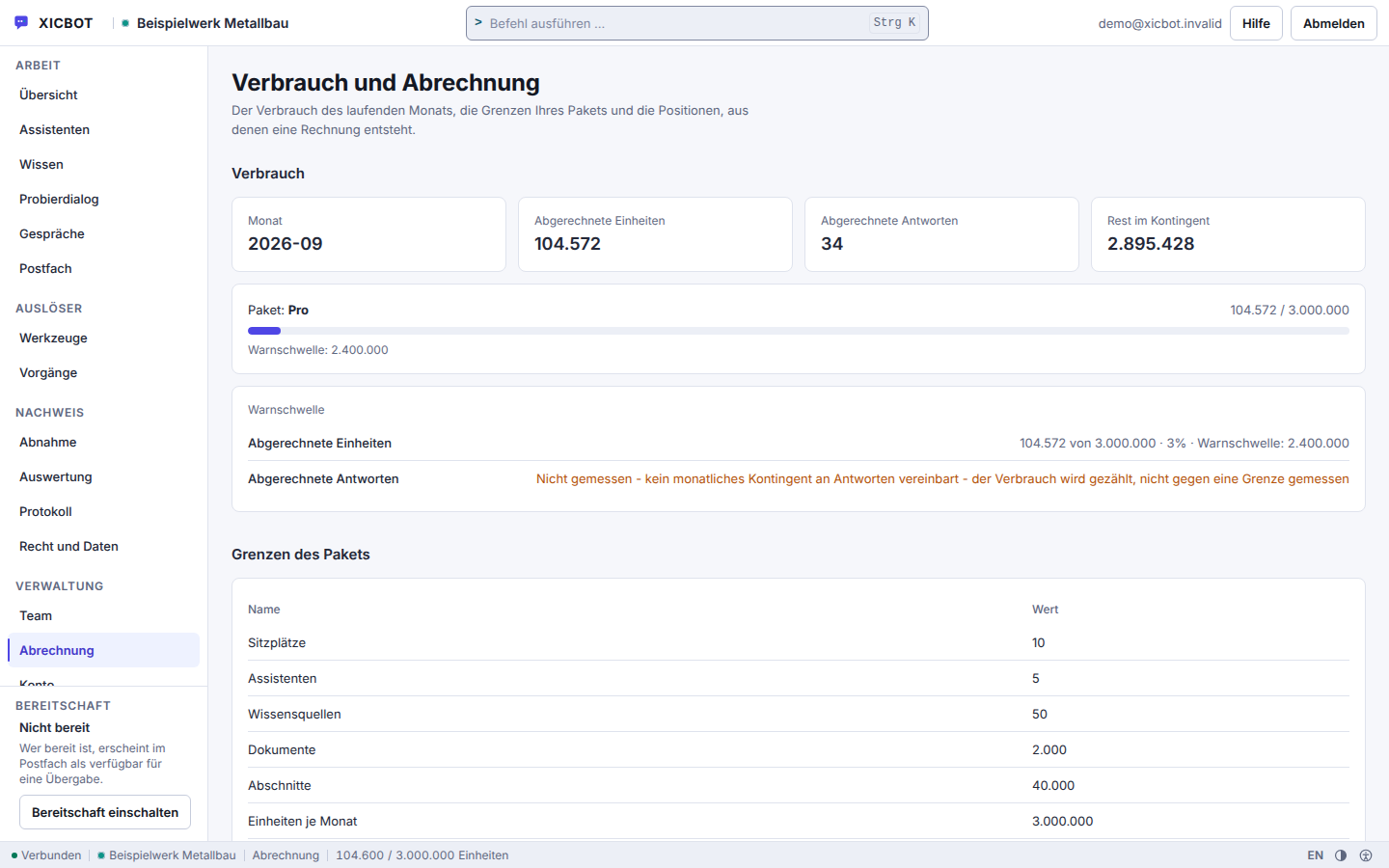
The monthly allowance is the only figure that changes a running assistant from the inside. So here is what happens, in this order — not so that you have to manage it, but so that you can place it when the notification arrives. Nothing is blocked silently: every step announces itself.
Every answer is booked against the allowance of the current month, together with the tool calls the assistant ran for it — at most five per answer. Consumption and limit sit side by side under Billing, so you can read the state instead of estimating it.
When an answer crosses the four-fifths threshold, a notice with the consumption and the budget of the month appears at the top of Billing. A notice is created once, not with every further answer; it goes to the people who run XICBOT, not to the users of your account. To get a message yourself when the limit is reached, use the “Budget exhausted” webhook.
From this threshold on the assistant answers more briefly, on the small model tier and with one tool round per answer instead of five. It keeps answering, it keeps handing over to the office, and it keeps saying what it does not know. What falls away is the length and the number of look-ups, not the information.
Once the limit is reached, the request is refused before the model call — so no further consumption arises. Until the month rolls over the visitor receives the fallback answer you stored yourself: usually a pointer to the phone, the form or the mailbox. No blank page and no error appears.
With the change of month the allowance starts over. If it is permanently insufficient, it is raised — either with the next larger plan or as a separately agreed value that sits alongside the plan. A guard reports when an agreed value deviates from the plan list, so the deviation stays visible instead of drifting unnoticed.
Alongside the monthly allowance there is a second, smaller cap: an upper limit per visitor and minute on the public interface of the widget. It is not aimed at your customers but at automated access that would otherwise consume your allowance.
12 requests per minute
cap per visitor on the public widget interface
applies per visitor and assistant; that allows one question every 5 seconds, and the series waits 5.5 seconds to keep clear of our own brake
The following overview shows which functions are included in which plan. Advising, guiding and capturing contacts is possible with every assistant. Selling with product cards and a cart comes with Pro, controlling your own tools and systems with Custom. This lets you see at a glance from which plan a given function is available and which profile best fits your project. You will find the prices in the table above.
| Start | Pro | Custom | |
|---|---|---|---|
| Reads website and knowledge base | Included | Included | Included |
| Answers questions, guides to pages | Included | Included | Included |
| Lead capture and forms | Included | Included | Included |
| Handover to staff | Included | Included | Included |
| Multilingual answers | Included | Included | Included |
| Hosting in Germany, GDPR | Included | Included | Included |
| Shop connection (Shopware CE) | not included | Included | Included |
| Product cards in the chat | not included | Included | Included |
| Cart in the chat | not included | Included | Included |
| Appointment and lead functions | not included | Included | Included |
| Conversation analytics | not included | Included | Included |
| Tool and API control | not included | not included | Included |
| Individual actions and workflows | not included | not included | Included |
| European or self-hosted models (separate project by arrangement) | not included | not included | not included |
| Best-fit use profile | Website | Shop and website | Complex systems |
With an amount that is debited every month, the second column matters as much as the first. So both sit side by side here: what the monthly fee settles and what is explicitly not part of it. The right column is the more complete of the two — the left is the one nobody else writes down.
None of this is tied to a term you first have to ask about: the price date, the minimum term and the notice period are in the price band at the top of this page. Anything you need beyond that — a custom action, a larger allowance, an additional language — is described as scope in advance and flows into the fixed price instead of appearing later as an add-on.
Switching, cancellation, data
A plan is not a one-way street, and the question of how to get out belongs on a pricing page, not into fine print. The switch runs through us, not through a toggle in your account: you report the need, we enter the new limits, and they take effect from that entry. There is a reason for that — a plan consists of several limits at the same time, and a half-converted state would be worse than a later-converted one.
From the first idea to ongoing operation, we guide you through manageable steps. You see early what your assistant should do and what it costs, and you stay in control of scope and budget. You take no risk on faith, because you experience the benefit before you commission the project in the free demo. Details on the individual functions are available at the website assistant, the shop assistant and tool control. Which tasks the assistant takes on in your industry is shown on the industry pages.
We look at your website, your shop and your goals and clarify which questions and tasks your assistant should take on. On request we set up a free demo with a test assistant for your own website, so you can experience the benefit before you decide.
From the conversation we determine the right plan and a transparent price for setup and operation. You know exactly what is included and what it costs, without hidden items and without an open hourly bill. You decide which functions start now and which follow later.
We train the assistant on your content, connect website, shop, documents and, on request, your tools and set up product cards, cart or appointment requests. Before going live, we test typical conversations together so that answers stay bound to your own sources.
Before the widget goes onto your page, we work through a set of real customer questions. Sourced answers name the source they used, and an answer without a used excerpt is recorded as a gap. This is where it reliably becomes visible whether a source is missing or merely a wording is awkward — the first cause is the more common one.
You receive a single script line together with a checksum of the delivered file. Alongside it we enter the domains on which the widget may load — on a foreign page it then does not load. Two separate switches ultimately decide whether it runs: the assistant's state and the widget switch. Both are yours.
After launch your assistant runs in monthly operation: hosting in Germany, maintenance, updates and data protection are included. Through conversation analytics we identify knowledge gaps and frequent questions and improve the assistant step by step.
Test first, then decideYou do not have to book on faith. In the free initial consultation we look at your situation and, on request, set up a demo with a test assistant for your website. This way you see how the assistant reads your content and answers before you choose a plan.
How to quantify the benefit of an assistant is worked through with typical examples in what an AI assistant costs and returns. Why a custom-trained assistant is priced differently from a template bot is explained in custom assistant instead of a standard chatbot.
Different questions are asked before a purchase than after one. So the questions listed here are the ones that actually come up before someone decides: what the difference between setup and operation is, whether anything else is added, how the allowance feels, whether a means of payment is needed to start at all, and what happens to the data in the end.
The price consists of a one-time setup and a monthly operation fee, each net plus VAT. Start begins at a setup from 990 € net and 49 € per month net and covers three seats, one assistant, ten knowledge sources and 200 documents. Pro begins at 2,900 € net and 149 € per month net with ten seats, five assistants, 50 knowledge sources and 2,000 documents. Custom begins at 4,900 € net setup; operation there follows the scope and therefore has no list price. We name a binding fixed price for your project after a free initial consultation. All services can be cancelled monthly; there is no minimum term.
The setup is one-time and covers the individual training on your content, the connection of website, shop, documents and tools and the integration into your site. Operation is the fixed monthly fee for hosting in Germany, ongoing maintenance, updates, data protection and reliable continued operation. So you pay once for the build and then only for ongoing operation. Operation includes your package allowances — seats, assistants, knowledge sources, documents and monthly usage — whose consumption you can see in the account. Operation can be cancelled monthly and there is no minimum term; the amounts per package are on the pricing page.
If you mainly want to answer visitor questions, guide people to pages and capture contacts, the website assistant in the Start package is the entry point: one assistant, three team seats, ten knowledge sources. If you run an online shop and want to advise, show products and sell in the chat, the shop assistant in the Pro package fits — five assistants, ten seats, fifty knowledge sources, plus the conversation analytics, which the Start package does not include. If your own systems are to be read and operated through tool control, Custom is the right choice. Once your usage reaches four fifths of a limit, the interface points that out before anything trips. In the initial consultation we find the fitting package together.
Setup and operation are shown separately. All prices are net plus VAT; the ongoing services are bookable individually and can be cancelled monthly, and there is no minimum term. The initial consultation and the demo with a test assistant cost nothing. Every plan carries fixed limits — seats, assistants, knowledge sources, documents, sections, monthly budget and requests per minute. They are visible in the admin area and are not quietly exceeded: from four fifths of the budget used, throttling begins. In the Custom package we bill operation by scope, because individual tools and connected systems differ in effort; what belongs to your case is recorded in writing before the start. The plans are listed under pricing.
There is no minimum term. The ongoing services are bookable individually and can be cancelled monthly, all prices net plus VAT. A change is possible at any time: you begin with Start and move later to Pro or Custom when the assistant should do more, such as connecting your shop or running tools of your own. What changes along the way are the limits of the plan — seats, assistants, knowledge sources, documents, sections, monthly budget and requests per minute. Your settings, sources and approvals stay in place; nothing is built anew. In the Custom package we bill operation by scope. The overview is under pricing.
Yes. Every project begins with a free initial consultation, and on request we set up a free demo with a test assistant for your own website. The demo is its own, leaner package: one assistant, one knowledge source and a small monthly allowance — enough to see how the assistant reads your content and answers questions before you choose a plan. An AI assistant can make mistakes, which is why we bind its answers to your own sources: sourced answers name their source, an answer without a used citation is recorded as a gap, and handover to a human is available on request.
Every package contains limits for seats, assistants, knowledge sources, documents and monthly usage. Billing lists all limits of your package and the consumption in the current month against the monthly allowance; how many seats are taken is shown in the Team area. Seats count as accounts plus open invitations — an invitation you have sent already occupies a seat. From four fifths of the monthly allowance, a notice appears at the top of Billing, and the assistant answers more briefly and runs only one tool round per answer instead of switching the service off. The notice created when this threshold is crossed goes to the operator, not to the users of your account. What each package contains is stated on the pricing page.
No. Registration takes an email address, a company name and a password of at least twelve characters containing letters and digits; the confirmation link for the address is valid for two days. No payment method is requested. Your account starts on the Start package and is active once you sign up, while the first assistant sits there as a draft. It goes live as soon as you flip two switches: the assistant to active and the widget to enabled. There is no step where we would first have to unlock something. What the plans cost and which limits they carry is listed under pricing; the ongoing services can be cancelled monthly, and there is no minimum term.
Not here. The changelog records changes to the product: new features, changed defaults, fixed errors. A price change is not one of them. It is communicated to you directly, and the valid figures are stated on the pricing page, together with each plan's limits for seats, assistants, knowledge sources and documents, so that price and scope stand side by side in one place. The entry here is therefore the side track and not the announcement. What changes on your own account, a plan change for instance, is in turn recorded in the audit log of your account, with a timestamp and the account that triggered it.
Deletion removes assistants, knowledge base and conversations. Only the account owner triggers the whole process, not administration, and it requires a typed confirmation word. The run works through a fixed catalogue of 39 tables in a fixed order; if that catalogue is incomplete it aborts instead of deleting half. The log line for the process is written before the deletion, not after. Beforehand you can take your data out: there is an export of the data stored in the account and one for conversations. Which data is stored for how long, and what has to be kept longer for legal reasons, is described under Privacy and hosting.
Further questions about pricing and operation are in the Pricing and Operation category, the full set in the frequently asked questions. Whatever is not there we clarify in the free initial consultation — including the questions whose answer is “it depends on your inventory”.
No payment method
No payment method is required to sign up; billing starts with the operation of an assistant. Adding sources, reviewing answers in the test area and embedding the widget you do step by step in your own account. Create an account and set it up yourself
Tell us briefly about your website or shop and what your assistant should do. You receive a clear assessment and a transparent price for setup and operation, without obligation and without sales pressure. You can reach us by phone at +49 5123 9579000.