1.3 s
to the first character of the answer, median
64 questions to our own assistant, not to customer projects
The XICBOT booking assistant takes appointment requests by chat, at night and on weekends too, relieving phone and reception.
This page shows the assistant for bookings. It takes booking requests in the chat, also at night and at weekends. When asked, it names free times. It works them out from your types of booking. It can also move a booking. First it asks the customer if all is right. A booking is only fixed once your business confirms it.
Request a free demo View all prices
On request, it names free times, calculated from your appointment types minus the appointments already requested or confirmed at XICBOT, and takes the chosen time as an appointment request as soon as the visitor has approved the summary. The request only becomes binding once your business confirms it; the visitor then receives a confirmation email if she has given an email address, and a reminder to that address twenty-four hours ahead. The language model runs through a self-operated gateway, listed in the register of subprocessors with Germany as its location; behind it, the answers are generated by a specialised model provider, also outside the EU on the basis of standard contractual clauses. Where the case calls for it, the assistant is meant to hand over to a human.
Visitor:I need to reschedule my appointment on Thursday.
Assistant:Found: Thursday at 14:00, consultation, 45 minutes. Next week in the morning, Tuesday at 10:30 is free. Shall I reschedule?
Visitor:Yes, please.
Assistant:Just to be sure before I change anything: reschedule appointment · reference 4812 · new start Tuesday 10:30. Is that correct?
Visitor:Correct.
Assistant:The rescheduling has been received as a request and only counts as an appointment once the business confirms it. As soon as that has happened, you receive a confirmation email to the stored email address and a reminder there 24 hours before the appointment. The old Thursday slot is free again.
Ask it yourself, Assistant of this website
Automated assistantAppointment requests rarely reach a business exactly when someone is free to answer the phone. They come in the evening, on the weekend or in the middle of a busy shift when no one can pick up. Every unanswered request is a lost appointment and often a lost customer. The XICBOT booking assistant closes exactly this gap: it lives on your website, knows your appointment types with their duration and time windows, names free times on request and takes the requested time as a request as soon as the visitor has approved the summary. The request holds its slot — it becomes an appointment once your business confirms it. Because the assistant uses defined actions and qualifies matters like a lead assistant at the same time, a chat window becomes a reception desk that is reachable around the clock. For practices, law firms and other appointment-driven businesses, the industry page shows what that looks like in concrete terms.
A booking assistant is more than an appointment form. It leads the conversation, clarifies follow-up questions, suggests suitable times and creates the request once the visitor has approved the summary. The following six capabilities form the core. Each of them depends on settings you define: which appointment types exist, how long one of them takes, how much lead time it needs, which buffers stay free before and after it and in which time windows it is offered at all.
On request the assistant names free times for the chosen appointment type. They are calculated from what is defined per appointment type — time windows, duration, lead time, buffers before and after — minus the appointments already requested or confirmed at XICBOT. There is no sync with an external calendar, and a named time is a suggestion: the request stays a request until your business confirms it. The calculation itself is purely a read: it changes nothing and therefore needs no confirmation prompt in the conversation.
Requesting, rescheduling and cancelling are three cases of the same action. Before each of these steps the assistant shows a summary that names the deed — “request appointment” with start, type, duration, name and email, “reschedule appointment” or “cancel appointment” — and waits for a yes. Without that approval nothing is written; if the visitor declines, the appointment records stay unchanged.
After the approval the assistant enters the request and answers with a plain sentence: it has been received and only counts as an appointment once the business confirms it. That confirmation is set by someone on your side in the administration. With it the appointment changes its state, an event goes out to the systems you have connected, and the visitor receives a confirmation email if she has given an email address.
An hourly run queues a reminder twenty-four hours before the start when two things are in place: the state “confirmed” and a stored email address. If the address is missing or the appointment is merely requested, the reminder stays away — and the assistant says so in the conversation instead of quietly promising it.
Ready-made connectors for individual calendar providers are not part of the delivery. A binding direct entry into your calendar is only possible through a calendar connection set up in the Custom package; what can be connected there is anything that offers an interface for bookings — your own practice or workshop system just as much as an intermediate layer your calendar brings along. The occupancy check compares the padded spans of both appointments and runs under a lock so that two conversations cannot take the same slot.
Recurring appointment questions run through the chat, including outside consultation hours. Anything the assistant cannot answer from your data it hands over: it offers a callback or passes the conversation with its full history to a human instead of guessing.
One limit belongs to the picture: the assistant does not confirm on its own. It creates the request with time, appointment type and contact details and keeps the slot occupied; whether it becomes an appointment is your business's decision. That separation is deliberate — it keeps the decision where the resources are and prevents a conversation from making promises no one has checked.
1.3 s
to the first character of the answer, median
64 questions to our own assistant, not to customer projects
For the assistant to create requests, it first reads: the possible appointment types with their respective durations and rules such as lead time, buffers before and after, and the time windows in which a type is offered at all, plus the appointments already requested or confirmed at XICBOT. On this basis it answers the typical questions — “When do you still have time free this week?”, “Is Saturday morning possible?” — with free times from these settings instead of vague promises; a named time remains a suggestion until your business confirms the request. A call to another system only goes through a connection you have entered, with a deadline of eight seconds that can be set between one and twenty seconds. If the other side does not answer, the call counts as failed and is not quietly repeated. All further information around the appointment — directions, documents, preparation — is answered from your knowledge base.
Reading turns into acting. Via defined actions the assistant enters the chosen time as a request, reschedules an existing appointment, cancels it, notes a callback on request, pre-fills a contact form once the visitor confirms or, in the Custom package, hands the contact over to your CRM in a structured way. For sensitive or unclear matters it is meant to pass the conversation with its full history to a human. This way the booking assistant works hand in hand with the lead assistant: anyone not yet ready for a concrete appointment is recorded as a contact and noted for a callback instead of being lost. At most five such calls are possible per answer; once the month's quota is largely used up, it stays at one.
Before every entry the assistant checks whether the time is still free. What gets compared are not the bare spans but the ones extended by their buffers — on both sides, because otherwise the result would depend on the order of the requests. The check runs under a lock. It sees this assistant's appointments in the state “requested” or “confirmed”; whatever exists only in your own calendar it does not see, because there is no sync with an external calendar.
The manual work does not end entirely with the entry, but it moves: the appointment sits in your overview as a request, where a number counts how many are still open. Whoever confirms triggers an event to connected systems in the Custom package and at the same time enables the reminder; the visitor then receives a confirmation email if she has given an email address. If it is cancelled, the record stays with its history and the slot becomes free again — nothing disappears from the file.
Neither safeguard depends on how the assistant phrases things; both sit deeper: the lock against double allocation is in the database, and an appointment's one-time key is formed from the conversation, the tool and the sorted input. A double click therefore creates no second entry, even when the connection stutters.
What the assistant does not take on here is the decision. It makes a request, and that becomes binding only once someone in your business confirms it. No account setting takes that step off its hands.
Appointment requests look different depending on the business, but the pattern is the same everywhere: check the free times, create the slot, have it confirmed, remind. In practices and health businesses the assistant accepts appointment requests, states consultation hours and explains which documents to bring — without medical advice, since it passes medical questions on to the team. Service providers and trades businesses let consultation, survey or service appointments be requested and offer a callback for emergencies. Car dealerships coordinate test drives and workshop appointments, law firms initial consultations and estate agents viewings. In hospitality the same assistant takes table reservation requests and event enquiries. In every case it speaks the visitor's language and works even when your business is closed.
What differs by industry are the rules, not the tool An appointment type carries its name, its duration, the required lead time, a buffer before and one after, as well as the time windows in which it is offered. If the appointment takes place at the customer's site, a travel buffer is added. These settings are what separate a test drive from an initial consultation and a lash extension from a survey appointment — the tool behind them is the same. The assistant receives the possible types as a pick list; a type that is not on it does not get entered, and it states the reason in plain words when lead time or time window do not fit.
Visitor:Can the survey still happen tomorrow morning?
Assistant:A survey has two working days of lead time stored, tomorrow morning falls below that. The earliest time I can offer is Thursday at 8:30.
Visitor:And an emergency repair?
Assistant:An emergency repair is not a stored appointment type here. So I will not enter it, and I will not invent a time either. What I can do: note a callback with name, availability and the matter at hand.
Visitor:Yes, please. I can be reached this afternoon.
Assistant:Noted: callback this afternoon, matter emergency repair. The entry goes to your team together with the conversation history — I have not created an appointment for it.
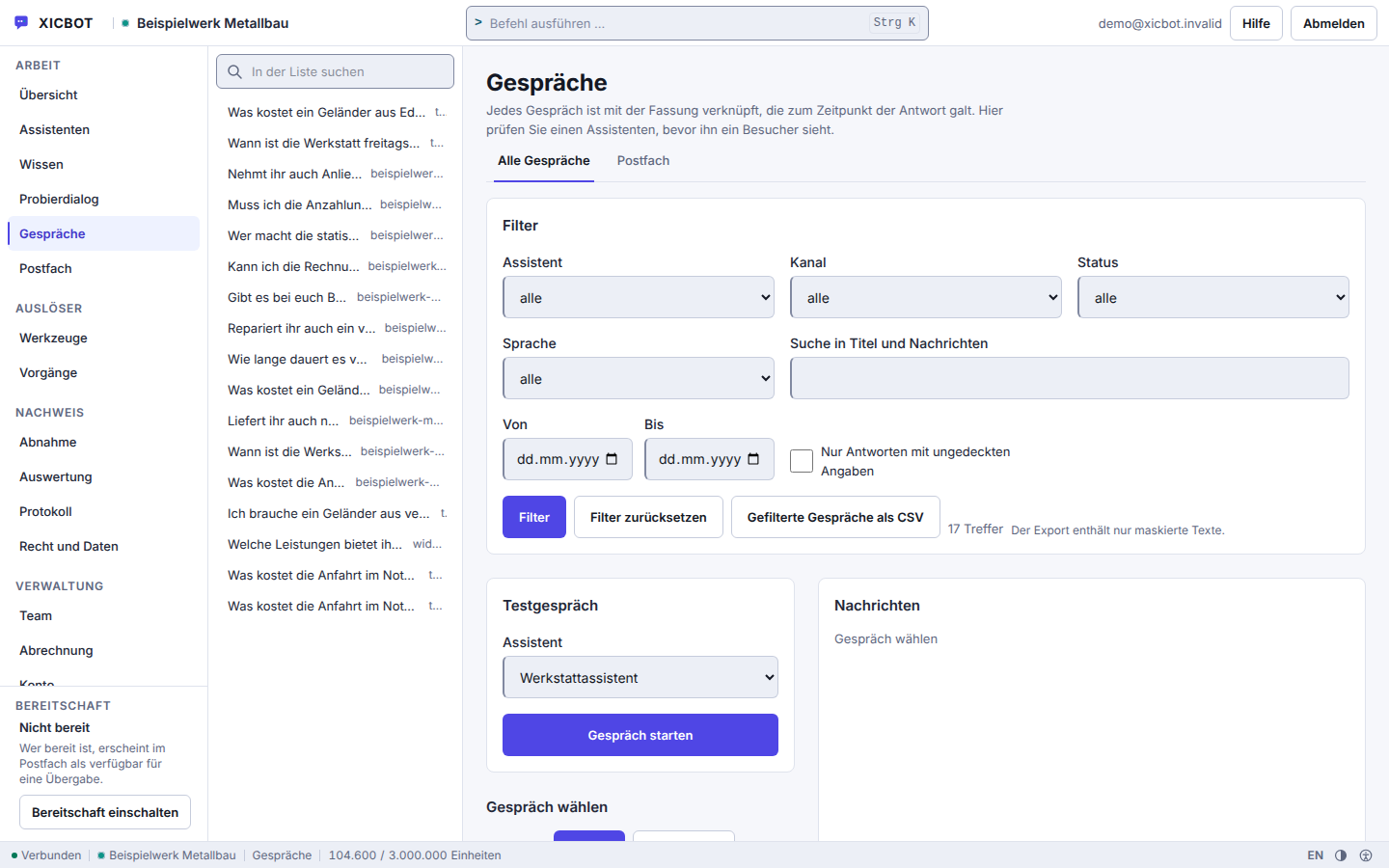
The list shows question, channel and time before a conversation is opened.
The date filter collects the enquiries of a single week.
A test conversation runs through the same flow; a slot is only taken once a proposal in it is approved.
The path from the first idea to the first appointment request in the chat is manageable. We take the setup off your hands and align every step with you so the assistant fits your workflows. We need from you the rules by which an appointment comes about and, if appointments are to go bindingly and directly into your calendar, access in the Custom package through which appointments can be written.
In the free initial consultation we record what the assistant will need to know: the appointment types with name and duration, the lead time per type, the buffers before and after, the time windows in which a type is offered and whether it takes place at the customer's site — in which case a travel buffer is added. These settings later decide every free time the assistant names and every single request.
A binding direct entry into your calendar is only possible through a calendar connection in the Custom package. What can be connected there is anything that offers an interface for bookings — ready-made connectors for individual calendar providers are not part of the delivery. We enter the address of that interface, set the deadline for the call and use defined actions to define what may be read and what may be written. Every outgoing call only goes to a target stored there. Without this connection the assistant names free times from your appointment types and takes requests that your business confirms.
Everything around the appointment — directions, documents, preparation, cost — is answered from your knowledge base. What is not in there, the assistant is not supposed to say: instead of inventing an answer, it usually declines and offers a handover to a human instead.
The assistant is embedded in your website, CMS or shop with a short code snippet and loads inside its own shadow tree so it disturbs neither your layout nor your scripts. The details are described on the integration page.
Before going live the route runs once as a test conversation: it checks the flow from reading to the preview; a slot is only taken once someone approves the preview. It also shows what the assistant refuses — an appointment type that is not stored, or a time that falls short of the lead time.
After the joint test the assistant goes live. We take over hosting in Germany, support ongoing operation, keep the content current and improve the request route based on real conversations — readable in the conversation list, where every appointment question appears with its channel and time. We are happy to discuss concrete results in a personal conversation.
Without a calendar connection, a task remains for your business afterwards: confirming requests. The assistant creates them and keeps the slot occupied, the overview shows how many are still open — the decision is made by a person on your side. Anyone who does not want to do that daily confirms them in batches.
The process does not end with the entry, it has a state. Four stations are possible, and each of them is traceable in the conversation and in the overview.
Before anything comes about, the assistant presents the appointment verbatim — only the visitor's click triggers it. Then the tool checks three things: whether the appointment type is known to your business, whether the lead time is observed and whether the time falls into a window you have opened. If one of these checks fails, no entry is created but a reply in the conversation.
The appointment sits in the state “requested” and occupies its span including buffers. A second conversation can no longer take the same slot. Your overview shows how many requests are waiting for a decision.
Someone in your business confirms. The state changes, an event goes out to the systems you have connected, and the visitor receives a confirmation email if she has given an email address. Only this step makes the appointment binding — the assistant does not take it off anyone's hands.
An hourly run looks for confirmed appointments whose start is twenty-four hours ahead and queues a reminder for each one with an email address on file. It counts what it checked, queued and skipped: no address, not confirmed, already reminded. No one is written to a second time.
A rescheduled appointment runs through the same checks as a new request and afterwards stands at “requested” again. A cancellation deletes nothing: the record stays with its history and merely releases the time. An appointment can be changed where it was requested — anyone returning in a new conversation is referred to your team.
An appointment hangs on the conversation but does not end with it: if the conversation is deleted, the record stays and no longer carries a conversation reference. It keeps start, type and state so that what was agreed remains traceable later. It has no retention period of its own: it follows the period set for enquiries, counted from the day it is booked for. If no period is set for enquiries, no run removes it; it can then be deleted individually in its row or together with the account.
The states are not decoration but the reason nobody is booked twice: the request alone blocks the time span including its buffer, and only confirmation by a person turns it into an appointment. Anyone who wants the assistant purely as a signpost leaves out the appointment action — it then answers questions from your knowledge base and notes a callback on request, but enters no appointment.
A page that lists only capabilities keeps half the story back. This one names the limits too, because they lead to decisions before the setup: anyone who wants to keep the confirmation in-house plans for it; anyone who wants appointments entered bindingly and directly in their own calendar settles the calendar connection in the Custom package beforehand rather than afterwards.
We do not measure what we cannot measure Whether fewer appointments are missed because a reminder goes out appears on none of our measurement series — we would have to count your no-shows before and after, and we do not. Backed is only what is documented on this website with a period and a quote. What the assistant demonstrably does instead is right next to this: it declines questions without a basis instead of guessing.
8 of 8
questions without a basis declined instead of guessed
eight questions deliberately outside the material; the wording of every answer is in the measurement file
The booking assistant is not a price tier of its own but a capability inside the Pro package. How much work the setup takes depends on your workflow: which appointment types exist and which windows are opened determines the effort. A connection to your own calendar is part of the Custom package; connectors for individual calendar providers are not part of the delivery.
Operation is billed monthly and can be cancelled monthly; there is no minimum term. The price date given is that of the price list and not a quote for your case — we name the range for the connection only once we have seen the interface.
from 149 € per month net
Minimum term: none, cancellable monthly
All prices net, plus VAT Source: XICBOT price list, as of 11 September 2026
The booking assistant is part of the Pro package: a one-off setup from 2,900 € net (individual training, appointment types and integration) plus operation from 149 € per month net (hosting in Germany, care, updates). Included are reading free times, creating, rescheduling and cancelling appointments, the reminder for confirmed appointments, the lead features and conversation analytics. If the appointment should land directly in your own calendar or your workflow needs custom rules, it becomes the Custom package. At the start there is a free initial consultation: we look at your calendar, the appointment types and the windows to be opened, and show on a free test assistant for your website how an appointment runs from proposal to confirmation. Ongoing services are booked individually and can be cancelled monthly; there is no minimum term.
Tell us which calendar you use and whether appointments should land bindingly and directly in it — that works through a calendar connection in the Custom package. In the initial call we go through your appointment types and show how a request in the chat would run in your specific case.
The difference shows less in individual features than in everyday practice. Without an assistant, every appointment request depends on someone having the time to pick up the phone or answer an email. With an assistant the work shifts: searching and entering happen in the conversation, the decision stays with your team. The following comparison plainly summarises the points that change.
The guide goes deeper: appointment requests via chat describes slot lookup, confirmation and reminders in detail, and AI assistant for medical practices shows, using healthcare as an example, where automatic scheduling reaches its limits. How scheduling works for service providers is described in AI assistant for service providers.
Two questions come up almost every time, so they go first. Do visitors really book themselves, or is it only a request? It is a request: after the approval in the conversation the slot is taken for every other conversation, and it becomes binding with the confirmation from your business; a binding direct entry is only possible through a calendar connection in the Custom package. And does that reduce no-shows? We do not claim so: a reminder goes out by email ahead of confirmed appointments if an address is on file, but we have not counted the effect. What has been counted is in the measurement series.
With a calendar connection in the Custom package, the assistant reaches your calendar or booking system through defined actions: the calendar_availability shape reads free slots, calendar_booking writes the appointment straight into it. Reading runs without asking, the entry only after the visitor has seen the proposal in plain text and confirmed it. Both shapes are remote tools and therefore need a stored address; the call goes out over exactly one connection with target check, time limit and size limit, and without redirects. An entry carries a one-time key that the database locks against, so the same appointment cannot be created twice. Without that connection the assistant names free times from your stored kinds of appointment, minus the appointments already requested or confirmed in XICBOT, and takes appointment requests that your business confirms. Any system that offers an interface for free slots and for bookings can be connected — ready-made connectors for individual providers are not part of the delivery. Which connection fits your case we clarify in the initial consultation.
The assistant checks occupancy under a lock: the check and the entry happen in one go, so a time slot is not given out twice. Against a double click there is a bolt in the database rather than in the program flow — the same request submitted twice does not create a second request. An appointment request becomes an appointment when your business confirms it. Without a calendar connection the assistant counts the appointments already requested or confirmed in XICBOT; what is only in an external calendar it does not see. With a calendar connection set up in the Custom package it reads free times through the calendar-availability form and writes the entry through the calendar-booking form; then the free times offered follow your calendar — including appointments that came in by phone or email. The check under a lock does not apply on this path: whether a slot taken in the meantime is rejected at booking is decided by your calendar. XICBOT sends each booking with an idempotency key by which your calendar can recognise a booking submitted twice.
Yes, both live in the same tool type as the appointment request: appointment takes appointment requests, reschedules and cancels. Each of these acts writes and therefore requires confirmation, and the proposal names the act as its own sentence — cancel, reschedule or request is spelled out before anything is clicked. The text of the proposal is stored before the confirmation and not generated anew: what gets confirmed is exactly what was read. A new time has to meet the same rules as a new request — known kind of appointment, matching lead time, approved window, occupancy checked under a lock — and a rescheduled appointment is a request again until your business confirms it. If a case turns delicate, the assistant is meant to call the handoff tool type; that sets the conversation to escalated and notifies a person in your company.
Tool control means the assistant does not only read your connected systems but also operates them. Seventeen forms are available: seven in the core — capture a request, take an appointment request, hand over to a human, search the catalogue, put together a cart in the chat, query an external system, pre-fill a form on your site once the visitor confirms — and ten for calendar, inventory, catalogue, customer management and ticketing; querying an external system and these ten come in the Custom package. Every tool is registered as reading, writing or irreversible; confirmation is the default. Anything that does more than read is first shown as a proposal, and only a click by the visitor carries it out. Every call is then recorded in the log, with input, result, duration and the path by which it was approved. How your own processes can be mapped is shown on custom functions.
If a matter becomes personal or sensitive, the assistant is meant to hand over to a human: the conversation is then marked as handed over, the request becomes an enquiry in your account, and your team is notified. The visitor reads the reason for the handover in plain text beforehand and confirms it themselves. A second handover in the same conversation does not trigger a second notification. The visitor is not told by which route your business is notified — they only see that someone will get in touch. The conversation history is preserved, so your team does not start from scratch. How this looks in everyday use is shown by the support assistant.
Yes, and the built state reckons with it. For every question at most five search hits from your sources, plus your text blocks, go to the model, numbered, and sourced answers name the excerpts they rely on. Figures, prices and deadlines that are not in your sources are replaced with a notice. If the search finds nothing, the assistant says that nothing on this is on file instead of composing freely. Four topics are hard-blocked — legal advice, medical information, the assessment of allergies and a binding financing offer. Its rules forbid it to invent contact details, file numbers or appointments, or to pose as a human being. Questions left open are logged and become visible in conversation analytics — and turn into the next source.
The booking assistant belongs to the Pro package: a one-off setup from 2,900 € net plus operation from 149 € per month net, including hosting in Germany, care, updates and GDPR. The chat first creates an appointment request; it only counts as an appointment once your business has confirmed it. The occupancy check and the creation run under the same lock, and a verbatim repeat is recognised as a duplicate through a one-time key. If your workflow needs custom rules or several calendars, it becomes the Custom package from 4,900 € net setup. Details under booking assistant and pricing. All services can be cancelled monthly; there is no minimum term.
It works towards that without us promising a rate. An appointment request in the chat stays a request until your business confirms it — and only a confirmed appointment is ever reminded. The reminder goes out one day before the appointment to the address given in the conversation, if the visitor gave one, and is triggered by an hourly run, not by hand. Before sending, the visitor reads in plain text what is being requested and confirms it themselves; a double click does not create a second request. How many no-shows this saves depends on industry, appointment type and audience — but planning generally becomes more reliable.
If your question is not among these, it usually comes down to the calendar: without a calendar connection the assistant takes requests that your business confirms; whether appointments should go bindingly and directly into your system is something we settle before the quote, not afterwards.
What the assistant does not do: it confirms no appointment itself, and it does not enter a time as a request if it fails on appointment type, lead time, time window or occupancy. If a question stays open, it goes to a person with the full conversation.
Your Appointment Types
A short list of your appointment types helps: each with its duration, required lead time, buffer before and after, and the time windows in which you offer it. If an appointment takes place at the customer's site, mention that too, and we plan a travel buffer. In the demo you then see which times the assistant names and where it does not enter a request but states the reasons.
Tell us your website and your typical appointment types — consultation, treatment, viewing or reservation. We will show you, with no obligation, how the assistant names free times, creates an appointment request and what happens in your overview afterwards. You can reach us by phone at +49 5123 9579000.