12 requests per minute
cap per visitor on the public widget interface
applies per visitor and assistant; that allows one question every 5 seconds, and the series waits 5.5 seconds to keep clear of our own brake
This page describes what is monitored, how an incident becomes visible and where you can query the measured state.
At the top of this page you see the status of the service. Your browser asks for it when the page opens. If no answer comes, it says: not measured. Here you can read what we monitor. You can also read how a fault becomes visible. And you can read what happens during maintenance. You can report a fault here.
Go to the overview in your account Report an incident
Your browser queries the current state from the public status endpoint when the page opens, without signing in; it is not built into the page itself, because a static page could only assert it. The overview in your account shows key figures and conversations.
Visitor:Our assistant is not answering right now. Does this page say whether there is an outage?
Assistant:This page shows the current state at the top: your browser queries it from the public status endpoint when the page opens, without signing in. If no answer comes, it shows “not measured” — never “operational”.
Visitor:Where do I see that?
Assistant:The status endpoint states for each part whether it is operational, degraded or not measured; how to query it is described in the documentation under Availability, status and alerts. Key figures and conversations are shown in the overview in your account; whether a source is indexed is shown under Knowledge. There are no fixed times for maintenance and no committed announcement; what changes in a release is listed in the changelog.
Ask it yourself, Assistant of this website
Automated assistantYour browser queries the public status endpoint when this page opens, without signing in. If it does not answer within five seconds, this shows “not measured” and never “operational”.
An assistant on a website is part of that website: if it does not answer, your visitors see it before you do. The chain from delivering the widget to the answer is not played through continuously; its load-bearing parts are measured, and individual links are checked on fixed occasions. What is checked, when and how, and what happens during an incident is described here.
The state at the top comes from the measurementYour browser queries it from the public status endpoint when the page opens; how to query it yourself is described under availability, status and alerts. No state is built into the page: a static page would have to assert a state it does not measure — and during an incident an assertion is exactly what helps nobody.
What is measured are the load-bearing parts, not merely whether a machine responds. The application measures the nine parts itself when the status endpoint is queried; from outside, the way a visitor reaches them, the addresses are checked when a new release is rolled out. Every response of the status endpoint carries its timestamp. If a measurement fails, it counts as not measured, not as fine.
Whether the loader and the frame are delivered is checked from outside by the smoke test each time a new release is rolled out: the loader, the frame page with its checksums and the security policy that allows embedding. Delivery is not measured continuously and is not a part of the status endpoint. The points below describe what the frame itself does when something is missing.
Does the interface respond? The public status endpoint is itself a real request to the interface and checks database, cache and storage by writing and reading — not a ping to the machine. It measures when it is queried, not at fixed intervals; response time is not assessed.
The answer path is not measured continuously. Once a day, after the nightly knowledge refresh, the knowledge probe checks for accounts with a probe set whether search finds the expected document; it asks no model and no answer is produced. A test question with an answer is asked only by the acceptance run you start yourself.
Sources are read in a lane of the queue of their own. Whether the nightly refresh runs is shown by its heartbeat with a deadline; whether jobs are piling up is shown by the age of the oldest open job. A backlog here does not cause an outage but leads to outdated answers.
What is measured is not the length of the queue but how long its oldest open job has been waiting and how many jobs failed in the last hour; if it waits longer than a fixed limit, the queue counts as degraded.
Outbound mail and the database schema are among the nine measured parts; the sign-in is limited against guessing. The system does not measure certificate validity itself — an expired certificate silences the widget without any machine failing, and therefore does not appear as a part of its own in the status endpoint.
The state is measured from nine parts: database, cache, storage, queue, schedule, daemon, outbound mail, model access and schema. The run also measures its own duration and returns it in the operator area; there is no threshold above which a long measurement counts as a finding.
What is not listed here is not measured either. A statement about the availability of your own website is not part of it: if your page does not load, neither does the widget, and at this point that is not a finding about XICBOT.
12 requests per minute
cap per visitor on the public widget interface
applies per visitor and assistant; that allows one question every 5 seconds, and the series waits 5.5 seconds to keep clear of our own brake
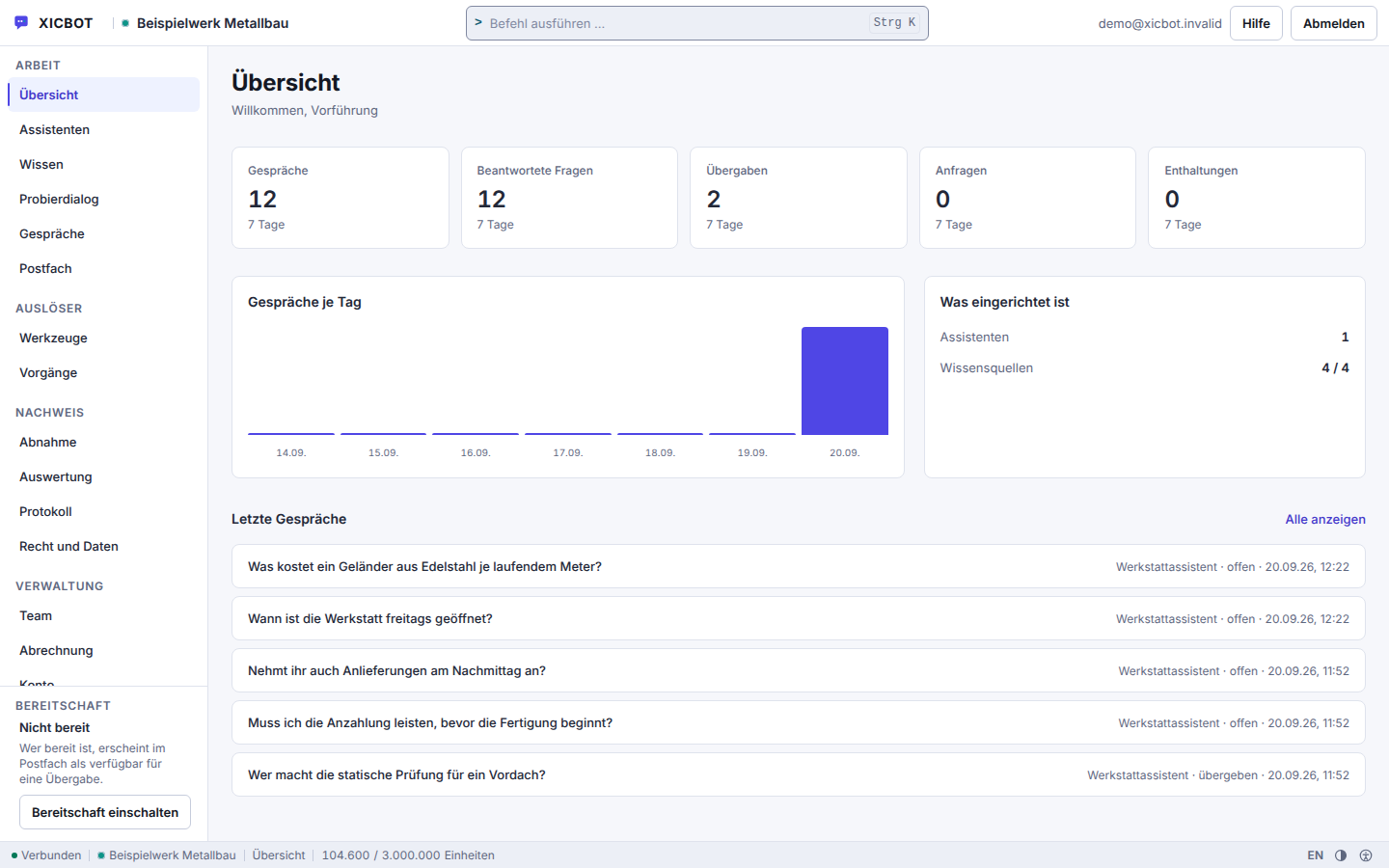
Key figures for the last seven days sit at the top, conversations per day below them.
What is set up stands as a list next to them.
The most recent conversations sit below the numbers, not in a second area.
The order below is the one the system works in, not the one in which we hear about it. Detection comes first from the system itself, as far as it measures; what it does not measure, such as a missing answer while model access is reachable, reaches us through your report.
An incident is not always an outage. Answering more slowly, reading sources late and not appearing at all are three different situations with three different consequences — the second is usually invisible from outside and still a finding.
Detection works in three ways. A scheduled run that fails and a job that fails after its last attempt raise an alert immediately. The hourly maintenance run reports overdue runs, recovered and expired jobs and an incomplete schema. And every request to the status endpoint that is not served from the short-lived cache measures the nine parts afresh. Detection therefore comes from the system itself, not from someone reporting an incident.
We distinguish degraded from not measured: a part whose measurement succeeds but shows a fault counts as degraded; a part whose measurement itself fails counts as not measured, not as fine. Each alert also carries a severity — info, warning or critical — by which the list in the operator area is sorted.
Before an alert has even been written, the visitor already has the incident in front of them. So the frame decides for itself: configuration not loadable means locked input with the reason in the status line; a language model failure mid-answer means the half-written text is discarded and the stored fallback answer is sent. The visitor reads a sentence in the flow of the conversation, not an error code.
Whatever the system detects as an incident is recorded as an alert in the operator area, with source, severity, last sighting and counter; if the alert cannot be written, it goes to the application log. Outwardly, the public status endpoint returns the measured state of each part, without signing in and without error texts; how to query it is described under availability, status and alerts.
During and after the incident the queue catches up. A job has three attempts, the daemon reclaims orphaned jobs on start, and whatever finally fails does not simply sit there but raises a critical alert of its own. A source read can therefore arrive late; if it finally fails, the previous state keeps answering rather than a half-replaced one.
Changes resulting from the fix appear in the changelog.
What is not stated here: a deadline by which an incident is resolved. We do not name one, because we cannot measure it before we know the cause. What exists instead is the measured information: the status endpoint shows a degraded part even while the cause is still open — it does not name a cause to the outside anyway.
You can switch the assistant off yourself at any time without waiting for us. The widget switch applies from the next request to every embed of that assistant; the page stays, the chat disappears.
There are no fixed times for maintenance and no committed announcement. What changes in a release is listed in the changelog. The public status endpoint has no state of its own for maintenance: a part that is not working during maintenance shows up there as degraded or not measured, and if the API itself cannot be reached, the endpoint does not answer either.
The questions here concern day-to-day operation. How you can query which part is currently stuck is described under availability, status and alerts; what changed in a release is in the changelog.
Your browser queries it from the public status endpoint when the page opens, without a login, and shows it with the time of the measurement. No state is built into the page itself: a static page would show a state frozen at build time — wrong precisely during an incident, when it matters. If the endpoint does not answer within five seconds or not at all, the page shows “not available, not measured” and never “operational”. Nine parts are checked: database, cache, storage, queue, schedule, background service, outgoing mail, model access and schema. Not measured is reported there as “unknown” and not as “fine”. How to query the endpoint yourself is described under availability, status and alerts.
Not by email, but by measurement. Monitoring covers nine state parts and one heartbeat per schedule entry; an overdue heartbeat is recorded as a critical alert. A public state endpoint is reachable without a login and answers anything other than normal operation with code 503, so that even a monitor reading nothing but the code sees the incident. Not measured is stated there explicitly as unknown and not as healthy: a failed measurement is not booked as a green result. Outward, the endpoint names no error texts, no table names and no host names. What is monitored and what happens during maintenance is described under status.
Conversations that have started are kept and can be reviewed afterwards under Conversations. If the model fails, the visitor does not get an error code but the stored fallback reply; the conversation does not break off, it ends with a note and the way to a human. An empty knowledge base is kept apart from an outage: a different sentence to the visitor, a different record, a different signal — otherwise an empty knowledge base would look like a fault. What the assistant could not take in during that time does not appear later; so please name the affected period in your incident report. The current state comes from the public status endpoint explained on the status page; a failed measurement appears there as not measured, with code 503, and not as a success.
As a rule, no. The widget does not sit in your page's critical path. The loader is a single self-contained file that triggers no network call of its own; the frame is only built after your page has fully loaded, plus one further tick, in its own origin with no access to your document. If the service fails, the assistant is missing while your page is delivered unchanged; the frame then shows a plain sentence instead of an error code. Nine parts are measured — database, cache, storage, queue, scheduler, daemon, outgoing mail, model access and schema. Anything other than operational is answered by the public status endpoint with 503. The current state comes from that endpoint; the status page explains what it reports.
Yes. In the Assistants area you can pause delivery without removing the snippet from the template. That is the fastest route if the assistant should not appear on the page. A paused assistant behaves outwardly like an unknown or switched-off one: the response is the same in all three cases, so nothing about your key can be read from it. Without the script your page stays unchanged — the assistant sits in its own area and does not interfere with your layout. You use the same switch the other way round during setup: a newly created assistant is a draft and only answers once you set it active.
No, and the built state records that as a decision: there is neither a commitment in per cent nor an announced maintenance period nor a promise about response times. What does exist is measurement. Nine parts are checked — database, cache, storage, queue, scheduler, daemon, outgoing mail, model access and schema; anything other than operational is answered by the public status endpoint with 503. The queue counts as healthy as long as the oldest open job is young enough and few runs failed within the last hour; model access is checked via key and port, not through a model call. The current state comes from the status endpoint, and there is no history; the status page explains what is measured, the plans are listed under pricing.
One question comes up regularly and has an uncomfortable answer: no, there is no committed availability figure. What we state instead is what is measured, at what interval, and what happens when a measurement fails. A number nobody can recalculate would be worth less here than a description of the measurement.
Overview
The overview shows the key figures for the last seven days, conversations per day, what is set up and the most recent conversations. Your package consumption in the current month is under Billing. Go to the overview in your account
Describe briefly what you see and name the affected website URL and the approximate time. Both help to match your observation against the alerts recorded for that period; there is no history of the status endpoint. By phone you can reach us at +49 5123 9579000.