Changelog: what changes in XICBOT
This is where product changes are recorded: new features, changed defaults, fixed bugs. What you change on your own assistant is not here but in the audit log of your account — with timestamp and the account that triggered it.
In plain language
This page lists changes to XICBOT. These are new features, new defaults and fixed errors. Each change names the area it belongs to. For new defaults, it names the new value. Your own changes are not listed here. You find them in the log of your account. There you can see who changed what and when.
Open the audit log in your account Documentation
- Answers with a source reference
- Loads only after your consent
- No minimum term, cancellable monthly
- 8 of 8
- questions without a basis declined instead of guessed
- XICBOT, own measurement series of 11 September 2026
-
Visitor:Has anything changed in the product in recent weeks?
-
Assistant:Yes. The entries are on this page, the most recent at the top, each with its date, version and the points that changed.
- Changelog read · latest entries · date and area per entry
-
Visitor:And my own changes?
-
Assistant:Those are not in the changelog but in your account log. There you can see who changed what and when.
Ask it yourself, Assistant of this website
Automated assistantEntries
The delivered versions with their date, type and the points that changed; the most recent entry is at the top.
-
Legal: version 2026-09-28 of the data processing agreement and legal texts
- The data processing agreement, the annex on technical and organisational measures, the terms of use and the privacy policy carry version 2026-09-28.
- Acceptance of an earlier version of the data processing agreement does not apply to the new one; the agreement shows as open again in the account.
- Agreement and annex state that the answers are generated by a specialised model provider; processing may also take place outside the European Union or the European Economic Area, on the basis of standard contractual clauses.
- The annex describes the roles Read, Edit, Administration and Owner individually.
- From the Administration role upwards, a retention period can be set for conversations, enquiries, uploaded files, visitor attachments and logs. A new account starts with 90 days for conversations and 30 days for logs; the other periods are empty. Appointments and shopping cart handovers follow the enquiry period.
- Backups keep 14 states; deleted data only disappears there once these states expire. Frequency and location of the backups and the last restore test are not entered in this version; the annex makes no commitment about them.
- The owner can delete the account. As the only personal detail in plain text, the deletion log keeps the email address of the person who confirmed the deletion; after 1095 days a maintenance run removes the remaining shell together with the log.
- If a visitor deletes their conversation, their attachments go with it. A handed-over enquiry, appointment or shopping cart stays with the tenant as a case of its own under the enquiry period.
- The export of all data leaves out stored check values such as address hashes and stored access keys, and names for each section which columns it withholds.
- The accessibility statement names as its scope the administration interface at app.xicbot.de and the embedded chat window. Bar charts have their figures next to them as a table or visible label. The chosen language is stored on the device; a link can preset it with ?sprache=de or ?sprache=en.
-
Operations: health probe, job queue and operator area
- The health probe actually writes to and reads from database, cache and storage.
- The background service takes on jobs atomically; a restart leaves no job half processed.
- Operator area with tenant overview, takeover and action log.
- Usage and billing records complete; the payment provider is not connected yet.
-
Legal: access, export, deletion and consent
- Access and export per conversation without the visitor signing in.
- Withdrawing consent takes effect in the ongoing conversation.
- Data processing agreement and subprocessor list visible in the account.
-
Conversations: history, handover and export
- Conversation list with filters, escalation and resolution.
- Export as a file with a retention period per tenant.
-
Knowledge base and assistants
- Website sources are crawled, split up and stored in searchable form.
- Answers carry page links to the sections used.
- Assistants with versions, templates and an embeddable widget.
What gets recorded here
A tool that changes without anyone noticing what changed is a tool you cannot trust. This page therefore records how changes come about, which of them are announced and where you can read them. It does not replace the audit log in your account: that one records what happened in your account, this one records what changed in the product.
The record starts with the first releaseBefore it there is no history here. A changelog showing entries from before the first release would be invented — and an invented history devalues every real entry that follows.
What gets recorded is what is visible or noticeable to the operator of an assistant. Internal rework without effect on operation, answers or quotas does not appear — it would fill the list without answering a question.
New features
What is added and which area it belongs to.
- The area comes before the title, for example Legal, Operations or Conversations
- Plus whether the feature has to be switched on — a newly created assistant is a draft and does not answer until you set it active
- Not recorded is anything that concerns the operator branch alone: it holds status, notices, jobs and tenant administration, but no unlocking for your account
Changed defaults
When a default behaviour changes, the entry states what applied before, what applies now and how to keep the old behaviour, if that is possible.
- The entry names the old and the new default, not merely the fact of the change
- A value you set yourself stays in place; a default only applies where nothing is set
- Such defaults for a new account are the conversation period of 90 days and the log period of 30 days; the other periods are empty out of the box
Fixed bugs
What did not work, since when it is fixed and whether anything is required on your side for the fix to take effect.
- The entry names since when the bug is fixed and whether anything is required from you
- For the widget nothing is required: the version changes via the file name, with no action on your page
- For a knowledge source a refresh may be required for the fix to reach the index
Security and data protection
Changes to access, rights, retention and deletion periods. Anything affecting the data processing agreement is marked separately.
- Affected are access, roles, retention and deletion periods
- Anything touching the data processing agreement is marked separately: its wording sits in the source, and three of its twelve sections are produced at delivery time from the same configuration the deletion runs work from
- If wording and version number diverge, acceptance of the agreement is refused — there is no silent change to wording already accepted
Scope and quotas
Changes to what a package contains. Price changes are additionally stated on the pricing page.
- The entry names what a package contains and from when
- Price changes are additionally stated on the pricing page
- A new account starts on the
startplan in stateactive; from there it is readable what an entry shifts
Deprecations
What will be removed, from when, and what replaces it. Deprecations appear here before they take effect, not afterwards.
- The entry names the date and what takes its place
- Deprecations appear here before they take effect, not afterwards
- For the widget an older version stays reachable under its name; an unknown version name answers with 404 rather than with some version or other
Anything that fits none of these six lines gets no entry. That is a decision against completeness and in favour of readability: a list containing every internal rework stops being read after a few weeks — and then the line that shifts a default goes unnoticed as well.
What happened inside your account is not recorded here but in the account's own log. Keeping the two apart has a reason: a product change affects every account, a log entry only yours.
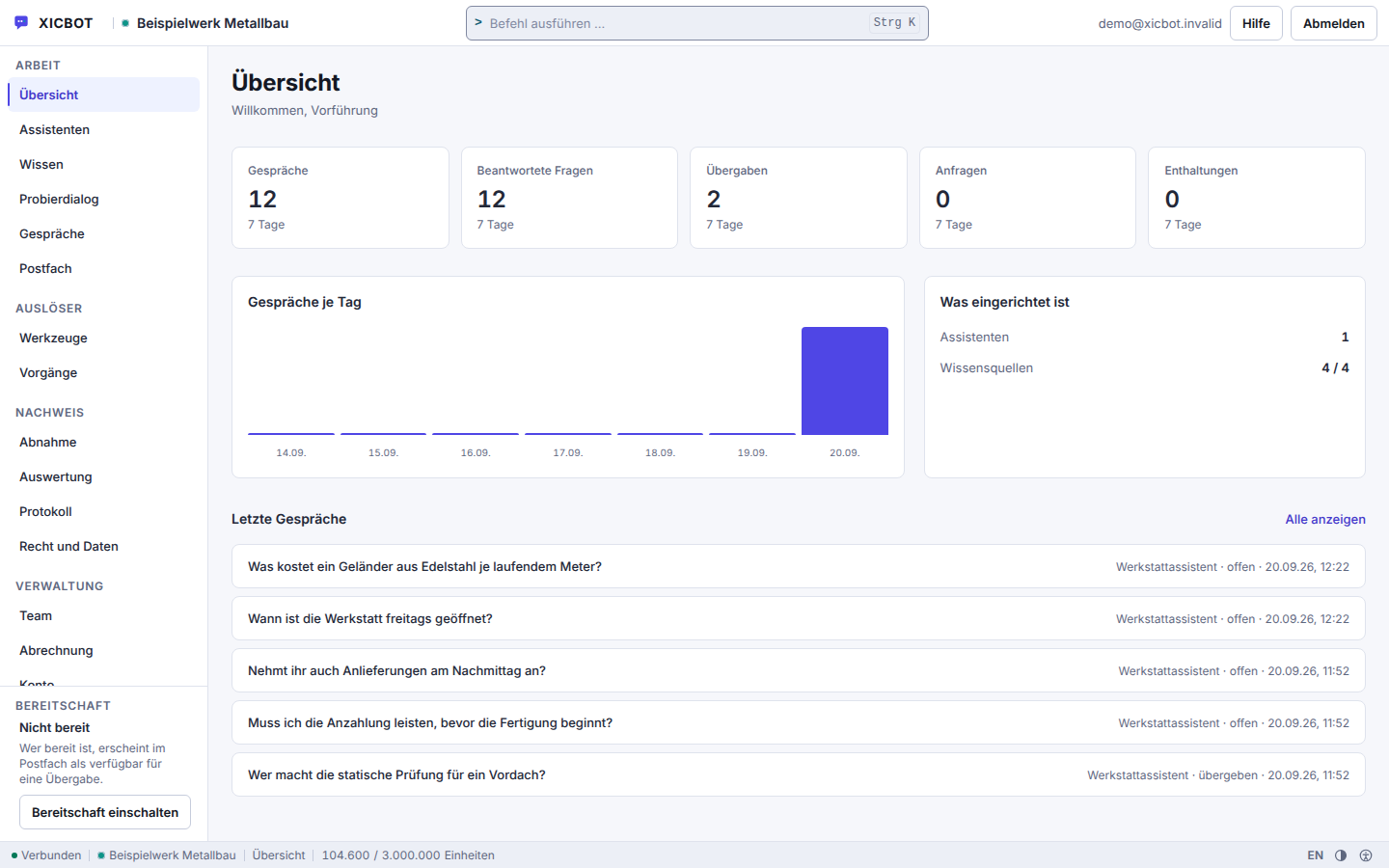
What changes shows up on the surface
-
The overview shows the key figures of the last seven days and conversations per day.
-
Next to it stands what is already set up and what is still missing.
-
The most recent conversations are on the same page, with no detour through a menu.
How a change is delivered
Between the finished change and the entry on this page lie several steps. They are listed here because otherwise the entry would be nothing but a date: what matters is not when something was released, but what was measured beforehand and what was watched afterwards.
The order cannot be rearranged. The entry comes into being after delivery, not before — an announcement running ahead of delivery would be a commitment to a date, and no such commitment is made here.
-
Build and verify
Every change is verified against the interface it affects — by measurement, not by looking at it. What cannot be measured counts as unverified.
-
Run the counter-test
Before delivery the checker is fed a known fault. If it does not report it, it measured nothing — and then the green result before it does not count either.
-
Deliver
Delivery happens at times of low usage. Changes that may cause an interruption are announced beforehand; the channel for that is described under Status.
-
Watch the status
After delivery, nine status components and the heartbeats of the scheduled jobs keep running. On a fault, the public status endpoint answers with 503 rather than with a reassuring page.
-
Record
After delivery the entry appears here — with date, version and affected area.
-
Roll back when necessary
If a fault shows up after delivery, the change is rolled back rather than patched. The rollback gets an entry too; a history that failures disappear from is not a history.
The rollback gets an entry too. A history that failures disappear from is not a history but a selection — and a selection tells you nothing about the next entry.
Updating happens on three separate levels: the software via the rollout path, the embedded widget via version names without action on your side, the knowledge via the refresh interval per source.
Your own changes: the audit log in your account
What happens in your account does not belong in a public history. Every change to assistants, sources, tools and approvals is listed under Audit log, with timestamp and the account that triggered it. That is the place for the question why the assistant has been answering differently since yesterday: in the vast majority of cases a source changed, not the product.
- Product changes are recorded here and concern every account.
- Account changes are recorded in the audit log and concern only your account.
- Incidents and planned work are described under Status.
- How to operate the areas is described in the documentation.
Frequent questions about the changelog
The most frequent questions about this page revolve around three things: why the history only starts with the first release, how to learn about a change without checking daily, and whether a running assistant changes on its own.
Why does the history only start with the first release?
Because the record starts with the first release. A history with entries that did not exist beforehand would be invented. The entries on this page are produced when the website is built, from the same file the public change endpoint reads; if a language is missing there or the file cannot be read, the build stops instead of delivering an empty or partial list that looks like standstill. What is measured in operation is not here but on the status page: there your browser queries the public status endpoint, which answers without a login and also reports a disruption in the response code.
Am I notified about every change?
No, and that is deliberate. Notification covers what requires a decision or an action: changed defaults, deprecations, changes affecting the data processing agreement. Changes to the product itself, meaning new features, changed defaults and fixed errors, are recorded in the changelog and do not fill your mailbox. What you or your team change on your own assistant is kept separately in the audit log of your account, with a timestamp and the account that triggered it; named events there include plain-text access, export and deletion of a conversation. Operating alerts are not sent out by email either, you query the state instead.
Does my assistant change when the product changes?
Not in what you have set: your settings, your sources and your approvals belong to your assistant and stay as they are when the product changes. New tool types arrive as their own adapter file, without anything being rearranged on an existing tool; the model is offered only what you have entered and switched to active anyway. If a default behaviour changes that you never touched, the changelog states what applied before and what applies now. The widget parts also carry a version name derived from their content, with an integrity check: an unknown version is rejected instead of being silently replaced by another one.
Where do I see when my sources were last read?
Under Knowledge in your account, per source with a timestamp. It also states whether a crawl was capped and how many links were left open — without that figure the source would afterwards read as finished, as if it had been read in full. As long as nothing has been measured the field stays empty and is not reported as zero. Every source also carries its refresh interval; it counts as stale only once more than twice that interval has passed since the last check, and at least 14 days. A conditional fetch via ETag and Last-Modified may well conclude that nothing has changed. All of this is independent of product changes and the most frequent explanation for changed answers.
Are price changes announced here?
Not here. The changelog records changes to the product: new features, changed defaults, fixed errors. A price change is not one of them. It is communicated to you directly, and the valid figures are stated on the pricing page, together with each plan's limits for seats, assistants, knowledge sources and documents, so that price and scope stand side by side in one place. The entry here is therefore the side track and not the announcement. What changes on your own account, a plan change for instance, is in turn recorded in the audit log of your account, with a timestamp and the account that triggered it.
Can I keep using an older version?
No. One version runs for all accounts — that keeps the security level and the behaviour uniform. This is why deprecations appear here before they take effect and not afterwards. What changes is listed in the change list; it is delivered publicly and reports it itself if it could not be read, instead of returning an empty list that looks like “no changes". What an update did inside your account can be looked up in the log: every change is recorded there with timestamp and the account that triggered it, including the approval of a tool and the removal of a source.
If your question is not among them, the shortest route is the contact form. Answers that concern several customers subsequently end up in the frequent questions — not in a single email nobody else gets to see.
Operations
Incident, maintenance or current state?
What is monitored, how incidents are reported and where the measured state is shown is described on the status page. Go to the status page
Something changed and you cannot find it here?
Write us what you noticed and, if available, your website URL and the approximate time. Whatever was a product change gets an entry. By phone you can reach us at +49 5123 9579000.