42 of 48
answers carrying a source reference
questions whose answer is in the knowledge base; six carried no source reference
XICBOT guides new users through onboarding, answers feature and pricing questions from your documentation, takes requests for demos and trial access and relieves your support by resolving recurring questions in chat around the clock.
This page is for software companies. The assistant guides new users through the first steps. It answers questions on features and prices from your docs. It also names the place where it says so. It takes requests for a demo or a trial account. It may only create something after the user confirms. Only real special cases are meant to go to your support team as a ticket.
Request a demo for your product View pricing
Only genuine individual cases land with your team, with full conversation context; as a ticket in your ticketing system in the Custom package.
Visitor:Can I assign roles per project or only per account?
Assistant:Per project. One account can read in one project and write in another.
Visitor:Does that apply in the trial account as well? Please set one up for me.
Assistant:Yes, the same scope. I can create the trial account — but not unasked. Here is what would happen.
Visitor:Confirmed.
Assistant:The system reports: created, the invitation is on its way. The log records the call with a note that a visitor confirmed it. A second click on the same button does not create a second account.
Ask it yourself, Assistant of this website
Automated assistantSoftware and SaaS providers live on activated users and a support team that does not drown in routine questions. This is exactly where an individual AI chat assistant comes in: it knows your documentation, your plans and your most common onboarding hurdles and answers questions in seconds, instead of leaving prospects and trial users waiting in a ticket queue. The support assistant catches recurring how-to questions, via tool control it reads out system and billing status on request, and the conversation analytics show you where users get stuck during onboarding. That turns a trial into a paying customer more often, and your team gains time for the demanding cases.
Whether during a trial, in live operation or on the pricing page: an assistant that knows your product content answers the recurring questions directly and forwards only what genuinely needs a human. It handles six tasks in everyday SaaS work particularly reliably.
The assistant guides new users step by step through the first setup steps, explains features at the right place and thus lowers the hurdle from registration to active use.
«How do I set up a feature?» it answers directly from your documentation and help, pointing to the relevant source, instead of making users search through scattered help articles.
Questions about plans, quotas and billing model the assistant answers from your pricing overview and guides prospects to the right plan, without anyone having to search.
For prospects it takes a request for a demo slot right in the conversation and holds the time, without long form chains; the appointment becomes binding once your team confirms it.
Recurring how-to and standard questions it resolves in chat, so fewer enquiries land as tickets in support and handling time drops noticeably (project experience).
On request it reads out system, subscription or billing status from the systems connected in the Custom package via defined actions and states the current status directly in chat.
Two limits belong to this. One answer carries at most five tool calls; anything beyond that is not dropped quietly but logged as capped. And when the monthly allowance runs low, the cap falls to a single round — so the assistant stays able to answer instead of failing mid-month.
An assistant in the software space is only as good as the answers it gives. That is why XICBOT binds it to your own content: documentation, changelog, help articles and price list are split into sections, and for every question the assistant picks out the sections that might carry it. Sourced statements carry the number of the excerpt they came from; an answer containing not one of these numbers is recorded as a gap. If the search finds nothing, it says openly that nothing is stored on this. A failure of the language model gets a different sentence: these are two different things, and they should sound different too.
Read and Act — With Your Approvals
A SaaS assistant only helps if its answers are correct and its actions run in a controlled way. It reads your product content and status sources and carries out the actions you have approved, from a demo request to creating a ticket. Writing actions do not run unasked: the visitor sees a card with the state word and two buttons and reads, before clicking, exactly the text that was stored with the proposal. The log later records whether a call ran automatically or whether a visitor confirmed it. Which systems the assistant reaches and which fields it may fill you decide; the connection to calendar, ticketing system and internal tools runs via defined actions in the Custom package, more on that under tool control. Anything that needs a human it passes to your team with the full conversation.
One limit is part of the deal: the search compares words, not meaning. A question that shares no word with the section holding the answer falls below the threshold — and then the assistant is instructed to decline rather than guess. No larger language model helps against that; your wording in the docs does, and so does the check set we use before going live to measure which of your typical questions hit the right place. Every question left without a citation in live operation lands as an open point in the conversation analytics instead of disappearing unnoticed.
42 of 48
answers carrying a source reference
questions whose answer is in the knowledge base; six carried no source reference
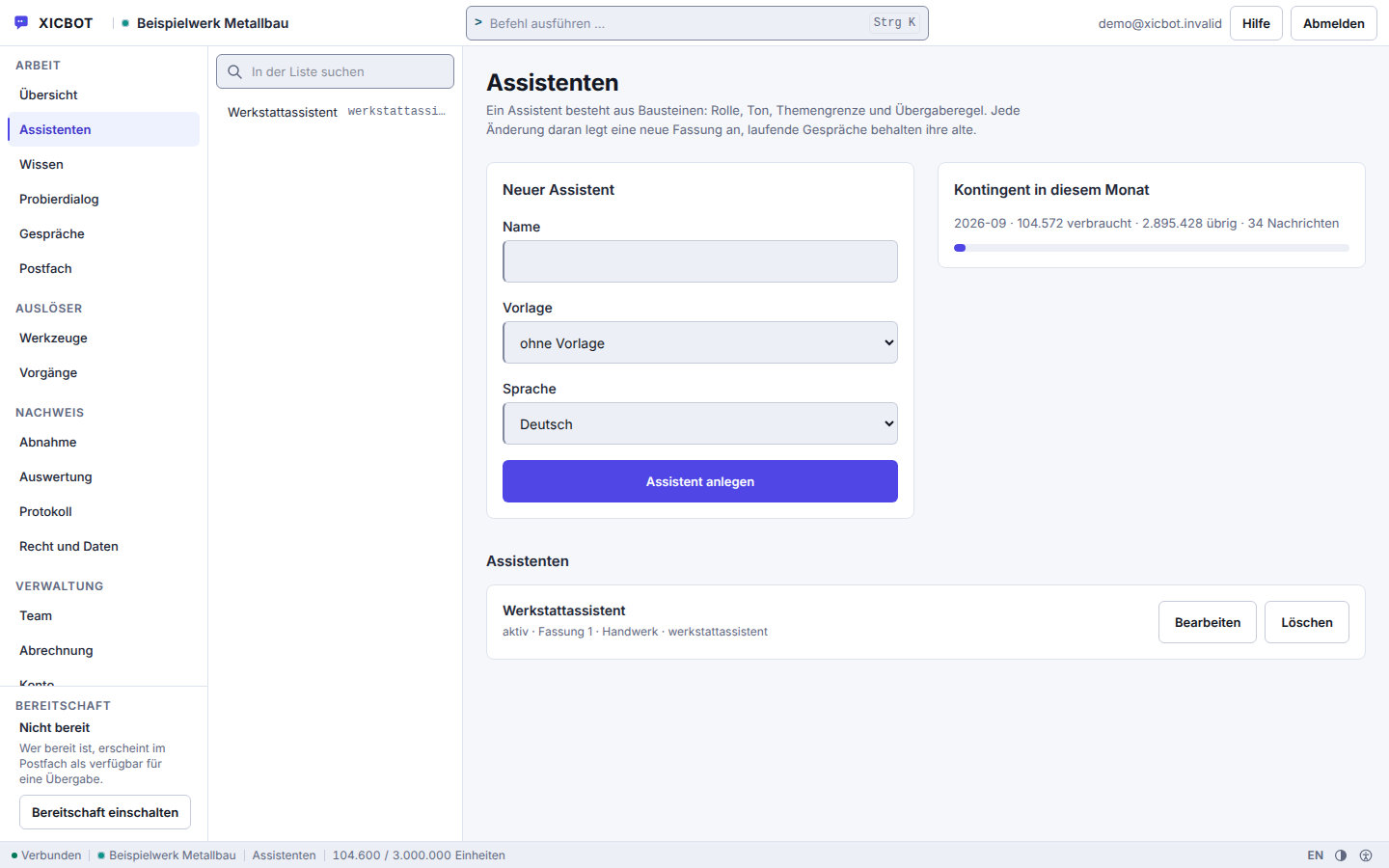
Each product can have its own assistant with its own key.
Name, template and language are the three fields a new assistant needs.
The allowance used this month sits next to the list of assistants.
Visitor:Is two-factor login for team accounts on your roadmap, and when is it coming?
Assistant:There is nothing about that in the stored knowledge base.
Visitor:A rough estimate would do.
Assistant:I will not give one, it would be guesswork. I will pass the question to your product team and note it as a gap, so it is answered in the next revision of your docs.
8 of 8
questions without a basis declined instead of guessed
eight questions deliberately outside the material; the wording of every answer is in the measurement file
For software and SaaS providers, much is decided in the first minutes after registration. Anyone who gets stuck during onboarding rarely becomes a paying customer, and every unanswered how-to question in this phase costs activation. At the same time, a large share of incoming support enquiries are recurring standard questions about setup, features, plans and status (project experience). Every one of these questions the assistant resolves in chat does not become a ticket a human has to handle. This relieves your team and at the same time shortens the wait for the enquiries that genuinely need personal handling. The prerequisite is a maintained knowledge base of documentation, changelog and help articles the assistant quotes from.
43 of 48
questions without a handover to a person
measured on a single assistant on our own knowledge base, not on customer projects; a figure from live operation is not yet available
An assistant for software and SaaS is built in manageable steps. We review your most frequent questions, connect your sources and systems and define when the assistant acts and when it hands over to a human. You stay in control of content, actions and escalation rules throughout. For internationally used products the same assistant answers in the language of the enquiry, see multilingual assistant.
In the free initial consultation we look at which questions come up most often in onboarding and support, which docs exist and which systems should be connected. This gives a clear picture of what the assistant can take on and where humans stay in charge.
We connect documentation, help articles, changelog and price list. A website is read by a dedicated fetcher: it obeys your robots.txt, follows only links within the approved address and leaves images and media out of the crawl. A page marked noindex receives no section at all — what is not published should not carry an answer either. Manuals and price lists as PDF are added as their own source; a scanned sheet without a text layer is rejected on import instead of having its letters guessed.
We set up the approved actions, such as demo request, trial access and ticket creation via tool control; trial access and ticket creation belong to the Custom package. Every action is given its kind: what only reads may run without a prompt; anything that writes is forced onto confirmation when it is created and cannot quietly be exempted. On top of that we define together when the assistant hands over to a human, so sensitive cases reach your team.
Before going live we create check questions with their expected answer and run them along the same path a visitor takes later. Judgement is passed without a language model, on three recomputable feet: required terms, forbidden terms and the literal overlap with the model answer. Rows that could not answer at all count as errors and enter no score — a failure must not disguise itself as a passed check. What fails usually points to a gap in the knowledge base, not in the assistant.
A new assistant starts as a draft and answers nobody while it is one. Only when you switch it to active does the widget serve, and only where your key is embedded. If the key is missing, if the widget is switched off or if the assistant is paused, the same empty response comes back; from the outside there is no telling which of the three applies, and that is deliberate.
We operate the assistant with hosting in Germany and keep the knowledge base in step with your releases. The conversation analytics continuously show where users get stuck in onboarding and which questions went unanswered; every metric names its basis, and a card without a measurement is shown as unmeasured instead of displaying a zero. Once a week a report goes to the confirmed address of the account, unsubscribable in the same view.
After going live the knowledge base works in step with your releases. Sources are re-read every seven days by default, adjustable per source from daily up to «never»; unchanged pages are recognised by the fingerprint of their text and skipped instead of being split again. Every run writes into a new version and switches over only at the end: if it fails halfway, the previous state keeps answering instead of leaving your knowledge base empty for a while. If a change has to take effect at once — a changelog entry on release day, say — you trigger the import by hand in the admin area.
What the setup costs depends on three things: how many sources are connected, how many actions the assistant may carry out and how large the check set for acceptance becomes. Documentation that is already structured is connected faster than a help centre grown over years with scattered articles; an assistant that only gives information is finished faster than a chain of booking, ticket and status lookup. We name the range after the initial consultation, not before.
from 149 € per month net
Minimum term: none, cancellable monthly
All prices net, plus VAT Source: XICBOT price list, as of 11 September 2026
The assistant for software and SaaS sits in the Pro package: from 2,900 € net one-time setup plus 149 € per month net operation. It includes answers from documentation and knowledge base, feature and pricing information, demo and trial booking, requests with confirmation, handover to humans with context, multilingual answers, hosting in Germany and the conversation analytics. For the connection to your ticketing system, your own API integrations and custom workflows, the Custom package is available from 4,900 € net. Every project begins with a free initial consultation and, on request, a free demo with a test assistant for your website. Ongoing services are booked individually and can be cancelled monthly; there is no minimum term.
The following journeys are anonymized and illustrative. They show which recurring tasks an assistant can take on across different software and SaaS providers, from guided onboarding through demo requests to relieving support.
There are deliberately no figures beside this. How many tickets an assistant intercepts depends on your knowledge base, your product and the questions actually asked; we have no dependable figure from live operation of a customer project. What we have measured so far is our own assistant on our own knowledge base — that is where the figures on this page come from, along with the questions they fail on.
Concrete Results on RequestWould you like to know how much an assistant can relieve your onboarding and support? In the free initial consultation we look at your most frequent questions and, on request, show a free demo with a test assistant for your website, without sales pressure and without empty promises.
Further reading: AI assistant for SaaS describes onboarding and ticket deflection in a product context, and building a knowledge base shows which content from docs, changelog and FAQ the assistant really needs.
Three questions come up in almost every conversation with a software provider, usually in this order: whether the assistant fits your own product, where its answers come from and what happens when it does not know something. The last one matters most — it decides whether an assistant builds trust or squanders it.
For providers whose users ask recurring questions about setup, features, plans or status. Your documentation goes into the knowledge base as a website, a file, free text or a maintained question-and-answer pair; a website run reads at most 25 pages per pass and obeys robots.txt, and a PDF is read through its existing text layer. Whatever stayed open is recorded as an unanswered question and as a knowledge gap in conversation analytics — and becomes your next page of documentation. Questions about system or billing status are answered by a tool of your own against your system, reading only and filtered down to the declared result fields. More under assistant for software.
From your own sources: documentation, help articles, changelog, price list and connected status systems. It is bound to this content and instructed not to invent answers into the blue. The search combines a keyword comparison with a local feature calculation, whose rankings are merged; every section keeps its heading and origin, which is why an answer can name the source it used. If it finds no supporting section, it usually says so openly and hands over to a human. Such cases do not vanish: they collect as unanswered questions and as knowledge gaps in the evaluation, and the next addition to your knowledge base follows from them.
The appointment tool type takes a demo appointment as a request that you confirm; the assistant enters it straight into your calendar only with a calendar connection set up in the Custom package. A trial access runs through a tool of your own against your system. For that you describe a schema with up to twenty fields; the input is trimmed to it before execution, and if a required field is missing nothing is executed at all. The access key for your system is stored, replaced by a placeholder in the interface and never returned. Both operations write and therefore require confirmation: the visitor reads the proposal in plain text, and only their click triggers it. How approvals and the connection work in detail is described under tool control.
That depends on your questions, which is exactly why it is counted rather than estimated. The evaluation keeps conversations, self-resolved cases, cases handed to your team and questions without an answer as separate metrics; the weekly report repeats them as labelled cards over the preceding seven days. Every recurring standard question about setup, features or plans that the assistant resolves in chat never becomes a ticket. Where it has to pass, knowledge gaps and unanswered questions appear as their own lists, from which the next improvement follows. We promise no target figure; you see your own in the conversation analytics.
Yes, provided you connect the system. A reading tool may run without a query if you explicitly set it to automatic; everything that writes is forced to confirmation when created or changed, no matter what the request says. The call goes to exactly one stored connection, the target is checked beforehand, the deadline is eight seconds and can be set between one and twenty seconds; at most 64 KiB are accepted and redirects are not followed. What comes back are only the result fields you declared. Contract changes stay outside all this: they run through a handover to a person. The details are described under tool control.
The assistant sits in the Pro package: from 2,900 € net one-time setup plus 149 € per month net operation, including hosting in Germany, care and conversation analytics. Pro covers ten seats, five assistants, 50 knowledge sources and 2,000 documents, which is enough for the manual, the change log and help articles in one shared knowledge base. For your own API integrations, writing actions and individual workflows the Custom package is available from 4,900 € net setup, with operation there by scope. Every project begins with a free initial consultation. All packages are listed under pricing. All services can be cancelled monthly; there is no minimum term.
The frame around it is tight and anchored in the code. The assistant calls only tools you have entered and switched to active; there is no open access to your systems. Anything that writes is forced to confirmation when created or changed, no matter what the request says — without confirmation only something that reads and is explicitly set to automatic will run. Every call leaves a log row that is written before execution and knows seven states, from proposed to deadline exceeded. A one-time key made of conversation, tool and sorted input prevents double execution, and a missing required field prevents execution altogether. At most five calls run per answer. More under tool control.
Not in the same instant, but without you doing anything. Website sources carry a refresh rhythm, seven days by default; it can be set from one day up to 365 days, and the value zero switches it off. The run happens at night. If a change should take effect sooner, trigger the read manually under Knowledge and then check the state of the source to see how many sections were produced. Each run writes a new version and switches over only at the end: if it breaks off, the previous state keeps answering, and a run that wrote nothing deletes nothing either. Five versions are kept. More under knowledge base.
Yes, in the Custom package. We chain individual actions into a continuous process — for example read out, calculate, create a document, create a ticket and hand over the lead. This creates a path without media breaks in which each step has its own permission: anything that does more than read is first shown to the visitor as a proposal and confirmed by them. The chain is bounded so it cannot run away: per answer the assistant performs at most five tool calls, and only one when the monthly allowance is tight. Every single call is then recorded in the log, with input, result, duration and the path by which it was approved.
Anything not covered here is answered step by step in the documentation; the full collection sits under frequently asked questions. Everything that concerns only your product we clarify in the initial consultation — including when the answer is that an assistant would add little in your case.
Free and Without Obligation
In a free initial consultation we look at your most frequent questions and show how an assistant guides new users through onboarding, takes demo requests and resolves recurring questions in chat around the clock. On request with a free demo for your website.
Tell us briefly which questions tie up your onboarding and support the most. You receive a factual assessment, the right package and, on request, a free demo with a test assistant for your website. You can reach us by phone at +49 5123 9579000.