42 of 48
answers carrying a source reference
questions whose answer is in the knowledge base; six carried no source reference
XICBOT bundles fourteen coordinated functions into one AI chat assistant that truly knows your business.
XICBOT is a chat assistant with fourteen functions. It reads your website and your shop. It answers questions and shows products. It can put together a cart. It takes appointment requests and notes requests from new customers. It can also control the tools you connect. It works around the clock and in several languages.
Request an assistant View pricing
It reads your website and your shop, answers questions in seconds, shows products, puts together a cart, takes appointment requests, captures leads and controls your connected tools. Around the clock, multilingual and hosted in Germany.
Visitor:I am looking for a spare part but do not know the exact name.
Assistant:Just describe it. I can search the article data, check stock and give the delivery time.
Visitor:A sealing ring for series 4, around 40 millimetres.
Assistant:Found, and it is in stock. Shall I put together a cart with it here in the chat or show the product page first?
Visitor:Please put two of them in the cart.
Assistant:I have prepared the cart. Confirm it and the two items sit in the cart here in the chat — “Continue” then leads into the shop.
Ask it yourself, Assistant of this website
Automated assistant42 of 48
answers carrying a source reference
questions whose answer is in the knowledge base; six carried no source reference
A good chat assistant is more than a pop-up with a few canned answers. XICBOT bundles fourteen coordinated functions into a single assistant that truly knows your business. It reads your website and your shop, advises visitors in seconds, shows products with image and price, puts together a cart, takes appointment requests, captures qualified leads and, on request, controls your connected tools via defined actions. On this page you will find all functions organized by four tasks, each with its own detail page. Below we show the three packages Start, Pro and Custom and how a collaboration works.
Everything XICBOT does comes down to four tasks: it advises, it sells, it takes appointment requests and it controls. In the overview below, the fourteen functions are grouped exactly that way. You do not have to introduce them all at once. Many projects start with the website assistant and add selling, appointment requests or tool control when it fits. Each function has its own detail page with concrete use cases. Which functions fit which industry is shown additionally on the industries page.
Each row first states what the function does and, below it, the limits it works against: thresholds, states and the points at which the visitor has to confirm. Each function is bookable individually or as part of a package.
Answers visitor questions from your website content, explains services and guides visitors to the right page. The entry point to any collaboration. More on the website assistant page.
noindex is fetched but never taken into the knowledge base.Round-the-clock answers from FAQ and knowledge base, status queries through a connection in the Custom package and escalation to a team member with full context. Noticeably reduces ticket volume. Details under support assistant.
escalated, creates a lead and notifies a person — in one step.gap.detected callback is raised — the gap is not papered over.How the assistant is trained on your business: website, documents, PDFs, FAQ and price lists. Answers stay bound to your own sources. More under knowledge base.
Detects the visitor's language and answers consistently in many languages, the same content without extra effort. Details under multilingual assistant.
Product advice, variants, prices and availability for your shop based on Shopware Community Edition. Less support, more conversion. More under shop assistant.
inventory_status reads stock without asking. order_status reads, in the Custom package, the order status from a connected merchandise management system and by default still requires a confirmation, because it is a personal matter; the Shopware connection itself only reads catalogue, price and availability.Product cards with image, title, price and add-to-cart button right in the chat, including recommendations, comparison and bundles. The chat becomes a showroom. Details under product cards.
Puts together a cart in the chat, changes quantities, applies vouchers, shows shipping costs and leads on into the shop with “Continue”. Also addresses cart abandoners. More under cart assistant.
set, add, update, remove, clear, coupon. Each of them writes and therefore needs confirmation.Names free times from your stored appointment types on request and takes appointment requests, reschedules or cancels them as soon as the visitor agrees; your business confirms the request in its view. With the confirmation the visitor receives a confirmation email and a reminder before the appointment, if an email address was given. Relieves phone and reception. Details under booking assistant.
calendar_availability reads free slots without asking, and calendar_booking writes and is shown to the visitor as a proposal first.Qualifies enquiries with targeted follow-up questions, pre-fills forms once the visitor confirms and hands structured leads to your inbox or, in the Custom package, to your CRM. A funnel instead of a form maze. More under lead assistant.
lead writes name, email, phone and request into the company's inbox and attaches files uploaded beforehand.crm_lead creates the same record in a connected CRM — a write, and therefore confirmed by the visitor.callback_note records a callback request in a connected customer management system in the Custom package when nobody is reachable right now.Analyzes chats: frequent questions as topics, knowledge gaps, drop-off points and which conversations lead to appointments and enquiries. A data basis for better closes. Details under conversation analytics.
measured field and a reason next to the value. If the basis is missing, the reason stands there — never a zero.Reads and controls connected systems such as calendar, CRM, inventory and ticketing via defined actions with permissions (function calling), in the Custom package. More under tool control.
Tailored actions, workflows, calculations and configurators to your needs. Almost any conceivable case can be modeled. Details under custom functions.
timeout, any other error failed; there is no retry.tenant_id, mandant, mandant_id and konto_id are blocked as field names so that no call can bypass tenant separation.Embedded with a short code snippet into any website, any CMS and any shop, first-party via your domain on request, performant and in your brand's design. More under integration.
allow-same-origin and is only built once your page has finished loading.GDPR-compliant with hosting in Germany, a data processing agreement, data sovereignty and a deletion concept; European or self-hosted models as a separate project by arrangement, not included in standard operation. Details under privacy & hosting.
Fourteen rows are not fourteen building blocks. What the assistant may trigger are seventeen shapes — seven at the core and ten adapters. One function in this list uses several of them, and one shape carries several functions.
The bullet points describe the state that ships. Whatever your project needs beyond that belongs in the quote, not in this list.
8 of 8
questions without a basis declined instead of guessed
eight questions deliberately outside the material; the wording of every answer is in the measurement file
24.1 KB
loader on your page, compressed
only the file that runs on the host page, measured with the compression the web server actually sends; the chat window lives in its own frame and loads only once your page has finished loading
The list of configured parts says, per function, whether it really runs — an assistant still in draft does not answer.
The bar chart counts conversations per day; which function carried them is in the individual transcript below.
If a metric has no basis, the card names the reason instead of a zero — for instance that no tool call has happened yet.
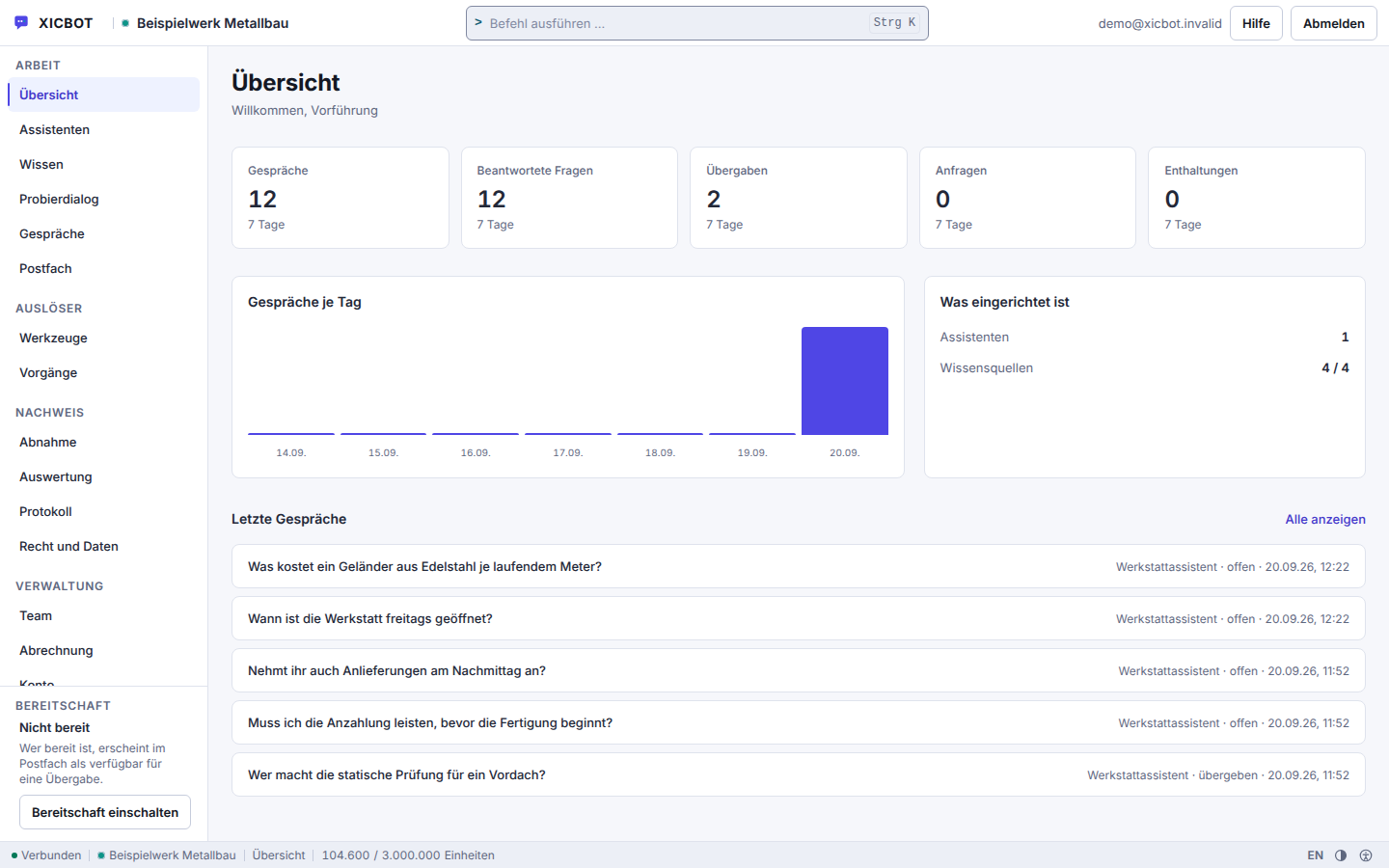
The decisive difference from a rigid menu chatbot lies in two abilities. First, XICBOT reads your real content: website and subpages, the shop catalog with products, prices and availability, opening hours, documents, the internal knowledge base and your stored appointment types. So it does not answer out of nowhere but bound to your own sources. Second, it acts: via defined actions with permissions it puts together a cart, takes appointment requests, captures leads and, in the Custom package, also creates tickets and controls connected tools. When it cannot or should not decide something, it hands over to a human, with full conversation context. An AI assistant can be wrong, which is why we bind it to your content, allow handover and evaluate conversations continuously.
Reading and actions, cleanly separated and permitted
What the assistant reads and what it is allowed to do is up to you. Reading covers website, shop, opening hours, documents, appointment types and, through a connected inventory system in the Custom package, order status. The actions range from a cart in the chat through an appointment request to handing over structured leads. Every writing action requires a permission, and sensitive topics such as complaints or legal questions are meant to go to a human deliberately.
Visitor:What does shipping to Austria cost, and how long does it take?
Assistant:There is nothing on this in the stored knowledge base. I can pass the question to a colleague — shall I?
Visitor:Yes, please.
Assistant:Done. My colleague sees the whole conversation, you do not have to repeat any of it.
43 of 48
questions without a handover to a person
measured on a single assistant on our own knowledge base, not on customer projects; a figure from live operation is not yet available
A model of one-time setup and monthly operation: the Start package from 990 € net setup, Pro from 2,900 € net setup and 149 € per month net operation, Individual from 4,900 € net setup. Which of the fourteen functions your project really needs we clarify up front, free and without obligation, on request on a test assistant for your website. Ongoing services are booked individually and can be cancelled monthly; there is no minimum term.
Which functions you need depends on your goal. For a pure website assistant, the Start package is enough. Anyone who wants to sell in the shop chooses Pro with shop connection, product cards and cart in the chat. Anyone who wants to control their own tools or model special cases is right with the Custom package. The exact price depends on scope and is fixed bindingly after a free initial consultation. You will find a detailed comparison on the pricing page.
All prices net plus VAT. Setup depends on how many sources are indexed and how many actions are connected; ongoing operation depends on the volume of conversations. Both appear separately in the quote, not as a lump sum.
from 990 € setup net
Minimum term: none, cancellable monthly
from 2,900 € setup net
Minimum term: none, cancellable monthly
from 4,900 € setup net
Minimum term: none, cancellable monthly
All prices net, plus VAT Source: XICBOT price list, as of 11 September 2026
All prices net plus VAT. The model consists of a one-time setup plus monthly operation (hosting in Germany, care, updates, GDPR). A binding quote names the functions one by one, not just the package, and is fixed after the initial consultation.
Your own AI assistant does not have to be a big IT project. We guide you in six transparent steps from the first idea to ongoing operation. You keep control of scope, content and permissions and, after the initial consultation, you know which package fits you.
We go through the fourteen functions and strike out what you do not need. Three questions decide the scope: which sources the assistant may read, which actions it should trigger and which of those the visitor has to confirm. Free and without obligation; on request you see the result on a test assistant for your website.
Your website, documents, price lists and, in the Pro package, the shop catalogue are split into sections and indexed. Sourced claims in the later answer then carry the number of their excerpt; if the search finds nothing, the assistant says so instead of composing something.
We settle which of the seventeen shapes are connected, from which role level they apply and what may run without asking. Everything that writes is hard-set to confirmation, regardless of what the request looks like.
The assistant is embedded into your website or shop with a short code snippet, first-party via your domain on request, performant and in your brand's design. We define the actions and permissions together.
Before launch we ask real questions from your everyday business — including ones with no basis. What the assistant declines is as much part of acceptance as what it answers.
After launch, we take over hosting in Germany, care, updates and ongoing improvement. Through conversation analytics you see what visitors ask and refine both the assistant and the website.
Between training and trial run sits the work nobody sees later: which source is out of date, which question has no basis and which action does need a confirmation after all.
Every step can be repeated afterwards. New sources, new actions and new permissions are added during operation; how that works is in the documentation.
In a free initial call we go through your most common customer questions and match them to a plan — no sales pressure and no preparation needed on your side.
The following examples are anonymized and illustrate typical starting points and paths. They show how the functions work together in practice. We are happy to discuss concrete results and references in a personal conversation.
Concrete results on requestThese examples are deliberately anonymized and illustrative. We are happy to show you fitting scenarios and a realistic assessment for your project in the free initial consultation or by phone at +49 5123 9579000.
We go deeper into individual functions in the guide: What is an AI chat assistant? sorts out the terms, the AI assistant controls your tools describes how an answer turns into a real action, and building a knowledge base shows which content an assistant needs so its answers hold up.
If a new website or shop is to be built alongside the assistant, xicweb.de handles that. For connecting ERP or inventory management to the shop, see shop-integration.de.
Most follow-up questions about the functions circle the same point: the line between reading and acting, and who draws it in a given case.
A simple chatbot works with rigid menu trees and canned answers. XICBOT is trained on your business, reads your website and your shop and answers from your own knowledge base: sourced answers name their source, and an answer without a used excerpt is recorded as a gap. On top of that it acts: it shows product cards, puts together a cart in the chat, takes appointment requests and captures leads — every writing step only after the visitor clicks a proposal they have read in plain text beforehand. When it cannot answer something, it hands over to a human and passes the request on.
For selling, three functions matter most: the shop assistant for advice and availability, and, with your inventory system connected in the Custom package, also for order status, the product cards for product cards in the chat and the cart assistant for putting together and changing a cart in the chat and the way into the shop. They are part of the Pro package and work with a shop based on Shopware Community Edition. The product search knows four forms — search, compare, bundle, also bought — and returns at most six hits, exclusively from your own catalogue. The cart sits with XICBOT, not in your shop: it collects items and calculates with the current price from your shop, or, if the shop cannot be reached, with the last synced price and its date, plus the rules you deposited for shipping, threshold and voucher. “Continue” then opens your shop's stored address with a one-time pickup token that lets your shop fetch the cart from XICBOT, provided it integrates that pickup itself. Checkout and payment stay in your shop.
Both. Seventeen tool types are available: seven at the core — lead, appointment, handoff, product search, cart, an outbound call of your own and pre-filling a form on your site once the visitor confirms — plus ten adapters for merchandise management, calendar, catalogue, customer management and ticket systems; the outbound call of your own and the ten adapters come in the Custom package. The model is offered only what you have entered, switched to active and allowed for the role of the conversation; if the list is empty, it receives no tool field at all. At most five calls run per answer, the sixth is logged as capped. Anything that writes never runs unconfirmed: the proposal stands in plain text in the chat, only the click executes it, and every call leaves a log row carrying one of seven states. More under tool control and custom functions.
The assistant is bound to the deposited excerpts: sourced statements carry the number of the excerpt they came from, and figures, prices and deadlines that are not in your sources are replaced with a notice. If the search finds nothing, it usually says that the deposited knowledge base holds nothing on the subject. Like an answer without a used excerpt, the case is recorded as a knowledge gap and reported outwards, so you find it again in the analytics from the Pro package and can add the missing source. On request the assistant hands over to a human, and when a topic is delicate it is meant to, in each case with transcript and responsible place. How this binding to your own content works is described under knowledge base.
In the language it is written to in. That language is detected in our own code through function words and characteristic characters, with no external service and no extra model call; word lists exist for nine languages: German, English, French, Spanish, Italian, Dutch, Polish, Portuguese and Turkish. If a sentence is not clear-cut, the field stays empty instead of guessing German. Detection happens per sentence, which is why a switch mid-conversation is carried too. You do not have to maintain your content several times over: the knowledge base is not filtered by language, language acts as a ranking bonus. More under multilingual assistant.
There are three packages, each consisting of a one-time setup and monthly operation. Start begins at 990 € net setup and 49 € per month net and covers website and knowledge base, answers with a citation, lead capture, handover to a human and multilingual answers. Pro from 2,900 € net setup and 149 € per month net adds shop integration, product cards and cart, appointment and lead functions and the conversation analytics. Custom begins at 4,900 € net setup; operation there follows the scope and therefore has no list price. The packages also differ in seats, assistants, knowledge sources and the monthly token allowance. All figures are listed under pricing. All services can be cancelled monthly; there is no minimum term.
The frame around it is tight and anchored in the code. The assistant calls only tools you have entered and switched to active; there is no open access to your systems. Anything that writes is forced to confirmation when created or changed, no matter what the request says — without confirmation only something that reads and is explicitly set to automatic will run. Every call leaves a log row that is written before execution and knows seven states, from proposed to deadline exceeded. A one-time key made of conversation, tool and sorted input prevents double execution, and a missing required field prevents execution altogether. At most five calls run per answer. More under tool control.
Permissions are the heart of tool control. The assistant is offered only what is active and what the role of the conversation is allowed to call; a muted conversation gets no list at all. Every tool carries a kind — read, write or irreversible — and an approval mode: automatic or only after confirmation, with confirmation as the preset. This way an availability query runs without a prompt, while a cancellation runs only after explicit consent. Kind and schema come from the register and not from the request, and one answer carries at most five tool calls. Hosting is in Germany and the answers are generated by a specialised model provider, also outside the EU on the basis of standard contractual clauses; details under privacy and hosting.
The questions and answers page covers more; the settings behind each function are in the documentation.
No call needed
Knowledge, the test area, conversations and analytics are ready in your own account once you sign up. No payment method is required to sign up; billing starts with the operation of an assistant. The five steps up to the embedded widget are described under create an account and set it up yourself.
Tell us briefly what your assistant should be able to do: advise, sell, take appointment requests or control. You receive a factual assessment, the fitting package and, on request, a free demo for your website. You can reach us by phone at +49 5123 9579000.