Function Calling: How an Assistant Uses Your Tools
How an AI assistant uses function calling to take appointment requests and to read and control your CRM, inventory and ticketing, with clear approvals per step.
In plain language
The assistant is given set tasks with a name and a short note. In the chat it picks the one that fits. It cannot use any other task. It reads your data straight from the source, such as open slots, stock, prices and, in the Custom package, delivery status. If a price changes, the answer changes too. Before it creates or changes something, it shows it and waits for your yes. Each link gets only the rights it needs, and each action is logged. Complaints and special cases are meant to go to a person.
A modern AI assistant does not only answer questions, it acts. It reads the systems your business already uses and, on request, performs real actions in them: it names free times from the stored appointment types and takes appointment requests, creates a qualified lead in the CRM, checks stock in the inventory system or opens a support ticket. This is made possible by a technique known as function calling, which you can think of as a collection of clearly defined actions the assistant is allowed to trigger. The decisive difference from a rigid menu bot: the assistant understands the request in natural language and picks the right action itself. Just as important is control: reading (Read) changes nothing, writing (Write) only happens after a clear approval. This article explains how an assistant reads and controls tools, which systems can be connected, how approvals and security work and which concrete cases this covers. Around 60 percent (McKinsey) of all occupations include activities of which at least one third could be automated. It is exactly these recurring tasks that a well-connected assistant takes over.
%3C%2Ftext%3E%3Cline%20x1%3D'300'%20y1%3D'118'%20x2%3D'322'%20y2%3D'118'%20stroke%3D'%236366f1'%20stroke-width%3D'3'%2F%3E%3Ctext%20x%3D'328'%20y%3D'121'%20font-family%3D'system-ui%2C%20sans-serif'%20font-size%3D'7.5'%20font-weight%3D'600'%20fill%3D'%234338ca'%3Econtrols%20(Write)%3C%2Ftext%3E%3Crect%20x%3D'32'%20y%3D'52'%20width%3D'210'%20height%3D'306'%20rx%3D'10'%20fill%3D'%23ffffff'%20stroke%3D'%23cbd5e1'%20stroke-width%3D'1.2'%2F%3E%3Crect%20x%3D'32'%20y%3D'52'%20width%3D'210'%20height%3D'26'%20rx%3D'10'%20fill%3D'%231e293b'%2F%3E%3Crect%20x%3D'32'%20y%3D'68'%20width%3D'210'%20height%3D'10'%20fill%3D'%231e293b'%2F%3E%3Ccircle%20cx%3D'46'%20cy%3D'65'%20r%3D'3'%20fill%3D'%2322d3ee'%2F%3E%3Ctext%20x%3D'58'%20y%3D'68'%20font-family%3D'system-ui%2C%20sans-serif'%20font-size%3D'8'%20fill%3D'%23cffafe'%3Eyoursite.invalid%3C%2Ftext%3E%3Crect%20x%3D'72'%20y%3D'84'%20width%3D'152'%20height%3D'32'%20rx%3D'8'%20fill%3D'%234f46e5'%2F%3E%3Ctext%20x%3D'84'%20y%3D'97'%20font-family%3D'system-ui%2C%20sans-serif'%20font-size%3D'7.6'%20fill%3D'%23ffffff'%3EPlease%20move%20my%3C%2Ftext%3E%3Ctext%20x%3D'84'%20y%3D'108'%20font-family%3D'system-ui%2C%20sans-serif'%20font-size%3D'7.6'%20fill%3D'%23ffffff'%3Eappointment%20to%20Thursday.%3C%2Ftext%3E%3Crect%20x%3D'48'%20y%3D'122'%20width%3D'168'%20height%3D'42'%20rx%3D'8'%20fill%3D'%23e0e7ff'%2F%3E%3Ctext%20x%3D'58'%20y%3D'136'%20font-family%3D'system-ui%2C%20sans-serif'%20font-size%3D'7.6'%20fill%3D'%23312e81'%3EI%20check%20the%20free%20times%3C%2Ftext%3E%3Ctext%20x%3D'58'%20y%3D'147'%20font-family%3D'system-ui%2C%20sans-serif'%20font-size%3D'7.6'%20fill%3D'%23312e81'%3Eand%20suggest%20them%20to%3C%2Ftext%3E%3Ctext%20x%3D'58'%20y%3D'158'%20font-family%3D'system-ui%2C%20sans-serif'%20font-size%3D'7.6'%20fill%3D'%23312e81'%3Eyou.%3C%2Ftext%3E%3Crect%20x%3D'48'%20y%3D'170'%20width%3D'176'%20height%3D'46'%20rx%3D'8'%20fill%3D'%23ffffff'%20stroke%3D'%2306b6d4'%20stroke-width%3D'1.3'%2F%3E%3Ctext%20x%3D'58'%20y%3D'184'%20font-family%3D'system-ui%2C%20sans-serif'%20font-size%3D'7.4'%20font-weight%3D'700'%20fill%3D'%230e7490'%3EAction%3A%20request%20new%20time%3C%2Ftext%3E%3Ctext%20x%3D'58'%20y%3D'195'%20font-family%3D'system-ui%2C%20sans-serif'%20font-size%3D'7'%20fill%3D'%23475569'%3EThu%2C%2012%20Jun%2C%203%3A00%20PM%3C%2Ftext%3E%3Crect%20x%3D'158'%20y%3D'199'%20width%3D'58'%20height%3D'13'%20rx%3D'4'%20fill%3D'%2306b6d4'%2F%3E%3Ctext%20x%3D'187'%20y%3D'208.3'%20font-family%3D'system-ui%2C%20sans-serif'%20font-size%3D'6.6'%20font-weight%3D'700'%20fill%3D'%23ffffff'%20text-anchor%3D'middle'%3EApprove%3C%2Ftext%3E%3Crect%20x%3D'48'%20y%3D'222'%20width%3D'168'%20height%3D'40'%20rx%3D'8'%20fill%3D'%23e0e7ff'%2F%3E%3Ctext%20x%3D'58'%20y%3D'236'%20font-family%3D'system-ui%2C%20sans-serif'%20font-size%3D'7.6'%20fill%3D'%23312e81'%3ERequest%20taken%2C%20the%3C%2Ftext%3E%3Ctext%20x%3D'58'%20y%3D'247'%20font-family%3D'system-ui%2C%20sans-serif'%20font-size%3D'7.6'%20fill%3D'%23312e81'%3Ebusiness%20confirms%20it.%3C%2Ftext%3E%3Crect%20x%3D'48'%20y%3D'270'%20width%3D'158'%20height%3D'20'%20rx%3D'6'%20fill%3D'%23ecfeff'%20stroke%3D'%2367e8f9'%20stroke-width%3D'1'%2F%3E%3Ctext%20x%3D'58'%20y%3D'283.5'%20font-family%3D'system-ui%2C%20sans-serif'%20font-size%3D'6.8'%20fill%3D'%230e7490'%3EFree%20times%20checked%3C%2Ftext%3E%3Crect%20x%3D'48'%20y%3D'300'%20width%3D'178'%20height%3D'22'%20rx%3D'6'%20fill%3D'%23f1f5f9'%20stroke%3D'%23cbd5e1'%20stroke-width%3D'1'%2F%3E%3Ctext%20x%3D'58'%20y%3D'314.5'%20font-family%3D'system-ui%2C%20sans-serif'%20font-size%3D'7'%20fill%3D'%2364748b'%3EType%20a%20message...%3C%2Ftext%3E%3Ctext%20x%3D'360'%20y%3D'176'%20font-family%3D'system-ui%2C%20sans-serif'%20font-size%3D'8'%20font-weight%3D'700'%20fill%3D'%23312e81'%20text-anchor%3D'middle'%3EFunction%20Calling%3C%2Ftext%3E%3Crect%20x%3D'300'%20y%3D'188'%20width%3D'120'%20height%3D'56'%20rx%3D'14'%20fill%3D'%234f46e5'%2F%3E%3Ctext%20x%3D'360'%20y%3D'212'%20font-family%3D'system-ui%2C%20sans-serif'%20font-size%3D'14'%20font-weight%3D'800'%20fill%3D'%23ffffff'%20text-anchor%3D'middle'%3EXICBOT%3C%2Ftext%3E%3Ctext%20x%3D'360'%20y%3D'228'%20font-family%3D'system-ui%2C%20sans-serif'%20font-size%3D'7.5'%20fill%3D'%23c7d2fe'%20text-anchor%3D'middle'%3Edefined%20actions%3C%2Ftext%3E%3Cline%20x1%3D'242'%20y1%3D'205'%20x2%3D'300'%20y2%3D'214'%20stroke%3D'%236366f1'%20stroke-width%3D'2'%2F%3E%3Cline%20x1%3D'420'%20y1%3D'216'%20x2%3D'560'%20y2%3D'88'%20stroke%3D'%2306b6d4'%20stroke-width%3D'2'%2F%3E%3Cline%20x1%3D'420'%20y1%3D'216'%20x2%3D'560'%20y2%3D'144'%20stroke%3D'%236366f1'%20stroke-width%3D'2'%2F%3E%3Cline%20x1%3D'420'%20y1%3D'216'%20x2%3D'560'%20y2%3D'200'%20stroke%3D'%2306b6d4'%20stroke-width%3D'2'%2F%3E%3Cline%20x1%3D'420'%20y1%3D'216'%20x2%3D'560'%20y2%3D'256'%20stroke%3D'%236366f1'%20stroke-width%3D'2'%2F%3E%3Cpath%20d%3D'M552%2084%20L560%2088%20L552%2092%20Z'%20fill%3D'%2306b6d4'%2F%3E%3Cpath%20d%3D'M552%20140%20L560%20144%20L552%20148%20Z'%20fill%3D'%236366f1'%2F%3E%3Cpath%20d%3D'M552%20196%20L560%20200%20L552%20204%20Z'%20fill%3D'%2306b6d4'%2F%3E%3Cpath%20d%3D'M552%20252%20L560%20256%20L552%20260%20Z'%20fill%3D'%236366f1'%2F%3E%3Crect%20x%3D'560'%20y%3D'64'%20width%3D'200'%20height%3D'48'%20rx%3D'8'%20fill%3D'%23ffffff'%20stroke%3D'%23a5b4fc'%20stroke-width%3D'1.2'%2F%3E%3Crect%20x%3D'570'%20y%3D'76'%20width%3D'24'%20height%3D'24'%20rx%3D'6'%20fill%3D'%23e0e7ff'%2F%3E%3Ctext%20x%3D'604'%20y%3D'84'%20font-family%3D'system-ui%2C%20sans-serif'%20font-size%3D'9.5'%20font-weight%3D'700'%20fill%3D'%23312e81'%3EAppointments%3C%2Ftext%3E%3Ctext%20x%3D'604'%20y%3D'97'%20font-family%3D'system-ui%2C%20sans-serif'%20font-size%3D'7'%20fill%3D'%23475569'%3ERequests%2C%20free%20times%3C%2Ftext%3E%3Ctext%20x%3D'604'%20y%3D'107'%20font-family%3D'system-ui%2C%20sans-serif'%20font-size%3D'6.5'%20font-weight%3D'700'%20fill%3D'%230e7490'%3ERead%20%2B%20Write%3C%2Ftext%3E%3Crect%20x%3D'560'%20y%3D'120'%20width%3D'200'%20height%3D'48'%20rx%3D'8'%20fill%3D'%23ffffff'%20stroke%3D'%23a5b4fc'%20stroke-width%3D'1.2'%2F%3E%3Crect%20x%3D'570'%20y%3D'132'%20width%3D'24'%20height%3D'24'%20rx%3D'6'%20fill%3D'%23cffafe'%2F%3E%3Ctext%20x%3D'604'%20y%3D'140'%20font-family%3D'system-ui%2C%20sans-serif'%20font-size%3D'9.5'%20font-weight%3D'700'%20fill%3D'%23312e81'%3ECRM%3C%2Ftext%3E%3Ctext%20x%3D'604'%20y%3D'153'%20font-family%3D'system-ui%2C%20sans-serif'%20font-size%3D'7'%20fill%3D'%23475569'%3ELeads%2C%20contacts%2C%20notes%3C%2Ftext%3E%3Ctext%20x%3D'604'%20y%3D'163'%20font-family%3D'system-ui%2C%20sans-serif'%20font-size%3D'6.5'%20font-weight%3D'700'%20fill%3D'%230e7490'%3ERead%20%2B%20Write%3C%2Ftext%3E%3Crect%20x%3D'560'%20y%3D'176'%20width%3D'200'%20height%3D'48'%20rx%3D'8'%20fill%3D'%23ffffff'%20stroke%3D'%23a5b4fc'%20stroke-width%3D'1.2'%2F%3E%3Crect%20x%3D'570'%20y%3D'188'%20width%3D'24'%20height%3D'24'%20rx%3D'6'%20fill%3D'%23e0e7ff'%2F%3E%3Ctext%20x%3D'604'%20y%3D'196'%20font-family%3D'system-ui%2C%20sans-serif'%20font-size%3D'9.5'%20font-weight%3D'700'%20fill%3D'%23312e81'%3EInventory%3C%2Ftext%3E%3Ctext%20x%3D'604'%20y%3D'209'%20font-family%3D'system-ui%2C%20sans-serif'%20font-size%3D'7'%20fill%3D'%23475569'%3EStock%2C%20orders%3C%2Ftext%3E%3Ctext%20x%3D'604'%20y%3D'219'%20font-family%3D'system-ui%2C%20sans-serif'%20font-size%3D'6.5'%20font-weight%3D'700'%20fill%3D'%230e7490'%3ERead%20%2B%20Write%3C%2Ftext%3E%3Crect%20x%3D'560'%20y%3D'232'%20width%3D'200'%20height%3D'48'%20rx%3D'8'%20fill%3D'%23ffffff'%20stroke%3D'%23a5b4fc'%20stroke-width%3D'1.2'%2F%3E%3Crect%20x%3D'570'%20y%3D'244'%20width%3D'24'%20height%3D'24'%20rx%3D'6'%20fill%3D'%23cffafe'%2F%3E%3Ctext%20x%3D'604'%20y%3D'252'%20font-family%3D'system-ui%2C%20sans-serif'%20font-size%3D'9.5'%20font-weight%3D'700'%20fill%3D'%23312e81'%3ETicketing%3C%2Ftext%3E%3Ctext%20x%3D'604'%20y%3D'265'%20font-family%3D'system-ui%2C%20sans-serif'%20font-size%3D'7'%20fill%3D'%23475569'%3ECreate%20tickets%3C%2Ftext%3E%3Ctext%20x%3D'604'%20y%3D'275'%20font-family%3D'system-ui%2C%20sans-serif'%20font-size%3D'6.5'%20font-weight%3D'700'%20fill%3D'%230e7490'%3EWrite%3C%2Ftext%3E%3Crect%20x%3D'32'%20y%3D'372'%20width%3D'728'%20height%3D'64'%20rx%3D'9'%20fill%3D'%23ffffff'%20stroke%3D'%23cbd5e1'%20stroke-width%3D'1.2'%2F%3E%3Ctext%20x%3D'46'%20y%3D'390'%20font-family%3D'system-ui%2C%20sans-serif'%20font-size%3D'8.5'%20font-weight%3D'700'%20fill%3D'%23312e81'%3EExecuted%20actions%20%E2%80%94%20each%20write%20only%20after%20approval%3C%2Ftext%3E%3Crect%20x%3D'46'%20y%3D'400'%20width%3D'168'%20height%3D'22'%20rx%3D'6'%20fill%3D'%23ecfeff'%20stroke%3D'%2367e8f9'%20stroke-width%3D'1'%2F%3E%3Ccircle%20cx%3D'60'%20cy%3D'411'%20r%3D'6'%20fill%3D'%2306b6d4'%2F%3E%3Cpath%20d%3D'M57%20411%20l2.4%202.6%20l4%20-5'%20stroke%3D'%23ffffff'%20stroke-width%3D'1.5'%20fill%3D'none'%2F%3E%3Ctext%20x%3D'72'%20y%3D'414'%20font-family%3D'system-ui%2C%20sans-serif'%20font-size%3D'7.4'%20fill%3D'%230e7490'%3ERequest%20taken%3C%2Ftext%3E%3Crect%20x%3D'222'%20y%3D'400'%20width%3D'168'%20height%3D'22'%20rx%3D'6'%20fill%3D'%23ecfeff'%20stroke%3D'%2367e8f9'%20stroke-width%3D'1'%2F%3E%3Ccircle%20cx%3D'236'%20cy%3D'411'%20r%3D'6'%20fill%3D'%2306b6d4'%2F%3E%3Cpath%20d%3D'M233%20411%20l2.4%202.6%20l4%20-5'%20stroke%3D'%23ffffff'%20stroke-width%3D'1.5'%20fill%3D'none'%2F%3E%3Ctext%20x%3D'248'%20y%3D'414'%20font-family%3D'system-ui%2C%20sans-serif'%20font-size%3D'7.4'%20fill%3D'%230e7490'%3ELead%20created%3C%2Ftext%3E%3Crect%20x%3D'398'%20y%3D'400'%20width%3D'168'%20height%3D'22'%20rx%3D'6'%20fill%3D'%23ecfeff'%20stroke%3D'%2367e8f9'%20stroke-width%3D'1'%2F%3E%3Ccircle%20cx%3D'412'%20cy%3D'411'%20r%3D'6'%20fill%3D'%2306b6d4'%2F%3E%3Cpath%20d%3D'M409%20411%20l2.4%202.6%20l4%20-5'%20stroke%3D'%23ffffff'%20stroke-width%3D'1.5'%20fill%3D'none'%2F%3E%3Ctext%20x%3D'424'%20y%3D'414'%20font-family%3D'system-ui%2C%20sans-serif'%20font-size%3D'7.4'%20fill%3D'%230e7490'%3EStock%20checked%3C%2Ftext%3E%3Crect%20x%3D'574'%20y%3D'400'%20width%3D'168'%20height%3D'22'%20rx%3D'6'%20fill%3D'%23ecfeff'%20stroke%3D'%2367e8f9'%20stroke-width%3D'1'%2F%3E%3Ccircle%20cx%3D'588'%20cy%3D'411'%20r%3D'6'%20fill%3D'%2306b6d4'%2F%3E%3Cpath%20d%3D'M585%20411%20l2.4%202.6%20l4%20-5'%20stroke%3D'%23ffffff'%20stroke-width%3D'1.5'%20fill%3D'none'%2F%3E%3Ctext%20x%3D'600'%20y%3D'414'%20font-family%3D'system-ui%2C%20sans-serif'%20font-size%3D'7.4'%20fill%3D'%230e7490'%3ETicket%20created%3C%2Ftext%3E%3C%2Fsvg%3E)
Labels in the illustration
- controls (Write)
- yoursite.invalid
- Please move my
- appointment to Thursday.
- I check the free times
- and suggest them to
- you.
- Action: request new time
- Thu, 12 Jun, 3:00 PM
- Approve
- Request taken, the
- business confirms it.
- Free times checked
- Type a message...
- Function Calling
- XICBOT
- defined actions
- Appointments
- Requests, free times
- Read + Write
- CRM
- Leads, contacts, notes
- Read + Write
- Inventory
- Stock, orders
- Read + Write
- Ticketing
- Create tickets
- Write
- Executed actions — each write only after approval
- Request taken
- Lead created
- Stock checked
- Ticket created
What Function Calling Means
A language model alone can understand and phrase text, but by itself it has no access to your calendar, your customer database or your stock. Function calling closes exactly this gap. You give the assistant a list of functions, each with a clear name, a description and the details it needs. One function might be called read_free_slots and expect a date, another create_lead expecting name, contact and request. When a visitor phrases their concern, the assistant recognizes which function fits, takes the required details from the conversation and triggers it. The result flows back into the reply. This turns a pure conversation into an action, without the visitor having to search for a form or operate a portal.
It is important that the assistant does not invent functions. It can only trigger the actions you have explicitly given it, and only with the details intended for them. That makes the process predictable: every possible action is defined, documented and individually securable beforehand. At XICBOT these functions are tailored individually to your business and your systems, instead of shipping an assistant with generic default actions. Which actions make sense depends on your industry and your tools, and that is exactly the point of tool control and custom functions.
Menu Bot, Builder Kit or Controlled Assistant
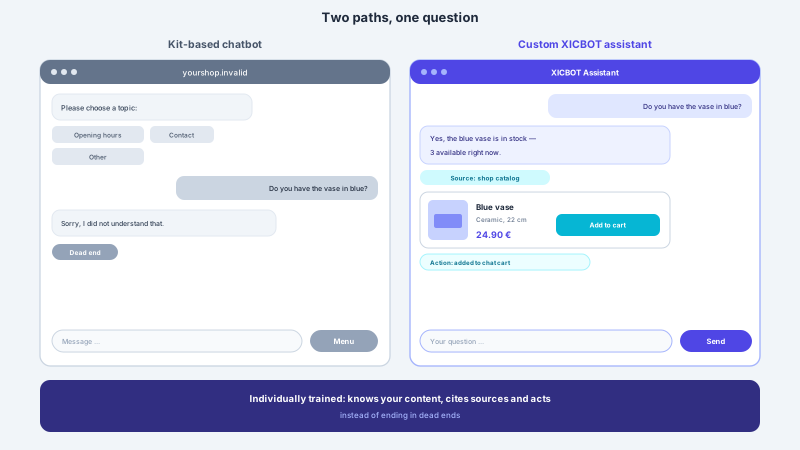
To see why function calling makes a difference, it helps to look at the alternatives. A classic menu bot works with fixed click paths: the visitor taps through predefined buttons, and anything the tree does not foresee ends in a dead end. A builder-kit chatbot is quick to set up but answers from generic scripts, does not know your specific business and cannot make anything happen in your systems. A controlled assistant understands free language, is trained on your business, reads your data live and triggers defined actions. The difference is not cosmetic: it decides whether a question becomes a completed task or just another pointer to a contact form.
-
Menu bot
Fixed decision trees and click paths. Quickly grasped but inflexible: whatever is not foreseen leads nowhere, and complex concerns end at the form.
-
Builder-kit chatbot
Set up fast, but answers from generic templates. It knows neither your prices nor your stock and cannot perform any action in your systems.
-
Controlled assistant
Understands natural language, is trained individually, reads your systems live and acts through defined actions with approvals instead of merely pointing.
For the choice, one simple question helps: if all you need is to guide visitors to the right pages, a simple bot may be enough. But as soon as answers must come from your real data and steps such as an appointment request or a lead handover are meant to actually happen, there is no way around a trained, connected assistant. This is exactly the fit XICBOT provides, not off the shelf, but built for your systems and your workflows.
What the Assistant Reads (Read)
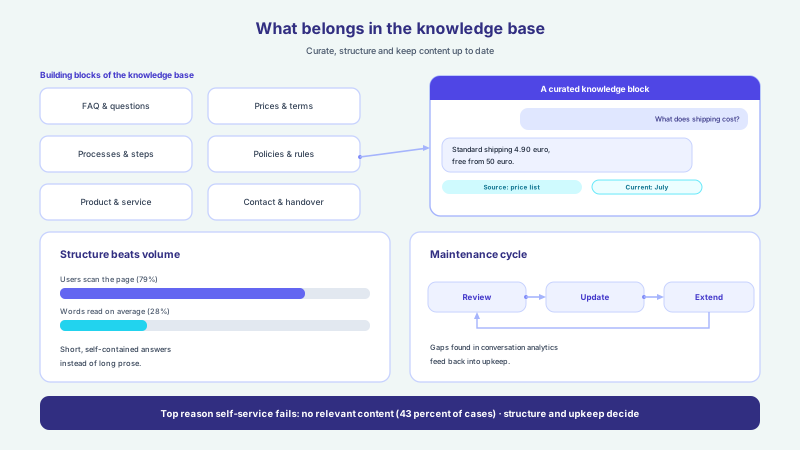
Before an assistant can act sensibly, it must know the current state. That is why reading is the basis of every control action. A well-connected assistant reads the content of your website and subpages, your shop catalogue with variants, prices and availability, your opening hours and locations, documents and data sheets, the internal knowledge base, the free times of your appointment types as well as, with a connected inventory system, the order and delivery status. It therefore does not answer off the cuff but on the basis of your real, up-to-date data. If someone asks whether an item is available in size M, the assistant checks the inventory system and states the actual stock instead of giving a general reply.
Reading has a pleasant side effect: it keeps the assistant up to date without anyone having to maintain texts constantly. If a price changes in the inventory system or a time is taken by a new appointment request, the assistant reflects that automatically because it queries the source live. So that answers stay bound to your own content and the assistant does not guess into the blue, it works against a maintained knowledge base. More than half of website visits today come from mobile devices (Statcounter), where nobody wants to click through subpages to a stock display. A short question in the chat and a precise answer from the system are clearly faster here.
-
Appointment types
Free times from time window, duration, lead time and buffer, minus appointments already requested or confirmed, so the assistant makes realistic suggestions instead of naming wishful times.
-
CRM
Customer and open activities for an email address, to place conversations in context.
-
Inventory system
Stock per article or variant including the restock date and prices with volume tiers, queried at the time of the question instead of outdated figures on a subpage.
-
Ticketing system
Number, status and queue of the ticket just created, so the assistant can say where the request now sits.
-
Documents and FAQ
Data sheets, PDFs, price lists and help articles as a source for reliable, traceable answers.
-
Order and delivery status
Where is my order, when does it arrive: the assistant reads the current status directly from the connected inventory system.
What the Assistant Controls (Write With Approvals)
Reading alone saves time, but the real gain comes when the assistant acts. On the writing side it puts together a cart, changes quantities, applies vouchers and promotions, shows shipping costs and leads on to the shop address with a pickup token via “Continue”. It takes appointment requests and requests to reschedule, asks for a callback, prefills contact forms once the visitor confirms and hands a structured lead to the CRM (Custom package) or an inbox. It creates support tickets in the Custom package; through custom functions served by your system it can, in the same package, also sign up to a newsletter, start a configurator or a calculation, or provide a quote or a file. Each of these actions is a previously defined function with clear limits, not a free command to a system.
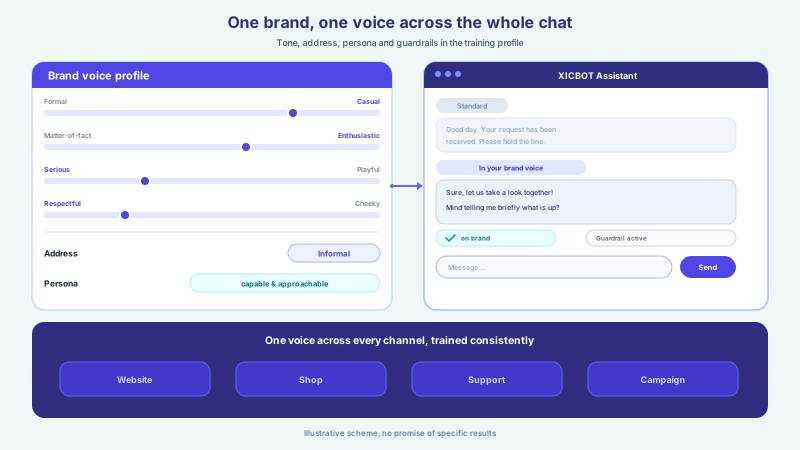
To keep this safe, a simple principle applies to writing actions: show first, then do. The assistant summarizes what it is about to perform and asks for confirmation. Only after the approval is the action actually triggered. This way the visitor sees exactly what happens and stays in control while the actual work is taken off their hands. At most reading actions may run without asking: looking up free slots, because it creates nothing, and reading tools such as the product search if their approval is set to automatic; you decide this per tool. Whatever XICBOT treats as a writing action, such as creating an enquiry, taking an appointment request or changing a cart, is confirmed by the visitor first, and that rule cannot be switched off. An own interface that you connect yourself in the Custom package is treated by XICBOT as reading: it is set to confirmation by default and belongs on automatic only if the address behind it changes nothing. Looking up a free slot is uncritical; an appointment request or a change to the cart is only triggered after the confirmation.
The approval principle
Reading actions usually run in the background, writing actions only after confirmation. Every function gets a clearly defined scope of effect, and sensitive steps such as a change to the cart, a cancellation or an appointment request are summarized to the user before execution. This keeps the assistant helpful and fast, without changing data in an uncontrolled way.
The Four Most Important Systems in Detail
In practice it is above all four systems that an assistant reads and controls: appointments, CRM, inventory and ticketing. They cover the most common recurring tasks, from scheduling and lead capture to stock information and support relief. Which connection makes sense in a given case depends on your tools; the connection itself is done in the Custom package, cleanly via integration and interfaces.
-
Appointments
Read: free times from the stored appointment types for the requested period. Write: once the visitor agrees, take an appointment request that the business confirms. A binding direct entry happens only through a set-up calendar integration (Custom package). This relieves the phone and reception, more at the booking assistant.
-
CRM
Read: customer and open activities for an email address. Write: create a contact with the request, record a callback request, hand over a form prefilled after confirmation. A conversation becomes a clean record, see the lead assistant. The CRM connection belongs to the Custom package.
-
Inventory system
Read: stock and availability per article or variant including the restock date, prices with volume tiers. Write: put together a cart, change quantity, apply a voucher, lead on to the shop address with a pickup token. The chat becomes a sales channel, see the cart assistant.
-
Ticketing system
Write: create a ticket with subject, description and priority; ticket number, status and queue come back. Escalate to a human where needed. Fewer routine questions in support, see the support assistant.
In the shop in particular this pays off: around 70 percent (Baymard Institute) of online carts are abandoned. An assistant that answers a question at the right moment, gives the shipping note and fills the cart directly in the chat addresses exactly the doubts that otherwise lead to a bounce. The interplay of reading and controlling turns a question about availability into an assembled cart; ordering and payment then happen in the shop, not in the chat.
Which Tasks Pay Off First
Not every task is equally worth automating. Two questions help with prioritization: how often does a concern recur, and how well can it be standardized? Frequent, clearly standardizable cases such as appointment requests, stock and delivery enquiries, recurring FAQ or lead capture bring immediate, noticeable relief and are well suited as a starting point. Rare or highly individual concerns, such as a tricky complaint or in-depth expert advice, are better left to a human; here the assistant only prepares and hands over with context. Prioritization often decides success more than the technology does: start in the wrong place and you build a lot while relieving little.
-
Automate first
High frequency, clearly standardizable: appointment requests, opening hours, stock, delivery status with a connected inventory system, standard FAQ, lead capture. Greatest relief at the lowest risk.
-
Add later
Medium frequency or more logic: cart in the chat, vouchers, configurator, rescheduling with reminder. Sensible once the core runs reliably.
-
Leave to a human
Rare, individual or sensitive: complaints, binding advice, exceptions. The assistant gathers the concern and hands over with full context.
Where to begin is revealed by everyday practice: wherever the same questions come up daily, the lever is greatest. Which topics those are is made visible by conversation analytics, which shows which questions dominate the chat and where knowledge gaps sit. This way the assistant grows along real demand instead of a wish list, and every expansion step pays into measurable relief rather than piling up functions almost no one uses.
Security, Permissions and Data Protection
An assistant that controls systems needs clear boundaries. That is why each connection gets only the permissions it truly needs. An assistant that suggests appointments must be able to read the appointment types and create appointment requests, but it needs no access to accounting or personnel data. This principle of least privilege limits the scope of effect from the outset. Writing actions are additionally secured by approvals, and every executed action is logged, so it can be traced what happened when.
Because personal data may be involved, data protection is part of the picture from the start. XICBOT hosts in Germany, with a data processing agreement, data sovereignty and a clear deletion concept; the answers are generated by a specialised model provider, also outside the EU on the basis of standard contractual clauses. European or self-hosted language models are possible as a separate project by arrangement; they are not included in standard operation. More on this under privacy and hosting. An assistant can err, so it does not replace expert advice but leads to a human with full conversation context on sensitive topics.
| Aspect | Reading (Read) | Controlling (Write, with approval) |
|---|---|---|
| Effect | Changes nothing, pure information | Creates or changes, after confirmation |
| Example | Free slots, stock, delivery status (ERP connected) | Take appointment request, create lead, open ticket |
| Approval | Usually runs in the background | Conscious confirmation before execution |
| Permissions | Only read access needed | Tightly limited write access |
| Log | Every call recorded | Every action traceably logged |
Concrete Cases From Practice
The interplay of reading and controlling becomes most tangible in concrete workflows. The following cases show how a question in the chat becomes a completed task, without anyone from your team having to step in, as long as no approval for a sensitive step is needed.
- Rescheduling: A customer asks for a later appointment. The assistant names free times from the stored appointment type and, once the customer agrees, takes an appointment request for the new time that the business confirms.
- Lead from the conversation: A prospect describes their project. The assistant asks targeted follow-up questions, prefills the form once the prospect confirms and, after approval, creates a lead with contact details and the request in the CRM instead of an unstructured email.
- Stock information and purchase: Someone asks about an item in a specific variant. The assistant checks the stock in the inventory system, shows a product card, puts together the cart in the chat after confirmation and leads on to the shop address with a pickup token via “Continue”.
- Delivery status with a connected inventory system: A customer wants to know where their order is. The assistant reads the status from the inventory system and answers in seconds, around the clock.
- Support ticket with context: A request cannot be solved immediately. The assistant creates a ticket with subject, description and priority and, when needed, escalates to a human who takes over the conversation with its history.
- Callback and configurator: For an advice-intensive service the assistant captures the callback request, or it starts a calculation through a custom function of your system and explains the result.
Where the Limits Are and the Human Takes Over
As much as a connected assistant takes on, its limits matter just as much, and they are set deliberately. It does not replace expert advice: legal, tax, medical or otherwise binding questions belong with qualified people. Here the assistant is a signpost that takes in the concern and hands over with full conversation context, rather than giving information it cannot be responsible for. An AI assistant can err; that is why answers are bound to your own content, writing steps need an approval, and when information is missing the assistant says so openly instead of guessing.
- Binding advice: legal, tax or medical questions go to a human as a signpost, not as the assistant's own answer.
- Complaints and escalation: with frustration or sensitive topics, a direct handover beats a forced automated reply.
- Exceptions without a defined action: whatever no stored function covers is not improvised but passed on.
- Technical gaps: if a system is briefly unavailable, the assistant says so honestly and offers the route back via a human.
Good design means drawing these lines in advance: which topics always lead to a human, which actions always need a confirmation and what happens when a system does not respond. This keeps the assistant a relief and not a risk. It takes the recurring load so your team has time for the cases that demand real judgment, more on this at the support assistant, which solves routine and escalates cleanly.
How a Function Call Works Step by Step
Behind the simple user experience is a clear flow. First the visitor phrases their concern in their own words. The assistant understands the intent and picks the right one from the defined functions, for example read free slots. If details are still missing, it asks briefly, for instance about the preferred day. Then it reads the data from the connected system and suggests concrete options. If the visitor wants an appointment, the assistant summarizes the writing action and asks for approval. Only then does it create the appointment request and log the step, and only the business can confirm the appointment. The whole process takes seconds and feels to the visitor like a normal conversation.
The economic appeal is obvious: the assistant handles recurring enquiries and tasks around the clock, in seconds and in the visitor's language, while your team focuses on the cases that really need a human. By 2027 chatbots will become the primary customer service channel for around a quarter (Gartner) of organizations, and across industries around 81 percent (Harvard Business Review) of customers try to solve their issue themselves before reaching out to a live representative. An assistant that not only knows your tools but operates them meets exactly this expectation. At XICBOT it is built individually tailored to your business, from tool control in the Custom package through custom functions to clean integration.
- Identify the systems the assistant should read and control: appointments, CRM, inventory, ticketing
- Define a clearly scoped function with a narrow effect for each action
- Separate Read from Write: reading in the background, writing only after approval
- Grant the least possible permissions per connection and log every action
- Consider data protection from the start: hosting in Germany, data processing agreement, deletion concept
- Start with a few actions and expand cleanly step by step
Frequent questions
What does function calling mean for an AI assistant?
Function calling is the technique with which an AI assistant does not only reply but triggers real actions. You give it a list of previously defined functions, each with a clear name and the necessary details, such as read free slots or create lead. When a visitor phrases their concern in their own words, the assistant picks the fitting function, takes the details from the conversation and executes it. It can only use the actions you have explicitly given it, nothing beyond that.
What is the difference between Read and Write?
Read means the assistant reads out information without changing anything, for example free slots, the stock level or, with an inventory system connected in the Custom package, the delivery status. Write means it creates or changes something, such as taking an appointment request, saving a lead or, in the Custom package, opening a ticket. Reading actions usually run in the background, writing actions are summarized to the user and only executed after a conscious approval. This keeps the assistant helpful without changing data in an uncontrolled way.
Which systems can the assistant connect to?
In practice above all appointments, CRM, inventory and ticketing (connected in the Custom package), plus website content, shop catalogue, documents, price lists and, with a connected inventory system, the order and delivery status. Which connection makes sense depends on your tools and your industry. XICBOT tailors the functions individually to your business and connects the systems cleanly via defined interfaces, instead of shipping an assistant with generic default actions.
How is the assistant prevented from acting in an uncontrolled way?
Through three layers. First, the assistant can only use previously defined functions with a narrow scope. Second, writing actions are summarized and only executed after an explicit approval; you decide whether reading steps need a confirmation as well. Third, each connection gets only the least possible permissions, and every executed action is logged. This keeps it traceable at all times what happened when.
Is connecting to my tools compliant with data protection?
Data protection is part of it from the start. XICBOT hosts in Germany, with a data processing agreement, data sovereignty and a clear deletion concept; the answers are generated by a specialised model provider, also outside the EU on the basis of standard contractual clauses. No data is passed on or sold; European or self-hosted language models are possible as a separate project by arrangement and are not included in standard operation. On sensitive topics the assistant leads to a human instead of giving its own answer.
How much effort is the setup?
A step-by-step start makes sense: first a few clearly defined actions such as appointments and lead capture, properly secured and tested, then further systems. This keeps every expansion step manageable. Every project starts with a free initial consultation and, on request, a free demo with a test assistant for your website, so you can see the value before you commit.
Ask it yourself, Assistant of this website
Automated assistant