42 of 48
answers carrying a source reference
questions whose answer is in the knowledge base; six carried no source reference
XICBOT sets up an AI chat assistant that answers from your own material: services, service area, process.
This page is for trade businesses. The assistant answers from your own documents. It takes requests for a quote or a job. Customers can add photos to the request. It suggests a date for a visit on site. In an emergency it gives the number of your on-call service. It does not promise any cost.
Request a demo for your business Packages and prices
It takes quote and job requests including photos, proposes an on-site appointment and passes urgent cases to your on-call service. What the deposited material does not contain, it usually does not answer: it says so and hands over to you.
Assistant:Hello! I know our services, the service area and the on-call service. How can I help?
Visitor:I would like a quote for a bathroom renovation.
Assistant:Gladly. To get the estimate right: where is the bathroom located and roughly how large is it? Photos help a lot — you can attach them here directly.
Visitor:Söhlde, about 8 m². Images attached.
Assistant:Thank you! Söhlde is within our service area. For an accurate quote I suggest a free on-site appointment:
Visitor:And if it is urgent — a burst pipe?
Assistant:For an emergency such as a burst pipe I give you the on-call service's number or take a callback request.
Ask it yourself, Assistant of this website
Automated assistantSetup is the work that happens once: depositing material, settling the role and its limits, adding the line to the website, going through the trial dialogue. Operation is what runs monthly afterwards — conversations, refreshing the sources, reviewing the gaps.
Which tier suits your business depends less on the number of trades than on two questions: how many conversations accumulate, and whether the assistant should only read or also write. Writing tools — taking an appointment request, opening a case — run only after the visitor confirms and therefore need a setup that goes beyond depositing material.
from 149 € per month net
Minimum term: none, cancellable monthly
All prices net, plus VAT Source: XICBOT price list, as of 11 September 2026
In the trades, whoever is reachable first often wins. Someone who calls while you are on the roof, in the workshop or under the sink ends up on voicemail or dials the next number. This is exactly the gap a website assistant from XICBOT closes: it stands ready on your website even when nobody in the business answers the phone, answers questions about services and service area from your own content and hands the enquiry to your inbox as a lead. It replaces neither a master craftsperson nor an assessment on site.
For trade businesses the Pro package with booking and lead functions is usually the right fit. If you want a lean start, begin with Start (setup from 990 € net, operation from 49 € per month net): a website assistant with question answering and lead capture. In the initial consultation we first clarify which trades you offer, how far your service area reaches and who covers the on-call service; without those three details no assistant can sensibly be set up for a trade business. Ongoing services are booked individually and can be cancelled monthly; there is no minimum term.
A trade business lives on jobs, not on admin. Yet time is lost to the same recurring questions, to scheduling and to chasing enquiries by phone. The assistant takes over these repetitive steps on your website and passes the result on to you in a structured form. It is instructed to answer solely from your own content.
The assistant asks before it hands over: what needs doing, in which town, by when. From those details a case with name, email, phone and concern appears in your inbox, with the files uploaded earlier attached to it. If you have designated an enquiry form on your page, it is pre-filled with these details once the visitor confirms, only in the fields you have mapped; it is submitted only if you allow that and the visitor agrees.
proposed and creates nothinglead.created, which goes to an event receiver in the Custom packageThe emergency answer is a mandatory field of the assistant and must not be left empty; it stands ready even when the month's quota is used up. For everything else your rule applies: a burst pipe, a heating failure in winter, a power cut go to your on-call service, by call or as a callback request carrying the issue already captured.
The assistant calculates free times from your appointment types and the appointments already requested or confirmed, without changing anything. A request is created only when three conditions hold at once: the appointment type is deposited for your business, the lead time fits and the slot falls into a released window. Availability is checked under a lock so that two visitors cannot take the same on-site appointment. The appointment becomes binding with your confirmation; the customer then receives a confirmation email, if an email address was given.
Do you come to my town? Do you do flat roofs as well? Roughly what does a service cost? The assistant looks for the answer in your sections, numbers the excerpts it used and points to the source. If the answer is nowhere, it says that there is nothing on this in the deposited knowledge base. Without a deposited basis it names no price, no deadline and no commitment.
Photos of the damage, a floor plan, an old quote: the assistant asks for them specifically and attaches the uploaded files to the case instead of leaving them in a second channel. That way you can judge the effort before you call back.
The assistant does not replace a tradesperson. When things get specific, personal or urgent, the assistant is meant to hand over; the handover sets the conversation to escalated, creates the case and notifies a person. You are notified by email at your handover address; a ticket in your ticketing system comes from a connection in the Custom package. A second handover in the same conversation with the same details is recognised and produces no second email. By which route you are notified is not disclosed to the visitor.
escalatedduplicate_prevented instead of a second caseautomatic, visitor_confirmed or, in test conversations and via the API, operator_confirmedInstead of a brief form line you get a complete case: service, location, time frame, photos and contact details. The assistant files it in your inbox, proposes an on-site appointment via the booking assistant where needed and passes urgent cases to your on-call service.
Anything that does not merely read but writes runs as a proposal: the visitor first sees a card with the details in plain text, and only a click triggers it. The proposal text is stored when it is created and not regenerated later, so the transcript holds what the visitor actually saw. The number of tool calls per answer is capped; anything beyond is recorded as capped instead of being run silently.
Trade businesses face a double pressure: the order books are full, and yet every missed enquiry is a possible customer who calls the next business instead. When an enquiry arrives in the evening, at the weekend or while you are on site, nobody in the office picks up. The assistant takes it instead, asks for location, scope and time frame and files the case in your inbox. It is instructed to draw its answers solely from your knowledge base; if it finds nothing there, it usually says so rather than guessing.
The assistant knows only your business. It answers from your services, prices, opening hours and service areas, and from nothing else. After writing, hard details such as prices and deadlines are checked against the excerpts; whatever is not covered there is replaced, and the visitor sees the correction as a notice of its own. An answer without a single used excerpt is recorded as a gap.
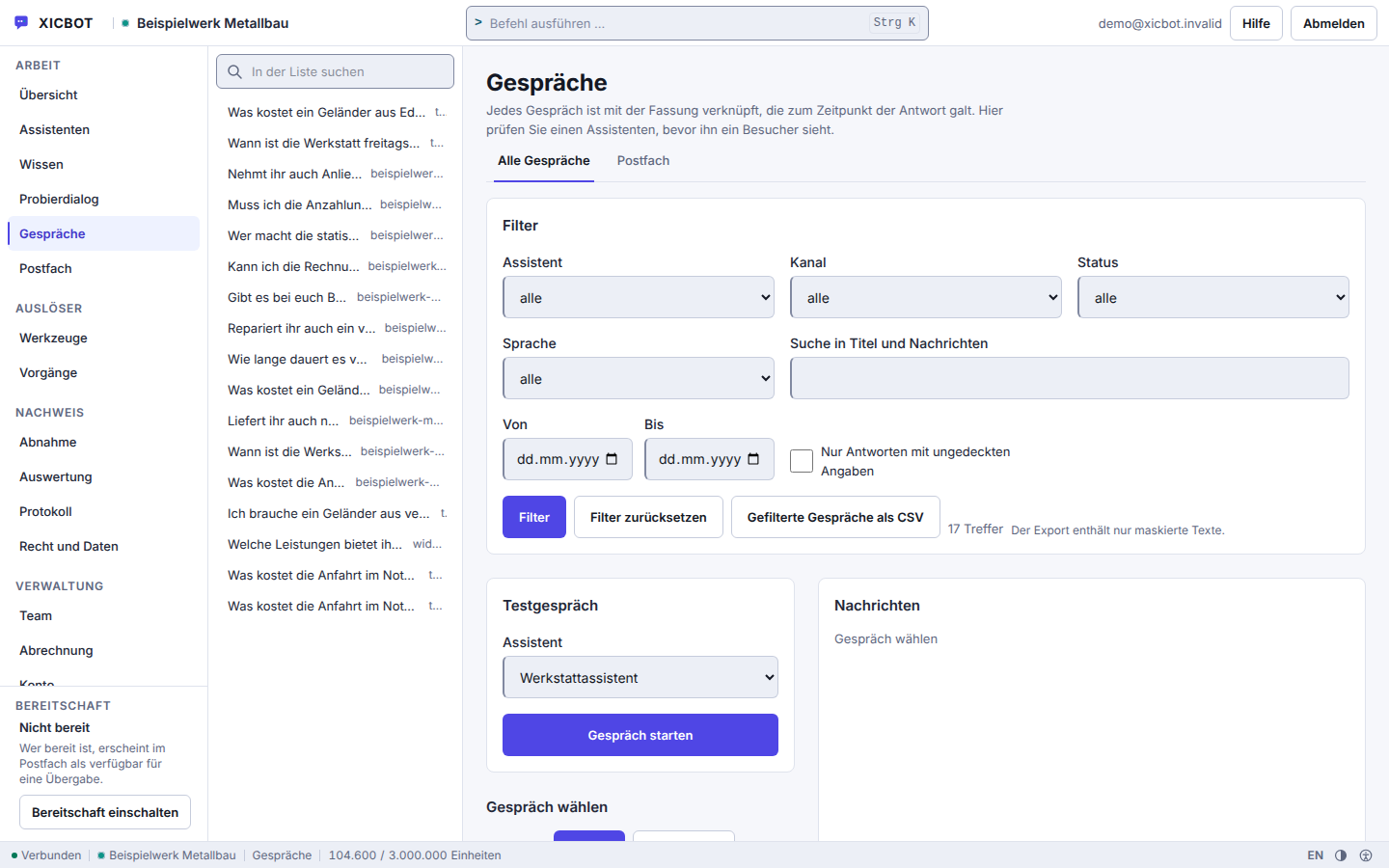
The list shows the question verbatim before a conversation is opened, so you can see whether someone asked for a trade you do not offer at all.
A tick in the filter narrows the list to answers without cover, that is, to the places where your material has a gap.
The test conversation checks a wording, the on-call rule for instance, without waiting for the next caller.
The obvious question from a trade business is: how is a program supposed to know what we offer and how far we travel? The answer is unspectacular and checkable. You deposit material, it is split into sections, and sourced answers lead back to the sections they came from.
You deposit free text, upload files, give the address of your website or maintain questions and answers. Each source becomes documents, each document becomes sections. The assistant does not answer from a source but from individual sections, and every section carries its origin with it.
The crawler identifies itself as XICBOT-Wissensbegeher and reads a limited number of pages per run. It obeys your robots.txt, and your own exclusion patterns take precedence over it: what you exclude is not read even where robots.txt would allow it. Price lists and service catalogues in PDF form you upload directly instead of publishing them on the site first.
The search is deliberately not a neural method. A word index of our own and a feature vector run separately and are merged by their rankings. That is precisely why an answer remains traceable to a section: there is no intermediate layer that blurs the reference.
For each answer the assistant draws on a small, fixed number of excerpts and numbers them. An answer without a single used excerpt is recorded as a gap. Hard statements are then checked once more against the material: whatever is not covered there is replaced by a placeholder, and the visitor receives the correction as a notice of its own.
XICBOT detects the language of a visitor message in its own code, from function words and characteristic characters, without a foreign service and without a model call. If the result is not unambiguous the field stays empty instead of guessing German: a guessed German would sit in the database like a measured one. The knowledge base itself is not filtered by language, so your German service description also answers an English question.
If the search finds nothing, the assistant says so and the question is recorded as a gap. It distinguishes whether it declined to answer or answered without a used excerpt. That list is the working basis for deciding which material is missing next.
If your offering changes, the source changes, not the model. A new run writes a new version of the sections and switches over only at the end; until then the previous state keeps answering. More on this is on the knowledge base page.
42 of 48
answers carrying a source reference
questions whose answer is in the knowledge base; six carried no source reference
2,670
sections from 70 documents in our own knowledge base
the corpus of the assistant answering on this site
Visitor:Do you also do lightning protection systems?
Assistant:There is nothing on this in the deposited knowledge base. I will not state anything I cannot back up. Shall I pass the question on to the business?
Visitor:Yes, please. And how far do you travel?
Assistant:The service area is in the material: excerpt 2 names the radius around Söhlde. I am passing your lightning protection question on; the business will come back to you on it.
Visitor:Water is running out of our ceiling right now.
Assistant:That is an emergency. Here is the business's on-call number, please call directly. We can sort out everything else afterwards.
8 of 8
questions without a basis declined instead of guessed
eight questions deliberately outside the material; the wording of every answer is in the measurement file
Visitor:Can we fix the measuring appointment right away?
Assistant:I am proposing an appointment to you. It is only entered once you click Confirm — until then it stands there as a proposal and nothing more.
Visitor:Eight o'clock is too early, I am declining.
Assistant:Declined. No request has reached the business as a result, not even a pencilled-in slot. Shall I record a call-back request instead?
Visitor:Yes, in the morning, on the number from my enquiry.
Assistant:I have prepared the call-back request: morning, reason measuring appointment. Please read the details and confirm; only your click creates it.
On record, not merely asserted
Every action the assistant takes appears as a line of its own in the conversation history, sorted by time between the messages rather than tacked on at the end. The line carries the preview, the state, the input, the result, the duration and the route by which execution was approved: automatically, or confirmed by the visitor. Where there has been a handover to the business, the reason is stated in plain words, not as a keyword.
The visitor sees a shortened version of this. Duration and approval path are dropped for the chat window, and an internal error message is replaced there by a general sentence: what went wrong inside is in your inbox, not on the enquirer's screen. If someone from your business takes over the conversation, the assistant's reply stream ends without text — it falls silent rather than talking on alongside the person.
Two things belong here because they are what makes the record worth keeping. What the visitor read before confirming is stored when the proposal is created and is not regenerated later: afterwards you read the same wording, not a present-day reconstruction of it. And how long conversations, cases and attachments are kept is set by you — that period belongs in the setup, not in a later clean-up round.
43 of 48
questions without a handover to a person
measured on a single assistant on our own knowledge base, not on customer projects; a figure from live operation is not yet available
You do not need to program anything or learn new software. The order is fixed: first the material, then the limits, then the integration, and you are the one who switches it live at the end. What such an assistant costs is stated on the packages and prices page.
We clarify three things without which no assistant can be set up for a trade business: which trades you offer, how far your service area reaches and who covers the on-call service. Alongside that we look at which enquiries come in to you most often.
You give us the address of your website. The crawler reads it, obeys your robots.txt and your own exclusion patterns, which take precedence over it. Pages, files and frequent questions become sections that overlap each other so a sentence does not fall apart between two of them. Every run writes a new version and switches over only at the end: if a run breaks off, the previous state keeps answering.
We define when the assistant proposes an appointment, when it collects photos and when it hands over. The emergency answer is a mandatory field here and must not be left empty. Legal advice, medical information and binding financing offers are locked before any role setting takes effect.
A single script element carrying your identifier goes into the page. It is assembled on the server and not touched afterwards, and it calls nothing on the network by itself. The chat window runs in a frame of its own on its own origin, without access to your page, and is only built once your page has finished loading. Your content security policy needs two entries for it: the script and the frame of the chat window, both from the address in the embed code; it needs none for the interface, for styles or for the brand mark in the trigger.
After it has been created the assistant is a draft. The machine proposes, you accept: two switches put it live, and there is no unlocking by us. Promotional superlatives and commitments are stripped from a machine proposal before it reaches you.
We host the assistant in Germany, keep it up to date and maintain it. Conversation analytics shows you which questions actually come in and where an answer had no basis. Every gap is recorded as a gap and not booked as an answer. Early on Monday a summary of the past week goes to you by email; from it we extend the material step by step. Conversation analytics in the customer area is included from the Pro package upwards; the email comes in every package.
Between the first conversation and live operation there is no building site inside your business: you supply material and decisions, we do the rest. Removal is simple, because all that sits in your website is that one script element.
24.1 KB
loader on your page, compressed
only the file that runs on the host page, measured with the compression the web server actually sends; the chat window lives in its own frame and loads only once your page has finished loading
From the roofer to the plumbing and heating business to the electrician and the painter, the requirements are alike: being reachable quickly, complete enquiries, arranged appointments. The lines below are examples, not customer reports. Which questions really come up most often with you is shown by conversation analytics after a few weeks.
What the initial consultation clarifies. We look at your website and go through your most frequent enquiries: which of them could the assistant answer from existing content, and which not? What is not deposited it cannot answer; we name that gap beforehand, not afterwards. On request we show a demo with a test assistant alongside. To the initial consultation.
Further reading: AI assistant for the trades describes how a business stays reachable even while on site, and qualifying leads via chat shows which details make an enquiry ready for a quote.
Three points that provider pages rarely mention belong here, because they bear on the decision. Without JavaScript no chat window appears, and there is no substitute display for it. If the service behind the window fails, the window stays empty: your website keeps running, the assistant does not. And exactly one assistant runs per page, not several side by side.
An availability commitment is not part of what is supplied. There is no assured response time and no fixed period during which work is carried out. This blank is declared as a decision rather than overlooked; what applies to your package is stated in your contract.
Conversation analytics sits behind the package boundary: it is not included in the Start package and is included from Pro upwards. Its figures are counted, not estimated, and where the basis is missing the card shows the reason instead of a zero. There is no alert for a value running outside a band.
The questions are in the order in which they come up in first conversations with trade businesses: the on-call service first, then the material, then integration and price.
No, and it is not meant to. The pointer to the emergency services takes precedence over everything else in the assistant's rule set and cannot be switched off; it can name your own on-call service if you store its number. When it recognises an urgent case, it is meant to call the handoff tool type: it sets the conversation to escalated, creates a lead carrying the request already captured and notifies a person. A second click produces no second notification, because a one-time key made of conversation, tool and sorted input blocks it. Plannable matters are taken as an appointment or a callback note, which relieves your phone. The assessment on site and the person on call are not taken off your hands by that.
Yes. The assistant asks specifically for photos of the damaged spot and for documents such as a floor plan or an old quote. PNG, JPEG, WebP and PDF up to 5 MiB are accepted, at most five attachments per conversation; the type is determined from the content of the file and not from its extension, so a renamed file does not get through. When the assistant then hands the enquiry over, the lead tool type attaches the previously uploaded files to the record, together with name, email, phone and request. What lands in your inbox is a structured lead with a picture instead of a brief line from the form.
We train it on your own website content, services, opening hours and service areas. It is instructed to answer solely on this basis and not to guess. What it does not know for sure, it is meant to hand over to a human. This keeps the answers tied to your business and reliable. The knowledge base can be extended at any time: a new service page, an updated price list or a PDF is added without anyone having to touch the embed on your website. How often a source is re-read is set per source — from daily to not at all, if a text is meant to stay exactly as it is.
The room for that is drawn tight. For every question at most five search hits from your knowledge base, plus your text blocks, go to the model, numbered, and sourced answers name the excerpts they rely on. Figures, prices and deadlines that are not in your sources are replaced with a notice. If the search finds nothing or the model declines, the assistant says that nothing on this is held in the knowledge base — and the case is logged as a knowledge gap, as is an answer without a used excerpt. Its rules forbid it to invent contact details, file numbers or appointments, or to pose as a human being. An error cannot be ruled out entirely with any language model; hence the binding to sources, the visible citation and the handover to a person.
It takes appointment requests; an appointment is arranged once you confirm it. The visitor requests the on-site appointment for measuring and advice through the appointment tool type, and because that is a write operation, nothing runs through unconfirmed: the proposal states kind, day and time in plain text in the chat, only the visitor's click creates the request, and it becomes an appointment once you confirm it in your view; if the visitor gave an email address, they then receive a confirmation email. On request the assistant names free times from your stored kinds of appointment — time windows, duration, lead time and buffer — minus the appointments already requested or confirmed in XICBOT; it does not compare them with an external calendar, and a time it names remains a suggestion. A binding entry straight into your calendar only happens with a calendar connection set up in the Custom package. Which kinds of appointment are on offer at all comes from your own list; a request is only possible if the lead time fits and the moment falls into an approved window. Occupancy is checked under a lock, and a double click creates no second appointment. An hourly run sends the reminder for the confirmed appointment by email, if an address is on file. More at the booking assistant.
With a single script tag carrying the public key of your assistant. An SRI checksum of the delivered file is issued alongside it, so your browser can verify that it received exactly that file; if the file cannot be read, the reason is shown instead of the checksum. Which system your page was built with does not matter. If you have stored a path on your own domain, a second snippet is provided for it. The chat window sits in a frame of its own, picks up your colours and loads only after your page rather than placing itself in the critical path. No suitable website yet? Then the website assistant is a good starting point.
It deliberately stays out of the critical path. The loader is a single self-contained file of 55905 bytes that triggers no network call of its own; the trigger and the frame are only built after your page has fully loaded, plus one further tick. No stylesheet is pushed into your page: every property is set individually, which is why even a strict content security policy needs no additional permissions for styles, connections or images. The chat itself runs in its own origin, not inside your document. The versioned parts carry a name derived from their content together with an integrity check and stay in the cache immutable for one year.
We work nationwide via video call, phone and email. We are based in Söhlde between Hildesheim and Hanover, and we also look after businesses in the region with on-site meetings. Distance plays no role for the setup: you create the account and the assistant yourself in the admin area, knowledge is added as a website, a file, free text or a maintained question-and-answer pair, and the integration is a single script line in the head or theme of your page. There is no step where we would first have to unlock something. The initial consultation and the demo with a test assistant are free of charge; what comes after that is listed under pricing.
For trade businesses the Pro package with appointment and lead functions usually fits: operation from 149 € per month net, setup from 2,900 € net. An appointment request in the chat stays a request until your business confirms it; only then does it count as an appointment. If you want a lean start, begin with the Start package from 49 € per month net and from 990 € net setup; it covers questions about services, lead capture and the handover to a human. All figures are net plus VAT. Details are on the pricing page. All services can be cancelled monthly; there is no minimum term.
If your question is not among them, the shortest route is a phone call. All answers together are at frequently asked questions.
Check first, then decide
In the initial consultation we check against your own content which enquiries an assistant could take on for your business and which it could not. If too little remains, we say so.
Tell us your trade, your service area and the three questions that come up most often with you. From that we can see what an assistant could answer from your existing content and where a gap remains. You can reach us by phone at +49 5123 9579000.