43 of 48
questions without a handover to a person
measured on a single assistant on our own knowledge base, not on customer projects; a figure from live operation is not yet available
Would you like an AI chat assistant that truly knows your business — one that reads your website and shop, shows products, takes appointment requests and qualifies enquiries?
On this page you can ask us for an assistant. Write to us using the form or give us a call. On request we build a free demo for your website. A fixed contact person reads your request in person. They get back to you with a first view. This costs nothing and does not bind you.
Describe your project Call directly: +49 5123 9579000
Describe your project via the form or by phone. On request we set up a free demo with a test assistant for your own website. A dedicated contact reads your enquiry personally and gets back to you with a first assessment — free of charge and with no obligation.
Visitor:I would rather speak to someone.
Assistant:Understood, I will hand over. So the callback fits: what is it about, briefly, and when can we best reach you?
Visitor:About an assistant for our shop, reachable in the morning.
Assistant:Noted. The conversation is attached to the request — you do not have to tell it again.
Ask it yourself, Assistant of this website
Automated assistant43 of 48
questions without a handover to a person
measured on a single assistant on our own knowledge base, not on customer projects; a figure from live operation is not yet available
Briefly describe your project and include — if available — your website or shop URL. That lets us assess in advance which content and actions your assistant should handle. Only your topic, name and email address are required; everything else is optional and helps us reply concretely straight away. A dedicated contact reads your enquiry personally and gets back to you with a first assessment and a proposed date for the initial consultation and the free demo. All information is treated confidentially.
You decide how to get in touch, and the three routes are not interchangeable. The form on this page carries a project with several requirements, the phone a single question, email everything that is already written down on your side. Which functions an assistant can take on at all is shown in advance under services; the three packages and their prices are on the pricing page.
The thorough route: you describe your project at your own pace and without interruptions, and the details are already on the table for the initial consultation.
The short route for a single question, Monday to Friday from 9 am to 5 pm CET.
The route for everything already written down on your side. Whatever you attach, we read before the initial consultation.
Whichever route you take, your enquiry reaches a dedicated contact and not an anonymous ticketing system. You may also leave it at a single piece of information; whether a project comes of it is your decision later.
An enquiry to XICBOT commits you to nothing. You can describe a concrete project, but you can also simply ask questions — for example whether an assistant suits your industry or which tasks it could take on in your case. We work without sales pressure and without empty promises: an AI assistant can err, which is why we talk openly about what is realistic and what is not, instead of holding out miracle numbers. We use the information from the form solely to process your enquiry. It is treated confidentially, not passed on to third parties and not used for external advertising. How we handle data in general and where it is processed is covered under privacy & hosting. If you prefer, it stays at a single piece of information — you decide the next step. Many conversations begin with a simple question and only later lead to a concrete project — that path is expressly welcome with us.
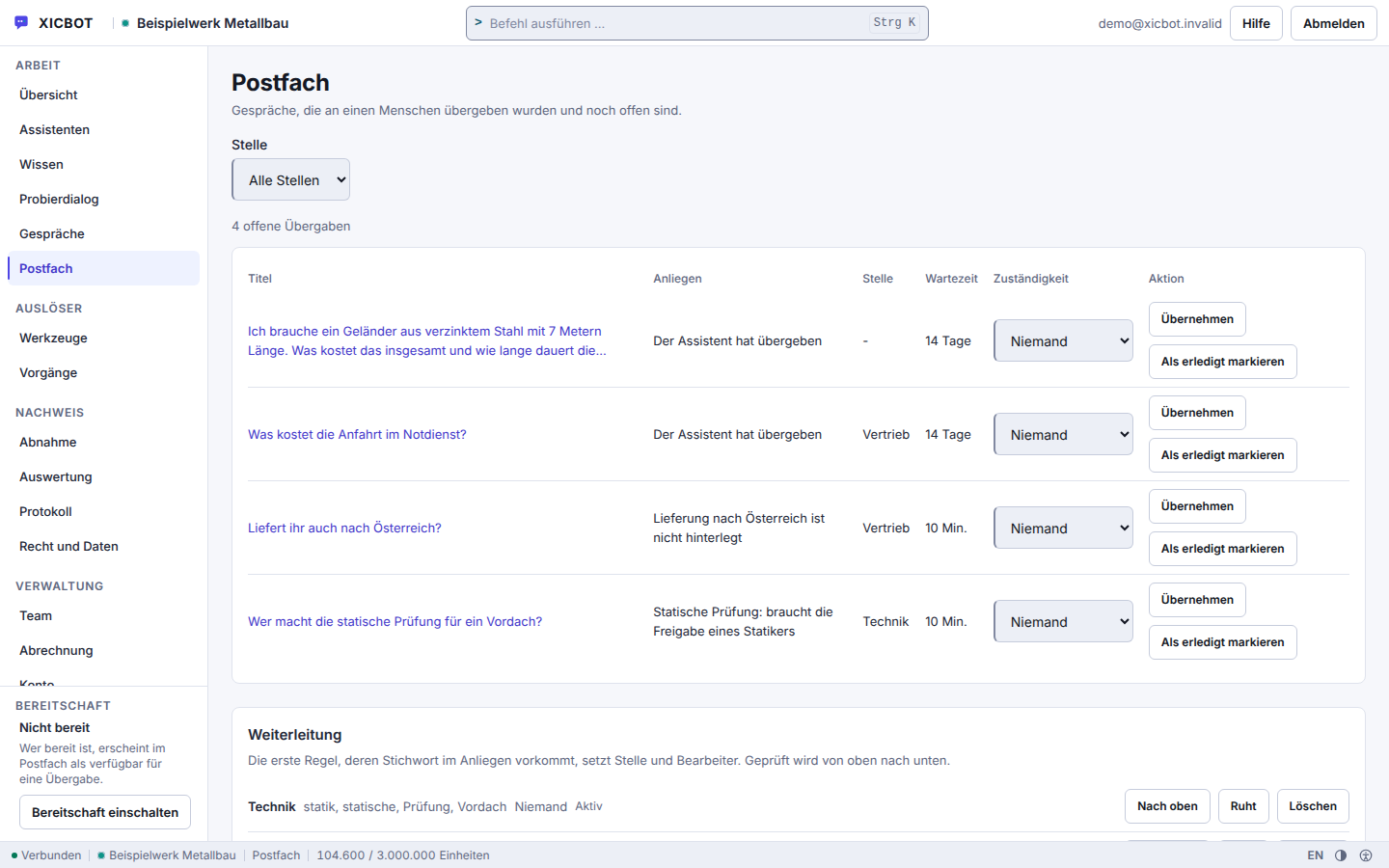
The view in which your own handovers will later appear — one row per request.
Waiting time and assignee sit right beside it, so nobody asks twice.
Which queue receives a topic is decided by your routing rules, not by the assistant.
Six stages lie between your message and an assistant that answers on your site. You do not have to commit to anything in advance: the enquiry, the initial consultation and the demo are free and without obligation. Only once scope and price are on the table do you decide about a commission. That way you keep control of budget, scope and schedule at every stage.
Because an assistant can be trained further with new content later, not everything has to be finished at launch — you start with what matters most and let the scope grow. What is needed from you in each stage is stated with it.
You submit the form, call us at +49 5123 9579000 or write to mail@xicbot.de. After sending, the page confirms receipt; a dedicated contact then reviews your project and gets back to you personally. It helps to give your website or shop address and one sentence on what the assistant should do — answer questions from your content, show products, take appointment requests or capture enquiries and hand them to your inbox. You do not need any finished documents for that.
Before we assess anything we read your pages the way the assistant will read them later. The knowledge crawler fetches the delivered page, follows only links in the text, runs no JavaScript and stays on your own address. Your robots.txt decides what it may touch; a page carrying a noindex note yields not a single excerpt, and no text comes out of images or scanned sheets. Whatever that turns up, we tell you before the offer — including when it argues against a project.
The initial consultation costs nothing. In it we clarify which work you want to hand over, which tools come into question for it — from the appointment request through the callback note to the handover to a human —, which desk a handover goes to at your end, and which topics the assistant must not touch at all. Some things are blocked regardless and cannot be opened on request: no legal advice, no medical information, no binding financing offer. At the end stands the package tier that fits the scope.
On request we set up a test assistant that reads your website and answers typical visitor questions. You put your own questions to it and see from the answer where it came from: every statement carries the excerpt it draws on, and where nothing is stored it declines instead of guessing. Its sentence for that is: there is nothing about this in the stored knowledge base. For online shops we additionally show product cards and cart functions. No costs arise, and whatever you do not release stays a draft: an assistant only answers once it is switched active and the widget is switched on. Which actions are possible beyond that is set out in the services overview.
If everything fits, you receive an offer with a clear scope. After your approval we train the assistant on your website, your documents and your knowledge base and embed it with a single script tag carrying your assistant's public key; the checksums sit on the two parts the chat window loads afterwards. After joint testing it goes live. We handle operation, care, updates and hosting in Germany on an ongoing basis, and your contact stays the same. You will find the amounts for setup and monthly operation of the three packages in advance on the pricing page.
From day one a list grows of the questions the assistant found nothing for — it is the template for what you store next. Your sources are re-read after an interval you set yourself per source; a failed run leaves the previous state answering instead of tearing a hole. What was asked, where a handover happened and which products are being searched for is shown in the conversation analytics.
Not every project holds up, and we say so before the offer rather than after it. These cases turn a good idea into a weak result:
An enquiry brings two kinds of question. One kind depends on your intent; those we answer during the call. The other depends on what your pages and documents actually contain — about those we say nothing beforehand, because any figure would be a guess. The review itself costs nothing and commits you to nothing.
The right-hand column is not a delay but the reason the assessment holds afterwards: whoever names the effort without a review names a figure they do not know. If the finding is unfavourable we say so — and it can usually be remedied with manageable effort before an assistant is built at all.
Many prospects want to see how an assistant deals with their own content before making a decision. That is exactly what the free demo is for. We train a test assistant on publicly available content from your website and let it answer typical questions from your visitors. You experience how the assistant answers from your own pages instead of delivering generic phrases, and how it hands over to a human when needed. For online shops we additionally show how product cards and cart functions work in the shop assistant. The demo is without obligation and serves only your orientation. How the training works and where the assistant draws its knowledge from is covered under knowledge base & training.
An assistant from XICBOT is not a rigid menu tree but learns your business. When reading, it captures your website content, opening hours, documents and — for an online shop with Shopware Community Edition — the product catalogue with prices and availability. When acting, it carries out real actions: it shows product cards and puts together a cart, factors in coupon codes you have set up, takes appointment requests, captures structured leads, and, in the Custom package, also creates support tickets and, where needed, controls connected tools via defined functions. If it gets stuck or a matter becomes sensitive, it is meant to hand over to a human with the full conversation context. That way it works around the clock, answers in seconds and records what a visitor asks for or puts in the cart. Which function makes sense for your project we clarify in the initial consultation — you will find the full overview under services. For industries with special requirements — such as medical practices or law firms — the assistant is deliberately meant to stay a guide and to hand sensitive topics to a human instead of replacing professional advice.
The difference lies in individuality. Instead of a generic modular script, you get an assistant instructed to answer exclusively from your own content and sources, which lets it give solid answers that fit your company. Because an AI assistant can err, we rely on three safeguards: binding to your own content, handover to a human and ongoing evaluation of the conversations. Through conversation analytics, from the Pro package, you see which questions are asked often, where knowledge gaps exist and which products are in demand — data-based rather than from gut feeling. Hosting remains in Germany, with a data processing agreement and a clear deletion concept. That way the assistant relieves your team and your phone without you giving up control over content and data. Companies with a high volume of enquiries in particular benefit from recurring questions being answered automatically, so your team can concentrate on the cases that truly need a human.
Elaborate preparation is not necessary — the clearer your idea, the more concrete our assessment. It helps most to have your website or shop URL ready and to consider which questions your customers ask most often today and which tasks you would like to hand to an assistant: information from your content, product advice in the shop, appointment requests, lead capture or relief for your support. If you have documents, price lists or an FAQ collection the assistant should later draw from, feel free to note that — all of it can be integrated at a later point. For an overview of all functions, see services. We work out everything else together during the conversation. Part of an enquiry is also telling us which languages your customers speak and whether the assistant should connect to existing systems such as a calendar or your inbox — that helps us estimate the effort realistically.
If you would like to read up before the call: from idea to a live AI chat assistant describes the project flow, and what an AI assistant costs and returns shows which figures we go through together in the initial call.
Almost everyone asks these questions before filling in the form. They are answered here so you do not have to wait for the answers.
Yes. The initial consultation and the demo with a test assistant cost nothing, and no payment method is requested for them. We set up the demo at your request; just give the address of your website in the form. The demo assistant is built from your own website: up to eight pages are read for it, so that it answers from your content and not from someone else's example. It runs for three days, is then switched off and fully removed after a week; a demo account cannot be logged into. Costs arise only when you place an order, and then net plus VAT, cancellable monthly, with no minimum term. Which functions are available is listed under features.
That depends on the scope. There are three packages: Start, Pro and Custom. The price consists in each case of a one-time setup for training and integration and a monthly operation fee for hosting, care and updates. Start begins at 990 € net setup and 49 € per month net, Pro at 2,900 € net and 149 € per month net, Custom at 4,900 € net setup with operation by scope. The packages differ in seats, assistants, knowledge sources, documents and the monthly token allowance; all figures are listed under pricing. We name a binding price after the free initial consultation, and a move to a larger package is possible later. All services can be cancelled monthly; there is no minimum term.
Enquiries via the form or by email are read by a dedicated contact, who gets back to you personally with a first assessment. For urgent matters, call us directly at +49 5123 9579000 — we are available in person Monday to Friday from 9 am to 5 pm CET. You do not speak to a call queue but to a dedicated contact who knows your project and can give you a solid first orientation. Outside these hours, the form accepts your enquiry. In the chat itself the path is shorter: when the assistant hands over to a human, an enquiry appears in the mailbox and the transcript goes along, so that nobody has to start over.
Yes. One dedicated contact looks after you throughout the entire project, from the first enquiry through the initial consultation and demo to setup and ongoing operation; afterwards it stays the same person when you extend the assistant, add new sources or adapt it to further tasks. Your account stays yours throughout: a look into your view from support runs through a separate session that expires after four hours and leaves a log entry — without your password and without bypassing your second factor. Inside your account you assign the roles Read, Edit and Administration yourself; the fourth role, Owner, is not granted by invitation. Invitations can be sent by anyone with the Administration or Owner role, and nobody can invite anyone into a role higher than their own.
You do not need finished documents. What helps is the address of your website or shop and a rough idea of what the assistant should do: answer from your content, show products, take appointments, qualify enquiries or relieve your support. The knowledge base takes four kinds of source — free text, an uploaded file, a website and a maintained question-and-answer collection. A website run reads at most 25 pages per pass, respects robots.txt and follows only ordinary links; if you want wider coverage, name the most important addresses straight away. Price lists, documents and an existing question collection are therefore the most useful things to bring. For an overview of the functions, see services.
Hosting is in Germany; the answers are generated by a specialised model provider, also outside the EU on the basis of standard contractual clauses. We sign a data processing agreement, you retain data sovereignty, and there is a clear deletion concept. Your data is not passed on or sold. European or self-hosted language models are possible as a separate project by arrangement; they are not included in standard operation. For your customers' data this means in concrete terms: a visitor's address is never stored in clear text, a visitor can delete their own conversation without an account and can withdraw consent, upon which a running answer is aborted. Eight kinds of object carry a declared retention period, seven of which you set yourself. How this is arranged in detail is covered under privacy & hosting.
If your question is not among them, ask it in the form or by phone — information is free, even if no project ever comes of it. All further answers are collected under questions and answers.
Direct Line
For a quick phone conversation, reach us at +49 5123 9579000, Monday through Friday from 9 am to 5 pm CET. Or write to us directly at mail@xicbot.de — we reply personally and set up a free demo for your website on request. Call directly: +49 5123 9579000
That is all a first enquiry needs: your topic in one click, plus your name and email address. A sentence about your project helps; we discuss the rest in the initial consultation.