43 of 48
questions without a handover to a person
measured on a single assistant on our own knowledge base, not on customer projects; a figure from live operation is not yet available
The XICBOT support assistant answers customer questions from your FAQ and knowledge base and so relieves your team.
This page shows the assistant for your customer service. It answers from your FAQ and your knowledge base. That takes work off your team. In the Custom package it looks up the state of an order in your stock system. For this it needs a link to that system and the customer must agree. If needed it suggests a ticket, also in the Custom package. It is meant to hand hard cases to your team with the whole chat.
Request a demo for your support View pricing
It queries order and delivery status in the connected inventory system, by default after confirmation, and proposes a ticket where one is needed, both through a connection in the Custom package, and is meant to hand complex or sensitive cases to a person with the full conversation context. If it finds nothing stored, it says exactly that instead of guessing.
Assistant:Hello. I help around the clock, with orders, invoices and common questions. How can I support you?
Visitor:Where is my order number 48213?
Assistant:For that I will query the order status in the connected inventory system. It concerns a personal matter, so I ask first:
Visitor:Yes, please query it.
Assistant:Thank you, the call has gone out:
Visitor:Thanks. I would like to cancel one item.
Assistant:A cancellation after dispatch is best settled by a colleague directly. I am handing the conversation over with the full history:
Ask it yourself, Assistant of this website
Automated assistantSupport teams spend a large share of their time on the same questions: Where is my order? How do I cancel? Which documents do I need? These recurring standard questions tie up capacity that is missing for complex matters, and outside office hours enquiries go unanswered altogether. The support assistant takes exactly this load off: it answers questions around the clock from your knowledge base, queries order and delivery status from a connected inventory system on request and, by default, after confirmation, and proposes a ticket where one is needed, both through a connection in the Custom package, and is meant to hand complex or sensitive cases to a person with the full conversation context.
The assistant knows your answers and your systems. Instead of rigid menu trees it understands freely worded questions while staying bound to your own content. Six tasks are listed below, each with its condition and its limit; for anything beyond them, it brings in a person.
The assistant answers at night, at weekends and on public holidays from the same sources as during the day. Anyone with a question gets the answer in the chat instead of waiting until the next working day.
It answers questions from FAQs, help articles, price lists and documents, and names the section the answer comes from. Read how the indexing works under knowledge base.
«Where is my order?» leads to a query in the connected system (Custom package). It is read-only and by default still requires a confirmation, because it concerns a personal matter.
The assistant settles recurring standard questions in chat. If a matter stays open, it proposes a ticket that the visitor confirms themselves; it is created through a connection to your ticketing system in the Custom package.
It is meant to hand sensitive or complex cases such as complaints or cancellations to a person, with the full conversation context, so no one has to repeat their question.
The conversation analytics show which questions come up often and where answers are missing, so you can rework your help content deliberately.
Four topics sit above every rule you set and cannot be unlocked: legal advice, medical information, assessing allergies, and a binding finance offer. The assistant is also instructed never to claim to be a person and not to invent contact details, reference numbers or appointments.
43 of 48
questions without a handover to a person
measured on a single assistant on our own knowledge base, not on customer projects; a figure from live operation is not yet available
A support assistant is only as good as what it stands on. That is why XICBOT binds it to your own content: it answers from FAQs, help articles, documents and status sources, and every statement is meant to carry the number of the excerpt it came from. If the search finds nothing solid, it usually says that there is nothing on that in the stored knowledge base, rather than guessing.
Without a Source: An Entry in the Gap List
If an answer comes about without a single source reference, it is recorded as a gap, together with whether the assistant declined or the answer stayed without a source. If the model itself fails, the visitor reads the stored fallback reply instead: an outage is not a knowledge gap. Which case applied is recorded in your analysis.
You decide what the assistant reads and which actions it may take. A curated question-and-answer pair goes out word for word, without chunking and without a model call, wherever the wording itself is what matters, for instance on cancellation rights or returns. Writing actions such as creating a ticket are tied to a confirmation; the connection to your ticketing system runs through defined actions in the Custom package, more on that under tool control.
8 of 8
questions without a basis declined instead of guessed
eight questions deliberately outside the material; the wording of every answer is in the measurement file
Visitor:Will you take my old appliance away for disposal when you deliver?
Assistant:There is nothing on that in the stored knowledge base. I will not guess here.
Visitor:Could you not simply estimate whether that is customary?
Assistant:No. I do not estimate anything that is not in a stored excerpt. I am passing the question to a person together with the history so far:
Visitor:All right, thank you.
Assistant:The question is now in your gap list. As soon as disposal is stored, the assistant will answer it itself next time.
Recurring standard questions about shipping, returns, invoices or status are the share of the volume an assistant can catch at all. Every one of them that is settled in chat does not become a ticket. How large that share is in your case we do not know before the first measurement, and we will not calculate it for you either: the product knows no industry figure and no target value against which it could be evidenced, because there is no body of data to check one against.
What we can show is a measurement series of our own: on a single assistant working on our own knowledge base, 43 out of 48 questions stayed without a handover to a person. That is an indication, not an experience value from customer projects. The questions were ours, and so was the content.
In operation the figure then sits in your own analysis: self-resolved, handed to your team, unanswered, with a source reference. Every share card names its numerator and denominator as well, so it stays visible what the share rests on. If the data basis is missing, the reason is stated in plain words instead of a zero.
A support assistant does not appear at the push of a button, but it does come together in manageable steps. The order is not arbitrary: first it is settled what stays with people, then the sources are indexed, and only then does a person decide about going live. A new assistant is always created as a draft, even when the setup assistant proposes it.
In the free initial consultation we sort your most frequent enquiries into three piles: what can come from a stored answer, what needs a query in a connected system, and what stays with a person from the outset. The third pile matters most, because it sets the escalation rules.
We index FAQs, help articles and documents and split them into overlapping sections, so that a sentence does not break off mid-thought. The crawler states its own name when fetching, obeys your robots.txt and follows only links within your own domain. Read how this works in detail under knowledge base.
The assistant is embedded with a short loader script and fits into your design. Together we set out when it proposes a ticket and when it hands straight to a person. Writing actions get no exception here: they stay tied to a confirmation, even if someone enters them otherwise.
Before go-live the assistant's test set runs: mandatory terms, forbidden terms and the literal overlap with the model answer, all three without a second model and therefore recomputable. Rows that could not answer at all count as errors and enter no quota. The test set judges, it does not block: a person flips the switch to active.
We run the assistant with hosting in Germany, maintain it and keep the sources current. The conversation analytics continuously show which questions are frequent and where answers are missing. A recommendation there arises from a case that occurred, not from a threshold, because a threshold would be an invented comparison value.
A machine proposal for your answer texts is filtered before it is adopted: promotional words that carry a claim to leadership, a promise or a seal of approval are dropped and listed in the report, so you can see what was struck.
The support assistant is not a separate product with its own price but an assistant cut for service enquiries. It is therefore billed like any assistant: the setup once, then operation per month. There is no minimum term; cancellation is monthly.
How extensive the setup becomes depends on the number of sources and on the systems to be connected. We name both in the initial consultation and put them into the quote; what is not in it is not priced in either. The price date given is that of the price list and not a quote for your case.
from 149 € per month net
Minimum term: none, cancellable monthly
All prices net, plus VAT Source: XICBOT price list, as of 11 September 2026
The support assistant sits in the Pro package: from 2,900 € net one-off setup plus 149 € per month net for operation. Included are answers from website and knowledge base, requests with confirmation, handover to people with context, multilingual answers, hosting in Germany and the conversation analytics. Status queries and tickets in your own systems run through a connection in the Custom package from 4,900 € net setup. Ongoing services are booked individually and can be cancelled monthly; there is no minimum term.
What the price does not cover is better settled beforehand: where nothing is stored, the assistant does not answer either. Setup is not a flat fee for any number of sources and systems, and whatever is not named in the initial consultation is not in the quote either.
Send us your ten most frequent support enquiries. We assess which ones the assistant answers from your knowledge base and where the handover to your team should apply.
There are three typical ways to catch recurring questions. A rigid FAQ widget with predefined questions, a plain ticket form that pushes every enquiry into the queue, or an assistant that understands freely worded questions, answers from your sources and hands over only genuine individual cases to humans. The comparison shows the difference in everyday practice.
Each way has its place. The difference lies less in the number of answers than in what happens when none is stored: the form turns it into a ticket, the widget into a shrug, the assistant into a handover with history and an entry in the gap list.
Predefined
Recommended
Queue
The columns describe designs, not providers. A widget that knows only a handful of questions can be exactly the right choice where there are only a handful of questions. The effort simply moves: from maintaining sources to maintaining question trees.
Title, request, queue and waiting time sit in one row of the table.
Take over and mark as resolved sit in that same row.
The routing rules below distribute to queues by keyword.
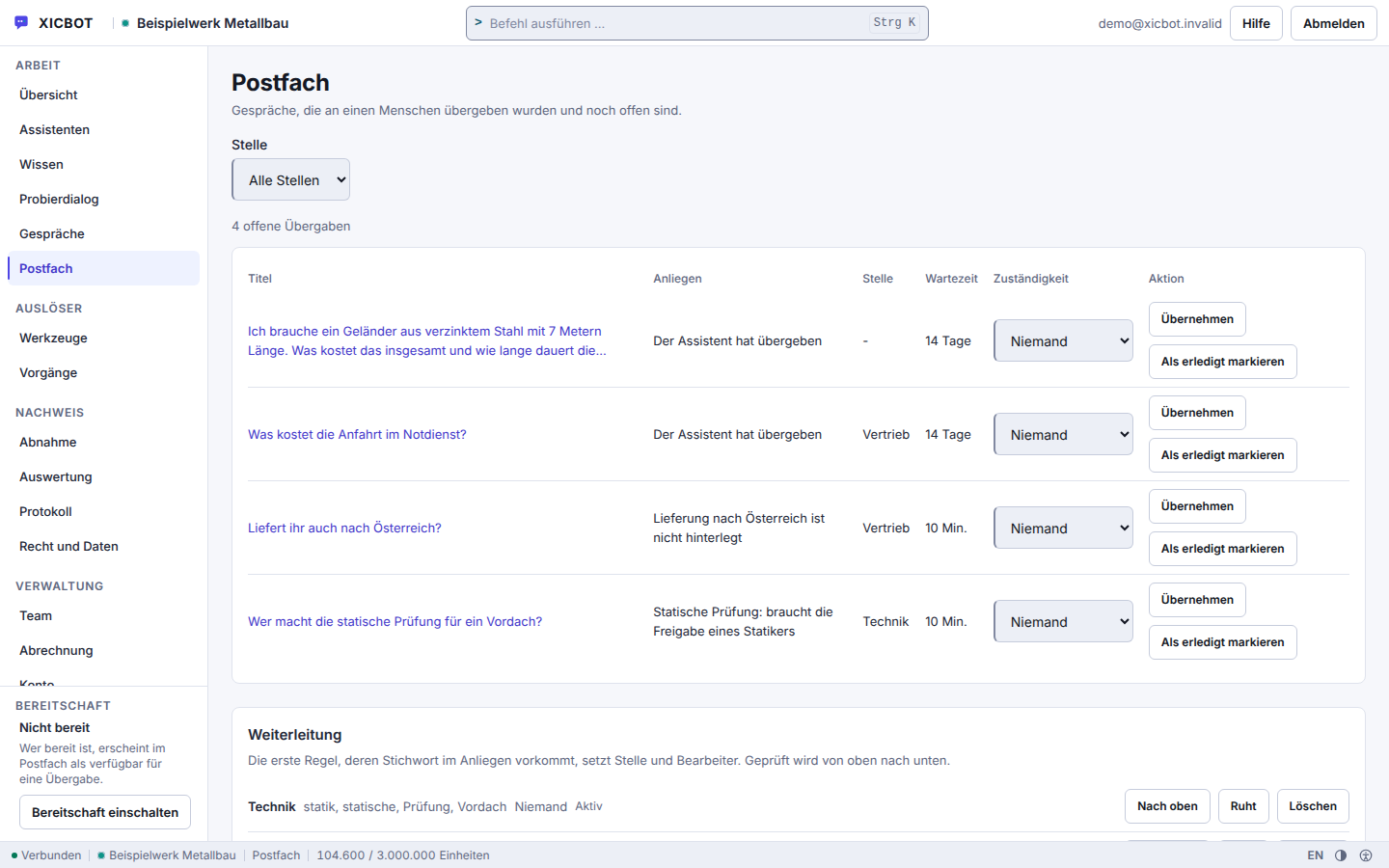
Three starting situations as they occur in projects, and what changes about them. The journeys are anonymised and exemplary: they describe the way of working, not a measured result. How an assistant works in your industry is shown on the pages for online shops, software providers and service providers.
What Cannot Be Calculated in AdvanceHow much an assistant relieves your office depends on how many of your enquiries have a stored answer at all. Nobody knows that share before the first month of operation, and we do not estimate it either. In the initial consultation we instead go through your most frequent questions and say for each one whether it can come from a source, needs a system query, or stays with a person.
Further reading: reducing support load with a 24/7 assistant describes which enquiries make sense to automate, and when the AI assistant should hand over to a human names the triggers we define for that in projects. Why an assistant makes things up and what helps against it technically is explained in preventing hallucinations.
The most common question in an initial consultation is not what the assistant can do, but what happens when it cannot do something. That is why this answer sits here among the other five and not at the end.
No. It takes the recurring cases and is meant to pass the rest on. Answers come from your knowledge base, and sourced answers name their source. Figures, prices and deadlines that are not in your sources are replaced with a notice. Status is read out only where you have entered a tool for it. Four topics are hard-blocked in the rule set — legal advice, medical information, the assessment of allergies and a binding financing offer. If a case turns delicate, it is meant to call the handoff tool type; that sets the conversation to escalated, creates a lead and notifies a person. Questions left open additionally appear in conversation analytics, so your team sees what the next answer is still missing.
From your own sources: documentation, help articles, changelog, price list and connected status systems. It is bound to this content and instructed not to invent answers into the blue. The search combines a keyword comparison with a local feature calculation, whose rankings are merged; every section keeps its heading and origin, which is why an answer can name the source it used. If it finds no supporting section, it usually says so openly and hands over to a human. Such cases do not vanish: they collect as unanswered questions and as knowledge gaps in the evaluation, and the next addition to your knowledge base follows from them.
Yes, if your inventory system is connected; that connection is part of the Custom package. The order_status tool type reads the status and by default still asks before it runs, because it is a personal matter; stock comes through inventory_status and runs read-only without a query. Whatever your system returns is filtered down to the result fields named in the adapter — text fields to 600 characters, lists to 20 entries — and a reply without a confirmation field counts as a contract breach, not as a result. The call goes to exactly one stored connection, waits at most eight seconds, accepts at most 64 KiB and follows no redirect. A change to the order runs through order_change, writing and requiring confirmation. More under tool control.
The assistant answers from the sources you deposited. If it finds nothing suitable there, it is instructed to say so openly instead of guessing. At the same time the question is recorded as a knowledge gap and an event goes out; from the Pro package you see in conversation analytics what was asked and what was missing. On request it hands over: the conversation moves into the handed-over state, an entry appears in your mailbox and a message with the transcript so far reaches the responsible place in your business — the assignment is fixed before the message leaves. If a ticket system is connected in the Custom package, the assistant opens a case there once you confirm. When someone from your team takes over the conversation, the visitor sees that in the window.
In the language of the enquiry. Detection runs in our own code through function words and characteristic characters, with no external service; word lists exist for nine languages, among them English, French, Spanish, Italian, Dutch, Polish, Portuguese and Turkish. Because detection happens per sentence, a switch mid-conversation is carried too. Your manuals and information sheets may stay in one language: the search covers the whole knowledge base, and language only acts as a ranking bonus. If a sentence cannot be assigned, the field stays empty rather than being guessed. Which languages actually turn up is something you can read later in conversation analytics. More under multilingual assistant.
The support assistant sits in the Pro package: from 2,900 € net one-time setup plus 149 € per month net operation, including hosting in Germany, care and conversation analytics. The analytics counts, among other things, conversations, unanswered questions, handovers to a human and self-resolved cases, so you do not have to estimate the relief. If the assistant finds nothing in the knowledge base, it says that nothing on this is on file and can hand over to a human. Every project begins with a free initial consultation and, on request, a free demo. All packages are listed under pricing. All services can be cancelled monthly; there is no minimum term.
Two questions are not in the list because the answer is short. No, nothing is read from the browser identifier, and a visitor's address is held only as a salted fingerprint per tenant. And no, there is no notification when a metric leaves its band: anyone wanting to set that band would first have to invent it.
To Prepare
Real examples help: an excerpt of the enquiries that came in by email, ticket or phone over the last few weeks, your existing FAQ and help articles, and a note of which system holds orders or customer data. Access to those systems is not needed for the assessment; whether a connection makes sense we only clarify once it is clear which questions need a query at all. It is best to leave names and contact details out of the examples.
Tell us briefly which questions tie up your support the most. For each one we will say whether it can come from a stored answer, needs a query in one of your systems, or stays with a person. You can reach us by phone at +49 5123 9579000.