43 of 48
questions without a handover to a person
measured on a single assistant on our own knowledge base, not on customer projects; a figure from live operation is not yet available
The XICBOT real estate assistant answers questions about a property and its listing from your own offers, qualifies prospects by budget and need, takes viewing appointment requests, takes callback requests and captures valuation requests from owners.
This page is for estate agents. The assistant answers questions about your homes. The data comes from your listings. If a value is missing there, it does not name one. It asks buyers about budget and needs. It takes requests for a viewing. People who want to sell can ask for a value check too. Value, price talks and loans stay with you.
Request a demo for your agency View pricing and packages
Two audiences, one assistant — around the clock, GDPR-compliant, hosted in Germany.
Visitor:Is the flat in the city centre still available? Three rooms, with a balcony.
Assistant:Two properties match: one with 78 m², one with 84 m², both with a balcony and both free from the first of the month.
Visitor:Can I view the larger one?
Assistant:Thursday 17:30 and Saturday 10:00 are free. For the request I need your name and a callback number.
Ask it yourself, Assistant of this website
Automated assistantWhat a real estate assistant costs depends less on the number of your properties than on whether it should merely answer or also act. An assistant that answers listing questions from your offers and captures contacts only needs a well-maintained knowledge base. As soon as it reads free windows from your calendar, enters a viewing or writes a lead into your agent software, each of those actions adds its own interface with separate read and write permissions. That is why the connection is a separate item in the setup and not part of the monthly price.
There is one figure we cannot responsibly name in advance: the effort for connecting your agent software. It depends on which interface that software offers at all and which fields your team wants filled in the end. We look at this in the initial consultation and only name a range afterwards. Setup is a one-off, operation is monthly, and you can cancel to the end of any month.
from 149 € per month net
Minimum term: none, cancellable monthly
All prices net, plus VAT Source: XICBOT price list, as of 11 September 2026
In the real estate business, speed decides. Anyone who comes across a listing has concrete questions — about the living space, the year of construction, the energy values, the commission or the next viewing appointment — and expects an answer, not a contact form and the prospect of a callback on the next working day. At the same time, unqualified enquiries and the same standard questions tie up valuable time needed for viewings and acquisition. The XICBOT real estate assistant works at both ends: it answers property and listing questions directly from your own offers, qualifies prospects with targeted follow-up on budget, need and timeframe, and turns the conversation into a viewing request or a structured lead. As a dedicated lead assistant with a connected booking assistant, it covers both sides of the market — the prospect side and the owner side that wants a property valued or sold.
The real estate assistant with prospect qualification, viewing and callback functions plus conversation analytics is part of the Pro package: operation from 149 € per month net plus a one-time setup from 2,900 € net (individual training on your listings and integration). For an assistant that only answers property questions and captures contacts, the Start package from 49 € per month net is often enough, setup from 990 € net. Connection to your CRM and agent software via defined actions from 4,900 € net setup. At the start there is a free initial consultation: we look at your property pages, your documents and the path of an enquiry, and show in a free demo how the assistant answers on your own listings. Ongoing services are booked individually and can be cancelled monthly; there is no minimum term.
An assistant for real estate is more than a chat window on the property page. It knows your listings in detail, asks the right questions and ensures that what reaches you is not an anonymous enquiry but a pre-qualified contact or an appointment request. The following six tasks form the core — each can be tailored to your agency, for example with mandatory details, property types, commission rules or team responsibilities.
Living space, number of rooms, year of construction, energy certificate figures, commission, location, features and availability — the assistant answers from your own offers and points to the right listing or data sheet.
It asks specifically about budget, buy or rent, desired number of rooms, timeframe and financing status. So you no longer receive empty enquiries but contacts your team can work with directly. More under lead assistant.
The assistant names free times from your appointment types and takes the viewing as an appointment request for you to confirm; once you confirm, the prospect receives a confirmation email and a reminder before the appointment, if an email address was given. Details under booking assistant.
Those who prefer to call leave a callback request with a preferred time and the relevant property. So no interest is lost, even when no one is on the phone right now.
Owners who want to sell or let are not handed to an empty form: the assistant captures property type, location, living space and year of construction and hands over a structured valuation request for your acquisition.
If a conversation becomes complex, urgent or sensitive — for example price negotiation or legal questions — the assistant is meant to pass it to a team member with full context. It replaces no one, it prepares the handover.
What is deliberately missing from this list is a valuation. The assistant names neither a purchase price nor a rent that is not in your offer, and it does not negotiate. Nor is it meant to give financing or legal advice; it is meant to take down the question and hand it on. That is not a gap in the build but a boundary we set: everything the assistant says must be traceable back to one of your documents.
Which of the six tasks are switched on is your decision, one by one. An agency that deliberately allocates viewings itself leaves out the appointment request: the assistant then takes the wish down as a callback request. The valuation request can likewise be switched off if your acquisition works differently.
43 of 48
questions without a handover to a person
measured on a single assistant on our own knowledge base, not on customer projects; a figure from live operation is not yet available
For a real estate assistant to genuinely help rather than just utter platitudes, it needs to do two things: read the context from your offers and property data and then perform real actions. XICBOT combines both in one continuous conversation, without the prospect having to leave the property page or hunt for a separate form. The basis for this is a well-maintained knowledge base of listings, property data and your own texts.
Before the assistant qualifies, it understands the property. It reads your listings, property data, energy certificate figures, commission details, location information and your FAQ on the process, and answers the prospect's question first. Only then does it ask the follow-up questions that fit this specific enquiry — different ones for a rental flat than for a house purchase. This makes the conversation feel like helpful advice rather than an interrogation.
A concrete next step grows out of the conversation. The assistant qualifies by budget and need, takes a viewing request when asked, takes a callback request, captures a valuation request from owners and hands the structured lead to your inbox or, in the Custom package, to your CRM or your agent software — every action only with clear permissions. How the connection to your CRM and other systems works through defined actions is covered under tool control.
Each of these actions is a named interface with its own permission, not open access to your system. Reading actions — free windows, property status — can run without a query. Writing actions do not: the assistant first presents verbatim what is to be entered, and only the visitor's confirmation triggers the write. If someone confirms twice because the line is stuttering, a lock in the database prevents the duplicate entry.
We prefer to name the limits of this connection up front. A call has a fixed deadline and a cap on the response size; if your system answers more slowly, the assistant aborts and offers the callback route instead of quietly retrying. It does not follow redirects, and addresses on the internal network are blocked. And whatever your agent software does not offer as an interface, the assistant cannot do either — then the route via the inbox remains, structured and with context.
8 of 8
questions without a basis declined instead of guessed
eight questions deliberately outside the material; the wording of every answer is in the measurement file
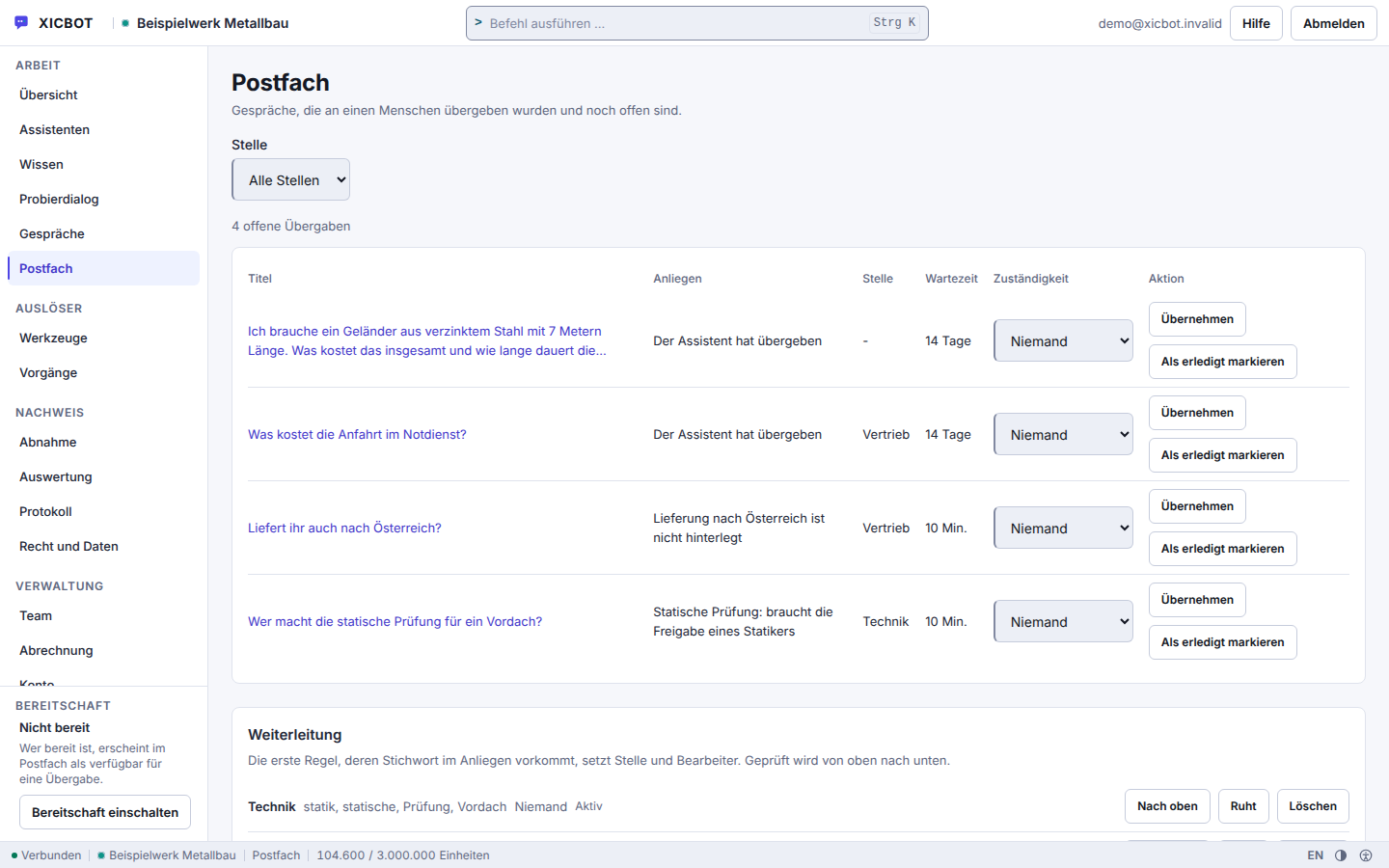
Title, request, queue and waiting time sit side by side, not in an email.
Whoever takes over signs up in that same row and closes the case there.
Without a matching routing rule a handover stays without a queue, and that shows.
The path from the first click on a listing to a viewing request or a qualified lead runs in five steps. For the prospect it feels like a short, helpful conversation. Behind it, a complete contact grows for your agency that can be handled without any follow-up chasing.
A prospect opens the chat on a property page because they want to know something — about the living space, the energy values, the commission or the next viewing appointment. The assistant greets them in line with the property they opened and answers the question in the chat from your listing instead of pointing them to a form.
Instead of asking for contact details right away, the assistant first understands the need: buy or rent, desired number of rooms, budget, timeframe and whether a financing confirmation exists. These follow-up questions are tailored to your business, so the result is a contact your team can genuinely place.
If the property fits the need, the assistant names free times and takes the viewing as an appointment request directly in the conversation, for you to confirm; once you confirm it, a confirmation email and a reminder go to the prospect, if an email address was given. Those who prefer to call leave a callback request with a preferred time — in both cases without a detour via a separate form.
The qualified prospect goes with full conversation context to your inbox or, in the Custom package, to your CRM or your agent software. If the enquiry comes from an owner, a structured valuation request grows instead for your acquisition. For urgent or sensitive matters the assistant is meant to hand over to a human.
The trail does not end with the handover. Every question for which the assistant found no covered answer in your documents is recorded as a knowledge gap, together with the wording of the question. From that you can see which detail is missing in your listings — typically purchase costs, service charges or the state of the documents. You add it once at the source, and the next enquiry gets the answer.
Two points in this sequence are settings, not automation. The first lies between step two and step three: whether the assistant enters a viewing itself or merely takes down the request and puts the confirmation in front of you is your decision. The second is the handover — you define from when a conversation goes to a human, for example on price questions or on financing topics; there is no rule by office hours.
And one step that deliberately does not appear here: the assistant concludes no contract, reserves no property bindingly and promises no commission that is not in your offer. The sequence ends at the point where a human has to decide.
An agency always addresses two sides of the market: prospects who want to buy or rent, and owners who want to sell or let. Both expect quick answers, and both decide early whether they feel looked after. The assistant serves both sides from the same content — it recognizes from the conversation whether someone is looking for a property or offering one, and leads the conversation accordingly. With international prospects it answers in their language without you maintaining content twice — more on this under multilingual assistant.
An Assistant That Advises — and Knows When a Human Must Take Over The real estate assistant answers factual questions and qualifies, but it does not negotiate prices and does not replace legal or financing advice. Because an AI assistant can be wrong, its answers stay bound to your own property data. For price negotiations, legal questions or delicate situations, it is meant to hand over to an agent with full context.
Owner:I am thinking about selling my terraced house. Roughly what is it worth?
Assistant:I will not name a value — an agent does that after the viewing. I can take down the key data so the assessment is prepared: property type, location, living space and year of construction.
Owner:Mid-terrace house, Hildesheim, 112 m², built in 1998.
Assistant:Noted. Shall I hand this over for valuation as it stands? Nothing is stored until you say yes.
Owner:Yes, please. What else do you need from me?
Assistant:Handed over. For the appointment the floor plan, the energy certificate and the latest statement are needed — if something is missing that is no obstacle, it merely delays the assessment.
We would rather advertise what a real estate assistant can do than with invented success stories. The following journeys are anonymized and illustrative and show how the assistant can be used in different situations.
Concrete Results on RequestWould you like to know how many listing questions and viewing requests an assistant can realistically take on for your property pages? In the free initial consultation we look at your offers and your enquiry process and show relevant examples from practice, without sales pressure and without empty promises.
Further reading: AI assistant for real estate describes how prospects are pre-qualified, and qualifying leads via chat shows how budget, needs and timing can be clarified in conversation.
Four things decide whether an assistant is any use in the estate agency business: where it takes the property data from, what it does with a contact, what happens when an offer leaves the market, and what it does when it does not know something. The answers are below, each with its boundary alongside.
What is not here is an answer to the question of how many additional viewings an assistant will bring you. We have no measurement from estate agencies on that, and an estimated figure would be nothing but a good-sounding invention in this place.
From your own material: listings, property data, energy performance figures, commission details and your FAQ on the process. Every source is read in, split into sections and stored with its heading and origin; the search over them combines a keyword comparison with a local feature calculation, whose rankings are merged. So it answers questions about living space, year of construction, location or availability from your offers and points to the right listing. Its answers stay bound to these sources: if it finds no supporting section, it usually does not guess but hands over to an agent.
Yes, as long as the document has a text layer. The knowledge base accepts files up to 10240 KB and splits them into overlapping sections so a passage does not end mid-sentence; a PDF is read through its existing text layer. A scanned sheet without a text layer deliberately yields nothing — there is no text recognition from the image, and the reason is shown as a message on the source instead of silently missing. For the question, at most five search hits plus your text blocks then go to the model, numbered, and sourced answers name the excerpts they rely on. For prices, terms or deadlines that have to be exact, the maintained question-and-answer pair is the better place: it goes out verbatim. More under knowledge base.
Not in the same instant, but without you doing anything. Website sources carry a refresh rhythm, seven days by default; it can be set from one day up to 365 days, and the value zero switches it off. The run happens at night. If a change should take effect sooner, trigger the read manually under Knowledge and then check the state of the source to see how many sections were produced. Each run writes a new version and switches over only at the end: if it breaks off, the previous state keeps answering, and a run that wrote nothing deletes nothing either. Five versions are kept. More under knowledge base.
It asks follow-up questions tailored to your business, for example about budget, buying or renting, the desired number of rooms, timeframe and financing status. Which fields are collected you define on the tool. So you do not receive an anonymous contact but a lead with context: name, address, phone and matter land in the mailbox of the business, with files uploaded beforehand attached. The assistant never sets an account or customer identifier itself and never states a result that did not come back. Where a conversation goes further than a form reaches, it hands over to a human and the transcript goes along. More under lead assistant.
It takes viewing requests; a viewing becomes firm only once you confirm it. The request runs through the appointment tool type and never unconfirmed: the proposal states place, time and kind of appointment in plain text in the chat, only the visitor's click creates the request, and once you confirm it in your view, the visitor receives a confirmation email, if they gave an email address. On request the assistant names free times from your stored kinds of appointment — time windows, duration, lead time and buffer — minus the appointments already requested or confirmed in XICBOT; it does not compare them with an external calendar, and a time it names remains a suggestion. A binding entry straight into your calendar only happens with a calendar connection set up in the Custom package. A request is only possible if its kind is known to your company, the lead time fits and the moment falls into an approved window; occupancy is checked under a lock, and a double click creates no second viewing. An hourly run sends the reminder for the confirmed appointment by email, if an address is on file. If nothing fits right now, the assistant takes a callback note with a preferred time instead. More at the booking assistant.
In the chat a request is created; it becomes an appointment only through your confirmation. Creating the request is a write operation and never runs through unconfirmed: the assistant presents the desired appointment as a proposal in plain text — what is to happen appears as its own sentence — and only the visitor's click creates the request. A request is only possible if its kind is known to your business, the lead time fits and the moment falls into an approved window; occupancy is checked under a lock. A double click creates no second request, because a one-time key made of conversation, tool and sorted input blocks it. Once you confirm the request in your view, it becomes an appointment, and if the visitor gave an email address, they then receive a confirmation email. The assistant enters appointments straight into your calendar only with a calendar connection set up in the Custom package; the calendar_booking adapter then writes the appointment into it after the visitor's click. Details under booking assistant.
The assistant checks occupancy under a lock: the check and the entry happen in one go, so a time slot is not given out twice. Against a double click there is a bolt in the database rather than in the program flow — the same request submitted twice does not create a second request. An appointment request becomes an appointment when your business confirms it. Without a calendar connection the assistant counts the appointments already requested or confirmed in XICBOT; what is only in an external calendar it does not see. With a calendar connection set up in the Custom package it reads free times through the calendar-availability form and writes the entry through the calendar-booking form; then the free times offered follow your calendar — including appointments that came in by phone or email. The check under a lock does not apply on this path: whether a slot taken in the meantime is rejected at booking is decided by your calendar. XICBOT sends each booking with an idempotency key by which your calendar can recognise a booking submitted twice.
Yes. When an owner gets in touch, the assistant captures property type, location, living space and year of construction in the conversation and hands a structured valuation request to your acquisition team. Which fields are asked for is your decision: a schema of your own carries up to twenty fields, the input is trimmed to that schema before execution, and if a required field is missing nothing is executed at all. What gets handed over is shown in plain text beforehand; the transfer writes and therefore requires confirmation. In this way one assistant serves both sides of the market — seekers and owners — from the same sources. More under assistant for real estate.
Yes. Through defined actions the assistant hands leads to your inbox, your CRM or your agent software — structured and with the conversation context. Ready-made forms exist for creating a customer record, querying a case, leaving a callback note and opening a ticket; if your system is not among them, it is connected through the general query of an external system. Every outbound connection runs over the same path with target checking, a fixed time limit and a size cap, and a stored access token cannot be read back afterwards. How permissions are set is covered under tool control. Handover to your inbox is available from the Start package; the connection to your CRM or agent software is part of the Custom package.
The real estate assistant with qualification, viewing and callback functions plus conversation analytics is part of the Pro package from 149 € per month net, plus a one-time setup from 2,900 € net. A viewing request from the chat counts as an appointment only once your office has confirmed it; the occupancy check and the creation run under the same lock. An assistant that only answers property questions and captures contacts is often already possible with the Start package from 49 € per month net and 990 € net setup. All details are listed under pricing. All services can be cancelled monthly; there is no minimum term.
Is your question missing? Send it to us before the initial consultation. Then we check in advance whether your case is covered by the existing building blocks or needs an action of its own — that is the difference between a setup and a project. Ask a question
Free Demo
In a free initial consultation we look at your property pages and your enquiry process and show how a real estate assistant qualifies prospects, takes viewing requests and wins seller leads. On request with a demo that is trained on your own listings.
Tell us briefly about your properties and your enquiry process — which questions your prospects ask, how you qualify and where the leads should go. You receive a clear assessment and, on request, a free demo with a test assistant for your listings. You can reach us by phone at +49 5123 9579000.