70.22 %
Around 70 percent of online shopping carts are abandoned
average across 50 separate cart abandonment studies collected by the Baymard Institute
An online shop needs a different assistant than a practice, and a restaurant needs different tasks than a law firm. XICBOT builds custom AI chat assistants that handle exactly the cases of your industry — trained on your business, multilingual, with handover to a human and hosting in Germany.
This page shows nine industries with their own page. Each industry has other questions. A shop needs something else than a practice. The assistant is trained on your business. It answers from your own documents. Some questions it answers itself. Other things it shows for approval or passes to a person. Pick your industry and ask for a demo.
Request a demo for your industry Call: +49 5123 9579000
Visitor:What would an assistant like this actually do for us?
Assistant:That depends on the business. In a shop it puts together a cart, in a practice it takes appointment requests, in a law firm it sorts first enquiries. What is your line of work?
Visitor:Metalwork. A lot of phone calls about dimensions and delivery times.
Assistant:Then dimension questions, delivery times and the quote request would be the first three cases. The details would come from your own documents, not from a general source.
Ask it yourself, Assistant of this website
Automated assistantAn AI assistant is only truly useful once it knows the tasks of your industry. Someone visiting an online shop wants to compare products, check availability and add to the cart. Someone visiting a practice wants to request an appointment and likes to know which documents to bring. And someone looking for a trades business needs a quote or the emergency service quickly. That is why XICBOT trains every assistant individually on your business and handles exactly the cases that matter in your industry. We have created a dedicated page with concrete scenarios for nine industries: online shops, service providers, restaurants and hotels, practices and health, trades and crafts, real estate, car dealers, law and tax firms and software and SaaS. Choose your industry below, or view all features at a glance.
The tiles below name the cases that come up first in each industry. What sits underneath is the same in all nine and follows further down this page: which tool carries a case, when a confirmation step is placed in between, and which limit applies even when nobody switched it on.
Product advice, product cards and cart in the chat, availability, order status through a connected inventory system in the Custom package, cross-selling and less support load.
Service FAQs, qualifying enquiries, initiating quotes, taking appointment requests and capturing contacts in a structured way.
Table reservations, menu and allergens, opening hours, catering and event enquiries as well as room questions.
Appointment requests, consultation hours, preparation and documents, phone relief — as guidance, without medical advice.
Quote and job enquiries, emergency service routing, appointment requests and collecting photos and documents.
Questions about properties and listings, viewing appointments, qualifying prospects and taking valuation requests.
Vehicle and model advice, test-drive and service appointments, financing and leasing enquiries, availability.
Qualifying initial enquiries, taking appointment requests, document checklists, clarifying responsibility — guidance only, no advice.
Onboarding and documentation questions, feature and pricing questions, ticket relief, demo and trial requests and status questions.
Your industry is not listed? That means we have not written a dedicated page for it, and nothing else. The classification further down applies just the same: what counts is which of your cases only read, which change something and which do not belong to an assistant at all.
The nine pages above read differently because the questions differ. Technically the differences come down to three questions, and they are the same in every industry: does a case only read, or does it change something? Is the answer in your own documents, or does it have to come from a connected system? And where does the case end — with the assistant, with a confirmation, or with a human? Anyone who answers these three questions for their business has nearly assembled the list of sensible actions.
Reading or changing. Opening hours, consultation hours, availability, free appointment slots and prices are reading cases. Changing an order, requesting an appointment, creating a contact or opening a ticket changes something in your system. Only what is reading and explicitly set to automatic runs without a query; everything else is put forward as a proposal. That is not a setting that turns out differently per industry, it follows from the kind of action itself.
Your own documents or an outside system. A practice gets a long way with what is on its website and in its documents. A shop does not: catalogue, price and stock sit in your shop, order status in your inventory system, which the assistant only reads through a connection in the Custom package, and it keeps no second truth beside them. The cart shows this most clearly — it is only put together in the chat and held by XICBOT, calculates with the live price from your shop, and “Continue” leads into the shop with a random collection key. In an online shop, revenue hangs on this: around 70 percent (Baymard Institute) of online carts are abandoned. Read more on shop assistant, product cards and cart assistant.
Where the case ends. There are three exits: the assistant answers the question from your documents, it puts forward a proposal for confirmation, or it hands over to a human. The third exit is not a failure but the built-in route for everything it must not judge. In practices and law firms it is taken more often than in a shop — not because the assistant can do less there, but because more questions hit a fixed limit.
What stays the same in every industry. The differences sit in knowledge, actions and limits. Underneath, every project shares the same foundation, and that is not your concern to manage. Details can be found under knowledge base, multilingual assistant and privacy and hosting.
70.22 %
Around 70 percent of online shopping carts are abandoned
average across 50 separate cart abandonment studies collected by the Baymard Institute
An assistant without tools can answer but cannot act. XICBOT brings seven build forms in the core plus ten more as connections to an existing system, ordered by area: catalogue, calendar, inventory, customer records and ticketing; these ten and the call to an outside system of your own come in the Custom package. An industry does not pick from these by taste but by its cases. How a build form is set up and bounded is described under tool control.
The mapping below names, for each area, what runs read-only, what needs a confirmation and which industries typically have the case. It is not a package list: what you need follows from your cases, not from your trade.
Reading queries against your catalogue: search, compare, bundle and look up what something costs and whether it is in stock. The answer comes from your catalogue, not from a general source.
Looking up free slots is something other than setting an appointment. Both belong to the same case and are still treated differently.
The cart in the chat is held by XICBOT, calculates with the live price from your shop and holds no price truth of its own. “Continue” leads into the shop with a random collection key; through a read-only pickup address at XICBOT your shop can fetch the cart, and your shop connects this pickup through an integration of its own.
Name, e-mail, phone number and concern land in your inbox or, in the Custom package, your customer records in structured form; files uploaded beforehand are attached.
Anything tied to a person is treated differently from a catalogue entry — even when it is only read.
When a case does not end in the chat, it ends in an orderly way: as a ticket in your system (Custom package) or as a handover to a human.
What applies to every build form. At most five tool calls per answer; the sixth is logged as capped instead of quietly disappearing. Every outbound connection runs through a binding with a target check, a deadline of eight seconds and a cap of 64 KiB per answer. Redirects are not followed, and a failed call is not silently retried.
What is missing gets built, not pretended. If your case needs a build form that does not exist yet, it can be defined as a custom action. That is project work and not part of the scope of the Start and Pro packages; what is included is listed above. Custom functions
The most common worry about an assistant that acts is not the wrong answer but the unasked-for action. XICBOT does not solve this with a promise but with a rule in the source: only what is reading and explicitly set to automatic runs without a confirmation. When an action is created or changed, the system sets the confirmation itself for every non-reading kind — even when the request says otherwise.
A call that requires confirmation first lands in the state proposed and executes nothing. Only the confirmation in the chat turns it into a transaction. Rejected, expired, failed and timed out are states of their own and stay visible in the log; a proposal has expired when nobody has agreed to it within the time allowed.
Five of the ten connections are writing and therefore permanently bound to confirmation; an industry cannot switch this off. Two of the reading ones ask for the confirmation on top by default, because they touch transactions tied to a person: order status from the connected inventory system and customer history. All connections to inventory, calendar, customer records and ticketing belong to the Custom package. Which build forms are connected at all is up to each industry.
How an action is set up, bounded and logged is described under tool control. What of it arrives in the conversations is shown by conversation analytics.
Fixed subject limits
Every industry has questions an assistant must not answer, and in some industries those are the most frequent ones. XICBOT does not handle this per tenant but in the source: four subject limits are fixed, because a tenant field would be overwritable. They come before everything else that is configured — before the role, the topic boundary and the handover rule.
When a question touches a limit, the assistant says in one sentence that it must not judge this, names the route to a human and hands over. The mandatory notice naming the limit that was touched is appended by the service itself; the model does not write it. Three further topics can be switched on per assistant: complaints, data protection and payment data.
What matters is that the check runs a second time after the answer has been written. A limit that exists only in the instruction text is a request to the model. If the model did not set the marker, the service sets it: the conversation goes to a human, and a notice the model wrote in its own wording is replaced by the correct one. Nothing is reported twice.
How often this happens depends on the industry, not on the assistant. In an in-house measurement series dated 11 September 2026, 43 of 48 questions put to one assistant stayed without a handover to a person. It was measured on a single assistant against our own knowledge base, not on customer projects; a figure from the live operation of a customer installation does not exist. All figures on this page are listed with their source under measurements.
43 of 48
questions without a handover to a person
measured on a single assistant on our own knowledge base, not on customer projects; a figure from live operation is not yet available
Visitor:Can you commit to a leasing rate for the estate car? 36 months, 10,000 kilometres a year.
Assistant:I am not allowed to make a binding offer; financing and leasing are off limits for me. I will take down your request with term and annual mileage and pass it to the sales team. Shall I do that?
Visitor:Yes. And the tow bar, can that be fitted later?
Assistant:It is listed as retrofittable in the dealership's specification list, which is why I may tell you. The rate is not in there, and I must not estimate it. The difference is not made by the industry but by the kind of question.
The difference between two trades sits in knowledge and rules, not in the interface.
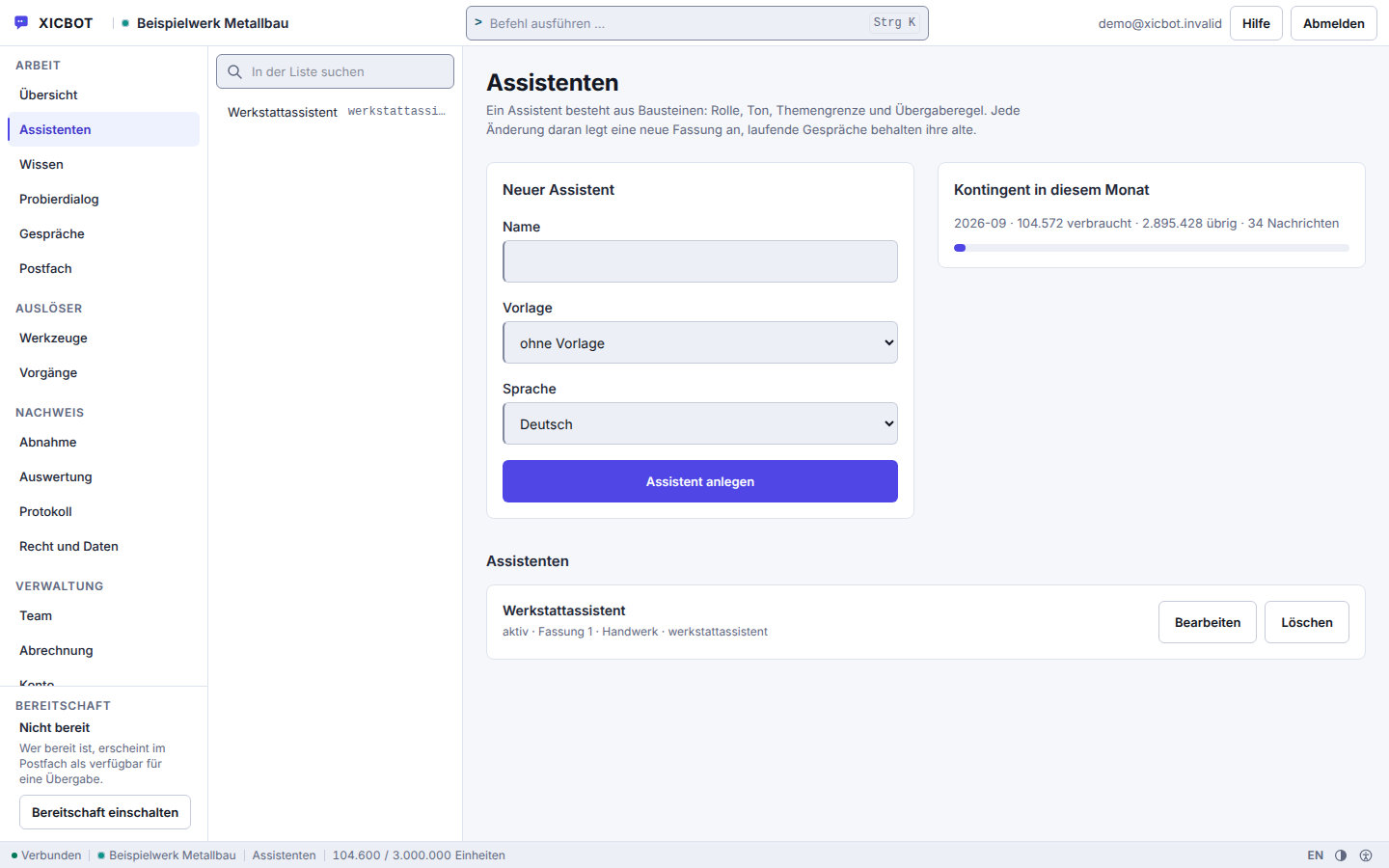
A new assistant is created from a name, a template and a language.
Several assistants run side by side, each with its own key.
The price does not hang on the trade but on three things: how much knowledge has to be prepared, which actions are added and whether a new build form has to be written. A law firm with a knowledge base and appointment requests therefore lands differently from a shop with catalogue, cart and order status from a connected ERP, and both can run under the same package name.
Setup is a one-off, operation is monthly. What each package contains is set out in detail under pricing.
from 990 € one-time setup net
Minimum term: none, cancellable monthly
All prices net, plus VAT Source: XICBOT price list, as of 11 September 2026
Every assistant is trained and integrated individually for your industry. The Start package begins at 990 € net setup plus 49 € per month net operation (website assistant, knowledge base, handover to a human, multilingual, hosting in Germany). For online shops and appointments, Pro fits from 2,900 € net and 149 € per month net (shop integration with Shopware CE, product cards, cart, conversation analytics). For tool control and custom cases, Custom starts at 4,900 € net. Which package fits is decided by the list of actions: anyone answering only from their own documents stays with Start; anyone using the catalogue, cart or appointment requests needs Pro; anyone connecting a calendar, an inventory system or a tool type of their own lands at Custom. Ongoing services are booked individually and can be cancelled monthly; there is no minimum term.
The route is the same in every industry. What differs is only what ends up on the list in step one. That is why the beginning is not a choice of package but a collection of cases.
The limits are set before the integration, not after it. An assistant that goes live first and is bounded afterwards has already answered the questions it was not allowed to answer.
We work through the questions that actually reach you: by phone, in the inbox, through the form. Each one is sorted — read only, change something, or not the assistant's business at all. What comes out is a list of cases, not a choice of package. On request we show the result in advance on a test assistant using cases from that list.
We train the assistant on your content: website, shop catalog, opening hours, documents, FAQs and price lists. It is instructed to answer bound to these sources instead of inventing freely.
The four fixed subject limits apply without anyone switching them on. On top comes what you want to exclude yourself: a topic boundary for your business and, optionally, complaints, data protection and payment data. In practices and law firms this step is the longest, in an online shop the shortest.
We set up the matching actions — product cards, cart, appointment requests or contact handover — and decide for each one whether it may run without a query, as far as it is reading. Then we integrate the assistant into your website or shop with a short script.
The assistant goes live, GDPR compliant from Germany. We maintain, update and analyze the conversations so it improves with every question. Your contact stays the same.
How long it takes depends on the extent of your documents and the number of actions, not on the industry. We give a firm figure only once the list from step one exists.
The integration itself is a short script in the page head. What that looks like technically is described under integration and in the documentation.
The following examples are anonymized and illustrative. They do not show what an assistant is capable of but what changes in the division of labour: which enquiries never reach the team in the first place and which arrive better prepared.
The three cases deliberately sit on three different axes: one reads from a connected system (Custom package), one takes down a request and hands over, one qualifies and passes on a contact.
Concrete Results on RequestThese examples are deliberately anonymized and illustrative; we do not quote invented figures. Which tasks an assistant sensibly handles in your industry and what that costs, we discuss openly in a personal conversation. Get in touch or call us at +49 5123 9579000.
Regardless of sector, the guide helps with orientation: what is an AI chat assistant? explains the basics, custom assistant instead of a standard chatbot describes the difference from template solutions, and building a knowledge base shows which content every sector should provide first.
These questions come up in almost every first conversation, across all industries. All the others are listed under frequently asked questions.
Most likely yes. The nine industries listed are focus areas, not an exhaustive list. What matters is not the industry label but which questions your customers ask and which tasks can sensibly be automated. The building blocks are the same everywhere: capture a request, take an appointment request, hand over to a human, search the catalogue, put together a cart in the chat, query a connected system — plus forms for calendar, inventory, catalogue, customer management and ticketing; querying connected systems and these forms belong to the Custom package. Which of these your case needs is decided during setup, not by the industry label. In the free initial consultation we clarify which cases your assistant should handle and, on request, show a free demo for your website.
A menu tree only knows the paths somebody laid out beforehand. A XICBOT assistant answers from your own sources and names for sourced statements the excerpt they rest on; an answer without a used citation is recorded as a gap. On top of that come tools that actually do something: take an enquiry, accept an appointment request, hand over to a human, search the catalogue, put together a cart in the chat and, in the Custom package, query a connected system. What is typical for an industry sits less in the technology than in the settings — taboo topics, handover threshold and handover address belong to the respective version and differ from business to business. Four protective rules stay in place in every version: no legal advice, no medical information, no assessment of allergies, no binding financing offer. More under knowledge base and tool control.
Both. Seventeen tool types are available: seven at the core — lead, appointment, handoff, product search, cart, an outbound call of your own and pre-filling a form on your site once the visitor confirms — plus ten adapters for merchandise management, calendar, catalogue, customer management and ticket systems; the outbound call of your own and the ten adapters come in the Custom package. The model is offered only what you have entered, switched to active and allowed for the role of the conversation; if the list is empty, it receives no tool field at all. At most five calls run per answer, the sixth is logged as capped. Anything that writes never runs unconfirmed: the proposal stands in plain text in the chat, only the click executes it, and every call leaves a log row carrying one of seven states. More under tool control and custom functions.
It leads into the shop; the selling happens there. The product_search tool type knows four forms — search, compare, bundle and also bought — returns at most six hits and only from the catalogue of your account; a stated article number beats the search term. The cart tool type knows six kinds of change, coupon among them, with at most 99 units per position. The cart is drawn as a card with line items, total and a shipping line. Price and stock come from the shop: the assistant assembles the cart in the chat, and “Continue” leads to the shop address you have stored, with a one-time pickup key attached; for the items to sit in the cart there, your shop needs an integration of its own. More under assistant for online shops and product cards.
In medical practices, law firms and tax offices the assistant deliberately acts as a guide. It answers organisational questions such as consultation hours, appointment requests or required documents, and is not meant to give medical, legal or tax advice. This rests on source binding: sourced statements carry the number of the excerpt they come from, and figures, prices and deadlines that are not in your sources are replaced with a notice. Where the stored knowledge base does not cover a question, the assistant usually says exactly that instead of inventing something. For a sensitive matter it is meant to hand over to a human: the conversation is then marked as escalated, an enquiry appears in the mailbox, and the transcript goes along so that nobody has to start over.
In the language it is written to in. That language is detected in our own code through function words and characteristic characters, with no external service and no extra model call; word lists exist for nine languages: German, English, French, Spanish, Italian, Dutch, Polish, Portuguese and Turkish. If a sentence is not clear-cut, the field stays empty instead of guessing German. Detection happens per sentence, which is why a switch mid-conversation is carried too. You do not have to maintain your content several times over: the knowledge base is not filtered by language, language acts as a ranking bonus. More under multilingual assistant.
The Start package begins at 990 € net setup plus 49 € per month net operation, Pro at 2,900 € net and 149 € per month net, Custom at 4,900 € net setup with operation by scope; all figures net plus VAT. Which package fits depends less on the industry than on the task: answering questions and capturing leads is covered by Start, appointments and shop integration belong to Pro, and your own systems with reading and writing actions to Custom. We name a clear price after the free initial consultation. An overview per industry is under industries, all packages under pricing. All services can be cancelled monthly; there is no minimum term.
Anything not covered here we answer directly: by phone at +49 5123 9579000 or through the contact form.
Industry Consulting
Bring three things along: the questions that reach you most often, the systems the answers live in, and the topics the assistant must not touch. Nothing more is needed for a sound assessment.
Tell us about your business and your goals. We will show you which cases an AI assistant sensibly handles in your industry, in person and without technical jargon.
Tell us briefly which industry you work in and which tasks your assistant should handle. You receive a factual recommendation and, on request, a free demo, without obligation. You can reach us by phone at +49 5123 9579000.