42 of 48
answers carrying a source reference
questions whose answer is in the knowledge base; six carried no source reference
The evaluation reads your own rows and nothing else: conversations, messages, replies, tool calls, outcomes and visitor ratings.
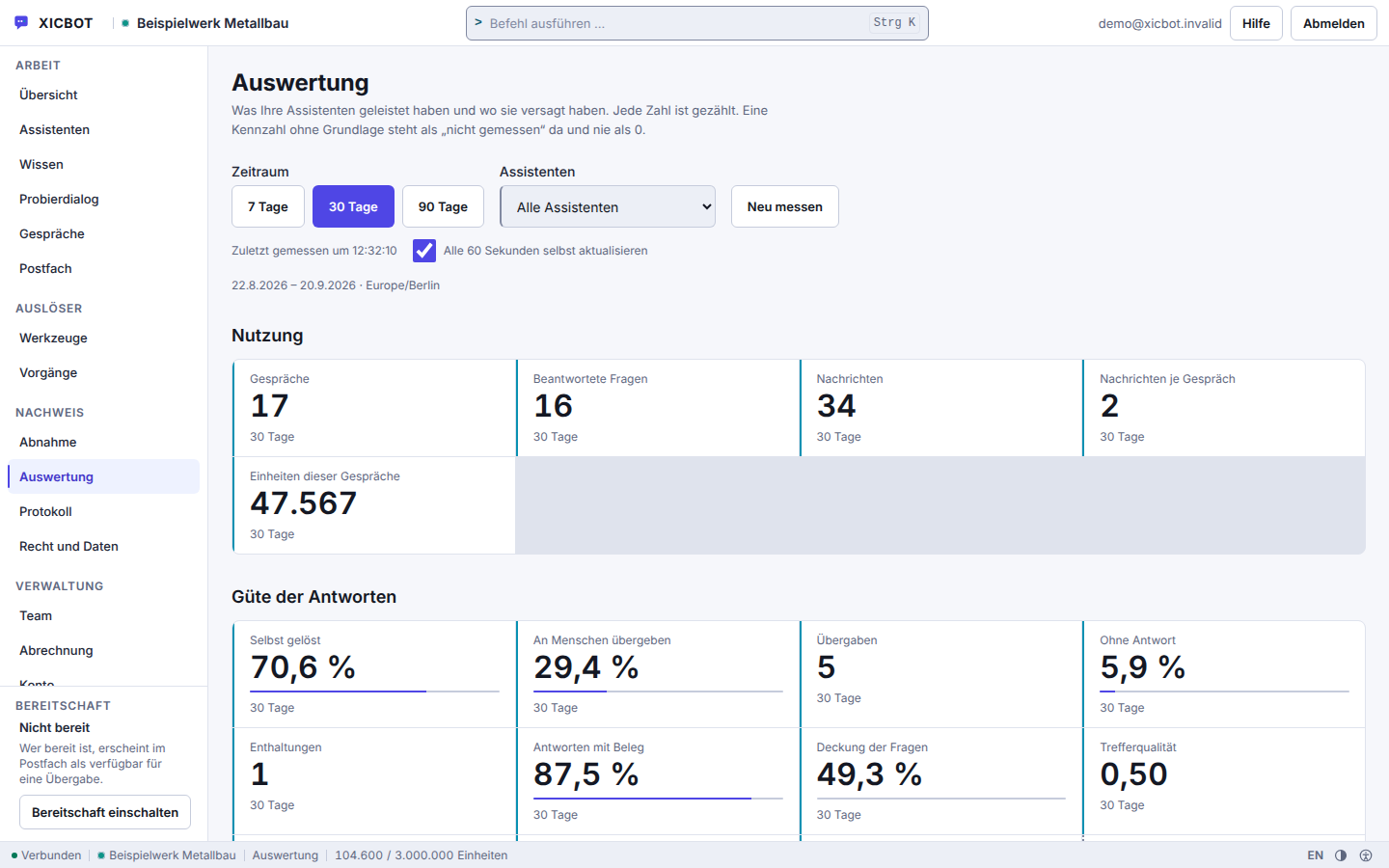
The analysis counts what happens in your chats. It only reads your own data. It shows topics, open questions and gaps in knowledge. It also shows where chats break off or are handed over to a person. Every number is counted, not guessed. If the basis is missing, the card shows the reason instead of a zero.
Request a free initial consultation View pricing
Out of them come metric cards, a daily series, topics, unanswered questions, knowledge gaps, drop-offs and prompts. Every figure in there is counted, none estimated — and where the basis is missing, the card shows the reason instead of a zero.
Visitor:Do you deliver to Austria as well?
Assistant:There is nothing on that in the stored sources. I do not guess — I would rather say so.
Visitor:And how do I find out, then?
Assistant:I am handing over to a person, along with the conversation so far, so that you need not write anything twice.
Ask it yourself, Assistant of this website
Automated assistantThe evaluation queries no outside party. It computes over your own rows and delivers the metric cards in a single request. Besides its value, every card states whether a measurement happened and, in case of doubt, the reason; share cards carry numerator and denominator so that it stays visible what a share rests on. Where nothing could be measured, that reason is shown — not a zero that looks like a result.
Seven, thirty or ninety days can be chosen. Without a setting, thirty days and Europe/Berlin apply. The time zone comes from the reader's browser; an unknown zone is an error, not a silent substitution. The window works with local day boundaries, and the current day is included.
Topics are formed from the most recent visitor questions inside the window. Identical wordings count with their frequency but enter the comparison only once. A topic carries at most three lead terms, in the spelling that was actually typed. Alongside it stand the conversations concerned, the suggestions offered and taken, and the share of handovers.
A gap is a row of its own, written the moment a finished answer ends without a single source reference. It carries one of two types: refusal by the model, or answer without a reference. In our own measurement series, 42 of 48 answers carried a source reference — the rest would each have produced a row here and show where the knowledge base needs to catch up.
Next to the gaps stands the visitor message immediately before an evasive answer, truncated to three hundred characters. Like concerns are grouped into bundles in chronological order rather than in the best conceivable division: whoever came first determines the bundle.
What the conversation produced is counted: enquiries, appointments, carts, plus the tool calls, separated into executed, declined and failed. A drop-off, by contrast, is not written but derived: an open conversation, not handed over, with at least one visitor message, silent for thirty minutes and without an enquiry, appointment or cart.
The assistant detects frustration deliberately without a language model, through a point system: the call for a human weighs heaviest, joined by angry words, sensitive topics, the same question for the third time, writing in capitals, piled-up exclamation marks and two fruitless answers in a row. From the configured threshold on, a handover happens — exactly once per conversation.
The distribution knows exactly two features: the language of the conversation and the window class — phone, tablet, desktop or wide. The class comes from the loader script; where it is missing it stays empty and the conversation is listed separately as unspecified, instead of moving into a guessed bucket.
An answer counts as referenced when its source field is filled. The coverage sits in the answer row and was measured at answering time against the knowledge as it then stood: the share of meaning-bearing question terms in the best match — the very figure that decides whether the assistant would rather not answer. Retrieval quality comes from the most recent test-set run inside the window.
Alongside the figures come prompts: ten kinds, each with the cases counted and the place where the change is made. A prompt arises from a case that occurred, not from a threshold and not from an industry value — a benchmark nobody measured would be invented. A kind without a case does not appear at all, and the response states the total number of kinds, so that an empty list stays distinguishable from a failure.
A figure only becomes something once someone reads it and acts. If questions about order status pile up, a status lookup through a connected inventory system in the support assistant suggests itself, with a connection in the Custom package; if a question about shipping costs sits just before many drop-offs, the answer belongs in the shop assistant before anyone has to ask it in the chat. We implement such changes with you and measure again afterwards, in the same window.
42 of 48
answers carrying a source reference
questions whose answer is in the knowledge base; six carried no source reference
Usage and answer quality are kept apart, so volume and quality do not blur into one.
Self-resolved, handed to a person and no answer together describe a period.
A figure without a basis reads as not measured, never as zero.
Between a conversation held and a better answer lie five steps, and none of them is magic. The assistant records as it answers, the evaluation computes over what was recorded, people read it, changes are made to knowledge, actions and pages — and afterwards the same figure stands there again for comparison.
While answering, the assistant records what it did itself: which sources it used, how well your knowledge covered the question, which tool it called and what came of it. These fields are already part of the answer row. The evaluation later reads exactly that and recomputes nothing that was not measured at the time.
One request returns the metric cards for the chosen window, separated by tenant and with local day boundaries. Every card states whether a measurement happened; where the basis is missing, the reason stands where a figure would otherwise be. Share cards carry numerator and denominator.
The view fetches the figures again on its own and marks a state as stale as soon as it is noticeably older than the cycle. Behind it sits a short cache, so that a screen left open all day does not keep the database busy. This is not a real-time picture: up to a minute passes between an event in the chat and it being shown.
Alongside the cards stand topics, knowledge gaps, unanswered questions, drop-offs and prompts. Every prompt names the cases it arose from and the place where a change would take effect. Sorting follows the number of cases, not an impact nobody has measured.
Then something is changed: a missing answer added to the knowledge base, a new action enabled, a follow-up question phrased differently, a section on your website made clearer. Afterwards the same card appears again in the next window — together with the value of the preceding window of equal length, so the direction stays readable.
The order is not decorative: whatever was not recorded while answering cannot be reconstructed afterwards. A card without a basis therefore shows the reason and not a zero — a zero would be a statement about something that was never measured.
What the analytics does not do belongs in the description too: it does not say why someone bought or broke off, and it proves no effect of your change. It shows the cases, the value of the preceding period of equal length and the point at which a change can take hold. What of that is chance it does not separate out — the decision stays with you.
Visitor:That is the third time I have asked this!!!
Assistant:You are right, I am getting nowhere here. I am bringing someone from the team in.
Visitor:Do I have to write all of it again now?
Assistant:No, the conversation so far goes along. The handover happens exactly once, so no fresh notice is raised with every further sentence.
Anyone who does not look at the evaluation every day has it delivered once a week. The report is the same computation over a fixed window, translated into sentences — and each of those sentences hangs on a figure from the report, not on a phrasing that always fits.
On Monday morning at 06:41 the scheduler places one job per tenant into the queue. The time deliberately sits off the hour so that the dispatch does not coincide with every other task on the hour.
Before the calculation, the run checks three conditions: the account has an owner with a confirmed address, the report has not been unsubscribed, and the tenant is active. If one of them is missing, no report comes about. An email to an unconfirmed address is not sent, and unsubscribed stays unsubscribed — even when a lot happened during the week.
The background service picks the job up and computes the window of the past seven days in Europe/Berlin. What results are twelve labelled cards — the same figures that also appear in the customer area.
The cards turn into sentences, and every sentence carries its figure with it. The sentence about the citation share, for instance, only appears when it is below half — otherwise it is not a hint but filler.
In the table each card carries either its figure or the reason it is missing, in plain words exactly where the value would otherwise stand. Shares are given as percentages, the response time in seconds. A card without a basis gets no zero: the zero would be a measurement and thus a statement about something nobody collected. If there was not a single conversation during the week, exactly one sentence says so.
The report goes to the account owner and only to a confirmed address. Unsubscribing deliberately sits outside the login: anyone who no longer wants the report need not sign in first.
If the report fails to arrive, that is a finding and not a coincidence: either the job never left the queue or the address is not confirmed. Both can be checked, instead of blaming the delivery.
An evaluation is only worth something once it is also clear what it does not say. This one counts your own rows and nothing else. Anything beyond that would be guesswork — and a guessed figure does more damage in a decision than a missing one.
The evaluation is tied to the package: it is included from Pro on. Without the entitlement, the interface answers with a block instead of empty cards — a zero would not be distinguishable from "not included". An integration key hands out exactly these figures, no conversation content.
from 149 € per month net
Minimum term: none, cancellable monthly
All prices net, plus VAT Source: XICBOT price list, as of 11 September 2026
Conversation analytics is part of the Pro package: one-time setup from 2,900 € net, operation from 149 € per month net with hosting in Germany, care and updates, including shop connection with Shopware Community Edition, product cards and cart in the chat. Before any setup we check what would be countable at your end today: without conversations held, every card stays empty, and a test assistant on your website produces the first rows for it. Ongoing services are booked individually and can be cancelled monthly; there is no minimum term.
An evaluation is only worth as much as the steps that follow from it. That is why we translate every insight into a concrete action on the assistant, shop or website, keeping an eye on what makes the biggest difference. The following list shows typical measures that can be derived directly from the conversations and that we implement together with you, before we measure the impact again. Often the measures concern the wording in the lead assistant, because a badly phrased follow-up question shows up there at the drop-off position: the sequence number of the last message says which question the conversation ended on.
In the initial call we show which evaluations an assistant delivers — from frequent questions and knowledge gaps to the topics that come up just before a decision.
How does conversation analytics help in everyday practice? The following journeys are anonymized and illustrative, but show typical patterns from our project experience. They connect the reading of conversations with the concrete actions that follow. One example of measurable impact: around 70 percent (Baymard Institute) of online carts are abandoned, and the evaluation makes visible at which point in the conversation this happens, for instance at the shipping cost or an open question about delivery time.
Evaluation without glass-box visitorsWhat gets evaluated are your own rows: conversations, messages, tool calls, outcomes. No visitor profile arises from that — the address exists only as a salted fingerprint per tenant, truncated to its leading part for IPv6, and the evaluation does not read it. Who processes the data and what the processing agreement says belongs on the privacy and hosting page.
70.22 %
Around 70 percent of online shopping carts are abandoned
average across 50 separate cart abandonment studies collected by the Baymard Institute
Without an evaluation much stays guesswork: you sense which questions are frequent and puzzle over why conversations end. The difference is less the amount of figures than where they come from — on the left what people remember, on the right what was counted, with anything unmeasured marked as such.
Both columns remain columns: a figure decides nothing by itself. It merely shortens the way from a hunch to a question that can be answered — and states how certain it is.
Your business does not stand still, and neither should your assistant. New products, seasonal promotions, changed opening hours or an additional language change what visitors ask. Conversation analytics keeps pace: it shows when a new topic emerges, whether an action is well received and where new questions arise after a change. A change becomes visible through the comparison with the preceding window of equal length: a topic that did not exist before carries no previous figure, and that is exactly what is stated next to it. The insights flow back into the knowledge base, actions and website — whether the support assistant or the shop assistant hits the mark better afterwards is decided by the next measurement, not by the intention.
How chat transcripts turn into concrete improvements is described in conversation analytics: evaluating and optimising chats. Which metrics work for a business case is shown in what an AI assistant costs and returns. How those insights turn into concrete test cases for the next iteration is described in acceptance and test cases before go-live.
The most frequent questions about the evaluation turn on two things: what exactly is counted, and who gets to see it. Both are answered briefly here.
The analytics view delivers 32 metric cards in one response, plus a daily series, topics, unanswered questions, knowledge gaps, blocked cases, drop-off points, recommendations and a version comparison. Things are counted, not estimated: a card without a basis in data carries the note not measured together with a reason instead of a 0, and every share shows its numerator and denominator beside it. Recorded are, among others, conversations, messages, self-resolved cases, handovers, answers with a citation, enquiries, appointments, carts and drop-offs. The distribution knows two attributes, language and window class — no browser identification is read for it. A revenue figure or an attribution to a purchase is deliberately absent. More under conversation analytics.
In most cases the source is missing, not the capability. An answer is built from the sections that were found: at most five search hits plus your text blocks go to the model, numbered, and sourced answers name the excerpts they rely on. If the assistant finds nothing suitable, it usually says that nothing on this is held in the knowledge base. That refusal, like an answer without a used excerpt, is recorded as a gap; from the Pro package you will find it again in conversation analytics among the detected gaps. The route is therefore clear: read the gap, put the content into the knowledge base, re-read the source.
Both, but kept apart. Analytics shows condensed metrics and topics so you can recognise patterns without profiling individual visitors; it evaluates your own conversations only and knows neither an industry benchmark nor revenue attribution. You can look at individual conversations — masked by default: email address, phone, IBAN and postal address appear as readable placeholders, and the response itself states that it is masked. The plain text is seen only by someone who holds the role for it, states a reason and accepts the log line. Masking protects the display, not the storage: the history remains stored in full.
It shows which products are asked about in the chat and where conversations break off. Topics are formed from the most recent 5000 visitor questions in the selected period, and the list ends at 15 entries. A drop-off is derived rather than guessed: an open conversation, at least one visitor message, silent for thirty minutes, not handed over and without an enquiry, appointment or cart. On top of that come recommendations in ten kinds, each with counted cases and the area in which you make the change. What the evaluation does not do: it calculates no revenue value and attributes no amount. How the shop assistant carries out the resulting actions is described on its page.
Conversation analytics belongs to the Pro package: one-off setup from 2,900 € net, operation from 149 € per month net, including shop connection, product cards and the cart in the chat. The analytics endpoints sit behind that plan boundary, not behind an extra line item. Inside you see metric cards, daily curves, topics, unanswered questions, knowledge gaps, abandonment points and a comparison of two versions of your assistant, across periods of 7, 30 and 90 days. Every figure is counted, not estimated: where the basis is missing, the field says unmeasured together with a reason, and not a zero. All services can be cancelled monthly, there is no minimum term. Overview under pricing.
The evaluation refreshes itself every 60 seconds and marks a reading as stale from 90 seconds on; the figures behind it sit in the cache for up to 60 seconds. On top of that comes a weekly report compiled early on Monday over the preceding seven days, in the Europe/Berlin zone, with twelve labelled cards ranging from conversations through self-resolved cases to the drop-off share. A card without a basis carries its reason in plain words instead of a zero, so that a failed measurement does not look like a result. The resulting improvements to assistant, knowledge base and actions we implement together with you and then measure the effect.
Yes. Conversation analytics works with aggregated metrics and topics instead of personal profiles. The analysis runs on our servers in Germany, governed by a data processing agreement with clear deletion periods; the answers in the chat itself are generated by a specialised model provider, also outside the EU on the basis of standard contractual clauses. Your conversation data belongs to you and is neither sold nor passed on to third parties. Technically, analytics reads no browser identifier and stores no visitor address, only language and viewport class; the similarity of two topics is computed in PHP on our own server, without an external service and without a model call. Every figure is counted: where the basis is missing, the field says unmeasured together with a reason instead of a zero. Details under privacy and hosting.
If a question stays open, it is usually a good one: send it to us and we will say whether the evaluation can answer it — and if not, why not.
Free and without obligation
We go through the figures with you, card by card: what each one counts, where the number comes from and what it expressly does not say. Afterwards you know which of them decides something in your business and which merely looks good. Request a consultation
Tell us what your assistant deals with and what you would like to read off the conversations. We go through the evaluation on a real screen and say which card would stay empty with your data for now. You can reach us by phone at +49 5123 9579000.