70.22 %
Around 70 percent of online shopping carts are abandoned
average across 50 separate cart abandonment studies collected by the Baymard Institute
In an online shop, seconds decide between a purchase and a bounce. The XICBOT assistant for online shops works on your product catalogue: title, image, price, variants, availability, delivery time, accessories and promotional prices sit there as cards.
This page is for online shops. The assistant gives advice from your catalogue. It shows products as cards with image, price and delivery time. It can compare two items and suggest add-ons. It puts together a cart in the chat. Each change first needs the customer to agree. After that the customer goes on to your shop.
Request a demo for your shop Call: +49 5123 9579000
From those it advises, compares two items, suggests stored accessories and assembles a cart in the chat; “Continue” leads to the shop address you have stored. If your shop runs on Shopware in the Community Edition, it takes the catalogue from the shop, syncs it on a schedule and queries price and availability of a named item only when answering; for other shop systems you deliver the catalogue. Whatever is not in the catalogue it does not show as a card — and it is instructed not to invent it but to say that the catalogue does not contain it.
Visitor:I am looking for a lightweight running shoe in size 43. Is it available?
Assistant:The delivered catalogue holds two items for this, both stored as available in size 43. The lighter one first — image, price and delivery time are on the card.
Visitor:I will take it. Can I return it free of charge?
Assistant:Your stored return conditions state a 30-day window and free returns within Germany. The source sits beneath the answer.
Visitor:Good. Then put the shoe and the matching socks in the cart.
Assistant:A twin pack of running socks is stored as an accessory for that shoe. I have assembled both into one cart; once you confirm, “Continue” leads into the shop. A voucher code goes into the cart too — whether it applies is decided by the shop, not by me.
Ask it yourself, Assistant of this website
Automated assistantAn online shop is open around the clock, the advice is not. In the evening and at night exactly those questions stay open that decide the purchase: Does the size fit? Is the variant available? How long does shipping take, and how does a return work? Whoever finds no answer puts the cart down — around 70 percent of online shopping carts are abandoned (Baymard Institute, average across 50 studies). The assistant starts here, with a clearly drawn limit: it answers product, variant and delivery questions from your catalogue, shows product cards in the conversation and assembles a cart via the cart assistant. If the shop runs on Shopware in the Community Edition, it reads your Shopware catalogue from the shop and asks there for price and availability while it answers; with other shop systems it works on the delivered catalogue and does not read live in the shop. How the assistant works with your range in general is shown by the shop assistant.
Setting it up is therefore mostly data work and not an installation in the shop: with Shopware you store the shop address and the access key of a sales channel, which XICBOT uses only for reading, after which the catalogue syncs on a schedule; with other systems it is delivered and refreshed regularly, your pages and documents go into the knowledge base, and together we define which tool the assistant may call and whether a reading call needs a confirmation first. How current a product card is then depends on how often the catalogue is synced or delivered — that is the most important lever and the most common cause of an outdated answer.
from 149 € per month net
Minimum term: none, cancellable monthly
All prices net, plus VAT Source: XICBOT price list, as of 11 September 2026
The Pro package suits the assistant in an online shop: operation from 149 € per month net plus a one-time setup from 2,900 € net (catalogue connection to Shopware CE or setting up catalogue delivery, building the knowledge base, individual training, product cards, cart handover and conversation analytics). Operation covers hosting in Germany, care, updates and data protection. You will find all packages in detail under pricing. Every project starts with a free initial consultation and, on request, a demo with a test assistant for your shop. Ongoing services are booked individually and can be cancelled monthly; there is no minimum term.
Work inside the shop itself is not included. The assistant reads the catalogue from Shopware or is handed it and returns a finished cart; what happens afterwards — stock keeping, checking the voucher, checkout, payment, shipping — stays with the shop. Order status, return processes or an inventory system need a connection of their own, which we estimate separately in the initial consultation. What such connections look like is described under tool control.
The assistant covers the tasks that lie between browsing and buying. The catalogue is the basis in every case, with Shopware in the Community Edition the one synced from the shop, otherwise the delivered one: without a search term and without a named item number nothing is searched at all, and an item missing from the catalogue appears in no answer; an item discontinued in the shop is no longer named by the assistant after the next sync — not even through a reference on another card. The following six tasks form the core, and each can be extended for your range.
Everything beyond reading depends on a confirmation. The operation appears in the chat as a card with a state word and two buttons; after the first click the buttons are locked, and the same operation is not triggered a second time. Which tool an assistant may call at all, and what of that runs without asking, is set out under tool control.
The assistant searches the tenant's catalogue and gives reasons why an item fits. It places two items side by side — price, main features, rating. If only one hit remains after the search there is no comparison, and it says exactly that instead of inventing a second one.
Instead of walls of text it shows product cards with image, title, price, rating, delivery time and a button directly in the conversation; an item the catalog lists as unavailable does not appear at all. Only what is stored on the item in the catalogue is shown: a strike-through price that is not above the current price counts as an error in the catalogue data and is not displayed.
The cart sits with XICBOT, but with no price or stock truth of its own. The assistant assembles items in the chat and recalculates the whole cart on every change, with Shopware using the live price from the shop and, if the shop cannot be reached, the last synced state with its date; “Continue” then leads to the shop address you have stored, with a pickup token attached. Through a read-only pickup address at XICBOT your shop can fetch the cart with that token; for the items to sit in the cart there, your shop connects this pickup through an integration of its own. Checkout, payment and shipping stay in the shop. The cart assistant shows the process in detail.
With Shopware the assistant queries price and availability of a named item in the shop at the moment of the answer; if the shop cannot be reached, it names the last synced state and says that it is that. In the delivered catalogue availability and delivery time are fields on the item — as current as the last delivery and not a query into the warehouse. Order and shipping status are read only where your inventory system is connected for it (connection in the Custom package); because this is a personal matter, the assistant by default asks for a confirmation before the query. Without a connection it says so and hands the case over.
Return window, process and conditions are explained from your knowledge base, with the source named. If the rule is stored nowhere, it names no deadline but says that nothing is stored on this. Concrete return and complaint cases are not decided by it but passed to your team with the full conversation.
The assistant suggests accessories and alternatives only where they are stored on the item in the catalogue. If nothing is stored there it names nothing — it does not invent an accessory that merely sounds fitting. It calculates the shipping threshold from the cart: how much is still missing for free shipping. Where there is no threshold, or the cart is empty, there is no value rather than a zero.
What the assistant cannot do belongs in the description: it looks up live in the shop only price, strike-through price, availability and delivery time with a connected Shopware, it writes nothing into the shop through that connection, it keeps no stock truth of its own, redeems no voucher and completes no order. One answer carries at most five tool calls; when the tenant's quota is largely used up, that limit drops to one call per answer. A call runs with a deadline of eight seconds, is not continued in the background and is not retried. If it runs into the deadline, the assistant says so instead of naming a result that never came back.
70.22 %
Around 70 percent of online shopping carts are abandoned
average across 50 separate cart abandonment studies collected by the Baymard Institute
Limits
The limits are not a gap in the list but the reason the answers hold. The assistant works on two bodies of data: the product catalogue, synced from Shopware or delivered by you, and the knowledge base built from your pages and documents. Whatever is not there does not exist for it — and if an answer draws on neither a stored section nor the catalogue, the question is recorded as open.
That does not rule out an error. But it makes the difference between a wrong answer you can check at its source and one that was made up freely. Where the assistant finds nothing it says so and hands over — in our own measurement series it declined 8 of 8 questions deliberately placed outside the material instead of guessing.
Two effects are credited to the assistant in a shop: less load on support and more completed orders. The first can be seen in the analytics, the second cannot — at least not on our side. Both are set out next to each other so it is clear which figure comes from which source.
Availability, variants, delivery time, shipping costs and returns: these questions repeat every day and tie up time that is missing elsewhere in customer service. The assistant answers them from the delivered catalogue and your knowledge base; sourced answers name their source. If it finds nothing, it says that nothing is stored on this and passes the case to your team with the full conversation. Which matters it intercepts is shown in the conversation analytics.
The conversation analytics counts, it does not estimate: conversations, tool calls, handovers, carts, every share with its numerator and denominator beside it. It attributes no revenue to any conversation, and there is no industry benchmark. Anyone who wants a conversion figure out of it needs the numbers from the shop as well: we supply the conversation side, not the till side.
How far that carries we measured on our own assistant instead of extrapolating: 43 of 48 questions stayed without a handover to a person. It was measured on our own knowledge base, not in a customer project; a figure from live shop operation is not available. The full measurement series is under measurements.
43 of 48
questions without a handover to a person
measured on a single assistant on our own knowledge base, not on customer projects; a figure from live operation is not yet available
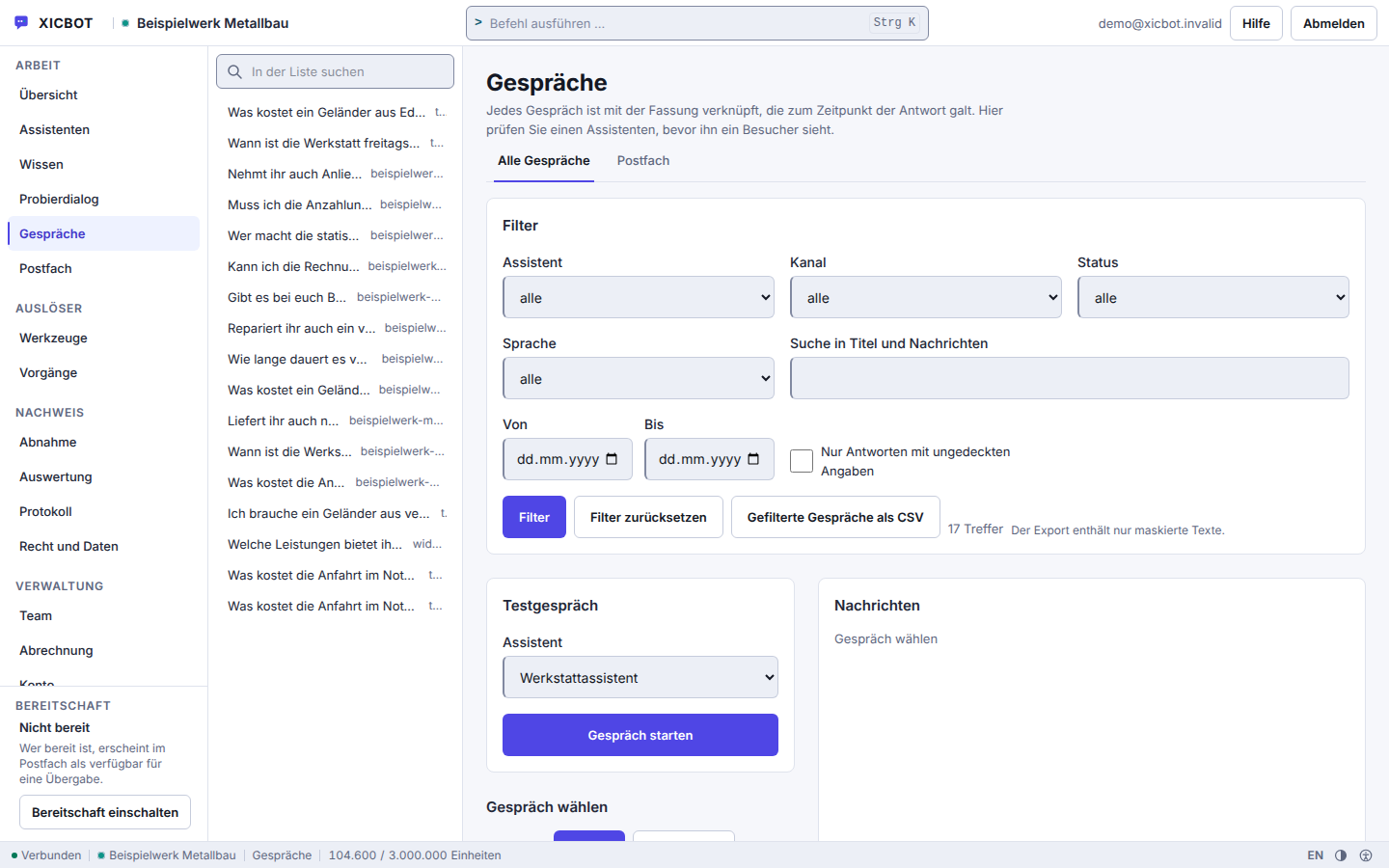
Every question from the shop sits on the left with channel and time, the filters on the right.
The switch for answers without cover shows those with no source — that is where you see what the catalogue or the knowledge base is missing.
A test conversation runs in the same view and is marked as a test conversation.
The path runs through the data, not through an installation in the shop. The first three steps decide what the assistant can say later at all; the last two make it visible and keep it running. On request a free demo with a test assistant for your own range stands at the beginning.
In the free initial consultation we clarify what your assistant should do and whether your data allows it: how does the catalogue get out of your shop, how often can it be re-delivered, and are shipping, payment and return conditions written down somewhere in a form that can be read in? On request you receive a free demo with a test assistant for your own range.
If your shop runs on Shopware in the Community Edition, you store the shop address and the access key of a sales channel for the Store API, which XICBOT uses only to query items and the currency of the channel; the key is stored encrypted and only ever shown masked. With that we connect your Shopware catalogue: it is taken from the shop and synced on a schedule, discontinued items are no longer named by the assistant, and if a sync fails the existing stock stays in place and the error is reported. With other shop systems the product catalogue is handed over as a file or through the delivery interface: title, description, price, strike-through price, image, address, availability, delivery time, rating, features, accessories and alternatives. Each call takes up to 500 items, matched by the item number — so a second run of the same file creates no duplicates. How often it is delivered decides how current the answers are.
Shipping, payment, returns, size charts and your FAQ come from your pages and documents into the knowledge base. The crawl honours robots.txt and takes at most 25 pages per run; a page carrying noindex contributes no section. Sourced answers then name their stored section — an answer without a source is recorded as a gap.
Together we define which tool the assistant may call and which call has to be confirmed first. The product search reads and runs without asking; every change to the cart, a status query and every handover to your team do not. The inputs of a tool carry no account, tenant or customer number. Which shapes exist is described under tool control.
The assistant is embedded in your shop with a short snippet, the same embed code as on any other website; even with Shopware no dedicated XICBOT plugin goes into the shop. The loader itself makes no network call, the chat window runs in its own origin, and the notice that answers come from an AI is sent by the server — the embedding page cannot remove it. The details are described under integration.
After acceptance your assistant goes live. Operation, German hosting, updates and data protection are on us. Through conversation analytics, from the Pro package, you see what is being asked and where an answer stayed without a basis: every uncovered answer is recorded as a gap. From that come the next additions to catalogue texts and knowledge base.
Between the steps there is work on your side: without a Shopware connection the catalogue has to arrive in the agreed form and be re-delivered regularly, otherwise the answers age with it. We say in the initial consultation what is needed for that — and we decline when the data does not allow a dependable assistant. We name no date for going live beforehand, because it depends on the data and not on the setup.
No online shop is like another, and the difference lies less in the trade than in the data. A fashion shop lives on sizes and variants, an electronics retailer on features and accessories, a mail-order business on shipping and return questions. Whether the assistant is any use there is decided by whether these details sit as a field on the item in the catalogue or as a section in the knowledge base — not by how well it phrases things.
The right-hand column therefore does not state what an assistant promises but what it does under that condition, and where it hands over instead. Cases beyond selling — from connecting an inventory system to ticketing — are described under tool control.
An Assistant Does Not Replace People — It Relieves ThemThe assistant takes on the many recurring product, delivery and return questions so your team has time for advice and the tricky cases. Because an AI can be wrong, we bind its answers to your Shopware catalogue or the delivered catalogue and to sections of your knowledge base, keep the handover to a person open and evaluate the conversations. That does not rule an error out, but it keeps the room for one small.
Concrete Results on RequestWould you like to know what an assistant can realistically do for your range? In the free initial consultation we look at your shop and your goals and show relevant examples from practice, without sales pressure and without empty promises.
Further reading: AI chat assistant for online shops summarises the typical use cases in retail, and recovering abandoned carts in shop chat describes how the assistant helps just before a visitor leaves.
Visitor:Is that shoe available in red as well?
Assistant:No red variant is stored for this model in the delivered catalogue. I do not name a colour that is not there — not even if it should exist in the shop.
Visitor:And what does shipping to Austria cost?
Assistant:There is nothing on this in the stored knowledge base, and I do not guess. The question now stands as an open row in your shop's gap list. If you like, I will pass the conversation to the team — please confirm once.
8 of 8
questions without a basis declined instead of guessed
eight questions deliberately outside the material; the wording of every answer is in the measurement file
The questions that come first in shop projects. Where an answer depends on a condition, the condition is stated with it and not in the small print.
XICBOT answers from the product catalogue — title, image, price, variants, availability, delivery time, rating and promotional prices. What is not in the catalogue the assistant does not show as a card, and it is instructed to invent neither product nor price. For a shop based on Shopware in the Community Edition the catalogue is taken from the shop and synced on a schedule; the assistant queries price and availability of a named item in the shop at the moment of the answer, and if the shop cannot be reached, it names the last synced state as such. With other shop systems you deliver the catalogue, and how current a card is depends on how often that happens. If someone puts together a cart in the chat, the price is calculated in exactly one place, so the chat cannot show a discount the handover does not know about; a voucher is redeemed in the shop. More on the shop assistant page.
A product card is a clickable product tile that XICBOT shows directly in the conversation: with image, title, price, list price and saving, rating including the number of votes, delivery time in days and features — plus a button leading to the address your catalogue stores for the card — your shop's cart or the product page. Instead of a text answer with links, the visitor sees a concrete, purchasable product right in the chat. Depending on the question, the assistant shows a single recommendation, a row of suggestions, a comparison of two items or a bundle. At most six hits are shown, and only what is in your own catalogue is found.
Yes. Besides the single recommendation, the assistant can contrast two products directly — price, key features and rating side by side — and suggest matching accessories as a bundle or complementary items in the sense of customers also bought. A comparison needs two items: if only one remains, it is shown on its own instead of faking a comparison. At most six hits are shown per answer, and only what is in your own catalogue is found — not even via a reference from another card. Which card types and suggestions appear is defined together for your assortment.
Many shops offer free shipping above a certain order value. From the cart rules you have stored, the assistant calculates how far the cart is from that threshold and points it out with a hint such as “only 5.30 € to free shipping". On request it suggests a matching addition. The rule is guarded against a pointless hint: a free-shipping threshold without stored shipping costs is rejected, so the assistant does not announce something that already applies anyway. The assistant only assembles the cart in the chat; payment happens in your shop — there is no separate price or stock truth on our side.
Yes, if your inventory system is connected; that connection is part of the Custom package. The order_status tool type reads the status and by default still asks before it runs, because it is a personal matter; stock comes through inventory_status and runs read-only without a query. Whatever your system returns is filtered down to the result fields named in the adapter — text fields to 600 characters, lists to 20 entries — and a reply without a confirmation field counts as a contract breach, not as a result. The call goes to exactly one stored connection, waits at most eight seconds, accepts at most 64 KiB and follows no redirect. A change to the order runs through order_change, writing and requiring confirmation. More under tool control.
The room for that is drawn tight. For every question at most five search hits from your knowledge base, plus your text blocks, go to the model, numbered, and sourced answers name the excerpts they rely on. Figures, prices and deadlines that are not in your sources are replaced with a notice. If the search finds nothing or the model declines, the assistant says that nothing on this is held in the knowledge base — and the case is logged as a knowledge gap, as is an answer without a used excerpt. Its rules forbid it to invent contact details, file numbers or appointments, or to pose as a human being. An error cannot be ruled out entirely with any language model; hence the binding to sources, the visible citation and the handover to a person.
It relieves support; we do not promise a fixed rate. Questions about availability, variants, delivery time and returns repeat every day; the assistant answers them directly in the chat and from your own knowledge base — an answer without a used citation is recorded as a gap. It gives the order status, asked about just as often, once your inventory system is connected in the Custom package. Cases that need people are handed to your team together with the conversation history instead of sending the visitor to a form. Through conversation analytics you see which matters it intercepts, where it handed over to a human and where answers are still missing in your shop — based on your own conversations, not on an industry average.
The Pro package suits the online shop: operation from 149 € per month net plus a one-time setup from 2,900 € net for catalogue connection, training, product cards, cart and conversation analytics. Operation covers hosting in Germany, care, updates and data protection. Pro contains ten seats, five assistants, 50 knowledge sources and 2,000 documents with an allowance of 3,000,000 tokens per month. If the catalogue goes beyond that or a system of your own is to be connected, the Custom package applies from 4,900 € net setup with operation by scope. All packages are listed under pricing; every project starts with a free initial consultation. All services can be cancelled monthly; there is no minimum term.
Yes. We connect the assistant to your shop based on Shopware in the Community Edition. It takes catalog, variants, prices and availability from the shop, syncs them on a schedule and can perform real actions via the cart assistant: set, add, update, remove, clear and apply a coupon. The assistant assembles the cart in the chat, and “Continue” leads into your shop — your price and stock truth continues to apply there. Only what is in your own catalogue is found. Because Shopware is an open system, your shop stays in your hands and can be extended flexibly. How the assistant works with your range in general is shown by the shop assistant.
If your question is missing, it may be in the collection of frequent questions or in the documentation. In live operation the question of the gaps answers itself: whatever the assistant could not cover is recorded as a gap and, from the Pro package, stands as a row in your account's gap list.
Free Demo
In a free initial consultation we look at your shop and say what an assistant would do on your data — and what it would not. On request with a demo loaded with your own range, so you see on real items where it answers confidently and where it declines.
Tell us briefly about your shop — range, shop system and Shopware version or, with another system, in what form the catalogue comes out: file, interface or export. Plus what the assistant should take on and which operations need a confirmation. You receive an assessment of whether the data carries, and on request a free demo with a test assistant for your shop. You can reach us by phone at +49 5123 9579000.