8 of 8
questions without a basis declined instead of guessed
eight questions deliberately outside the material; the wording of every answer is in the measurement file
The XICBOT law firm assistant takes initial enquiries around the clock, sorts them by area of law and matter, lists the right documents, proposes a first-consultation appointment and points the way to the responsible person.
This page is for law firms. The assistant takes first requests, also at night. It sorts them by area of law and by topic. It says which documents are needed. It suggests a date for a first meeting. It is not meant to give legal advice. This limit is built in.
Request a demo for your firm View pricing and packages
The line it keeps is not a matter of wording: in the system, the lock against legal advice overrides every role, every topic boundary and every handover rule, and it cannot be switched off. Every legal assessment stays with the qualified professional.
Visitor:My employer has given me notice. What can I do?
Assistant:I am not allowed to give legal advice. But I can sort your enquiry and prepare a first consultation. When did you receive the notice?
Visitor:The day before yesterday, in writing.
Assistant:For the first consultation the notice letter, the employment contract and the last three payslips are needed. Shall I suggest an appointment?
Ask it yourself, Assistant of this website
Automated assistantIn most law and tax firms the first enquiry arrives by phone or email — unstructured, outside office hours and not always with the right contact. A client describes their matter but does not know whether it belongs to family, employment or tenancy law; a tax question reaches the clerk who is currently in a meeting. The law firm assistant steps in ahead of that: it takes initial enquiries around the clock, sorts them by area of law and matter, lists the right documents and hands a structured new-client enquiry to the responsible person. What it does not do is the actual subject of this page: it is not meant to assess a case, give a view on prospects of success or offer price, deadline or promise of its own accord — what is not in an excerpt of your content, it is not meant to say. Qualification works like the lead assistant, with hosting in Germany; the answers are generated by a specialised model provider, also outside the EU on the basis of standard contractual clauses. The rules on retention and data processing are under privacy and hosting.
from 149 € per month net
Minimum term: none, cancellable monthly
All prices net, plus VAT Source: XICBOT price list, as of 11 September 2026
A law firm assistant with initial-enquiry qualification, appointment function, document checklist and conversation analytics is part of the Pro package: operation from 149 € per month net plus a one-time setup from 2,900 € net (individual training and integration). For a plain signpost with FAQ and document hints, the Start package from 49 € per month net is often enough, setup from 990 € net. Individual connection to a calendar or practice software from 4,900 € net setup. Before any quote there is a free initial consultation: we go through your areas of law, responsibilities and the path of an initial enquiry, and show in a free demo where the assistant sorts and at which point it hands over. Ongoing services are booked individually and can be cancelled monthly; there is no minimum term.
A law firm assistant is not a chat window that gives legal information. It takes on the everyday groundwork that otherwise ties up the phone and the front desk: receiving enquiries, sorting them, arranging appointments and finding the right responsibility. The following six tasks form the core — each can be tailored to your firm, for example by areas of law, locations or fixed responsibilities. The substantive assessment of a case stays with you.
The assistant asks in a structured way about area of law, a short description of the matter, urgency and the parties involved. So you receive not a vague note but an enquiry with fields — sorted, but not assessed.
If an appointment fits, the assistant names free times from your appointment types and takes the first consultation as an appointment request; the firm confirms it, and with the confirmation the client receives a confirmation email, if an email address was given. How this works in detail is covered by the booking assistant.
Depending on the matter, the assistant lists which documents make sense for the appointment — from your own templates, not made up. The client arrives prepared, the first meeting gets shorter and more productive.
The assistant guides to the right person: the fitting area of law, the responsible clerk or the correct location. No forwarding in the phone queue, no misassigned enquiries.
In a law firm, confidentiality is professional law, which is why what is not documented stands here too. The data processing agreement under Art. 28 GDPR builds its sections on measures, retention and sub-processors at delivery time from the same source the deletion runs work from — it cannot go stale while the annex changes. There is no certification and no review by an outside body. Hosting in Germany is part of operation; details under privacy and hosting.
As soon as it is about assessment, advice or a sensitive case, the assistant is meant to hand over to a qualified professional with full context — live, by email or, in the Custom package, via ticket. It replaces no one, it prepares the ground.
What the assistant can trigger is narrowly framed: at most five tool calls per answer, and everything that does more than read requires a confirmation first. The way out — into your practice software in the Custom package, for instance — knows one connection with a target check, a fixed deadline, a limit on the response size and no second attempt. Tenant and account identifiers are blocked as field names: they do not travel into a foreign system.
8 of 8
questions without a basis declined instead of guessed
eight questions deliberately outside the material; the wording of every answer is in the measurement file
For a law firm assistant to work reliably, it must keep two things cleanly apart: it may relay factual information from your content, but it must not make a legal assessment. XICBOT is built exactly that way. The assistant reads the context of an enquiry, answers organizational questions and prepares — the substantive assessment it does not give, it hands over.
The assistant reads your website and firm content: which areas of law you cover, who is responsible for what, office hours and locations, how a first consultation runs, general notes on fees and your document lists. On this basis it answers organizational questions and sorts. For anything that requires a legal assessment, it is instructed to give no information but to hand over to a human.
An ordered new-client enquiry grows out of the conversation. The assistant captures area of law and a short description, records the parties named, lists the right document checklist, proposes a first consultation and hands over in a structured way to the inbox or the responsible person. Checking them for a conflict is up to the firm; the assistant does not assess the names. Every action that does more than read is hard-set to confirmation; that is not an account setting but anchored in the tool. How calendar and practice software can be connected is covered under tool control.
The line between information and assessment is not a question of phrasing but anchored in the tool: every action that does more than read stands first as a proposal with the input in clear text, and only the enquirer's click carries it out. What is in no excerpt of your content the assistant usually does not answer — it hands over with the full conversation.
For professional confidentiality this has a practical consequence: the assistant records the parties named without assessing them; whether a conflict follows from that is for the firm to check. How long a conversation is kept and who processes it is set out under privacy and hosting.
Visitor:I have received a fine notice. Is an objection worth it, and how long do I have for it?
Assistant:Whether an objection is worth it and how long you have for it, I am not allowed to judge — prospects of success and deadlines are a legal assessment and stay with the qualified professional.
Visitor:And if I send you the notice?
Assistant:I would not assess it even then. But I can record the date of the notice, propose an appointment in traffic law and hand your enquiry to the responsible person. Shall I do that?
Visitor:Yes, please.
Assistant:The enquiry now sits with the traffic law department — with your matter, the date of the notice and a note that a legal assessment is wanted. None will come from me.
42 of 48
answers carrying a source reference
questions whose answer is in the knowledge base; six carried no source reference
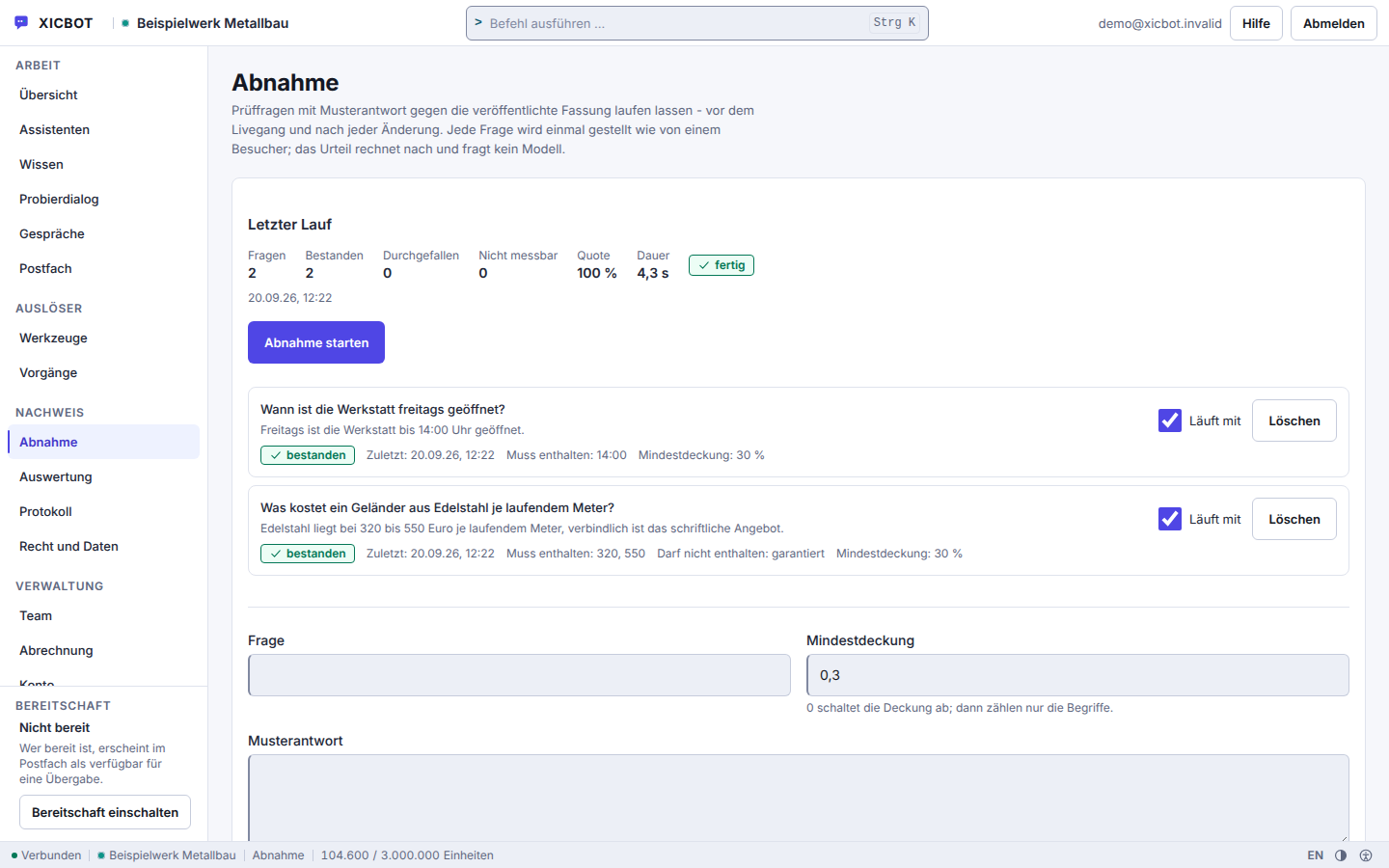
A set of your own questions runs against the assistant, each with a minimum coverage and a model answer.
The result of the last run sits at the top of the page, not in a log file.
The run can be repeated after every change to the knowledge base and blocks nothing: it shows the state, the decision to go live stays a separate one.
The path from the first message to an ordered handover runs in six steps, two of which rarely appear in a brochure: the case without a basis, and what actually ends up in the firm. For the client it feels like a short, helpful conversation. Behind it, a prepared enquiry grows for the firm that can be handled without repeated chasing — and where it stays clear that the legal assessment only happens in the meeting with the qualified professional.
The client opens the chat and describes their matter in their own words — even in the evening or at the weekend. The assistant greets them in line with the page they opened, answers organizational questions from your content and makes clear that it sorts and prepares but does not replace legal advice.
The assistant sorts the enquiry by area of law and captures a short, factual description and the urgency. It records the parties so the firm can check them for a conflict; it does not check them itself. It is not meant to assess the case or give a view on prospects of success — that remains reserved for the meeting with the qualified professional.
If the assistant finds no carrying section in your content, it does not fill the gap. It answers with a single sentence — „There is nothing on this in the stored knowledge base.“ — the same one for all four possible reasons, so that nobody reads the content out of the wording. Hard statements are held against the source material once more after the answer; whatever is not found there is replaced by a placeholder and noted as a correction.
Based on the area of law, the assistant lists the right document checklist from your templates and clarifies who in the firm is responsible — the right area of law, the responsible clerk or the fitting location. So the client arrives prepared and lands with the right contact straight away.
To finish, the assistant proposes a first consultation, takes it as a request when asked and hands the structured new-client enquiry to the inbox or straight to the responsible person — with full context. In urgent or sensitive cases it is meant to hand over to a human.
The inbox holds the enquiry with fields instead of running text, the transcript beside it. It is shown masked; the plain text is seen only by someone who holds the role for it, states a reason and accepts the line in the log. It cannot be set more finely than the role: whoever may see conversations sees those of all the firm's assistants, not those of a single department. Every question without a basis is then recorded as a knowledge gap — the next version of your knowledge base grows out of it.
The Assistant Does Not Advise — It PreparesLegal and tax advice is reserved for qualified professionals, and the assistant is meant to keep exactly this line. It gives factual, organizational information from your own content, sorts enquiries and prepares them — it is not meant to give a legal assessment, a view on prospects of success or a concrete recommendation to act. Because an AI assistant can be wrong, its answers stay bound to your content, and when uncertain it is meant to hand over to a human.
The journeys below are invented and serve as illustration: they do not come from customer projects and are not measurements. What has been measured stands beside it on this page as evidence with source and period. What they show is which work comes up before a handover and who does it today.
What We Can ShowWould you like to know how an assistant sorts and prepares your firm's initial enquiries? In the free initial consultation we go through your areas of law, responsibilities and enquiry process and put our own measurement series beside it. We show no figures from customer projects: so far we have measured on our own assistant, and presenting anything else would be a claim.
„We promise no client numbers and no legal information from the machine. We build an assistant that sorts initial enquiries, prepares them and hands them over in a structured way — and that is instructed to keep the line to advice.“ — Our approach
Further reading: AI assistant for law firms describes how initial enquiries are sorted without giving legal advice, and chatbot liability: the OLG Hamm ruling explains what a company is answerable for in chat responses.
The most common question from a firm is not what the assistant can do but what it refrains from. The answers here carry evidence: in our own measurement series, 42 of 48 answers carried the source they came from — six carried none. Those six are the reason a human decides in the end.
Questions about deadlines, prospects of success or the assessment of a specific case are not listed here, because the assistant does not answer them. What it does instead is in the answers below.
No. Legal advice is hard-blocked in the assistant's rule set, alongside medical information, the assessment of allergies and a binding financing offer. It gives organisational information from your own content — areas of law, responsibilities, process, required documents, deadlines as far as you have stored them — and sorts the enquiry. A legal assessment, a view on prospects of success or a recommendation to act are not part of it. Sourced answers name their source; if nothing is in the sections found, it says exactly that instead of composing something. For the next step the lead tool type puts the enquiry in front of a qualified professional. More under assistant for law firms.
It asks follow-up questions tailored to your firm: area of law, a short factual description of the matter, urgency and, for the conflict check, the parties involved. Which fields it collects you define on the tool; a call with missing required fields is not executed at all. What results lands as an enquiry in the mailbox of the business, with name, address, phone and matter, and files uploaded beforehand are attached. A one-time key made from conversation, tool and input prevents a second click from creating the same enquiry twice. The result is an ordered initial enquiry, similar to the lead assistant but tailored to a law firm.
Both in the same conversation, with the appointment starting out as a request. The appointment tool type takes appointment requests, reschedules and cancels — all three acts live in that one tool, and the kinds of appointment come from your own list. Because that writes, the proposal stands in plain text in the chat beforehand, and only the visitor's click creates the request; it becomes an appointment once you confirm it in your view, and if the visitor gave an email address, they then receive a confirmation email. On request the assistant names free times from your stored kinds of appointment, minus the appointments already requested or confirmed in XICBOT; a time it names remains a suggestion, and a binding entry straight into your calendar only happens with a calendar connection set up in the Custom package. The document checklist comes from your own templates: held as a maintained question-and-answer pair in the knowledge base, it goes out verbatim, without a model call — what it says is what is sent. An hourly run sends the reminder for the confirmed appointment by email, if an address is on file. More at the booking assistant.
XICBOT is built to be GDPR-compliant: hosting in Germany, a data processing agreement, data sovereignty and a deletion concept; the answers are generated by a specialised model provider, also outside the EU on the basis of standard contractual clauses. Data is only captured when it is provided in the conversation and only handed to the destinations you have defined. Inside your account a fixed ladder of roles applies: whoever invites cannot grant a higher role than their own. When our support accesses your account, it runs through a separate session that expires after four hours and leaves a log entry, without your password and without bypassing your second factor. Details under privacy and hosting.
Yes. As a responsibility signpost, the assistant routes by area of law, department or location to the right person. From your content it knows who is responsible for what and hands the enquiry over accordingly — and it is instructed to answer exclusively from your knowledge base, so that no wrong responsibility is invented; an answer without a used citation is recorded as a gap. For the handover the conversation is marked as handed over, the request becomes an enquiry, and your team is notified. For recurring organisational questions the assistant can additionally be set up as a support assistant.
A law firm assistant with initial-enquiry qualification, appointment function, document checklist and conversation analytics is part of the Pro package from 149 € per month net, plus a one-time setup from 2,900 € net. The conversation history is shown to you masked; the plain text is seen only by someone who holds the role for it, states a reason and accepts the line in the audit log. A plain signpost with FAQ and document hints is often already possible with the Start package from 49 € per month net and 990 € net setup. All details are listed under pricing. All services can be cancelled monthly; there is no minimum term.
The room for that is drawn tight. For every question at most five search hits from your knowledge base, plus your text blocks, go to the model, numbered, and sourced answers name the excerpts they rely on. Figures, prices and deadlines that are not in your sources are replaced with a notice. If the search finds nothing or the model declines, the assistant says that nothing on this is held in the knowledge base — and the case is logged as a knowledge gap, as is an answer without a used excerpt. Its rules forbid it to invent contact details, file numbers or appointments, or to pose as a human being. An error cannot be ruled out entirely with any language model; hence the binding to sources, the visible citation and the handover to a person.
For each answer the conversation run fetches five hits from your knowledge base and builds from them the excerpts the assistant may rely on. If none of the hits carries the question, it is instructed not to guess but to say that the deposited knowledge base holds nothing on the subject. In parallel the question is recorded as a knowledge gap; from the Pro package the list of knowledge gaps shows up to 50 cases and is the working stock for your next round of maintenance. On request the assistant hands over to a human: state change, mailbox entry and notification happen in one go, with the transcript attached. An open question therefore stays visible instead of disappearing into the conversation. More at the support assistant.
The assistant spots urgency in two places: the mood of the conversation and its topic. Eight word lists run behind this — among them emergency, health, allergies and complaint — deliberately without a language model, so that the handover still works when the model does not answer. Three points trigger it; asking for a human reaches the threshold on its own. If anything points to a danger to life or health, the assistant is instructed to refer to the emergency services before anything else, and that rule cannot be switched off; if the message contains an emergency word such as unconscious or heart attack, the service appends a fixed emergency notice to the answer, in German conversations with 112 for the emergency services and 116117 for the medical on-call service. The assistant is not meant to judge the case itself: the conversation moves into your mailbox with its transcript and the responsible place already assigned.
Yes. We conclude a data processing agreement with you under Art. 28 GDPR. You remain the controller under the GDPR, and we process the data solely on your instructions for the agreed purpose. It governs purpose limitation, technical and organisational measures as well as deletion and data minimisation, so you can cleanly add the assistant to your record of processing activities. Those measures are not a declaration of intent: tenant separation is enforced in every database query, not in the individual controller, the conversation history is displayed masked, and a plain-text retrieval requires the matching role, a stated reason and leaves a log line behind.
If your question is missing, that is a knowledge gap like any other in operation: it goes on our list and gets answered rather than guessed at. In the initial consultation we answer it directly.
Free Demo
In a free initial consultation we look at your areas of law, responsibilities and enquiry process and show how an assistant qualifies initial enquiries, arranges appointments and hands them over in an ordered way — without crossing the line into advice. For the demo we read in your own content and run a check set of your own questions against it; you see the result before anything goes on your website.
Tell us briefly about your firm — which areas of law you cover, how initial enquiries reach you and who is responsible for what. We tell you which of those enquiries an assistant can sort and which it has to hand over after the first follow-up question, and on request we set up a free demo with your own content. You can reach us by phone at +49 5123 9579000.