8 of 8
questions without a basis declined instead of guessed
eight questions deliberately outside the material; the wording of every answer is in the measurement file
The XICBOT assistant lives on your practice website, accepts appointment requests around the clock, states consultation hours, explains which documents to bring and sorts questions about prescriptions and referrals.
This page is for medical and therapy practices. The assistant takes requests for a visit, also outside your hours. It names your opening hours and free times. It says which papers patients should bring. A date only counts once the practice confirms it. It is not meant to answer medical questions. It passes them on to your team.
Request a demo for your practice View all prices
It is deliberately not meant to answer medical questions itself: it is a guide and hands over to your team. This way it relieves phone and reception, GDPR-compliant with hosting in Germany.
Visitor:Can I come in for a check-up next week?
Assistant:Tuesday 9:20, Wednesday 15:40 and Friday 11:00 are free.
Visitor:Wednesday works.
Assistant:Noted for Wednesday, 15:40. Please bring your insurance card and any previous findings. I do not comment on medical questions — the practice covers that in the appointment.
Ask it yourself, Assistant of this website
Automated assistantIn practices the phone usually rings exactly when no one in the treatment room can pick up. Callers end up on hold, reception juggles two things at once, and in the evening or on weekends appointment requests go entirely unanswered. The XICBOT assistant for practices closes this gap: it answers the ever-recurring questions about consultation hours, availability and preparation, captures appointment wishes and can name free times from your appointment types via the booking assistant. Unlike a rigid menu tree it knows the specific details of your practice and works like a support assistant around the clock. Crucially: it is not meant to give medical information, but to guide people to the right contact and hand over to a human.
The assistant takes on the recurring organisational matters that today tie up phone and reception. It answers them directly from the details you have stored and forwards whatever a human must decide. The six areas form the core and can be configured individually for every practice, from the appointment types and consultation hours to the wording that fits your house.
The assistant states your consultation hours, suggests free times from your appointment types and captures the appointment wish with all necessary details, around the clock and even when no one in the practice can answer the phone.
Questions about opening and consultation hours, holidays, cover or availability by phone are answered by the assistant directly from your stored details, instead of keeping callers on hold.
It explains which documents, referrals or insurance cards to bring to the appointment and how to prepare for an examination, so the visit runs smoothly.
It sorts questions about prescriptions, repeat prescriptions, referrals or certificates and forwards them to your team in a structured way. It is not meant to give medical information itself, but to ensure the matter arrives.
Recurring standard questions run through the chat instead of the phone. This takes pressure off reception, shortens waiting times and frees up time for the people who are currently on site.
As soon as something becomes medical, urgent or delicate, the assistant is meant to hand the conversation to a human with full context or note a callback. It does not replace your team, it relieves it.
The assistant is instructed to answer from what you have stored, and from nothing else. Sourced answers name the section of your knowledge base they rest on; where it finds none it usually does not guess, but says that nothing is stored on the matter. Hard details such as deadlines, time spans or phone numbers are checked once more against the source material after writing: whatever is not in there is replaced by a note, and the visitor is told in the same conversation that a correction was made. A thin knowledge base therefore shows up mainly in short answers.
Questions it found nothing on are recorded as gaps. From the Pro package your practice then sees a list of the gaps instead of a guess about what patients wanted to know.
8 of 8
questions without a basis declined instead of guessed
eight questions deliberately outside the material; the wording of every answer is in the measurement file
An assistant in a practice may be helpful, but must not give the impression that it replaces a medical assessment. That is why the boundary is built into XICBOT firmly: the assistant is instructed to give no diagnoses, no treatment recommendations and no information about symptoms, medication or findings. It answers organisational questions and guides people to the right contact. When a question contains a medical signal word, the service appends a fixed notice and hands the conversation to your team, in urgent cases with a clear pointer to the medical on-call service or, in an emergency, to the emergency number. This keeps responsibility where it belongs, and visitors still get reliable orientation.
Most appointment requests arise outside consultation hours: in the evening, on weekends or during the lunch break. The assistant accepts them anyway, states free times and records the appointment wish, so your team finds it the next morning as a request only needing confirmation; with the confirmation the patient receives a confirmation email, if an email address was given. This way no request is lost just because no one could pick up.
The assistant deliberately stays in its role. It sorts matters and shows the right path, but it is not meant to assess symptoms or recommend a treatment. Everything medical goes to a human, with full conversation context, so your team does not have to start from scratch. This boundary protects your patients and relieves your team at the same time.
This boundary is a rule, not a medical judgement. The assistant does not recognise how serious a matter is — it recognises that the matter is turning medical, and stops at that point. The pointer to the medical on-call service and the emergency number is therefore stored as fixed wording and does not depend on an assessment triggering it.
And this belongs with it: if someone types their symptoms into the chat anyway, the assistant does not engage with them — yet the text still sits in the conversation history afterwards. What is stored is what was typed, not only what was answered. How long it stays there is decided by the conversation period: 90 days by default, shorter if you set it shorter; why checking it is worthwhile is explained further down under data protection.
Whether a general practice, a dental practice, a physiotherapy, a naturopath or a veterinary practice: the organisational everyday is similar, and that is exactly where the assistant starts. In a general practice it captures appointment wishes for consultation and check-ups and explains what to bring to the examination. In a dental practice it answers questions about check-up and prophylaxis appointments and about availability for acute complaints, without judging itself whether it is acute. In physiotherapy it clarifies which prescription is needed and how many treatments are planned, and accepts appointment requests. In a veterinary practice it answers questions about consultation hours, vaccination appointments and availability in an emergency. In every case it speaks the language of the enquirer and forwards everything clinical to the team. It also stays helpful for patients who do not speak German; how that works is described on the multilingual assistant page.
Less Phone Load, More Time for the People on Site Every call answered in the chat instead relieves reception. The assistant takes the ever-same questions around the clock, including when nobody in the practice can pick up; in the morning the result sits in the inbox as a list instead of as a backlog on hold. How much that amounts to in your house depends on how large the organisational share of your calls is — we do not state a figure for it, because we have not measured it for your practice.
The boundary can be written in two columns, and that is exactly how it is configured. On the left is what the assistant finishes on its own: information that sits in the details you have stored, and appointment steps for which you have given it the type, lead time and time window. On the right is what it is not meant to touch, regardless of how obvious the answer may seem. The transition between them is not a judgement call: it is not meant to assess how serious a matter is, and when the question contains a medical signal word, the service passes it on.
How this splits depends on your practice and on what you have stored. The figure below comes from our own measurement series against our own assistant, not from a practice; a figure from the live operation of a practice is not available to us, and we do not write down one we have not measured.
43 of 48
questions without a handover to a person
measured on a single assistant on our own knowledge base, not on customer projects; a figure from live operation is not yet available
Visitor:My son has had bad earache since last night. Is that serious?
Assistant:Whether it is serious I do not judge — I say nothing on that. If it cannot wait, please turn to the medical on-call service, or in an emergency to the emergency number. Shall I pass the matter to the practice and note a callback?
Visitor:Yes please, ideally a callback this morning.
Assistant:Passed on: acute earache since the night, callback requested for this morning. The answer to it comes from the practice, not from me.
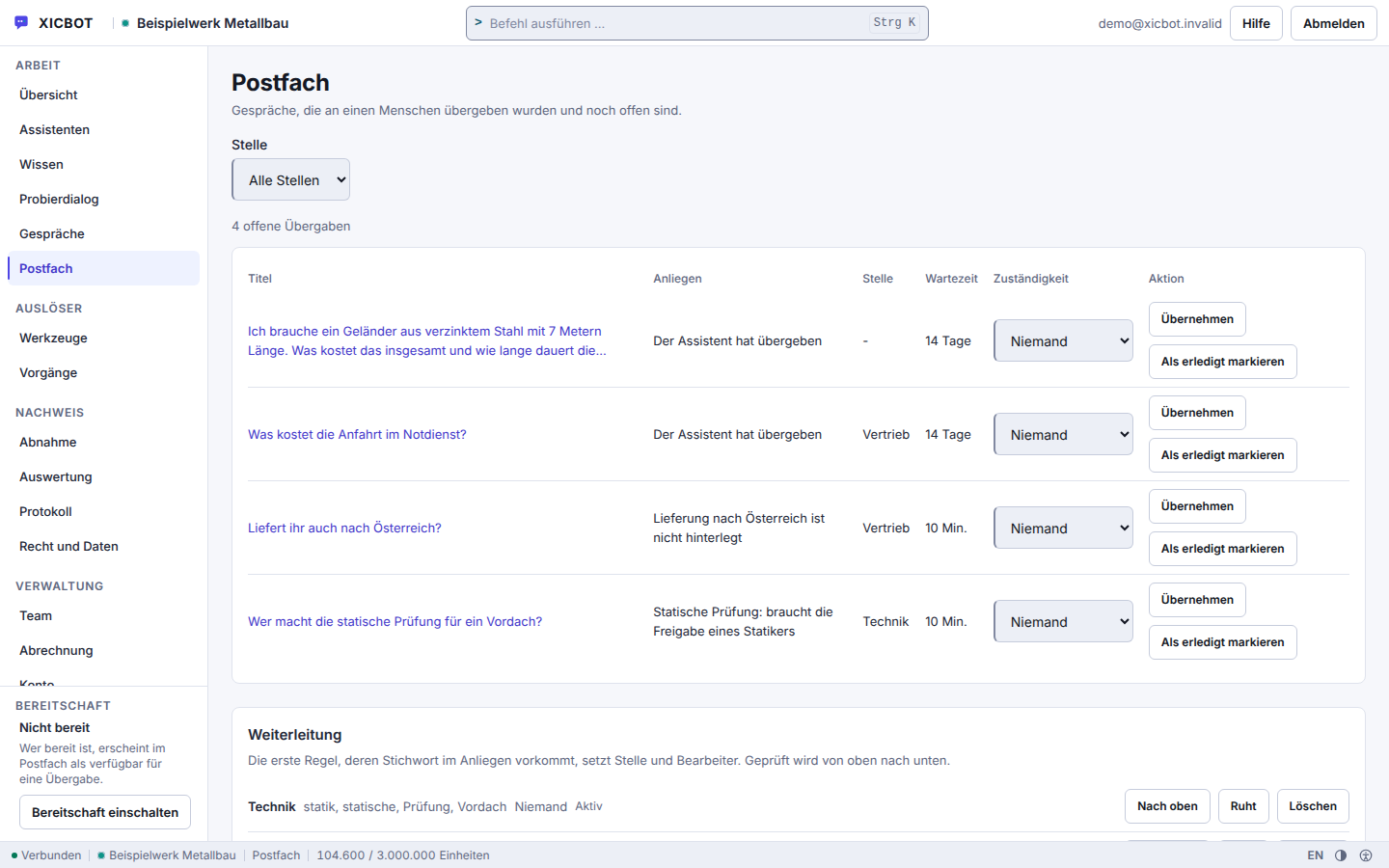
Each handover carries the request and the waiting time, so urgent cases do not sink.
Assignment and resolution sit in the same row as the request itself.
The routing rules below determine which queue picks up a topic.
The path to a finished assistant is manageable, and we take the setup off your hands. We align every step with you so the assistant fits your practice's workflows and the boundary to medical advice is drawn cleanly. The starting point is your knowledge base with consultation hours, appointment types and preparation notes.
In the free initial consultation we clarify your consultation hours, appointment types, cover rules and the most common questions. Together we define what the assistant answers itself and what it hands to the team.
Before the assistant says a word, we record what it answers and where it stops: appointment organisation, consultation hours and documents on one side, symptoms, medication and findings on the other. The sentence with which it points to the medical on-call service and the emergency number is also fixed verbatim, so that it reads the same in every conversation.
We train the assistant on your details and store your appointment types via the booking assistant. Reading and requesting happen with clear permissions, so only what you have approved can happen.
A new account starts with 90 days for conversations and 30 days for the log; no period is set at the factory for enquiries, uploaded files and visitor attachments, and without a period the clean-up run removes nothing there. That is why this is a step of its own: Administration checks per data type how long something stays, and the Owner accepts the data processing agreement. The agreement is generated from the same state the deletion runs read, and lists the measures still open itself rather than presenting them as done.
The assistant is embedded in your website or practice system with a short code snippet. It adapts to your appearance and loads with good performance, without a bloated third-party widget.
After joint testing, the assistant goes live. We support ongoing operation, keep the content current and improve the answers based on real conversations. We are happy to discuss concrete results in a personal conversation.
A new assistant is created as a draft. What the machine proposes from your sources — role, tone, first answers — goes live only once a human has accepted it. Advertising words that carry a promise are stripped from such a proposal by the system and the removal is named in the report, so that nothing stands on a practice page that nobody promised.
Which package fits is essentially decided by a single question: should the assistant only capture appointments, or also book them? Capturing means it records the appointment wish, name and callback request and puts them in your team's inbox. Booking means it names free times from your appointment types, creates the appointment once the visitor has confirmed and keeps the slot occupied — that sits in the Pro package. If the appointment should land directly in your own calendar, it takes a calendar connection, and that is part of the Custom package. Everything else — consultation hours, documents, prescription routes, languages — depends on your knowledge base, not on the package.
from 149 € per month net
Minimum term: none, cancellable monthly
All prices net, plus VAT Source: XICBOT price list, as of 11 September 2026
For practices the Pro package usually fits: a one-off setup from 2,900 € net (individual training, appointment connection and integration) plus operation from 149 € per month net (hosting in Germany, care, updates, GDPR). Included are appointment requests and booking, lead features and conversation analytics. If a pure information and guide assistant without appointment booking is enough for you, the Start package from 49 € per month net is sufficient. Every project begins with a free initial consultation and a free demo with a test assistant for your practice website. Ongoing services are booked individually and can be cancelled monthly; there is no minimum term.
In healthcare in particular, how data is handled matters. Your practice remains the controller; we process on instruction and under a data processing agreement. The language models run through our own gateway — it is listed in the register of sub-processors, self-operated, in Germany. Behind it, the answers are generated by a specialised model provider, also outside the EU on the basis of standard contractual clauses; data is neither passed on nor sold. How we implement data protection and hosting in detail is covered under privacy and hosting.
Consent comes before the first stored line, where you require one: without it the chat writes no record at all, and that is checked before writing rather than afterwards. A visitor's IP address is not held in clear text, only as a hash value; with IPv6 the rear part is dropped before the calculation even starts. And a visitor reaches their own conversation without an account: view it, withdraw consent, delete it. When something is deleted, the log line is written before the deletion and in the same transaction — if the log fails, nothing is deleted and the call reports an error instead of quietly disappearing.
What belongs with this, uncomfortable as it is: a freshly created account starts with 90 days for conversations and 30 days for the log; no period is set for enquiries, uploaded files and visitor attachments, and without a period the clean-up run removes nothing there. Checking these periods and setting the missing ones is a setup step, not a tick box that sits there from the factory. If a visitor deletes their conversation, the files they uploaded go with it; enquiries and appointment requests that arose from it stay with the practice and follow the enquiry period. Your team sees the history masked in the inbox; clear text depends on a role, a stated reason and a log line — masking protects the display, not the storage.
And there is no attestation from an outside body, neither for the technical and organisational measures nor for accessibility. Some of the measures in the annex to the agreement stand as placeholders for as long as they cannot be evidenced on the delivered state, and the agreement counts those open points itself. Anyone running a practice should know this before entering the assistant into their record of processing activities — we would rather deliver the details complete than pretty.
Further reading: AI assistant for medical practices describes tasks and limits in healthcare, and appointment requests via chat shows how appointment requests are handled without double bookings.
The questions below are the ones that come up most often in initial conversations with practices, usually in this order: first the boundary to advice, then the calendar, then data protection, then the price.
No. Medical information and the assessment of allergies are hard-blocked in the assistant's rule set, together with legal advice and a binding financing offer; the rule on the emergency number takes precedence over everything else and cannot be switched off. It answers what is organisational: consultation hours, kinds of appointment, documents to bring, how to get there. Even that, as instructed, only from your own sources — sourced answers name their source, and an answer without a used excerpt is recorded as a gap. If a question contains a medical signal word, the service appends a fixed notice and hands the conversation with the full transcript to your team; and the assistant is not meant to claim to be a human being.
It takes appointment requests for the practice; a request only becomes an appointment once your team confirms it. You decide with your list which kinds of appointment are on offer, and the appointment tool type works with a confirmation in between, because creating the request is a write operation: the proposal states kind, day and time in plain text in the chat, and only the visitor's click creates the request. A request is only possible if the lead time fits and the moment falls into an approved window; occupancy is checked under a lock. Once your team confirms the request, the patient receives a confirmation email if they gave an email address. On request the assistant names free times from your stored kinds of appointment — time windows, duration, lead time and buffer — minus the appointments already requested or confirmed in XICBOT; it does not compare them with an external calendar, and a time it names remains a suggestion. The assistant enters appointments straight into your practice calendar only with a calendar connection set up in the Custom package. More at the booking assistant.
The assistant checks occupancy under a lock: the check and the entry happen in one go, so a time slot is not given out twice. Against a double click there is a bolt in the database rather than in the program flow — the same request submitted twice does not create a second request. An appointment request becomes an appointment when your business confirms it. Without a calendar connection the assistant counts the appointments already requested or confirmed in XICBOT; what is only in an external calendar it does not see. With a calendar connection set up in the Custom package it reads free times through the calendar-availability form and writes the entry through the calendar-booking form; then the free times offered follow your calendar — including appointments that came in by phone or email. The check under a lock does not apply on this path: whether a slot taken in the meantime is rejected at booking is decided by your calendar. XICBOT sends each booking with an idempotency key by which your calendar can recognise a booking submitted twice.
Hosting is in Germany; the answers are generated by a specialised model provider, also outside the EU on the basis of standard contractual clauses. There is a data processing agreement, a deletion concept and no passing on of data. Because the assistant is not meant to give medical information, it is instructed to hand matters involving health details over to a human; this happens as a fixed step when the question contains a medical signal word. By then the model has already received the message itself, and it is part of the stored conversation. On top of that come safeguards you set yourself: retention periods per kind of object, a visitor who can delete their own conversation without an account, and a visitor address that is never stored in clear text. The plain text of a conversation is seen only by someone who holds the role for it, states a reason and accepts the log entry.
Yes. We conclude a data processing agreement with you under Art. 28 GDPR. You remain the controller under the GDPR, and we process the data solely on your instructions for the agreed purpose. It governs purpose limitation, technical and organisational measures as well as deletion and data minimisation, so you can cleanly add the assistant to your record of processing activities. Those measures are not a declaration of intent: tenant separation is enforced in every database query, not in the individual controller, the conversation history is displayed masked, and a plain-text retrieval requires the matching role, a stated reason and leaves a log line behind.
The assistant spots urgency in two places: the mood of the conversation and its topic. Eight word lists run behind this — among them emergency, health, allergies and complaint — deliberately without a language model, so that the handover still works when the model does not answer. Three points trigger it; asking for a human reaches the threshold on its own. If anything points to a danger to life or health, the assistant is instructed to refer to the emergency services before anything else, and that rule cannot be switched off; if the message contains an emergency word such as unconscious or heart attack, the service appends a fixed emergency notice to the answer, in German conversations with 112 for the emergency services and 116117 for the medical on-call service. The assistant is not meant to judge the case itself: the conversation moves into your mailbox with its transcript and the responsible place already assigned.
Wherever appointment requests and recurring organisational questions come up: general and specialist practices, dental practices, physiotherapy, naturopathic practices, veterinary practices and medical care centres. The assistant is not meant to give medical information — legal advice, medical information and the assessment of allergies are hard-blocked in the rule set, and the rule on the emergency number takes precedence over everything else and cannot be switched off. Only what you have approved can be requested: the kind of appointment has to be known to your practice, the lead time has to fit and the moment has to fall into an approved window; occupancy is checked under a lock, and a request becomes an appointment only once your practice confirms it. More under assistant for practices.
For practices with an appointment function the Pro package usually fits: a one-off setup from 2,900 € net plus operation from 149 € per month net, including hosting in Germany, care, updates and GDPR. It contains ten seats, five assistants, 50 knowledge sources and 2,000 documents. The appointment function creates a request that your practice confirms; only after that does a reminder go to the stored e-mail address. A pure information and guide assistant without appointment requests is possible as the Start package from 49 € per month net and 990 € net setup. All details are listed under pricing. All services can be cancelled monthly; there is no minimum term.
If your question is missing, that is no accident: only what we can evidence is written here. Everything else we clarify in the free initial conversation, and whatever comes up there ends up in this list afterwards.
Free and Without Obligation
In a free demo we connect a test assistant to sample details of your practice and show you how it accepts appointment requests, explains consultation hours and documents and cleanly hands medical questions to your team.
Tell us your website and your typical requests — appointments, consultation hours, documents or prescription info. We will show you, with no obligation, how the assistant answers and where it cleanly hands over to your team. You can reach us by phone at +49 5123 9579000.