42 of 48
answers carrying a source reference
questions whose answer is in the knowledge base; six carried no source reference
You create an account, add your website and documents as sources, review the first answers and embed the widget with a single line. If you would rather not walk that path yourself, book the setup and receive a finished assistant.
Here you create an account yourself. Then you add your website and your documents as sources. You check the first answers. Then you add the chat window to your site with one line. Would you rather not do this yourself? Then book the setup as well. You then get a finished assistant.
Create account See packages and scope
Visitor:What happens after I have created the account?
Assistant:You add your website as a source. It is then read and indexed, and you see the first answers in the test dialogue.
Visitor:And when is the widget on my site?
Assistant:As soon as you insert the line. Before that you check in the preview how it looks and how it answers.
Visitor:And what if something is not in my material at all?
Assistant:Then the assistant is instructed to say so and hand over to a human instead of guessing. The question is recorded as a gap.
Ask it yourself, Assistant of this website
Automated assistantAn assistant trained on your own content is not a project that runs for weeks — it is a manageable setup: name the sources, review the answers, approve them. This page describes the whole path so you know before signing up what to expect, what to have ready and where a decision is needed. What the assistant can do afterwards is described under Features; what it answers from, under Knowledge base.
Company and email address are mandatory, the name is optional; the password needs at least twelve characters with letters and digits. The address is normalised before it is stored, so that capitalisation or an appended plus sign do not turn one person into three accounts with three tenants. The confirmation link is valid for two days; until it is clicked, every protected request is refused. No payment method is required for this step.
You create your first assistant: name, language or languages, tone of voice and how it handles questions it cannot answer. It starts as a draft and only answers once it has been switched to active and the widget has been released — two separate switches, so nothing ends up on your site by accident. These settings determine how the assistant appears, not what it knows — that comes in the next step.
You enter your website address and upload documents, PDFs, FAQs or price lists; four source types are available: free text, file, website and question collection. Text and file are split within the same request, a website is queued as a job instead — a foreign server with a foreign response time and up to 25 pages per run would otherwise run into a timeout. For every source you see when it was last read and how many sections came out of it.
Before the assistant appears on your site, ask it the questions your customers actually ask. Every statement is meant to carry the number of its excerpt, and an answer without a single used piece of evidence is recorded as a gap. What is missing you add to the knowledge base; what sounds wrong you correct at the source rather than at the assistant.
You copy one line into your website or shop template: a single script element whose mandatory attribute is your assistant's public key. From the next page view it is visible. You define the permitted domains yourself, so the widget only loads where it belongs; if the list stays empty, every host is permitted.
Every step leaves a trace: signing up writes a log entry, every source its reading state with a reason in case of failure, every tool call its own line before execution. This is not decoration — when an answer looks wrong later, it is the way back to the cause. What becomes of it in daily operation is described under Conversation analytics.
Setup mostly takes as long as gathering the content takes. Anyone with the following at hand is through in one sitting. None of it is a prerequisite for signing up — you can create the account and add sources later.
The home page is enough. XICBOT follows the internal links and reads the pages you release. Pages that do not belong in the knowledge base can be excluded.
Manuals, data sheets, brochures, FAQ collections and price lists as PDF or text file. The more concrete the material, the fewer questions stay open.
When the assistant cannot proceed, it hands over to a human. That requires a mailbox or a form target that receives the enquiry together with the conversation.
For the widget, one place where a line can be inserted before the closing body tag is enough: website builder, CMS, shop theme or tag management.
defer; the mandatory attribute is data-xicbot carrying the assistant's public key.data: address; if your policy does not allow that for images, the trigger shows the brand dots.For the data processing agreement and the entries in your privacy policy. What is processed and for how long is described under Privacy and hosting.
Ten to twenty real questions from phone, email and chat. They are the yardstick: what the assistant answers from them, it will answer in production too.
If you would rather not gather this list yourself, have it put forward: the setup assistant reads your website and turns what it read into a proposal together with a list of gaps. A proposal is not yet a result — you accept it, field by field.
Both lead to the same result; the difference is the effort on your side. Anyone who knows the content anyway and wants to shape the assistant personally will get there alone: the interface guides through sources, answers and embedding, and every step can be undone. Anyone without the time for gathering and reviewing can book the setup — then we collect the sources, set up the assistant, review the answers and hand over a finished result that you maintain yourself from then on.
Setup is a separate service Ongoing operation and one-off setup are charged separately. Which packages exist, what each contains and which minimum term applies is stated on the pricing page. Without booked setup the path above stays open — no feature is lost, you simply do the work yourself.
The setup assistant is an additional path, not a mandatory step: every field can be filled in by hand. The difference is not speed, but where the sentences come from and whether their origin can still be looked up later. The principle behind it fits into one sentence: the machine proposes, the human accepts.
You accept field by field, and the questions taken over then run through the test dialogue like any other question. There is only ever one run: while one is open, a second is refused with the note that one is still running.
42 of 48
answers carrying a source reference
questions whose answer is in the knowledge base; six carried no source reference
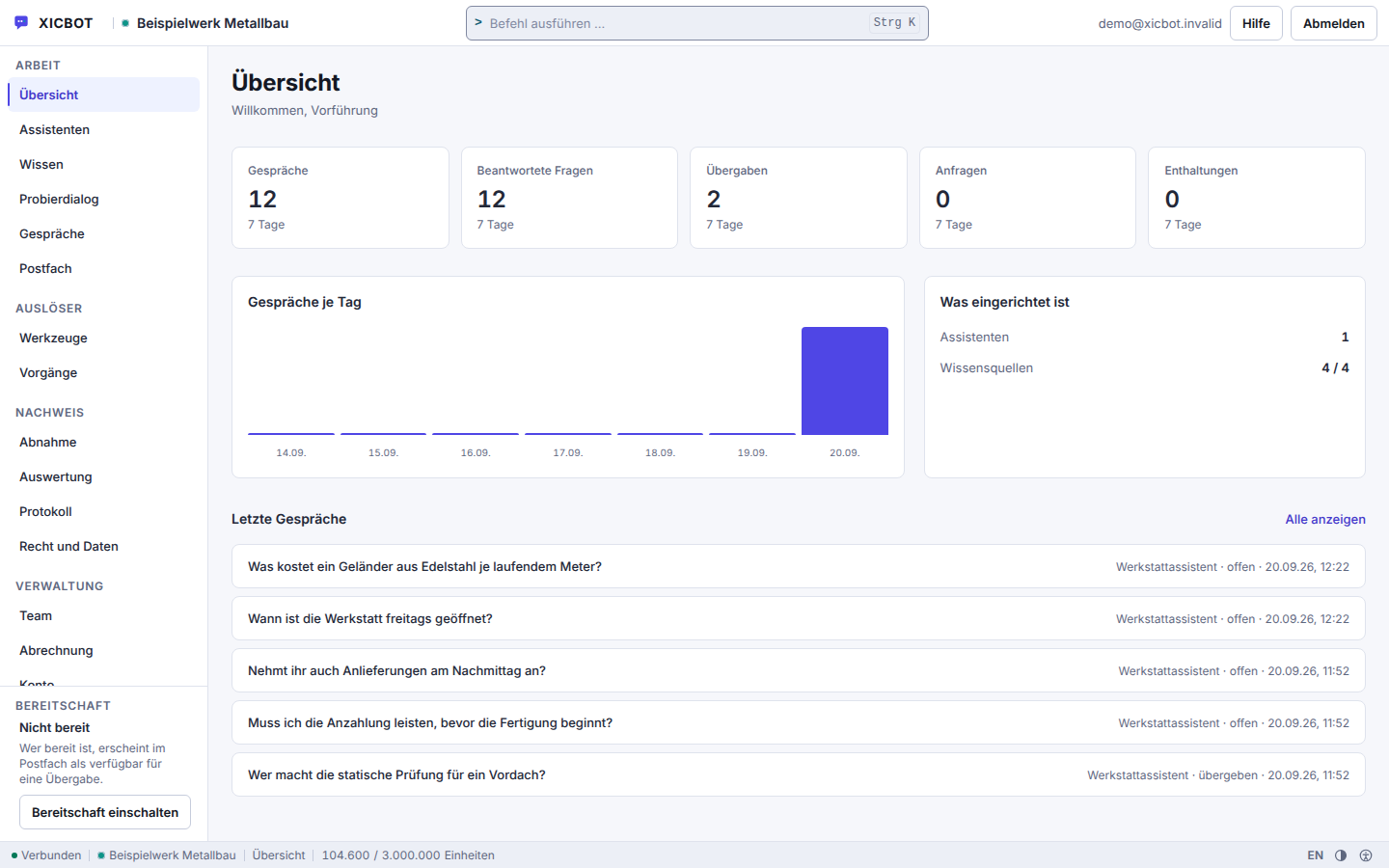
The overview lists four steps: create the assistant, add knowledge, embed the widget, test dialogue.
The widget step only appears once an assistant exists; a completed step disappears from the list.
The figures for the last seven days sit above it as soon as conversations exist; the left column leads into work, triggers, evidence and administration.
2,670
sections from 70 documents in our own knowledge base
the corpus of the assistant answering on this site
Six questions come up again and again before signing up. The answers describe how the product works today, not what it is meant to do one day.
No. Registration takes an email address, a company name and a password of at least twelve characters containing letters and digits; the confirmation link for the address is valid for two days. No payment method is requested. Your account starts on the Start package and is active once you sign up, while the first assistant sits there as a draft. It goes live as soon as you flip two switches: the assistant to active and the widget to enabled. There is no step where we would first have to unlock something. What the plans cost and which limits they carry is listed under pricing; the ongoing services can be cancelled monthly, and there is no minimum term.
That depends almost entirely on how quickly your content is at hand. Account and assistant are a matter of minutes, reading in the sources runs in the background: a website fetch takes at most 25 pages per run and records how many links were left open, so that a capped crawl does not pass as complete. The start page of the account leads through four steps, and a newly created assistant stays a draft until you set it active. The time to plan for is reviewing the answers; for that there is a test set of questions with expected answers, judged without a model. A quiet hour with your real customer questions is worth it.
Yes. One website is enough for the first answers. The crawler follows the rules in your robots.txt and takes in a limited number of pages per run; from these come the sections the assistant cites in its answers. You can add more at any time: there are four source types — text, file, website and question-and-answer collection. The assistant does not have to be rebuilt for that: every index run writes a new version and only switches over at the end, and a failed run leaves the previous state answering instead of creating a gap.
Then the assistant stays in your account and you carry on working there: under Trial you ask it questions like a visitor, under Acceptance you run a test set of questions with expected answers against the version in force — judged without a model, on grounds you can recalculate. Running on your website takes two separate switches: the state active and the widget switched on. As long as one of them is off, the public address answers as if the assistant did not exist — switched off, paused and unknown look identical from outside. The embed is later a single script tag with the public key, together with the checksum of the delivered file. Knowledge base, versions and settings are untouched by all this.
Yes. You invite additional people into your account and assign rights per person. The roles build on each other: Read, Edit, Administration and Owner. Read sees assistants, knowledge, conversations and analytics but changes nothing. Edit creates and changes assistants, works on conversations and maintains routing, tools, knowledge, catalogue and cases. Administration additionally deletes assistants and conversations, renews the widget key, sets the deletion periods, blocks visitors, sees the log and manages team, API keys and shop connection; the address, access token and minimum role of a tool are also changed only by Administration. The first three roles can be invited, and nobody can assign a higher role than they hold themselves. An invitation you have sent already occupies a seat in your package — accounts plus open invitations are counted. Every change is attributed in the log to the account that triggered it. Reserved for the Owner are accepting the data processing agreement, confirming the sub-processor state, the weekly report, viewing clear text, the handover address, exporting all data and deleting the entire account.
Deletion removes assistants, knowledge base and conversations. Only the account owner triggers the whole process, not administration, and it requires a typed confirmation word. The run works through a fixed catalogue of 39 tables in a fixed order; if that catalogue is incomplete it aborts instead of deleting half. The log line for the process is written before the deletion, not after. Beforehand you can take your data out: there is an export of the data stored in the account and one for conversations. Which data is stored for how long, and what has to be kept longer for legal reasons, is described under Privacy and hosting.
If something stays open, the documentation is the next step: it describes every area of the application, the widget and the API, starting with the quick start. Open the documentation
Write us briefly what it is about and, if available, your website URL. You will receive a factual first assessment of which sources are suitable and which package fits the scope. Only your topic, name and email address are required. By phone you can reach us at +49 5123 9579000.
No payment method is required to sign up; billing starts with the operation of an assistant. If we take over the setup later after all, you carry on in the same account afterwards, with the same rights and without depending on us.