Appointment Requests via Chat Assistant
Name free times, take requests and send reminders before confirmed appointments if an email address is on file: how a chat assistant relieves phone and desk.
In plain language
On the phone, slots are given out one by one and only in opening hours. Many people now prefer to book online, often on their phone. In the chat, the assistant sees what kind of appointment is wanted. It names open times and takes a request. It holds that time straight away. The appointment only becomes binding once the business confirms it. It does not offer times that are taken and does not make up an appointment. In a doctor's practice it is not meant to give health advice but to pass rare cases to the team.
A call during the lunch break, the line is busy, the next attempt ends at the answering machine: for many practices, service providers and car dealerships, booking appointments by phone is a daily bottleneck. While the phone rings at reception, people are waiting on site, and anyone who needs an appointment in the evening or at the weekend reaches no one. Yet 64 percent (Bitkom) of people in Germany have already booked a doctor's appointment online at least once, and the wish for digital booking has long applied well beyond practices. This is exactly where a booking assistant in the chat comes in: it names free times from the stored appointment types, takes the appointment request when asked and, if an email address is on file, reminds in good time before the confirmed appointment so fewer appointments fall through. This article explains how appointment requests via chat work, which tasks the assistant takes on, where its limits lie and how the phone and reception desk can be noticeably relieved, without anyone having to give up personal contact.

Labels in the illustration
- XICBOT
- Sure. Here are open slots
- for next week in the morning.
- Mornings please, next week
- Mon 09:00
- Wed 14:30
- Fri 11:00
- Appointment requested
- Friday, 12 June, 11:00
- Awaiting confirmation by the clinic
- Type a message
- Occupancy checked, no double booking
- With an email address: reminder 24 hours before
- Appointment list
- Free times from your appointment types
- Friday, 12 June
- 09:00
- taken
- 10:00
- free
- 11:00
- requested
- 14:30
- free
- 16:00
- taken
- Requests without a queue
- after hours and at weekends too
- Take appointment requests by chat and relieve phone and reception
Why booking by Phone Becomes a Bottleneck
The phone is a serial channel: it can only ever handle one conversation at a time. During the morning peak, when many people call at once, this turns into a queue, a busy signal or a callback that often never comes back. Every one of these moments is a point where an appointment request is lost. For the business this means not only missed appointments but also permanently tied-up staff: anyone taking calls all day has less time for the people who are already on site. On top of that comes the time limit. A large share of appointment requests arises outside opening hours, in the evening after work or at the weekend (project experience). That is exactly when no one is reachable, and the request fizzles out or moves on to the next provider.
At the same time, people's behaviour has shifted. They are used to sorting things out themselves and immediately, independent of opening hours. In Germany, just over two fifths (Statcounter) of page views came from mobile devices in 2025, often from people who want to clear something up quickly on the go rather than reach for the phone. A form that first gets checked and answered by callback is a detour for them. Anyone who can instead see and request an appointment right at the moment of interest is less likely to bounce. The booking assistant closes exactly this gap by adding a parallel, round-the-clock channel to the serial, opening-hours-bound phone intake.
How the Appointment Request in the Chat Works
The flow is deliberately designed to feel like a short, friendly conversation and still lead to a clean appointment request. The assistant greets the visitor to suit the page, clarifies the request in one or two follow-up questions and proposes concrete times that are free according to the stored appointment types. What matters is that it does not work with a generic calendar but with your own settings: it calculates with the time window, duration, lead time and buffer of each appointment type and subtracts appointments already requested or confirmed, so no occupied time is proposed. Only once a slot is chosen does it collect the necessary details and take the request; it becomes binding once the business confirms it. The whole path takes seconds instead of a queue and runs regardless of whether anyone at reception can pick up the phone right now.
- Greeting that suits the page and a question about the request
- Recognise the right appointment type, such as first consultation, check-up or test drive
- Name free times from the stored appointment types, without requested or confirmed appointments
- Let the visitor choose the preferred time and collect the necessary details
- Take the appointment request and hold the time directly
- Once the business has confirmed, remind by email in good time before the appointment, if an address is on file
In this way a single assistant covers the whole path from the first question to the checked appointment request. It replaces not only the enquiry form but also part of the manual follow-up at reception: checking occupancy, with a set-up calendar integration (Custom package) the binding entry there and, if an email address is on file, reminding shortly before the confirmed appointment. How the assistant is trained for your specific appointment types, durations and opening hours is part of the setup and can be adjusted at any time. A detailed overview of the functions can be found on the page about the booking assistant.
-
Name free times
On request, the assistant names free times, calculated from the time window, duration, lead time and buffer of your appointment types minus appointments already requested or confirmed. Every time it names is a suggestion, not a commitment.
-
Request appointments
On request, the assistant takes the chosen slot as a request and holds it directly, with a check against double booking; the appointment becomes binding once the business confirms it.
-
Confirmation by the business
The request appears in the appointment list of your account, and your team confirms it there; until then the time stays held for the request. With the confirmation, the visitor receives a confirmation email, provided they gave an email address.
-
Send reminders
Before a confirmed appointment, a reminder goes out automatically by email, if an address is on file. This lowers the number of missed appointments without anyone having to follow up by hand.
-
Reschedule and cancel
If an appointment requested in the same conversation has to be moved or cancelled, the assistant does so after asking and releases the old slot; the business confirms a moved request again.
-
Relieve the phone
Routine requests run through the chat. The reception team gains time for the people on site and for the cases that need personal advice.
An Appointment Request Step by Step
An example makes what this feels like in everyday use tangible. In the evening a visitor opens the website and types into the chat that she would like an appointment next week, preferably in the morning. The assistant understands this perfectly ordinary phrasing without her having to click through a menu tree. It briefly asks about the appointment type, such as first consultation or check-up, compares the desired window with the stored time windows and the appointments already requested or confirmed and proposes three concrete times that are free on that basis. The visitor picks a slot with a single tap. The assistant then collects only the details that are genuinely needed, such as name and contact, takes the appointment request after her confirmation and holds the time directly, so the same minute is not handed out a second time; the appointment becomes binding once the business confirms it.
The decisive difference from a rigid form lies in the in-between moments. If the visitor asks midway whether she needs to bring anything or where exactly to find the business, the assistant answers from your own content and then leads seamlessly back to the appointment request. If none of the suggestions fit, it asks for a different window and recalculates instead of ending in a dead end. In the end there is no loose wish in the inbox but a checked appointment request whose time is already held and which the business only has to confirm. It is exactly this understanding of natural language that sets a website assistant apart from a plain booking widget. How chat, form and live chat differ is compared in the article chat assistant, form or live chat.
Fewer Missed Appointments Through Automatic Reminders
A confirmed appointment is only valuable if it is actually kept. Missed appointments, known as no-shows, cost hard money in every industry: the time is reserved but no one shows up, and the slot can hardly be filled again at short notice. The most effective lever against this is surprisingly simple, namely the timely reminder. Systematic reviews show that automatic appointment reminders noticeably improve attendance in healthcare (Cochrane). The booking assistant takes on exactly that: before every confirmed appointment with an email address on file the reminder goes out automatically at the right moment, without anyone having to go through a list and follow up one by one.
The advantage lies not only in the reminder itself but in the closed loop. Anyone who realises through the reminder that they are unable to attend can cancel in time, and the freed-up slot is available to others again. This turns a looming gap into an appointment that can be requested again. This feedback relieves the team: it does not have to remind anyone itself, and the freed-up time can be requested again in the chat. Which appointments are moved particularly often and where visitors drop out during the appointment request can be traced through the conversation analytics and improved in a targeted way.
The slot is not lost
An automatic reminder is more than a courtesy. It gives people the chance to cancel in time and gives the business the chance to reassign the slot. A silent no-show turns into a freed-up appointment that another interested person can request directly in the chat.
When No Preferred Slot Is Free
Not every request meets a suitable free slot. In sought-after times in particular the preferred appointment is often already taken, and this is exactly where a well-thought-out assistant differs from a simple calendar widget that then simply shows nothing. Instead of turning the visitor away with an empty view, the assistant actively offers ways out and keeps the thread of the conversation. Honesty remains key here: the assistant checks the request against appointment type, lead time, buffer, stored time windows and the appointments already requested or confirmed, and does not accept the same time twice. A time it names is a suggestion that the business confirms; a binding direct entry happens only through a set-up calendar integration (Custom package).
- Suggest another time, calculated from the stored time windows of the appointment type
- Take the preferred time window as a contact request so the team gets in touch once something frees up
- Offer a callback at the preferred time when no suitable time is free
- For urgent or unusual cases, hand over directly to the team with full conversation context
This way a fully booked situation does not become a lost contact. If someone cancels, the slot becomes free again and can be requested anew. Which time windows are particularly tight and where visitors drop out for lack of an alternative is made visible by the conversation analytics and provides the basis for adjusting consultation hours or capacity in a targeted way.
Three Industries, Three Appointment Scenarios
Appointment scheduling is not the same everywhere. The appointment types, the necessary details and the handling of sensitive topics differ greatly. An assistant that is trained individually on the business reflects exactly these differences instead of forcing on a generic booking form.
Practices and healthcare
In practices the phone relief is especially noticeable, because a large share of calls are pure appointment requests. The assistant takes appointment requests, shows suitable consultation hours, distinguishes between appointment types such as first visit or check-up and points out documents to bring along. Important and deliberately limited: an assistant for practices is not meant to give medical advice or a diagnosis. For anything beyond that, it acts as a signpost and hands over to the team. How this can be implemented in detail is shown on the page about the assistant for practices.
Service providers and consulting
Service providers live from qualified first conversations. Here the appointment request combines sensibly with pre-qualification: the assistant briefly asks about the request, assigns it to the right type of consultation and takes a request for the matching slot, which the business confirms. If no slot fits, it hands the structured lead over to the inbox. In this way appointment requests and lead capture mesh together, and a non-committal website visit turns into a concrete appointment request or a cleanly qualified contact.
Car dealerships and workshops
Car dealerships juggle very different appointment types: test drive, service and workshop appointment, consultation on financing or leasing. The assistant recognises what it is about and leads to the right appointment request, for example a test drive for a specific model or a workshop appointment with the matching duration. Because each appointment type has its own time windows, duration and buffer, it only offers times that are stored for the respective area and not yet requested or confirmed. Test drives requested outside opening hours are thus no longer a problem either.
More Than Appointment Requests: One Assistant for the Whole Conversation
An appointment is rarely the only reason someone lands on a website. Before the appointment is set, questions come up: which service fits my concern? Roughly what does it cost? How does the first appointment go? An isolated booking tool leaves these questions open and sends the visitor back to searching. An individually trained assistant answers them in the same window from your own content and then leads to the appointment request. Many small points of friction turn into a continuous conversation that the visitor no longer leaves until she has reached her goal.
That also makes it easier to decide which solution is worthwhile. Anyone who only ever assigns identical standard appointments often gets by with a simple calendar. But as soon as advice, different appointment types, follow-up questions, several languages or handover to people come into play, an assistant plays to its strengths. The same assistant that takes appointment requests can answer questions, capture contacts as a lead and, thanks to multilingual support, also take in international enquiries, without you having to maintain several tools side by side. It is trained on your appointment types, texts and processes, so its answers stay bound to your knowledge base.
Connecting Calendar and Tools Securely
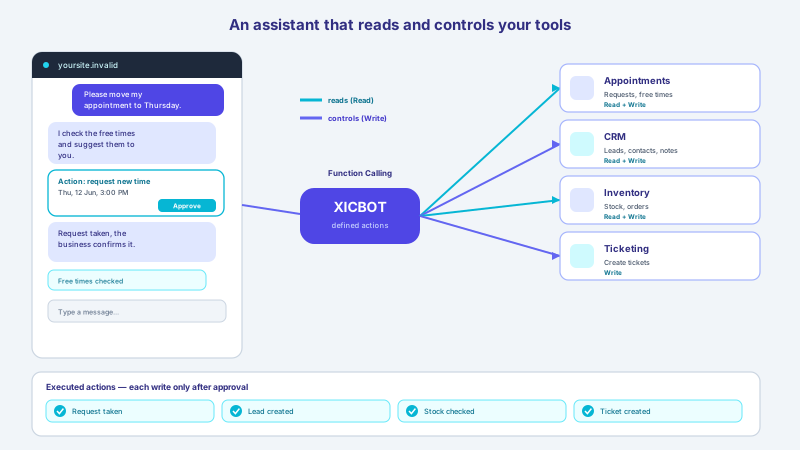
For the assistant to enter appointments bindingly and directly in your calendar, it needs controlled access to your systems through a set-up calendar integration (Custom package). Technically this happens through defined actions, often called function calling: the assistant may call clearly outlined functions, such as naming free times from the appointment types, taking an appointment request or moving one requested in the same conversation. In doing so it does not receive blanket full access, but only the rights that are necessary for the respective task. Reading and writing run with permissions and traceably. How this interplay of reading out and controlled action is set up is described on the page about tool control.
Depending on the business, the calendar, a booking or practice management system, a CRM or the merchandise management is connected in the Custom package. The assistant thus becomes the hub between website and back office, without the individual systems having to know each other directly. Because personal data such as name, contact and preferred appointment are processed here, data protection and hosting are part of it from the start: hosting in Germany, a data processing agreement and a clear deletion concept. Details on this can be found under privacy and hosting. In this way the appointment request stays not only convenient but also reliably governed.
| Aspect | Phone-based booking | Booking assistant in the chat |
|---|---|---|
| Availability | Only during opening hours, often busy | Around the clock, at night and at weekends too |
| Waiting time | Queue or callback needed | Answer and proposal directly in the chat |
| Parallel requests | One after another | Any number at the same time |
| Double bookings | Possible under high load | Occupancy check before every request |
| Reminders | Manual, easily forgotten | Automatic before every confirmed appointment with an email address |
| Languages | Depends on staff | Multilingual without extra effort |
What the Assistant Deliberately Does Not Do
A good booking assistant does not replace people, it relieves them. It takes on the recurring, well-structured work around scheduling and hands over to the team wherever things get personal, sensitive or unusual. With a complaint, a delicate health or legal question or a special case that does not fit the pattern, the right answer is not a forced appointment request but a clean handover with full conversation context, live or by ticket or email. Just as important is honesty about expectations: an AI assistant works with the content it is trained on and can make mistakes. That is why a properly set up assistant binds its answers to your own sources and passes on anything uncertain to people instead of inventing something. How that handover to the team works is described in the article on handover to staff.
A Few Steps to Your Own Booking Assistant
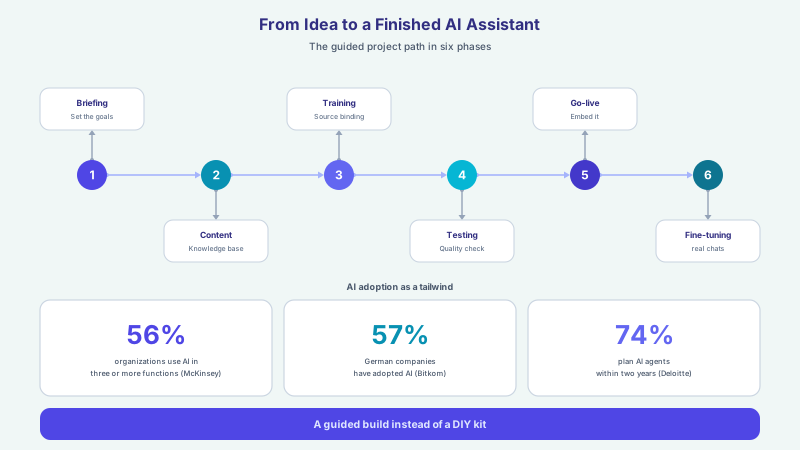
The path to your own booking assistant begins with a brief look at your appointment types, your calendar and the most frequent requests. On this basis the assistant is trained individually, connected to your system and embedded into the website with a short snippet. After that it takes appointment requests while your team looks after the people on site. A fixed rate cannot seriously be promised, because how many enquiries turn into appointments depends on the offer, target group and website. What is reliable, on the other hand, is the mechanism: reachable around the clock, direct answer, reminder before confirmed appointments included, if an email address is on file. An overview of all functions and packages is given by the services; if you would like to play this through with your own case, the contact form is the fastest way to a free demo.
- Define appointment types with time window, duration, lead time and buffer so the assistant only offers sensible times
- For binding direct entry, set up a calendar integration with permissions (Custom package)
- Use the automatic reminder before confirmed appointments and ask for the email address for it, to reduce missed appointments
- Clearly define handover to the team for sensitive and unusual cases
- Secure data protection and hosting in Germany contractually
- Continuously refine through the conversation analytics where appointment requests drop off
Frequent questions
How does a chat assistant take an appointment?
The assistant names free times, calculated from the time window, duration, lead time and buffer of the appointment type minus appointments already requested or confirmed. When the visitor chooses a slot, it collects the necessary details, takes the appointment request after her confirmation and holds the time directly, so no double booking occurs. The appointment becomes binding once the business confirms it; she then receives a confirmation email, provided she gave an email address. The whole path takes seconds and works independently of opening hours.
How does the assistant know which appointments are free?
From the stored appointment types: time window, duration, lead time and buffer give the possible times, and from these it subtracts the appointments already requested or confirmed in XICBOT. It does not sync with an external calendar; every time it names is a suggestion that the business confirms. A binding direct entry happens only through a set-up calendar integration (Custom package), and even then the assistant receives no blanket full access, only the rights needed to enter an appointment.
Does the assistant reduce missed appointments?
The most effective lever against missed appointments is the timely reminder, and it goes out automatically by email before every confirmed appointment, if an address is on file. Systematic reviews show that automatic appointment reminders noticeably improve attendance in healthcare (Cochrane). Anyone who made the request in the same conversation can cancel or reschedule there, and the freed-up slot is available to others again. A fixed rate, however, cannot be promised.
Which industries is a booking assistant suitable for?
Wherever appointments make up a large part of the enquiries: practices and healthcare businesses, service providers with consultation appointments, car dealerships with test drive, service and workshop appointments, trades, real estate and law firms. The assistant is trained on the respective appointment types. In sensitive areas such as practices or law firms it deliberately stays a signpost and is not meant to give medical or legal advice, but to hand over to the team.
Does the assistant replace our reception or phone team?
No, it relieves them. The assistant takes recurring appointment requests around the clock, so the team gains time for the people on site and for advice-intensive cases. With sensitive or unusual requests it is meant to hand over to a person with full conversation context, live or by ticket (Custom package) or email. In this way personal contact is preserved while the routine runs automatically.
Is chat-based booking data protection compliant?
Yes, when it is set up cleanly. At XICBOT, hosting is in Germany and the answers are generated by a specialised model provider, also outside the EU on the basis of standard contractual clauses; there is a data processing agreement, data sovereignty and a clear deletion concept. The assistant processes only the data needed for the appointment request, such as name, contact and preferred appointment, and it does not pass this on or sell it. European or self-hosted language models are possible as a separate project by arrangement; they are not included in standard operation.
Ask it yourself, Assistant of this website
Automated assistant