From Idea to a Finished AI Chat Assistant
The path to your own AI chat assistant in six phases: briefing, content, training, testing, go-live and fine-tuning. What businesses should prepare.
In plain language
A project for a chat assistant runs in several steps. First you set the goals, the audience and the topics to avoid. Then you collect existing texts, lists and guides for the knowledge base. What counts is that the content is up to date, not how much there is. The assistant answers from this content and not from general knowledge. Before the start, a test checks the answers and the handover to the team. It goes onto the website with a small piece of code. After the start, a look at real conversations closes the last gaps.
A good AI chat assistant is not built at the push of a button but as a project with clear phases. Between the first idea of putting an assistant on your own website and an assistant that answers visitor questions reliably and hands off cleanly to your team at the right moment lies a path made of briefing, content, training, a test phase, go-live and fine-tuning. Those who know this path understand what matters and what their own business should contribute. The demand is there: 56 percent (McKinsey) of respondents to a global survey report that their organizations already use AI in three or more business functions, and in Germany, for the first time, a majority of companies with 20 or more employees use AI, at 57 percent (Bitkom). Yet between wanting one and a working assistant stands the implementation, and this is exactly where many do-it-yourself attempts fail for lack of know-how and scarce resources. This article describes the project path from idea to finished assistant phase by phase, shows which roles are involved, and makes clear why a guided build is usually more dependable than a DIY kit.
%3C%2Ftext%3E%3Crect%20x%3D'284'%20y%3D'300'%20width%3D'232'%20height%3D'96'%20rx%3D'10'%20fill%3D'%23ffffff'%20stroke%3D'%23cbd5e1'%20stroke-width%3D'1.2'%2F%3E%3Ctext%20x%3D'400'%20y%3D'344'%20font-family%3D'system-ui%2C%20sans-serif'%20font-size%3D'26'%20font-weight%3D'800'%20fill%3D'%230891b2'%20text-anchor%3D'middle'%3E57%25%3C%2Ftext%3E%3Ctext%20x%3D'400'%20y%3D'364'%20font-family%3D'system-ui%2C%20sans-serif'%20font-size%3D'7.5'%20fill%3D'%23475569'%20text-anchor%3D'middle'%3EGerman%20companies%3C%2Ftext%3E%3Ctext%20x%3D'400'%20y%3D'376'%20font-family%3D'system-ui%2C%20sans-serif'%20font-size%3D'7.5'%20fill%3D'%23475569'%20text-anchor%3D'middle'%3Ehave%20adopted%20AI%20(Bitkom)%3C%2Ftext%3E%3Crect%20x%3D'528'%20y%3D'300'%20width%3D'232'%20height%3D'96'%20rx%3D'10'%20fill%3D'%23ffffff'%20stroke%3D'%23cbd5e1'%20stroke-width%3D'1.2'%2F%3E%3Ctext%20x%3D'644'%20y%3D'344'%20font-family%3D'system-ui%2C%20sans-serif'%20font-size%3D'26'%20font-weight%3D'800'%20fill%3D'%236366f1'%20text-anchor%3D'middle'%3E74%25%3C%2Ftext%3E%3Ctext%20x%3D'644'%20y%3D'364'%20font-family%3D'system-ui%2C%20sans-serif'%20font-size%3D'7.5'%20fill%3D'%23475569'%20text-anchor%3D'middle'%3Eplan%20AI%20agents%3C%2Ftext%3E%3Ctext%20x%3D'644'%20y%3D'376'%20font-family%3D'system-ui%2C%20sans-serif'%20font-size%3D'7.5'%20fill%3D'%23475569'%20text-anchor%3D'middle'%3Ewithin%20two%20years%20(Deloitte)%3C%2Ftext%3E%3Crect%20x%3D'40'%20y%3D'408'%20width%3D'720'%20height%3D'32'%20rx%3D'10'%20fill%3D'%234f46e5'%2F%3E%3Ctext%20x%3D'400'%20y%3D'428'%20font-family%3D'system-ui%2C%20sans-serif'%20font-size%3D'10.5'%20font-weight%3D'700'%20fill%3D'%23e0e7ff'%20text-anchor%3D'middle'%3EA%20guided%20build%20instead%20of%20a%20DIY%20kit%3C%2Ftext%3E%3C%2Fsvg%3E)
Labels in the illustration
- Briefing
- Set the goals
- 1
- Content
- Knowledge base
- 2
- Training
- Source binding
- 3
- Testing
- Quality check
- 4
- Go-live
- Embed it
- 5
- Fine-tuning
- real chats
- 6
- AI adoption as a tailwind
- 56%
- organizations use AI in
- three or more functions (McKinsey)
- 57%
- German companies
- have adopted AI (Bitkom)
- 74%
- plan AI agents
- within two years (Deloitte)
- A guided build instead of a DIY kit
From Idea to Assistant: Why the Path Should Be Guided
The idea is usually formed quickly: an assistant should answer questions around the clock, capture enquiries and relieve the team. The leap from this idea to an assistant that works reliably in everyday use, however, is often underestimated. An assistant is only as good as the content it was trained on, the limits set for it and the care with which it was checked before go-live. These are exactly the steps that tend to fall by the wayside in a pure DIY approach, because they demand time, experience and a structured process.
That these very prerequisites are often missing becomes clear when you look at the hurdles. Among companies in Germany with 20 or more employees that do not yet use AI, 85 percent (Bitkom) cite a lack of technical know-how for implementation as the reason; 51 percent (Bitkom) are held back by a lack of staff resources and 66 percent (Bitkom) by unsettling legal hurdles and uncertainties. A guided build starts exactly there: it brings the experience, takes the setup off your hands and clarifies data protection and operation from the outset. The business contributes its knowledge of its own operations without having to become an AI specialist itself.
The Six Project Phases at a Glance
Before diving into the individual steps, an overview of the whole path helps. An assistant project is divided into six phases that build on one another. Each phase has a clear goal and a contribution the business makes to it. The following overview shows what happens in which phase and what is needed from your side.
| Phase | What happens in this phase | Your contribution |
|---|---|---|
| 1. Briefing and goals | Clarify the assistant's goals, audience and limits | Name expectations and typical questions |
| 2. Gather content | Prepare website, FAQ, documents and catalogs as a knowledge base | Provide existing content and approvals |
| 3. Training and build | Train the assistant on the content, set up source binding and actions | Answer subject-matter follow-ups |
| 4. Test phase | Systematically check answers, limits and handover | Ask test questions and review answers |
| 5. Go-live | Embed and activate the assistant on the website | Approve the embed and inform the team |
| 6. Fine-tuning | Refine from real conversations and close gaps | Give feedback from everyday use |
Phase 1 — Briefing and Goal Setting
At the start comes not the technology but the question of what the assistant should actually do. In the briefing we clarify together which tasks take priority: should it mainly answer questions, take appointments, qualify leads or advise in the shop? Who are the typical visitors, which questions do they keep asking, and in what tone should the assistant answer? From these answers emerges a clear target picture that all further phases align with.
Just as important as the goals are the limits. Part of the briefing is defining what the assistant deliberately gives no information about and when it hands over to a human. A medical practice keeps clinical questions firmly with the team, a law firm every individual legal question. Drawing these limits early prevents missteps in operation. When and how an assistant hands off cleanly is described in our article on when the assistant should hand over to staff.
-
Set the goals
We determine which tasks the assistant takes on: answering questions, taking appointments, capturing leads or advising in the shop.
-
Understand the audience
Who are the typical visitors and which questions do they ask repeatedly? That reveals which content is especially important.
-
Draw the limits
We define what the assistant gives no information about and when it hands over to the team, instead of venturing into sensitive areas.
Phase 2 — Gather the Right Content
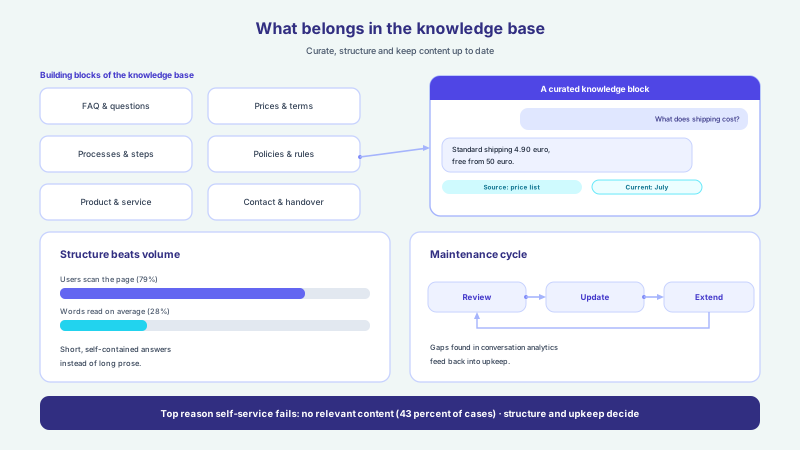
In the second phase the assistant's raw material is gathered: the content it will later draw its answers from. This is the point where the business contributes most, because no one knows the business better. The good news: much of it already exists. Website texts, an existing FAQ, price lists, product catalogs, guides, PDFs and internal notes on common questions together form the basis. The task of the guided build is to review this material, structure it and turn it into a clean knowledge base.
- Website content and service descriptions as a starting point
- An existing or newly gathered list of frequent questions and answers
- Price lists, product catalogs and availability, if the assistant is to advise
- Guides, documents and PDFs with reliable subject-matter information
- Details on opening hours, processes, contact routes and responsibilities
- Approvals on which content the assistant may use and which it may not
Phase 3 — Training and Building the Assistant
With the prepared content, the assistant is trained. This is not about laying out rigid click paths but about binding the assistant to the sources so that it understands freely worded questions and couples its answers to the stored content. This principle of source binding is decisive: the assistant answers from your content, not from general world knowledge, and says honestly when it cannot answer something reliably. How this helps avoid wrong answers is described in the article on hallucinations and source binding.
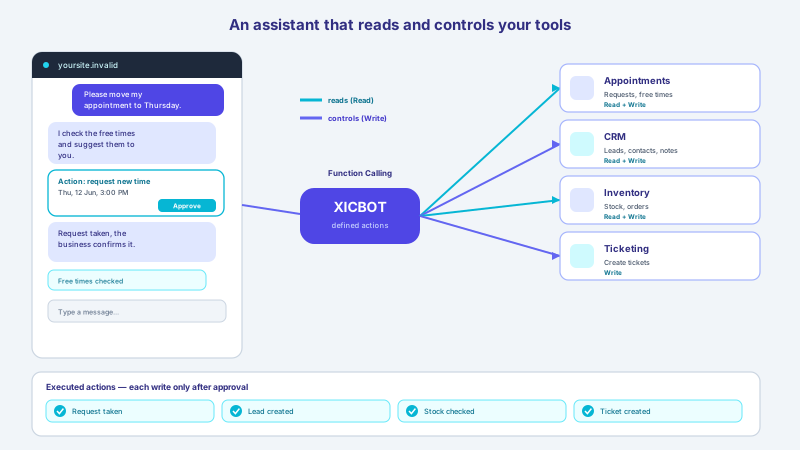
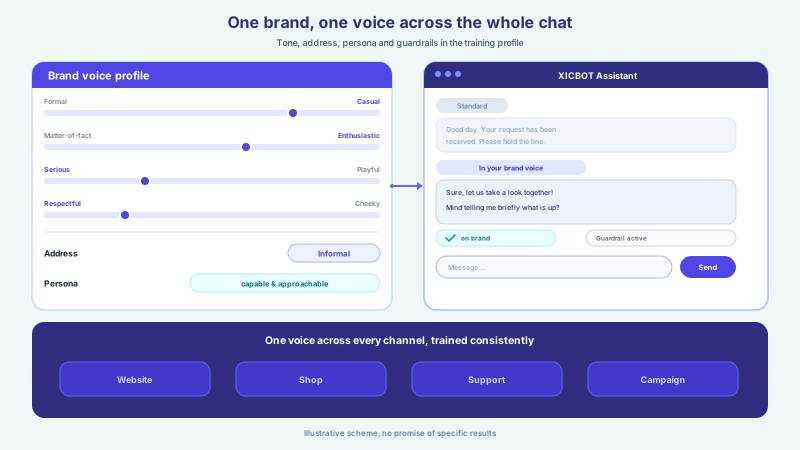
This phase also defines what the assistant may do, not only what it knows. Through connected functions it can suggest free times from stored appointment types and take appointment requests, put together a cart in the chat, capture leads or read systems in a governed way. Which actions make sense depends on the target picture from phase 1 and is set up with clear permissions. The basics are described on the pages about tool control and custom functions. The brand voice is set here too, so the assistant sounds like your business and not like some generic bot.
Training means connecting, not memorising
A trained assistant does not memorise fixed answers but is connected to your sources. If a price or a text changes later, the source is updated and the answer follows automatically. That keeps the assistant low-maintenance and current, without having to rebuild a branching dialogue tree.
Who Is Involved in the Project: the Roles
An assistant project is teamwork, but it ties up fewer people on the business side than many expect. Four roles typically work together, with small businesses combining several of them in one person. What matters is not the size of the team but that the roles are clearly assigned and that decisions and approvals can be made quickly.
-
A project owner
One contact person in the business bundles decisions, approves goals and limits and keeps the project moving. Without them, even the best plan stalls.
-
Subject and content experts
Those who know the customers' questions and the fitting answers best supply content and review the assistant's answers. Often that is service or sales.
-
A technical contact
For the embed on the website and possible integrations, one person with access to the website and systems is enough. The guided build keeps the effort low.
-
The XICBOT team
We handle concept, training, quality checks, embedding and ongoing operation including hosting in Germany, so your team can focus on the subject matter.
Phase 4 — the Test Phase Before Go-live
Before the assistant goes live, it is checked systematically. In the test phase we and the business ask typical and tricky questions and review the answers: is the information correct, does the assistant stay with the facts from the knowledge base, does it keep the set limits and does it hand over to a human at the right moment? It is precisely the difficult cases, unclear phrasing or deliberately provocative questions, that reveal whether source binding and handover work reliably.
- Answer quality on typical customer questions from everyday use
- Behaviour with unclear, ambiguous or provocative questions
- Adherence to the set limits and taboo topics
- Clean handover to the team with full context
- Correct execution of actions such as appointment, cart or lead
- Appearance and tone fitting the brand, in all languages used
An assistant does not go live because it looks finished, but because it answers the hard questions honestly and hands over cleanly when in doubt.
Phase 5 — Go-live and Embedding
Once the test phase is passed, the assistant is embedded on the website and activated. Technically this usually happens through a small embed snippet that shows the assistant as a chat window on the desired pages, without rebuilding the existing website. For many businesses the entry point is a website assistant that first answers questions and captures contacts and can later be extended with shop, appointment or tool functions, right up to recovering abandoned carts in the chat.
The go-live is deliberately restrained. The assistant greets in a way that fits the page but does not push itself forward, and the clearly visible option to reach a human is part of it from the start. How the assistant fits into existing websites and systems is described on the page about embedding and integration. Internally, a brief note to the team is worthwhile too, so that handed-over conversations are picked up quickly and no one is left facing a silent wall.
Phase 6 — Fine-tuning From Real Conversations
With go-live the project is not finished; instead the most valuable part begins: fine-tuning based on real conversations. Only in everyday use does it emerge which questions visitors really ask, where answers are still uncertain and which content is missing from the knowledge base. This evaluation makes the assistant better week by week. How conversations can be evaluated in a privacy-compliant way is described on the page about conversation analytics and in the article on how to evaluate and optimise chats.
The potential behind this is considerable. McKinsey sees AI as able to take on up to 60 percent (McKinsey) of the addressable contact volume in customer service and thereby free capacity for the demanding cases. At the same time, in a 2024 survey more than half of service leaders expected digital channels to make up over 40 percent (McKinsey) of inbound contacts within three years. Whether and how quickly a single assistant reaches such figures depends on industry, offering and upkeep and cannot be assured, yet the direction holds when the fine-tuning is pursued consistently.
What Businesses Should Prepare
For a project to start quickly, a manageable preparation helps. None of it has to be perfect, because structure and preparation are handled by the guided build. But the clearer the goals and content are, the faster a dependable assistant stands. The following list sums up what is worth having ready in advance.
- Name a clear goal: what should the assistant mainly do?
- Collect the most common customer questions, informally from everyday use
- Gather existing content: website, FAQ, prices, documents
- Define limits and taboo topics where a human takes over
- Assign a responsible contact person and clear approval routes
- Consider data protection early, such as hosting and data processing
A Guided Build Instead of a DIY Kit
In the end comes the fundamental question: assemble it yourself with a kit or have it built with guidance? A kit promises a quick start but shifts concept, training, quality checks and upkeep entirely onto the business, precisely the steps for which time and experience are lacking day to day. It is no coincidence that companies not yet using AI cite above all a lack of know-how as an obstacle, and many also feel held back by scarce staff resources (Bitkom). A guided build takes this load off and delivers a result tailored to the specific case from the very start.
| Aspect | DIY kit | Guided XICBOT build |
|---|---|---|
| Concept and goals | To work out yourself | Clarified together in the briefing |
| Training and source binding | Own learning curve needed | Handled and checked by the team |
| Quality check | Stays with the business | Systematic test phase before go-live |
| Data protection and hosting | To clarify yourself | Considered from the start, hosted in Germany |
| Upkeep and fine-tuning | To do yourself on an ongoing basis | A fixed part of operation |
| Effort in the business | High and permanent | Limited to knowledge and approvals |
That good support matters especially with AI is also shown by the outlook. In a survey from late summer 2025, 74 percent (Deloitte) of the companies surveyed said they plan to deploy AI agents within two years, and customer support is seen as the area with the greatest benefit (Deloitte). At the same time, only about one in five (Deloitte) of the companies surveyed has a mature model for governing autonomous AI agents. A guided build closes exactly this gap between the wish for an assistant and its dependable operation. Which packages suit a guided build is set out on the pricing and packages page; you can arrange the first conversation about your goals via the contact page.
- Think of the project path in six clear phases, from idea to fine-tuning
- Set goals and limits early in the briefing, before technology comes into play
- Prepare the knowledge base cleanly from existing, current content
- Test systematically before go-live, especially the difficult cases
- Refine from real conversations after launch and close gaps
- Have the build guided, instead of shouldering concept and upkeep yourself
Frequent questions
How long does it take to build an AI chat assistant?
That depends on the scope, the number of actions and the quality of the existing content and cannot be assured across the board. A website assistant that answers questions and captures contacts is usually ready to launch faster than an assistant with shop integration, appointment requests and several systems. What is decisive for the pace is how clearly goals and limits are set in the briefing and how well the content is prepared. In every case the path runs through the same six phases, from briefing through training and test phase to fine-tuning.
What does my business have to prepare itself?
The most important things are a clear goal, the most common customer questions and the existing content such as website, FAQ, prices and documents. None of it has to be perfectly prepared, because structure and training are handled by the guided build. It also helps to define limits and taboo topics and to name a responsible contact person who grants approvals quickly. The clearer these points are, the faster a dependable assistant stands.
Which roles from my team are needed?
Typically four roles work together: a project owner who bundles decisions, subject or content experts who supply content and review answers, a technical contact for the embed, and the XICBOT team for concept, training, checks and operation. In small businesses a single person often combines several of these roles. The effort on your side stays manageable, because the technical implementation and operation lie with the guided build.
Why a test phase if the AI learns anyway?
Because it is precisely the difficult cases that only show up under controlled conditions. In the test phase we check whether the assistant stays with the facts from the knowledge base, keeps its limits and hands over to a human at the right moment. An assistant that goes live unchecked risks uncertain or unsuitable answers in real customer contact. The later fine-tuning from real conversations complements the test phase but does not replace it, because it builds on an already checked foundation.
Is a guided build not more expensive than a kit?
A kit seems cheaper at first but shifts concept, training, quality checks and upkeep onto your own business, precisely the steps for which know-how and time are often lacking (Bitkom). These hidden efforts fall away with a guided build because they are part of the service. Whether one path or the other pays off depends on the individual case and cannot be answered across the board. In a free initial consultation we assess which scope fits your goals.
What happens after go-live?
After go-live the fine-tuning from real conversations begins. The evaluation shows which questions come up frequently, where answers are still uncertain and which content is missing, so that knowledge gaps can be closed in a targeted way. At XICBOT, this evaluation, the upkeep, updates and hosting in Germany are part of ongoing operation. That way the assistant stays current and gets better over time, without your team having to do the upkeep itself.
Ask it yourself, Assistant of this website
Automated assistant