Reduce Support Load With a 24/7 AI Assistant
A 24/7 AI assistant answers from FAQ and knowledge base, gives order status once your inventory system is connected and hands over to your team with context.
In plain language
Many support questions come up again and again, for example on shipping, returns or opening hours. A chat answers them at any time of day from your own documents. In the Custom package it reads the status of an order from the connected systems. Steps that change something only run once the customer agrees. The order number is usually enough for this. With sensitive or unclear questions, it is meant to hand the chat over to a person. The team then sees the whole conversation. How far the number of requests drops cannot be said in advance.
Every incoming support request is first of all a promise: someone wants to know something, has a problem or is waiting for information. But the more of these requests land in the same inbox, the longer the wait times grow, and a large share of them are questions that have already been answered dozens of times. This is exactly where an AI chat assistant comes in, working on your website around the clock: it answers recurring questions directly from your FAQ and knowledge base, provides status information, absorbs routine before a ticket even arises, and hands everything that truly needs a person to your team with full conversation context. Around 81 percent (Harvard Business Review) of customers try to solve their issue themselves before seeking direct contact, and an assistant makes that first step fast, friendly and possible at any time of day. This article shows how a 24/7 assistant reduces ticket volume without abolishing personal service, and where its honest limits lie.

Labels in the illustration
- Good evening. How can I help
- you right now?
- Where is my order?
- Order 4821 has shipped.
- Delivery tomorrow by 12 pm.
- Tracking opened
- Hand over to an agent
- Write a message
- Send
- Fewer tickets in the inbox
- 100 incoming support questions
- solved by the assistant
- escalated
- Split illustrative, depends on knowledge base and request
- The better the knowledge base, the more the assistant handles
- 24/7
- available,
- without waiting
- Seconds
- to the first
- reply
- Context
- on handover
- to the human
- Escalation with context
- Customer question
- Assistant solves
- Agent
- Figures illustrative - no guaranteed outcomes
- Answer around the clock, absorb routine, relieve your people
Why the Support Inbox Keeps Overflowing
In most teams, support volume is not steady but comes in waves: in the morning, after hours, at weekends and always when nobody is at their desk. Customers still expect a fast response, and for many an immediate reply means minutes rather than the next working day. An inbox that is only cleared during office hours cannot keep this pace. The result is wait times, follow-up emails and calls that pile up until the team faces a full queue on Monday.
To make matters worse, a large part of the requests is neither complex nor new. Where are the shipping costs, when will my order arrive, how do I cancel, which opening hours apply on holidays — the same questions keep coming back. Each one on its own is quickly answered, but together they tie up exactly the time missing for the genuinely tricky cases. Anyone who automates this routine not only wins back capacity but also gives their team the calm to focus on the concerns that really need a person. An assistant that knows your content takes over precisely this sediment of repetition. How it is trained for that is described on our page about the knowledge base.
Answers From FAQ and Knowledge Base, Around the Clock
The core of a support assistant is its binding to your own sources. Unlike a rigid chatbot with prefabricated menu trees, a trained assistant reads your website, your FAQ, your help articles, price lists, data sheets and internal documents and formulates a suitable answer in natural language. If someone asks about the return period, it draws the answer from your actual policy, not from a generic template. This source binding is the decisive difference: the assistant answers based on what actually applies at your company and can point to the relevant page or document when needed. That keeps the information traceable rather than invented.
These answers are available around the clock, at night, at weekends and on holidays, without anyone having to be on call. For the customer the benefit is immediate: they do not have to wait until the next working day but receive a solid answer without a wait. For your team it means far fewer standard questions in the queue in the morning. And because the assistant uses the same, well-maintained source, the answers are consistent across all channels — there are no differing statements depending on who happens to be on duty. When prices, deadlines or processes change, you update the knowledge base in one place and the assistant answers with the new state from then on. Which content belongs in that knowledge base is shown in the article on building a knowledge base.
-
Direct, not in the queue
Recurring questions about shipping, returns, opening hours or payment methods are answered directly in the chat, without a person having to step in.
-
Answers from your sources
The assistant binds its information to your FAQ, documents and price lists and points to the relevant page when needed, instead of guessing into the blue.
-
Relieves the team
Because the routine is absorbed automatically, your staff have time for the cases that require genuine judgement.
Status Requests Without Asking the Team
A particularly large share of volume goes to status questions: where is my order, has my payment been recorded, when will my technician come, is my appointment confirmed. These questions are urgent for customers and tedious for the team, because answering them usually just means looking something up in a system. An assistant connected to your ERP and shipping systems does exactly that itself: it reads the order and delivery status, checks availability or opens the tracking and gives the information directly in the chat. The customer receives their answer without the detour of a ticket, and no one on the team has to look up the case manually.
Such requests run as defined actions with clear permissions, so the assistant only reads what it is allowed to and does not change anything it should not. It can look up an order number and return the status without gaining access to sensitive areas that are not needed for the information. Where actions go beyond mere reading — such as rescheduling an appointment or changing an address — this happens with confirmation and, where sensible, with handover to a person. How an assistant reads and controls connected systems in a governed way is shown on our page about tool control; for international customers it answers in the language of the visitor.
An inbox that no longer overflows
The greatest effect arises where routine does not become a ticket in the first place. Every status request the assistant answers itself is one fewer email in the inbox and one fewer call on the line. Not because fewer questions are asked, but because the recurring questions are cleared directly and without human effort — and the team can concentrate on the cases that count.
From Reading to Acting: What the Assistant Handles Itself
A support assistant does not stop at merely looking things up. Many concerns can only really be kept out of the inbox once it is allowed to act as well, within a clearly defined scope. If a customer asks for a callback, the assistant records the request along with the number and a suitable time slot and files it in a structured way in the inbox. If someone wants to reschedule an existing appointment, it suggests free alternatives and confirms the change only after explicit agreement. A return can be initiated, a contact form pre-filled, a ticket opened with the right details. Each of these actions is a defined function with a permission, and anything that changes data happens with confirmation — nothing runs in the background without the customer's knowledge.
The distinction between reading and acting is drawn deliberately. Pure information such as a price or a stock level can run without asking because it changes nothing. An order status, by contrast, concerns a personal case; by default the assistant only looks it up once the customer has agreed. As soon as a step intervenes in your systems, stricter rules apply: clear limits on what is allowed, a confirmation by the customer and, where needed, handover to a person who releases the final step. So the assistant stays reliable even when it does more than just answer. Which actions can be connected to your systems in the Custom package is shown on our page about tool control; for appointment requests the booking assistant helps, and for qualified enquiries the lead assistant.
-
Callback and appointment
The assistant takes callback requests and reschedules appointments with free alternatives — confirmed only after the customer agrees.
-
Only with confirmation
Anything that changes data happens with an explicit release. A person takes over sensitive steps where needed.
-
Forms and tickets
Contact forms are pre-filled once the visitor confirms and enquiries with the right details are placed in the inbox; returns and tickets in your systems run through a connection in the Custom package.
Escalation to Humans, With Full Context
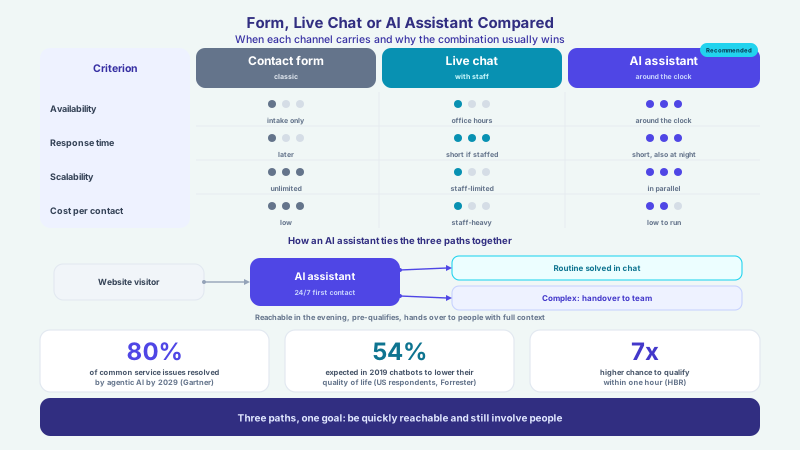
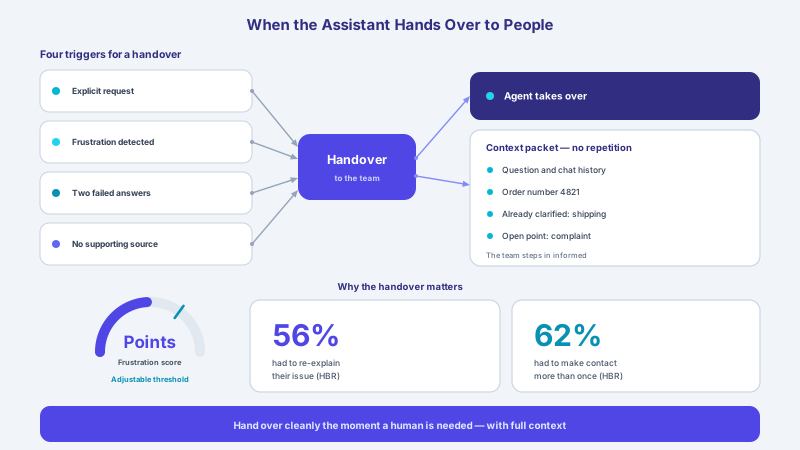
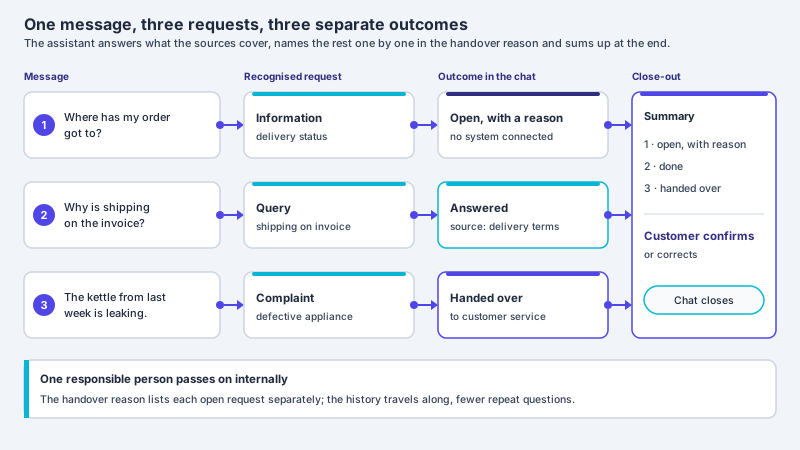
A good assistant does not replace people, it relieves them. That is why a clean handover is just as important as the automatic answer. As soon as a concern exceeds the knowledge base, is sensitive or the customer explicitly asks for a staff member, the assistant escalates. With XICBOT, handing over means: the conversation sits in the inbox with its entire history, an email goes to your team, and whoever is there can take over the conversation and reply in person; there is no switch by office hours. Complaints, legal or contractual questions and anything requiring judgement deliberately belong in human hands — the assistant forwards such cases instead of masking them with a risky answer.
The decisive advantage over a simple contact form is context. When a case reaches the team, everything is already there: the question asked, what the assistant has clarified, the order or customer number given and exactly what the customer is now stuck on. Your staff member does not have to start from scratch and ask half the backstory again but steps in informed. That shortens handling, prevents tedious back and forth and makes the handover seamless for the customer. So escalation becomes not a rupture but a smooth transition from fast self-service to personal support. How such a handover is built in detail is described in the article on handover to staff.
| Aspect | Classic support inbox | Assistant with escalation |
|---|---|---|
| Availability | Office hours only, then a queue | Around the clock, instant first reply |
| Routine questions | Each lands as a ticket for the team | Resolved directly in self-service |
| Status requests | Manual lookup in the system | Automatic answer from the system |
| Handover to a human | Ticket without any backstory | Full conversation context is present |
| Answers | Vary depending on the person | Consistent from one maintained source |
Fewer Tickets, Measurably Better
An assistant is not a one-way street but also delivers valuable insight. Every conversation shows what customers really ask, where the website leaves answers wanting and at which point people drop off. From this analysis, knowledge gaps can be closed in a targeted way: if a question the assistant cannot yet answer confidently keeps recurring, you extend the knowledge base exactly there. So self-service gets better week by week, and the share of concerns cleared without human involvement rises step by step. This feedback loop makes the relief lasting rather than a one-off. How conversations can be analysed in a privacy-compliant way is described on our page about conversation analytics.
An honest handling of numbers matters. How much ticket volume drops depends on your industry, the quality of your knowledge base and the type of requests; no one can seriously promise a fixed percentage. What can be observed reliably, though, is the direction: the more complete the knowledge base and the clearer the connected status sources, the greater the share the assistant handles itself. In projects (project experience) it shows again and again that it is precisely the unspectacular standard questions that offer the biggest lever — because they are so frequent. Software and SaaS teams that receive many recurring onboarding and documentation questions find examples on our page about the assistant for software.
A Support Assistant for Every Industry
How much a support assistant relieves depends on the industry, because each has its own recurring questions. In the online shop most requests revolve around availability, shipping, returns and order status — exactly the cases the assistant clears directly from the catalogue and, once your inventory system is connected in the Custom package, from its status data, while showing matching products along the way. Service providers and trades mainly receive enquiries about services, areas and appointments; here the assistant qualifies the request, gathers the necessary details and passes on a clean lead, instead of every call interrupting the day's work. For service providers that means less phone time and a faster first response.
In sensitive areas the assistant deliberately draws clear lines. A medical practice uses it for consultation hours, appointment requests and preparation notes, not for medical advice or diagnoses — such topics are signposting plus handover to the team. Software and SaaS providers, in turn, receive many recurring onboarding, documentation and status questions; here the assistant absorbs the bulk from the knowledge base and directs only genuine exceptions to support. Industry observers such as Gartner also expect AI-supported self-service assistants to become an established channel in customer service (Gartner). Which cases offer the biggest lever in your industry is best clarified in an initial consultation.
Data Protection and Security in Everyday Support
Support almost always touches personal data: an order number, an address, a customer number, sometimes the content of a complaint. That is why data protection here is not an add-on but a foundation. Hosting is in Germany, a data processing agreement governs the cooperation, and a deletion concept defines how long conversation data is kept. Following the principle of data minimisation, the assistant accesses only what is needed for the respective information — an order number is enough for the delivery status from the connected inventory system, without it needing broad access to the customer account. Permissions govern precisely which systems it may read and which actions it may trigger.
For companies with particularly high requirements, European or self-hosted language models are possible as a separate project by arrangement; they are not included in standard operation. Data is neither shared nor sold, and the analysis of conversations serves solely to identify knowledge gaps and improve self-service. Precisely because an assistant talks to customers around the clock, this framework has to be in place from the start, so that relief does not turn into a risk. How we handle hosting, contracts and data sovereignty in detail is described on our page about data protection and hosting.
What the Assistant Does Not Replace
Honesty means naming the limits clearly. An AI assistant can err, and that is why it is deliberately bound to your sources, gives its answers in a verifiable way and is meant to pass sensitive cases to people. It replaces neither your team's expertise nor personal support for complaints, goodwill decisions or complex special cases. Where judgement, empathy or responsibility are at stake, the human cannot be replaced — and should not be. The assistant takes the repetition off your team, not the decision. That is precisely its value: it creates room for the moments in which good service really counts.
For that to work, it needs a well-maintained knowledge base, clearly defined escalation rules and a privacy-compliant foundation with hosting in Germany. Being available around the clock is not an end in itself; it only pays off when the answers are right and the handover runs smoothly. That is exactly what we align a support assistant towards: trained individually, connected to your systems and with a clear path to a human as soon as needed. An overview of all functions is on our page about the assistant's features; the matching packages are under pricing, and you can arrange a non-binding initial consultation with a demo via the contact page.
- Add the most frequent support questions cleanly to the knowledge base and keep them current
- Connect the most important status source so order and job questions are answered automatically
- Set clear escalation rules: what the assistant resolves and from when a human takes over
- Pass the full conversation context to the team on every handover
- Analyse conversations in a privacy-compliant way and close knowledge gaps in a targeted manner
- Deliberately forward sensitive topics such as complaints and contractual questions to people
Frequent questions
How does a 24/7 AI assistant reduce ticket volume?
The assistant answers recurring questions directly from your FAQ and knowledge base and provides status information directly from connected systems (Custom package), so many concerns do not become a ticket in the first place. This is called ticket deflection: the customer gets their answer faster than through a form, and your team is relieved. Around 81 percent (Harvard Business Review) of customers try to solve their issue themselves first anyway. How much volume drops depends on your industry and the quality of the knowledge base and cannot be promised as a fixed value.
Where does the assistant get its answers from?
It is trained individually on your own sources: website content, FAQ, help articles, documents, PDFs and price lists. From this content it formulates a suitable answer in natural language and points to the relevant page when needed. This source binding is the difference from a generic chatbot: the assistant answers based on what actually applies at your company. When prices or processes change, you update the knowledge base in one place and the assistant uses the new state from then on.
Can the assistant look up order and delivery status?
Yes, if, in the Custom package, it is connected to your ERP or inventory system and the relevant shipping systems it reads order and delivery status, checks availability or opens the tracking and gives the information directly in the chat. These requests run as defined actions with clear permissions, so the assistant only reads what it is allowed to and does not change anything unintentionally. Status questions such as Where is my order make up a large part of volume and are answered this way without manual lookup by the team.
What happens with questions the assistant cannot answer?
Then it is meant to hand over to a human. The conversation then sits in the inbox with its entire history, an email goes to your team, and whoever is there can take over the conversation and reply in person; there is no switch by office hours. Your team does not start from scratch but already knows the question, the previous course and the relevant data. Sensitive topics such as complaints and legal or contractual questions are meant to be forwarded deliberately by the assistant instead of being masked with a risky answer.
Does an AI assistant replace my support team?
No. The assistant takes the repetition off your team, not the decision. It resolves routine questions and, in the Custom package, status requests automatically and so creates room for the cases that require judgement, empathy and responsibility. An AI assistant can err and is therefore bound to your sources, gives its answers in a verifiable way and is meant to pass sensitive concerns to people. Personal support for complaints or complex special cases remains the task of your team.
Is a support assistant privacy-compliant?
We run the hosting in Germany, with a data processing agreement, data sovereignty and a deletion concept; the answers are generated by a specialised model provider, also outside the EU on the basis of standard contractual clauses. European or self-hosted language models are possible as a separate project by arrangement; they are not included in standard operation. The analysis of conversations is carried out in a privacy-compliant way and serves to identify knowledge gaps and improve self-service. Status requests run in the Custom package through defined actions with permissions, so the assistant only accesses the data needed for the respective information.
Ask it yourself, Assistant of this website
Automated assistant