Quota in peak week: throttled rather than blocked when it runs low
Black Friday and Cyber Monday fall at the end of the month in 2026: what is throttled from four fifths of the allowance, what happens at the limit and what to settle first.
In plain language
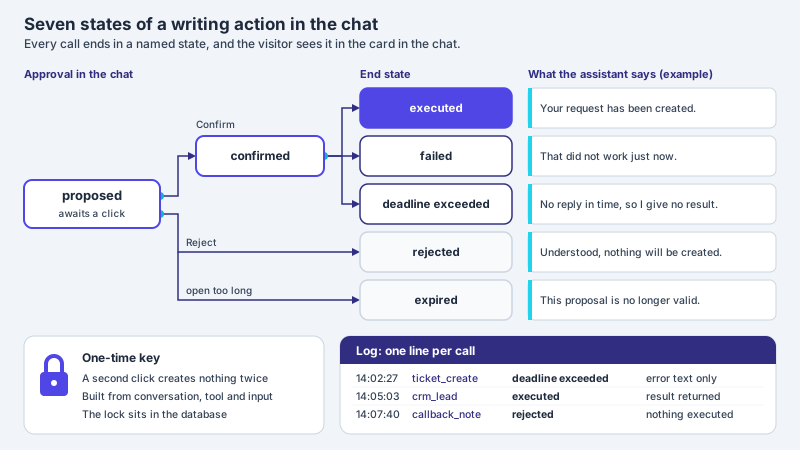
Your assistant has a fixed budget each month, called the allowance. When most of it is used, the assistant gives shorter answers and looks up less. But it still passes questions on to your team.
When all of it is used, the visitor only sees your fallback answer until the new month. That is a short text you wrote for this case. This year the big sale week falls at the end of the month.
So check how much is left before that week. Also check the fallback answer and whether you need more.
At the end of November many shops get busy: in 2026 Black Friday falls on Friday 27 November and Cyber Monday on Monday 30 November. That puts the sales week exactly where the least is left of a chat assistant's monthly allowance – at the end of the month. What happens when it runs low is fixed in XICBOT: from four fifths on the assistant is throttled, and at the limit the stored fallback answer goes out until the month changes. You see the status under Billing; a message of its own to you only exists in the Custom package. This article walks through the stages in order, shows what they mean during a sales week, and names the three things to do beforehand: read your usage, maintain the fallback answer and settle in good time whether more allowance is needed.

Labels in the illustration
- November 2026
- Sales week
- 27–30 Nov
- 1 Nov
- 15 Nov
- 30 Nov
- Usage of the monthly allowance
- four fifths
- Limit
- Regular operation
- throttled
- Regular operation
- answers at full length
- up to five tool rounds
- every answer is booked
- status shown under Billing
- Visitor: as usual
- From four fifths
- notice at the top of Billing
- shorter answers
- small model tier
- one tool round instead of five
- handover to the office stays
- Visitor: briefer answers
- Limit reached
- refused before the model call
- no further consumption
- fallback until the month changes
- webhook (Custom package)
- Visitor: fallback answer
The sales week falls at the end of the month
The calendar is clear this year. Black Friday falls on Friday 27 November 2026, Cyber Monday on Monday 30 November. In between lies a weekend; anyone planning those days as a sales week plans it in as well. On the Tuesday after, 1 December, a new month begins. The days on which retailers expect a rush therefore fall on the last four days of November – at a point where a monthly allowance already has more than three weeks of usage behind it.
How many questions arrive in the chat on these days depends on the shop. On sales days, though, more questions than on an ordinary day are typically to be expected: people who buy online ask about delivery time, size, returns and availability, and every answer to those questions is booked against the allowance. Which questions already come before the week, such as about future discounts, is covered in the article on questions about future discounts before Black Week.
The peak meets what is left of the allowance
A monthly allowance is used up across the whole month. Whatever is left on 27 November has to last through the sales days. Anyone who already uses a lot in November may reach the throttling threshold in exactly the week in which retailers expect particularly many questions.
The allowance: a figure that changes a running assistant
Most decisions about a chat assistant are made before launch: which sources it reads, which systems it queries, the tone it writes in. After that they are settled and only change when someone changes them. The monthly allowance, by contrast, keeps acting every day, with every answer. The XICBOT pricing page says so explicitly and describes in a section of its own what happens when it runs low.
The monthly allowance is the only figure that changes a running assistant from the inside.
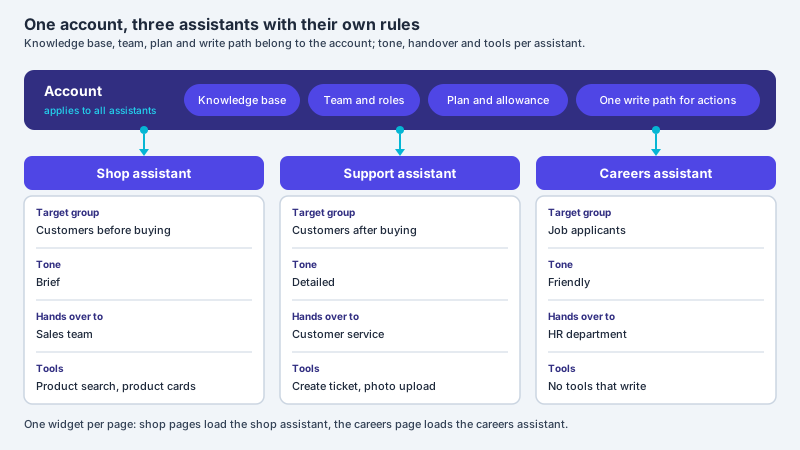
Every answer is booked, together with the tool calls the assistant ran for it – at most five per answer in regular operation. Consumption and limit sit side by side under Billing: billed units, billed answers and the remaining allowance for the current month. The allowance belongs to the package and therefore to the account, not to the individual assistant. If several assistants run in one account, they all book against the same allowance; how to separate them sensibly is covered in the article on several assistants in one account.
A second, smaller cap has to be kept apart from this: an upper limit per visitor and minute on the public interface of the widget. It is aimed at automated access that would otherwise use up the allowance and has nothing to do with the month. How that limit can be justified and what a visitor sees when it is hit is covered in the article on rate limiting per visitor and minute. This article is only about the monthly allowance and its stages.
The stages up to the limit
What happens when the allowance runs low follows a fixed order. Each stage has a trigger, an effect on the answers and a place where it becomes visible. The table sets the stages side by side; the sections after it go through them one at a time.
| Stage | Trigger | What the assistant does | Where it becomes visible |
|---|---|---|---|
| Regular operation | every answer | answers at full length, at most five tool calls per answer | consumption and limit under Billing |
| Throttled | an answer crosses the four-fifths threshold | answers more briefly, on the small model tier, with one tool round instead of five; keeps handing over to the office | notice at the top of Billing; a one-off message to the people who run XICBOT |
| Limit reached | a booking lifts consumption to or above the allowance | refuses the request before the model call and sends the stored fallback answer | in the Custom package the “Budget exhausted” webhook, if set up; in Start and Pro only the status under Billing |
| New month | change of month | starts the allowance over | consumption under Billing starts again |
Throttled means shorter, smaller, one round
From the four-fifths threshold the way the assistant answers changes in three places. It answers more briefly. It answers on the small model tier. And it runs only one tool round per answer instead of five. These three levers reduce the effort per answer without switching the assistant off. The tool control page describes the cap on tool chains in more detail: an answer carries at most five calls, and only one when the allowance is low.
- It keeps answering: the visitor receives information, just more briefly.
- It keeps handing over to the office: anyone who needs a person is passed on as usual.
- It keeps saying what it does not know: that is intended in throttled mode as well.
- It keeps booking: throttled answers count against the allowance as well. Throttling is meant to stretch what is left; it does not stop consumption.
During a sales week the tool round is what makes itself felt most. In a shop, product search, product card and cart are tools of their own in the conversation, and a question like “Do you still have the jacket in M, and what does shipping cost?” typically needs several look-ups in a row. With five rounds the assistant can work through it in one answer. With one round it lacks the follow-up steps: whatever only emerges from the first look-up cannot be looked up in the same answer. It can then answer with what the first round produced and ask about the rest. What an assistant can do when an item sells out during the week is covered in Sold out during the sales week.
Fewer look-ups, not less information
The pricing page sums up throttling in one sentence: what falls away is the length and the number of look-ups, not the information. For the sales week that means a throttled assistant tends to need more steps for the same result, but it stays in the conversation.
At the limit: the fallback answer until the month changes
Once consumption reaches the allowance, every further request is refused before the language model is called. So no further consumption arises. The visitor sees neither a blank page nor an error but the fallback answer you stored yourself – usually a pointer to the phone, the form or the mailbox. That remains the case until the month changes; then the allowance starts over.
During the sales week this rule has an awkward consequence. If the limit is reached on Saturday 28 November, the assistant answers only with the fallback answer up to and including Monday 30 November – across the whole weekend and on Cyber Monday. Only on 1 December does the allowance start again. Unlike an outage, nothing sorts itself out here: the limit is a billing limit, not a failure. Anything still to be settled in the middle of the sales weekend becomes an arrangement under time pressure; before the week it is a decision.
Read your usage in advance
Whether the sales week will fall into throttling can be estimated beforehand, using the figures that are shown under Billing anyway: billed units, billed answers and the remaining allowance for the current month. The plan limits stand below as a table. The estimate needs no formula, just a set day, one division and an honest mark-up.
- Pick a set day: about a week before Black Friday, read the status under Billing and note it down with the date.
- Work out the daily average: divide the usage so far by the number of days that have passed in the month. That gives what an ordinary day costs.
- Use the threshold, not the limit: throttling starts at four fifths, not at the limit. For the question of whether the sales days will be answered at full length, the distance to that threshold is what counts.
- Set the remainder against the days left: divide the distance to the threshold by the daily average. If the result does not reach 30 November, things get tight even without a sales week.
- Add a mark-up for the sales days: how many more questions come in on those days depends on the shop. A useful guide is your own history from earlier promotions, if there is one.
- Count every assistant: if several assistants run in your account, they consume together. An assistant with little traffic usually hardly matters; a second shop assistant does.
The result is one of three situations. If the four-fifths threshold lies beyond 30 November even with the mark-up, there is nothing to do. If it is reached during the sales week but the limit is not, the assistant runs throttled on the sales days; that is acceptable if the handover and the fallback answer are right. If the limit is also reached before 30 November, visitors on sales days only get the fallback answer – then the question of more allowance belongs on the table before the week begins. Which content belongs in the knowledge base before the season so that the answers hold up on those days is covered in Absorbing support spikes in peak season.
Maintain the fallback answer for the week
The fallback answer is the text a visitor gets to read at the limit, and during a sales week it may be the text that many visitors see on a single day. It sits in the flow of the conversation, not in an error box. What it says decides whether a visitor knows how to get further now. A text entered once in the spring may name a phone number nobody answers at the weekend, or a mailbox that is only read on Monday.
- It names a channel that is staffed during the sales week: the phone with the weekend hours, the form or the mailbox with an honest note on when it is read.
- It does not say why the assistant is not answering in full right now. Allowance or outage make no difference to the visitor, and the same text appears in both cases.
- It promises no deadline the team cannot keep during the week. “We will get back to you as soon as we can” is more honest than a fixed time.
- It points to pages that help without the chat: shipping, returns, order status, if the shop has them.
- It is short. Two or three sentences are enough; anyone reading a paragraph at this point is only looking for the one sentence with the way forward.
- It has been proofread before the week by someone who checks that number and hours are right for that week.
Settle a raise before the week
If the allowance is permanently insufficient, the pricing page names two ways of raising it: the next larger package or a separately agreed value that sits alongside the package. A guard reports when an agreed value deviates from the package list, so the deviation stays visible instead of drifting unnoticed. The pricing page names no route of its own for a single peak week; whether anything can be arranged for one can only be settled case by case, ideally calmly before the week. Which limits and features change when you switch package is answered under what happens if your needs grow later.
| Situation after the estimate | Obvious route | What to do beforehand |
|---|---|---|
| Threshold is only reached after 30 November | change nothing | note the status on the set day, check the fallback answer |
| Threshold is reached during the sales week, the limit is not | accept throttling deliberately | check the handover to the office and the fallback answer, record the decision |
| Limit is reached before 30 November | ask case by case before the week | check the fallback answer for the sales days with particular care, record the outcome of the request |
| Demand is permanently higher, not only in November | next larger package or an agreed value | check the move against the other limits of the package |
Throttled is a decision, not a breakdown
A sales week in throttled mode is not a mistake if it was chosen. If you know that the assistant will answer more briefly from a certain day and keep handing over, you can prepare the team for it. It only becomes awkward where nobody expected it.
Who learns what: notice, message, webhook
During the sales week what matters is who learns about a stage, and when. Throttling at four fifths is visible to you, but it does not contact you: the notice appears under Billing, and the message created once at that point goes to the people who run XICBOT. At the limit, in the Custom package, the “Budget exhausted” event is added as a webhook. What is reported is the transition, not the state: the message arrives once, when a booking lifts consumption to or above the allowance. In Start and Pro this message does not exist; there only Billing shows where consumption stands.
- You in the account see the notice at the top of Billing from four fifths on, with the consumption and the budget of the month – as soon as you look.
- The people who run XICBOT receive a message once at four fifths, not with every further answer.
- Your own system receives the “Budget exhausted” event at the limit, with month, budget and consumption, if a webhook is set up for it – which is only possible in the Custom package.
- The visitor notices briefer answers from four fifths on and the fallback answer at the limit, but no error message.
Frequent questions
Is the assistant switched off during the sales week when the allowance runs low?
Not all at once. From four fifths of the monthly allowance it answers more briefly, on the small model tier and with one tool round per answer instead of five, but it keeps handing over to the office. Only at the limit is the request refused before the model call, and until the month changes the visitor receives the fallback answer you stored.
Do I get a message when four fifths have been used?
Not as a message to you. At four fifths a notice with the consumption and the budget of the month appears at the top of Billing; the message created once at that point goes to the people who run XICBOT, not to the users of your account. Your own system only receives a message in the Custom package, when the limit is reached, through the “Budget exhausted” webhook, if it is set up. In Start and Pro there is no message either at four fifths or at the limit. During the sales week a daily look at Billing is therefore usually advisable.
What does a visitor see once the limit is reached?
They see the fallback answer you stored yourself, usually with a pointer to the phone, the form or the mailbox. No blank page and no error message appears. This applies until the month changes; after that the allowance starts over. How well the visitor gets on with it depends largely on whether the channel named is staffed that week.
How is the allowance raised?
If the allowance is permanently insufficient, the pricing page lists two routes: the next larger package or a separately agreed value that sits alongside the package. No separate route is named there for a single peak week; whether anything can be arranged for one can only be settled case by case. Raise it before the sales week if you can; in the middle of the weekend it becomes an arrangement under time pressure while the assistant may already be throttled.
When does the allowance start over?
With the change of month. Usage is counted per calendar month, so for the 2026 sales week the allowance starts over on 1 December, the Tuesday after Cyber Monday. From then on the assistant usually answers at full length again, and consumption under Billing starts again. Throttling or the fallback answer from November therefore does not carry over into December.
Is throttling the same as the limit per visitor and minute?
They are two different caps. The limit per visitor and minute is aimed at automated access to the public interface of the widget and has nothing to do with the month; more is in the article on rate limiting per visitor and minute. Throttling from four fifths depends on the monthly allowance of the account and usually lasts until the month changes.
Ask it yourself, Assistant of this website
Automated assistant