Change or cancel an order: taking post-purchase requests in chat
How an assistant records change and cancellation requests before dispatch with the details needed, keeps cancellation and withdrawal apart and leaves the decision to your team.
In plain language
After buying, customers sometimes want to change something. They want a new address, a new size or no order at all.
The assistant takes this wish in the chat. It asks for the order, the kind of change and a way to reply. The customer checks it all and confirms. Then the wish goes to your team.
Your team decides if the change can still be made. To withdraw means the customer ends the sale under the law, and they can do so even before it is delivered.
No sooner has the order been sent than many customers think of something else: the present should go straight to their sister, the jacket should be one size larger, or the purchase from the discount campaign was a little too quick. Around a sales week such requests can pile up, and they often arrive outside office hours. An assistant on the website can take them, ask for the details your team needs to process them and pass the case on once the customer has confirmed. What it should not do: promise a change that nobody has checked yet, or brush off a cancellation request that may legally be a withdrawal. This article shows where the line runs, which details make a request workable and how it reaches the team complete.

Labels in the illustration
- Change or cancellation before dispatch
- Agreement under Section 311 BGB, your shop decides
- Withdrawal: can be declared before receipt
- Signpost in chat, the period starts on receipt of the goods at the earliest (Section 356 BGB)
- Ordered
- Customer’s offer
- Processing
- Change usually still possible
- Dispatched
- Change rarely still possible
- Received
- Earliest start of period
- Proposal in chat, awaiting confirmation
- Order number
- as in the order email
- Type of change
- different delivery address
- Contact
- email used for the order
- Confirm
- only the click creates it
- Handover to the inbox
- no connection needed, with the full history
- Ticket in your ticket system
- via a connection in the Custom package
- In both cases your team decides
- change, cancel or decline
Requests after purchase, before the parcel leaves
Between sending an order and handing it to the carrier there is a window in which something can still be moved in the warehouse. How long it lasts depends on your business: some shops pack on the same day, others batch orders, engraved goods go into production first. In this window customers get in touch with requests that have two things in common. They concern an order that already exists, and only someone allowed to step into order processing can fulfil them. As a rule, the assistant cannot. What it can do is make sure the request reaches the team in a form that needs no follow-up question, and that the customer knows where they stand.
| Request | Typical first message | What the assistant records | Who decides |
|---|---|---|---|
| Different delivery address | “Can the parcel go straight to my mother?” | Order number, new address, contact channel | Order processing, after checking against the order |
| Different variant | “I need the shoes one size larger.” | Order number, item concerned, size or colour wanted | Order processing, depending on stock |
| Add or remove items | “Please add the matching case.” | Order number, item, quantity | Order processing; an extra item may also be a new order |
| Later delivery date | “We are away until Friday.” | Order number, earliest day for delivery | Shipping |
| Cancel the order | “Please cancel, I ordered twice.” | Order number, in full or in part, contact channel | Order processing, with priority, because it may be a withdrawal |
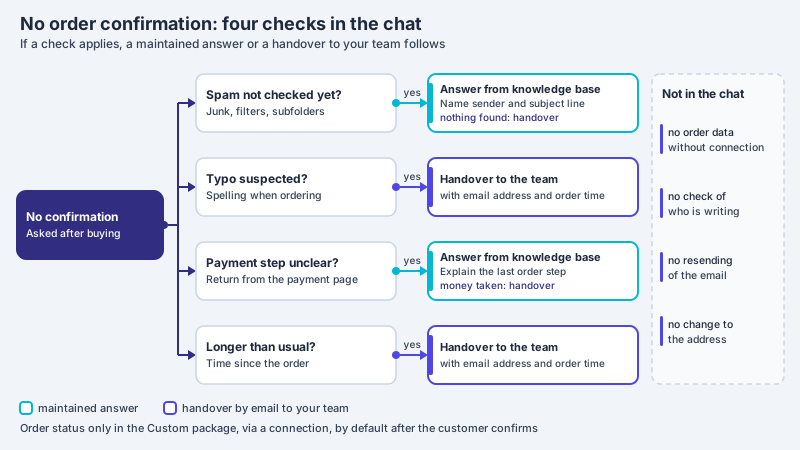
This article does not cover two related cases. If the confirmation email is missing after the purchase, the first question is whether the order arrived at all; the article on no order confirmation received describes that. Where a shipment stands and how a return works after receipt is covered by the article on order status and returns in chat. This one is about the wish to change or undo an existing order before dispatch, and about what the chat may say about it.
Why the chat does not promise a change
With the order, the customer usually makes an offer by which they are in principle bound under Section 145 BGB. Once your shop accepts it, depending on your terms for example with the order confirmation or with dispatch, the contract is concluded. Delivery address, variant and quantity are part of its content, and what has been agreed cannot be changed by one side alone. The German Civil Code says so expressly in Section 311(1):
To create an obligation by legal transaction and to change the content of an obligation, a contract between the parties is required, unless otherwise provided by statute.
For the chat this means: the customer’s request for a change is an offer that your business can accept or not. Whether it does depends on things the assistant usually cannot see, such as whether the order has already been picked, whether the other size is in stock or whether the new address lies in a country you deliver to. If the assistant writes “I have changed your address”, it gives the impression that the agreement has already been made. Whether such a statement binds your business depends on the individual case; the article on guarantee statements in the sales conversation describes when a chat answer can be understood as a commitment. A more cautious sentence confirms receipt only: the request has been recorded, your team will check it and get back in touch.
Cancellation and withdrawal: two different routes
In everyday language, anything meant to undo an order is called “cancelling”. Legally there are at least two routes behind it. One is cancellation by agreement: the customer asks, your business agrees, often as a goodwill gesture. The other is the right of withdrawal that the law grants consumers in distance contracts (Section 312g(1) BGB). For this, the law does not require the shop’s consent but a declaration by the consumer. What it has to look like is set out in Section 355(1) BGB:
Withdrawal is effected by declaration to the trader. The declaration must clearly show the consumer’s decision to withdraw from the contract. The withdrawal need not state any reasons.
The wording does not require a particular word, but it does require a clear decision. A message such as “Please cancel my order, I no longer want it” may therefore be a withdrawal even if the term is not used. Whether it is one in the individual case, and whether a message in the chat reaches your business as a declaration, is for your team to assess, if in doubt with professional advice. The assistant does not assess it. For the assistant, something simpler follows: it does not treat a cancellation request as a mere favour that can wait, but passes it on to the team without detour.
In customer service one sometimes hears that a withdrawal is only possible after delivery. That confuses the start of the period with the earliest moment of the declaration. Section 356(2) no. 1(a) BGB governs when the withdrawal period begins for a consumer sale of goods delivered in one shipment, namely
as soon as the consumer or a third party named by the consumer who is not the carrier has received the goods
The provision states when the period starts to run, not that nothing can be declared before then. The European directive on consumer rights, which German withdrawal law for distance contracts implements, addresses early withdrawal expressly in its recital 40:
In addition the consumer should be able to exercise the right to withdraw before acquiring physical possession of the goods.
| Feature | Cancellation by agreement | Withdrawal |
|---|---|---|
| Basis | Agreement between customer and shop (Section 311(1) BGB) | Statutory right in distance contracts (Sections 312g and 355 BGB) |
| Who decides | Your business agrees or declines | The consumer declares; the law does not provide for the shop’s consent |
| Timing | As long as your business can still step in, typically before dispatch | Declaration possible before receipt of the goods; for delivery in one shipment the period starts on receipt at the earliest (Section 356(2) no. 1(a) BGB) |
| Reasons | Your business may ask for the reason | Need not state any reasons |
| What the assistant does | Records the request and hands it over | Names the route from your withdrawal notice, records the message and hands it over |
Personalised goods: cancellation only by agreement
Not every order carries a right of withdrawal. For engravings, made-to-measure items or photo products an exception described in Section 312g(2) no. 1 BGB may apply. Under it, unless the parties have agreed otherwise, there is no right of withdrawal for the following contracts, among them no. 1:
contracts for the supply of goods which are not prefabricated and for whose production an individual selection or specification by the consumer is decisive, or which are clearly tailored to the personal needs of the consumer
For the chat this shifts the situation. Anyone who wants to cancel an engraved watch shortly after ordering depends on your business being accommodating, and that usually depends on whether production has already started. Here time is what decides. The assistant should therefore not drop such requests into a general queue but hand them over so that the team able to stop production sees them. Whether an item actually falls under the exception is assessed by your team, not by the assistant; the article on gift advice in chat shows how the question can be raised before the purchase.
Five details for a workable request
A request that only says “Please change the address” triggers a follow-up question in the team, and every follow-up costs time that the tight window before dispatch does not have. Five details usually cover each of the cases in the table above. Following its instruction, the assistant asks for them one after the other, takes over what the customer has already written and asks only for the rest.
| Detail | What it is for | How the assistant asks |
|---|---|---|
| Order number | Links the request to the order | “What is your order number? You will find it in the order confirmation.” |
| Type of change | Shows which team is responsible | “Is it about the delivery address, an item, the delivery date or the whole order?” |
| New state wanted | Makes the change actionable | Asks for the new address, the size or colour, the day, or whether the order should be cancelled in full or in part |
| Fallback wish | Saves a second round if the change is no longer possible | “If the change is no longer possible: should the order stay as it is, or would you like to cancel it?” |
| Contact channel | Tells the team where the reply goes | Asks for the email address given with the order |
In XICBOT these details are asked for in the conversation, not through a form placed in front of it. Which five they are is set out in the assistant’s instruction; before passing them on it summarises them, and the customer corrects whatever is wrong. Only what the chosen action type knows can be marked as a required field: for the enquiry to the inbox, name, email, phone and the matter; for the handover to a person, the reason and the same contact details; for the ticket in the Custom package, among other things subject, email and a reference such as the order number. If a required field is missing, nothing is created and the assistant learns which detail is missing. The remaining details are in the summary and in the conversation history your team sees with the case.
No identity check in the chat
A change of delivery address is the most delicate of the requests. Anyone who only knows an order number, for example from a forwarded email, could use it to try to divert goods to a different address. XICBOT does not check, before giving information or passing anything on, whether the person writing placed the order; no procedure for that has been built. In the chat the order number is therefore a reference, not an identity document. The check belongs with your team: it compares the request with the order data and is best off replying to the address given with the order, not to one first mentioned in the chat.
If your inventory system is connected through a connection in the Custom package, the assistant can query the state of an order, by default only after the customer has confirmed. Among other things it reads the status and the order and dispatch dates; it does not read a tracking number. That helps with classifying the request: if the order already shows as dispatched, the assistant can say that a change will probably no longer take effect and name the route after receipt. This query does not check identity either; it works with the order number and only passes further details such as email or postcode on to the connected system. The page on the support assistant describes how the status query is safeguarded.
The order number is a reference, not an ID document
The assistant records the order number so that your team can match the request. It does not check who placed the order. Without a connection it gives out no order data; with the status query in the Custom package, your connected system decides which details it requires for matching. It promises no change, and your team is best off replying to the address from the order.
From conversation to handover to the team
Once the summary is confirmed, the request goes to your team. In XICBOT every action that writes something is tied to a confirmation: the customer sees beforehand in a preview what is about to happen, and only their click triggers the action. This applies to a handover proposed by the assistant as much as to the enquiry to the inbox and the ticket. Which route fits depends on where your team handles orders.
| Route | What is created | Requirement |
|---|---|---|
| Handover to a person | The conversation is set to escalated, an entry is created in the inbox and a person is notified, with the full history | No connection needed |
| Enquiry to the inbox | A case with name, contact and matter, created after confirmation | No connection needed |
| Ticket in the connected ticket system | A ticket with subject, description and the order number as reference, tied to confirmation as a writing action | Connection to your ticket system in the Custom package |
| Change in the inventory system | A change of address or items, passed on to the connected system; the system reports back whether it took effect | Connection in the Custom package and a matching endpoint in your inventory system |
For a handover, your routing rules decide which team gets the case, not the assistant. They look for their keywords in the reason for the handover and in the conversation title, which is created from the first question, and the first matching rule in the order of the list wins. For change requests, words such as “cancel”, “address” and “exchange” suit the order processing team; for personalised goods a word such as “engraving” suits the team that controls production, and that rule belongs higher up. If no rule matches, the handover stays in the inbox without a team rather than landing with someone who does not expect it. The page on tool control with approvals describes how writing actions are safeguarded.
What the customer reads in the chat
The answer decides whether the customer waits reassured or also writes an email and calls. Three parts carry it: what has been recorded, what happens next and what the assistant cannot say. Commitments on deadlines or outcomes only belong in it if they appear word for word in your documents. In XICBOT firm statements are checked against the source material after they are written; anything that appears nowhere in it is replaced and shown as a correction. That is a net for figures and promise words, not a barrier against every kind of promise, and it does not replace the rule in the instruction.
| Request | Not like this | But like this |
|---|---|---|
| Different delivery address | “I have changed the address.” | “I have recorded your request with the new address. Your team will check whether the order can still be redirected and will reply to the address from your order.” |
| Cancellation request | “A cancellation is not possible, please withdraw after receipt.” | “I am passing your request on to the team. How you can declare a withdrawal is explained in the shop’s withdrawal notice.” |
| Different size | “No problem, the larger size is on its way.” | “I have noted the size you want. The team will clarify whether it is in stock and can be swapped.” |
| Change engraving | “We will still adjust that.” | “Personalised items go into production early. I am passing your request on now; the team will decide whether it can still be done.” |
The sentence about withdrawal should not be reworded by the model every time. In XICBOT a curated question-and-answer pair goes out word for word, without chunking and without a model call; that fits wherever the wording itself is what matters. When a fixed pair is worth it is described in the article on fixed answers word for word. In addition, store a page on which your business describes until when and how orders can be changed, so that the assistant can state the rule with a source.
Set up and test before the sales week
A change route in the chat can hardly be introduced in the week the requests arrive. Before that, the knowledge base, the instruction and the routing rules should be in place, and a few typical sentences should have been run through: “Please deliver to a different address”, “I don’t want it any more”, “Can the engraving still be changed?” and “I would like to speak to someone”. Check whether the assistant asks for the five details, promises no change and hands over the cancellation request instead of putting it off.
- Knowledge base: A page describes until when and how orders can be changed or cancelled, phrased as a condition, not as a promise.
- Withdrawal: The withdrawal notice is in the knowledge base, and a fixed question-and-answer pair gives the route to withdrawal in its exact wording.
- Instruction: It names the five details and the sentences the assistant does not say: no confirmed change, no confirmed cancellation, no claim that withdrawal is only possible after receipt.
- Routing: One rule sends handovers with change and cancellation requests to order processing, and handovers about personalised goods reach the team that stops production.
- Check: Your team checks every request against the order and replies to the address from the order.
- Test sentences: The four sentences above have been run before going live, and the handover carries the history with the details recorded.
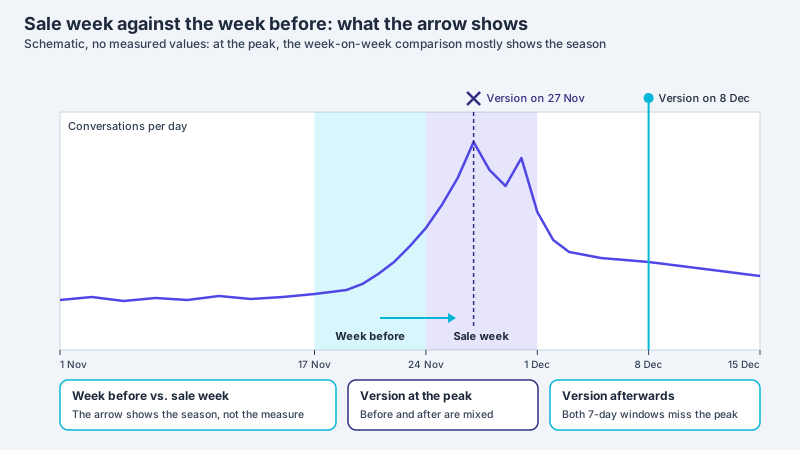
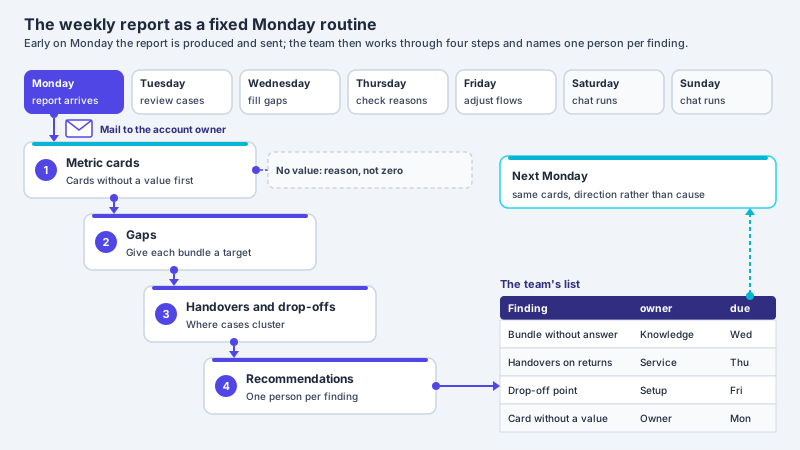
After the sales week, conversation analytics shows whether change requests come up as a topic of their own and how often such conversations were handed over. If they cluster around one product group, the cause may lie before the purchase, for instance in an unclear size chart or a hard-to-find option for delivery to another address. Why comparing with an ordinary week is easily misleading is described in the article on metrics in the sales week.
Frequent questions
Can the assistant change or cancel an order itself?
Not out of the box. It records the request and passes it to your team once confirmed. The shop connection in the Pro package reads the catalogue, not orders. With a connection in the Custom package a change can be passed on to your inventory system, provided it offers an endpoint for it, as a writing action and only after confirmation; whether it takes effect is decided by your system, and it should be settled beforehand how that system verifies the person who placed the order.
Is a cancellation request in the chat already a withdrawal?
It may be. Under Section 355(1) BGB, withdrawal is effected by a declaration to the trader from which the decision must clearly emerge. Whether a chat message meets that in the individual case is usually for your team to assess, if in doubt with professional advice. The assistant should therefore hand the request over promptly and name the route from your withdrawal notice.
May the assistant say that withdrawal is only possible after delivery?
That is best avoided. Section 356(2) BGB governs when the withdrawal period begins, not the earliest moment of the declaration, and according to recital 40 of Directive 2011/83/EU the consumer should be able to exercise the right of withdrawal even before receiving the goods. Such a sentence can therefore give a false impression.
What applies to personalised goods?
For goods made to the consumer’s specifications or clearly tailored to them, Section 312g(2) no. 1 BGB provides no right of withdrawal unless otherwise agreed. A cancellation is then typically a matter of agreement. The assistant should pass such requests particularly quickly to the team that can stop production.
How does the team know the request comes from the person who ordered?
Not from the assistant: XICBOT does not check identity, and the order number is only a reference. Your team compares the request with the order data and usually replies to the address given with the order. This check matters most for a new delivery address.
Do I need a ticket system for change requests?
Not necessarily. Without a connection, the assistant proposes a handover to a person or an enquiry to the XICBOT inbox; it is created once the customer confirms, with the conversation history. A ticket in your own ticket system requires a connection in the Custom package and is mainly worthwhile if orders are handled there anyway.
Ask it yourself, Assistant of this website
Automated assistant