Where Is My Order? AI Assistant for Shop Support
Where is my order? An AI assistant connected to your ERP answers questions on order status, shipment tracking and returns around the clock.
In plain language
Many customers ask: where is my order? This question comes even more often in peak season. If a link to your system is set up in the Custom package, the assistant asks it. For this it sends the order number and email. Then it gives the status your system reports. On returns it gives your rules. Telling people early about a delay saves questions. For damage and complaints, a person from your team helps.
There is one question that comes up particularly often in online shops: where is my order? Behind this single message sits one of the most common ticket categories in e-commerce. In normal months, so-called WISMO enquiries (short for where is my order) make up a large share of all support contacts, and in peak season their share rises noticeably again. The tricky part: many of these enquiries are alike, recurring and essentially avoidable. They often arise only because customers are not informed clearly and in good time. This is exactly where an AI assistant connected to shop, ERP and shipping steps in: it answers the order-status question itself, shows the tracking history, states the expected delivery date and guides the customer through the return, around the clock and without anyone on the team having to open a ticket. This article shows why after-sales support eats up so much time, how an assistant connected to the ERP or inventory system takes over order status and returns, and where the limits of this automation lie.

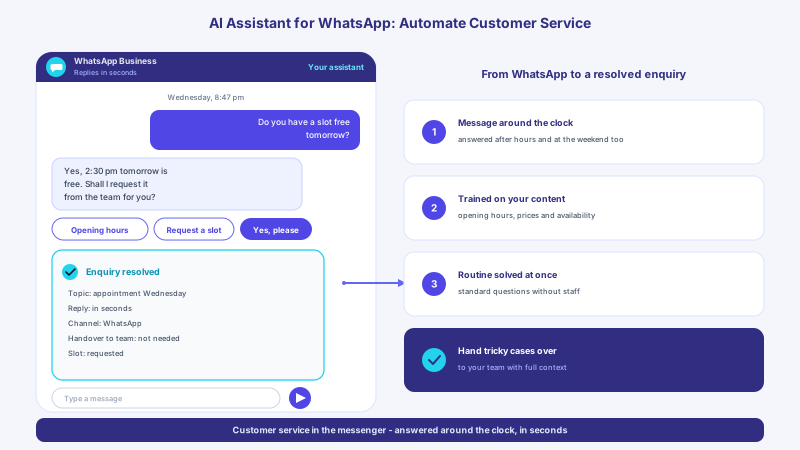
Labels in the illustration
- XICBOT
- Sunday, 10:47 pm
- Where is my order
- no. 100482?
- Sure, let me check right away.
- With order number and email
- I can find your shipment:
- No. 100482
- Email confirmed
- Carrier
- Your order is on its way
- Status: shipped, with the carrier
- Dispatched: yesterday, 2:20 pm
- Delivery: tomorrow by 6 pm
- Tracking: follow it in the chat
- Return: deadline and route explained
- Type a message
- From chat to self-service in the shop
- 1
- Question around the clock
- asked at night and at the weekend too
- 2
- Order safely matched
- via order number and email address
- 3
- Status from the shipment
- tracking history and delivery date live
- Return or handover
- route explained or passed to the team
- Turn where is my order into self-service - around the clock, without a ticket
Why WISMO Eats Up Shop Support
After-sales support is the quiet cost driver in online retail. Once the order is paid, the waiting begins for many customers, and with the waiting come the questions: has the payment arrived? When will it be delivered? Why has the tracking been stuck since yesterday? Each of these messages is harmless on its own, but in bulk they tie up an enormous amount of time. WISMO enquiries typically account for a large share of the total enquiry volume and grow further with order volume during sale weeks and around the holidays. Each of these cases costs handling time, even though the answer is the same in almost every case and could be read out of the system in seconds. It is not the tricky cases that overload support, but the ever-same standard question.
The frustrating thing is that many customers do not even want to call or write. They often prefer self-service over talking to a member of staff and first try to solve a problem themselves before reaching out to support. Precisely for a simple, clearly answerable question like the order status from a connected inventory system, the route via a contact form or hotline is the worst for both sides: the customer waits for an answer that already exists, and the team types the same sentence for the hundredth time. An assistant that gives the answer directly and independently hits exactly what many would prefer anyway, and takes the most monotonous work off the team.
Order Status via ERP Connection in the Chat, Not in the Inbox
The heart of a shop support assistant is the connection to the systems where the answer already sits. A pure chat window that only gives general information helps little with WISMO, because the customer does not want to know how shipping works in general, but where exactly their parcel is. That is why the assistant asks your system via a connection set up for it; the system matches the order and returns the current state, just as a staff member would look it up in the back end. For the customer it feels like a short, friendly conversation; in the background a clean, verified query runs.
- Greeting and recognising the concern: the customer asks about the whereabouts of their order
- Safe matching via order number and email address or a confirmation link
- Reading payment, shipping and tracking status from shop, connected ERP and shipping system
- Clear answer in the chat: current state, expected delivery date, tracking history
- Where needed, direct entry into return, address change or shipment query
- Clean handover to the team as soon as the case departs from the standard
In this way a single assistant covers the whole path from the question to a reliable answer, without a ticket arising. For businesses using an assistant connected to tracking, the number of support tickets can drop noticeably, because the standard whereabouts question lands in the inbox less often. How such an assistant fits into website and shop in general and which building blocks sit behind it is shown by the scope of the shop assistant; that it mainly catches recurring standard cases is the thread running through the article on 24/7 support without extra staff.
-
Find the order safely
Order number and email address go to your connected system, which matches the enquiry to the right order before the assistant gives any information.
-
Shipping status in plain words
Instead of cryptic tracking codes, the assistant, connected to your ERP and shipping, names the understandable state: processed, shipped, out for delivery or delivered.
-
There around the clock
Most WISMO questions arise in the evening and at the weekend. The assistant answers even when no one on the team is at the desk.
-
Start a return directly
The customer reports the return wish in the chat, the assistant explains the way from your rules; it triggers a label or return slip only via a connection set up for that purpose.
-
Proactive, not reactive
On a delay or delivery problem the shop's shipping notifications inform on their own initiative; in the chat the assistant gives the same status along with the next step.
-
Handover to humans
Complaint, claim or special case: as soon as it gets personal, the assistant is meant to hand over to your team with full context.
What the Assistant Can Concretely Answer
After-sales support consists of surprisingly few but very frequent question types. Almost all of them can be answered once the assistant knows the order and shipment. It does not replace special-case handling, but it takes over the ever-same pieces of information that today devour most of the time. It matters that it only reads out what is needed for the specific question and ties the information transparently to the right identity, instead of handing out order data carelessly.
- Order status from the connected ERP and payment receipt: has the order arrived and been paid?
- Shipping and tracking: when was it dispatched, where is the parcel, when will it arrive?
- Delivery date and delay: what to do when the shipment stalls or a date falls through?
- Return and exchange: how do I send back, where is my label, which deadline applies?
- Refund: when and how do I get my money back after a return?
- Invoice and receipt: where do I find the invoice, delivery note or an order confirmation?
Because the assistant is tied to your own content and systems, it stays within your rules: it names your return deadlines, your shipping routes and your payment methods, not some general information from the web. Questions around purchase and advice that come before the order belong to a different use case; how to catch abandoned purchases in the chat is covered by the article on cart abandonment in the chat. Which questions an assistant takes on in an online shop beyond returns and order status from the connected inventory system is shown on the page about the assistant for online shops.
Handle Returns with Confidence
Right behind the whereabouts question sits returns support, and in Germany it carries particular weight. With a return rate of 24.1 percent (University of Bamberg) for parcels shipped in B2C online retail, German online retail is among the most return-heavy markets in Europe; among the textile online retailers surveyed in the German-speaking region, 12.2 percent (EHI Retail Institute) even report return rates above 50 percent. In total, according to an estimate, around 530 million (University of Bamberg) return parcels passed through logistics here in 2024. Every one of these returns triggers questions: how do I send back, where is my label, what deadline do I have, when do I get my money? For support this is the second big wave after WISMO, and it too is highly standardisable.
A connected assistant guides the customer through the return instead of sending them into a form and making them wait for processing. It names the stored deadline and explains the right way for the particular item; whether the deadline is met in the individual case it is not meant to judge. It requests a return label only if a connection to your shipping system is set up for it; otherwise it is meant to pass the case to your team. This is not an end in itself: a smooth, fast return is a tangible trust signal and one of the reasons customers order again. Instead of an annoyance at the end of the customer journey, the return becomes a guided, clean process that does not burden the team.
A return is loyalty, not just a cost centre
The way a shop handles returns co-decides whether a buyer becomes a regular customer. A return that is settled in the chat in a few sentences, with a clear deadline, the right label and a reliable statement on the refund, leaves a good impression despite the send-back. The assistant can make this process available around the clock and consistent, as far as your rules and connections support it, even in weeks when many returns come in at the same time.
Why Proactive Beats Reactive
A particularly effective lever against WISMO is to stop the question from arising in the first place. Many WISMO tickets can be avoided this way: whoever informs on their own initiative at the right moment saves the follow-up. This role is mainly played by your shop's shipping notifications, for instance when a shipment stalls unusually long, a delivery attempt fails or a delivery date shifts. The assistant complements them where customers go to check: anyone who asks about their shipment on your site gets the current state and the next steps instead of writing an annoyed email. A potential complaint thus becomes a well-informed customer who keeps the overview.
The most expensive support enquiry is the one that did not need to happen. Whoever informs the customer before they ask saves not just the ticket but prevents the frustration that would otherwise turn into a bad review.
This principle of fast, active response carries far beyond order status from a connected inventory system. It is the same mechanism by which a quick first answer turns a prospect into a customer, as described in the article on speed-to-lead and response time. And because customers ask their status questions where they happen to be checking, the assistant belongs on the pages they open for that; where the widget sits well is described in the article on chat widget placement.
Connecting to Shipping and Shop
For the assistant to give real information, it needs controlled access to the systems where the data lives: the shop system for order and payment status, the shipping or tracking system for the tracking history and, where present, the inventory or ticket system. Technically this happens via defined interfaces, where the assistant triggers individual actions in a targeted way, such as querying the status of an order in the connected inventory system or requesting a return label, instead of rummaging through data unfiltered. How an assistant carries out such actions safely and traceably is described in the article on tool control via function calling; the right embedding into your system landscape is bundled in tool control and integration.
| Aspect | Form, hotline and email | Connected AI assistant |
|---|---|---|
| Reachability | Only in business hours, reply often the next day | Around the clock, information in the conversation |
| Order status | Staff searches the back end, customer waits | Read directly from shop, connected ERP and shipping |
| Parallel enquiries | One after another, queue at peaks | Several conversations in parallel, within the package |
| Return | Form, then a wait for the label | Guided in the chat, label requested from the connected shipping system |
| Delays | Customer asks in frustration | Current status and next step in the conversation |
| Team load | Ever-same standard questions tie up time | Standard cases run independently |
Where the Assistant Hands Over to Humans
A good shop support assistant knows its limits. It takes over the standard information, but it does not push into cases that need human judgement. A genuine complaint, a damaged parcel, a goodwill request or an annoyed customer belong in the hands of a staff member, and with full conversation context so the customer does not have to tell their story twice. This restraint matches what users want: 62 percent (Bitkom) of online buyers want to turn to a quickly reachable, human contact in case of a problem, while a chatbot is wanted by 36 percent (Bitkom). The assistant thus takes on the routine and hands over cleanly as soon as things become personal, contentious or sensitive. How this handover succeeds without friction is shown by the article on the seamless handover to human agents; the relief in standard operation needed for it is delivered by the support assistant.
A Few Steps to an Order-Status Assistant with ERP Connection
The path to your own shop support assistant begins with a look at your most common enquiries and the systems where the answers live. On this basis the assistant is connected to shop and shipping, trained on your return and shipping rules and embedded into website and shop with a short snippet. After that it takes over the standard information, while your team looks after the cases that really need attention. A fixed relief rate cannot be seriously assured, because how strongly an assistant relieves depends on range, season and enquiry structure. What is reliable, by contrast, is the mechanism: reachable around the clock, information within the conversation, standard cases independent, special cases cleanly handed over. Which areas of competence and examples sit behind this is shown by the reference projects; for an overview of the packages see the pricing and packages; and if you want to run this through your own shop, a no-obligation demo is a good way in.
- Collect the most common WISMO and returns questions so the assistant covers the real cases
- Clarify the connection to shop and shipping system: where do status and shipment data come from?
- Define safe identification: order number, email address or confirmation link
- Store return and shipping rules so information fits your conditions
- Define handover rules to the team for complaints and special cases
- Secure data protection and hosting in Germany contractually and set a deletion concept
Frequent questions
How does the assistant know where exactly my order is?
It learns it only via a connection to your shop or ERP system set up for the purpose, in the Custom package; there is no separate order status tool without that connection. After the customer confirms, order number and email address go to your system, which matches the order and returns the status; the assistant reports it in understandable language. It is meant not to guess or invent anything, but to name the status your system reports, such as processed, shipped or delivered, plus details such as dispatch date or carrier, where your system supplies them. If a detail is not clear in the system, it is meant to say so openly and offer the handover to your team.
Can the assistant also handle returns?
Partly. The assistant guides the customer through the return instead of sending them into a form: it names your stored return deadline and explains the right way for the particular item; whether the deadline is met in the individual case it is not meant to judge. There is no separate returns tool: it can trigger a return label or assign the case to an order only via a connection to your system set up for that purpose in the Custom package. On the refund it gives information within your stored rules. Special cases such as damaged goods or goodwill requests it is meant to hand over to your team with full context, so that a fast, clean return becomes a trust signal instead of an annoyance.
How much support effort does an order-status assistant really save?
That depends on range, season and enquiry structure, so no fixed rate can be assured. The problem itself, however, is easy to grasp: WISMO enquiries make up a substantial share of all support contacts and increase noticeably again at peak times. Because these questions are highly standardised, much of them can be answered automatically once the ERP or inventory system is connected in the Custom package. The decisive point is that your team gains time for the cases that really need human judgement.
Does the assistant hand out order data safely?
The assistant names order data only from the answer of your connected system: by default, order number and email address go out only after the customer confirms, and your system checks that the two match. Of the answer, only the defined result fields reach the assistant, and before the lookup the customer sees which order goes to which system. At XICBOT, hosting is in Germany, with a data processing agreement, data sovereignty and a clear deletion concept; the answers are generated by a specialised model provider, also outside the EU on the basis of standard contractual clauses. This data minimalism is at the same time a trust signal towards your customers.
What happens with complaints or complicated cases?
The assistant takes over the recurring standard information but does not push into cases that need human judgement. A genuine complaint, a damaged parcel, a goodwill request or an annoyed customer are handed to your team with the full conversation history, so no one has to tell their story twice. This also matches the wish of the majority to turn to a human in case of a problem (Bitkom). This keeps the personal contact exactly where it counts, while the monotonous routine runs automatically.
How is the assistant connected to our shop?
The connection happens in the Custom package via defined interfaces to your shop, your ERP or inventory system and your shipping system, through which the assistant triggers individual actions in a targeted way, such as querying the order status or requesting a return label. It is embedded into the website and shop with a short code snippet, without you having to rebuild your existing presence. Which systems are connected and which actions the assistant may carry out we define together, tailored to your business, so that it gives exactly the information that fits your processes and rules.
Ask it yourself, Assistant of this website
Automated assistant