Chat Widget and Cookie Banner: What Section 25 TDDDG Requires
When a chat widget needs consent under Sec. 25 TDDDG, what it may store before the first message and how banner, withdrawal and records fit together.
In plain language
Two sets of rules apply to a chat window. One is about what is stored on the device. The other is about the content of the chat. Without consent, the window may only store what the chat needs. In the view of the authorities, the chat is only wanted once someone clicks on it. Before the first message there is a short privacy notice. Where consent is asked for, decline and accept sit side by side with equal weight. Taking consent back must be as easy as giving it.
For many operators, the chat widget is the last element that still ends up in the cookie banner, and it often lands there out of uncertainty rather than for a reason. Two questions are involved, and two laws answer them. Sec. 25 TDDDG governs what the widget may store in the visitor’s browser or read from it, whether or not personal data is involved. The GDPR governs the legal basis on which the content of the conversation is processed. This article separates the two levels, shows what a widget may and may not do before the first message, and what notice, withdrawal and records look like in technical terms. It explains the legal position and does not replace professional advice in an individual case.
%20TDDDG%2C%20for%20example%20via%20the%20cookie%20banner%3C%2Ftext%3E%3Cline%20x1%3D'340'%20y1%3D'188'%20x2%3D'412'%20y2%3D'188'%20stroke%3D'%23312e81'%20stroke-width%3D'1.5'%2F%3E%3Ccircle%20cx%3D'340'%20cy%3D'188'%20r%3D'4'%20fill%3D'%23312e81'%2F%3E%3Cpolygon%20points%3D'412%2C183%20412%2C193%20420%2C188'%20fill%3D'%23312e81'%2F%3E%3Ctext%20x%3D'380'%20y%3D'182'%20font-family%3D'system-ui%2C%20sans-serif'%20font-size%3D'9.5'%20font-weight%3D'600'%20text-anchor%3D'middle'%20fill%3D'%23334155'%3Eno%3C%2Ftext%3E%3Crect%20x%3D'420'%20y%3D'248'%20width%3D'340'%20height%3D'56'%20rx%3D'10'%20fill%3D'%23f8fafc'%20stroke%3D'%2306b6d4'%20stroke-width%3D'1.5'%2F%3E%3Crect%20x%3D'420'%20y%3D'258'%20width%3D'5'%20height%3D'36'%20rx%3D'2'%20fill%3D'%2306b6d4'%2F%3E%3Ctext%20x%3D'434'%20y%3D'272'%20font-family%3D'system-ui%2C%20sans-serif'%20font-size%3D'11.5'%20font-weight%3D'600'%20fill%3D'%231e293b'%3EConsent%20required%2C%20even%20after%20the%20click%3C%2Ftext%3E%3Ctext%20x%3D'434'%20y%3D'289'%20font-family%3D'system-ui%2C%20sans-serif'%20font-size%3D'10'%20fill%3D'%23334155'%3Ee.g.%20recognition%2C%20visit%20markers%2C%20measurement%3C%2Ftext%3E%3Cline%20x1%3D'340'%20y1%3D'276'%20x2%3D'412'%20y2%3D'276'%20stroke%3D'%23312e81'%20stroke-width%3D'1.5'%2F%3E%3Ccircle%20cx%3D'340'%20cy%3D'276'%20r%3D'4'%20fill%3D'%23312e81'%2F%3E%3Cpolygon%20points%3D'412%2C271%20412%2C281%20420%2C276'%20fill%3D'%23312e81'%2F%3E%3Ctext%20x%3D'380'%20y%3D'270'%20font-family%3D'system-ui%2C%20sans-serif'%20font-size%3D'9.5'%20font-weight%3D'600'%20text-anchor%3D'middle'%20fill%3D'%23334155'%3Eno%3C%2Ftext%3E%3Cline%20x1%3D'190'%20y1%3D'128'%20x2%3D'190'%20y2%3D'152'%20stroke%3D'%23312e81'%20stroke-width%3D'1.5'%2F%3E%3Ccircle%20cx%3D'190'%20cy%3D'128'%20r%3D'4'%20fill%3D'%23312e81'%2F%3E%3Cpolygon%20points%3D'185%2C152%20195%2C152%20190%2C160'%20fill%3D'%23312e81'%2F%3E%3Ctext%20x%3D'200'%20y%3D'148'%20font-family%3D'system-ui%2C%20sans-serif'%20font-size%3D'9.5'%20font-weight%3D'600'%20fill%3D'%23334155'%3Eyes%3C%2Ftext%3E%3Cline%20x1%3D'190'%20y1%3D'216'%20x2%3D'190'%20y2%3D'240'%20stroke%3D'%23312e81'%20stroke-width%3D'1.5'%2F%3E%3Ccircle%20cx%3D'190'%20cy%3D'216'%20r%3D'4'%20fill%3D'%23312e81'%2F%3E%3Cpolygon%20points%3D'185%2C240%20195%2C240%20190%2C248'%20fill%3D'%23312e81'%2F%3E%3Ctext%20x%3D'200'%20y%3D'236'%20font-family%3D'system-ui%2C%20sans-serif'%20font-size%3D'9.5'%20font-weight%3D'600'%20fill%3D'%23334155'%3Eyes%3C%2Ftext%3E%3Cline%20x1%3D'190'%20y1%3D'304'%20x2%3D'190'%20y2%3D'328'%20stroke%3D'%23312e81'%20stroke-width%3D'1.5'%2F%3E%3Ccircle%20cx%3D'190'%20cy%3D'304'%20r%3D'4'%20fill%3D'%23312e81'%2F%3E%3Cpolygon%20points%3D'185%2C328%20195%2C328%20190%2C336'%20fill%3D'%23312e81'%2F%3E%3Ctext%20x%3D'200'%20y%3D'324'%20font-family%3D'system-ui%2C%20sans-serif'%20font-size%3D'9.5'%20font-weight%3D'600'%20fill%3D'%23334155'%3Eyes%3C%2Ftext%3E%3Crect%20x%3D'40'%20y%3D'336'%20width%3D'300'%20height%3D'44'%20rx%3D'10'%20fill%3D'%234f46e5'%2F%3E%3Ctext%20x%3D'54'%20y%3D'355'%20font-family%3D'system-ui%2C%20sans-serif'%20font-size%3D'11'%20font-weight%3D'700'%20fill%3D'%23ffffff'%3ENo%20consent%20needed%20under%20Sec.%2025%20TDDDG%3C%2Ftext%3E%3Ctext%20x%3D'54'%20y%3D'370'%20font-family%3D'system-ui%2C%20sans-serif'%20font-size%3D'9.5'%20fill%3D'%23ffffff'%3EExemption%20under%20Sec.%2025%20(2)%20no.%202%20TDDDG%3C%2Ftext%3E%3Crect%20x%3D'420'%20y%3D'336'%20width%3D'340'%20height%3D'44'%20rx%3D'10'%20fill%3D'%23ffffff'%20stroke%3D'%23cbd5e1'%20stroke-width%3D'1'%20stroke-dasharray%3D'4%203'%2F%3E%3Ctext%20x%3D'434'%20y%3D'355'%20font-family%3D'system-ui%2C%20sans-serif'%20font-size%3D'11'%20font-weight%3D'600'%20fill%3D'%231e293b'%3EAssessed%20per%20storage%20operation%2C%3C%2Ftext%3E%3Ctext%20x%3D'434'%20y%3D'370'%20font-family%3D'system-ui%2C%20sans-serif'%20font-size%3D'10'%20fill%3D'%23334155'%3Enot%20once%20for%20the%20widget%20as%20a%20whole%3C%2Ftext%3E%3Crect%20x%3D'40'%20y%3D'392'%20width%3D'720'%20height%3D'42'%20rx%3D'10'%20fill%3D'%23312e81'%2F%3E%3Ctext%20x%3D'400'%20y%3D'417'%20font-family%3D'system-ui%2C%20sans-serif'%20font-size%3D'11.5'%20font-weight%3D'600'%20text-anchor%3D'middle'%20fill%3D'%23ffffff'%3ESeparately%3A%20chat%20content%20needs%20a%20legal%20basis%20under%20Art.%206%20(1)%20GDPR%3C%2Ftext%3E%3C%2Fsvg%3E)
Labels in the illustration
- 1
- Does the widget store or read
- anything in the visitor’s browser?
- 2
- Has the visitor expressly requested
- the chat, for example by clicking?
- 3
- Is it strictly necessary in technical
- terms to hold the conversation?
- Sec. 25 TDDDG is not engaged
- What remains is the legal basis under the GDPR
- no
- Consent before anything is stored
- Sec. 25 (1) TDDDG, for example via the cookie banner
- no
- Consent required, even after the click
- e.g. recognition, visit markers, measurement
- no
- yes
- yes
- yes
- No consent needed under Sec. 25 TDDDG
- Exemption under Sec. 25 (2) no. 2 TDDDG
- Assessed per storage operation,
- not once for the widget as a whole
- Separately: chat content needs a legal basis under Art. 6 (1) GDPR
Two laws, two different questions
The first question concerns the location. Sec. 25 (1) TDDDG permits storing information in terminal equipment, and accessing information already stored there, only with the end user’s consent. The provision does not ask whether the information makes a person identifiable. The supervisory authorities stress this explicitly in their guidance: the TDDDG governs the protection of privacy when terminal equipment is used, whether or not a personal reference exists. An entry in the browser’s local storage that holds nothing but the value “open” or “closed” is therefore just as much covered by the provision as a visitor identifier.
The storage of information in the end user’s terminal equipment or access to information already stored in the terminal equipment is only permitted if the end user has consented on the basis of clear and comprehensive information.
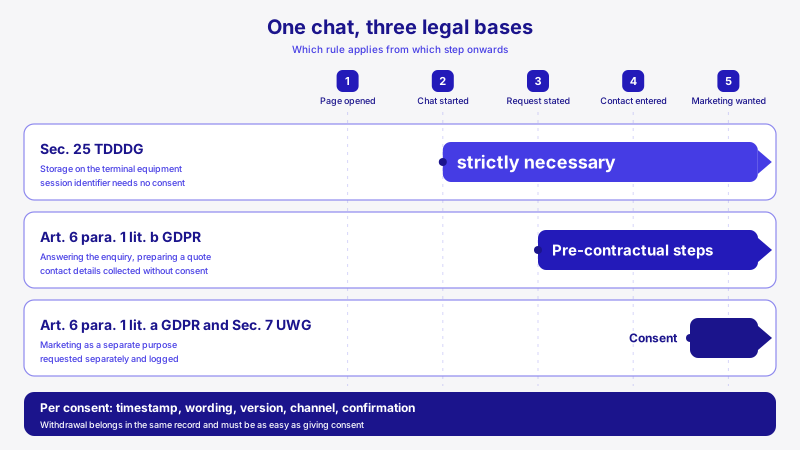
The second question concerns the content. What a visitor types into the chat window, the question, an order number, perhaps a name, is personal data, and processing it requires one of the conditions in Art. 6 (1) GDPR. For an enquiry, steps taken at the request of the data subject prior to entering into a contract often come into consideration (Art. 6 (1)(b) GDPR); alongside that stand legitimate interests under point (f) or consent under point (a). Which basis applies depends on the assistant’s purpose. For contact details taken down during the conversation, this is covered in Contact details in chat: obtaining consent properly; this article is about the terminal device. What matters is how the two levels connect: according to the guidance, agreement in a banner whose wording does not mention the subsequent processing is not a bundled consent under the TDDDG and the GDPR, but merely a consent under the TDDDG.
| Check | Sec. 25 TDDDG | GDPR |
|---|---|---|
| Subject | Storing in the browser and reading from the browser | Processing of personal data, such as chat content |
| Personal reference required | No | Yes |
| Permitted without consent if | strictly necessary for an expressly requested service | another condition in Art. 6 (1) applies, such as point (b) or point (f) |
| Typical case in chat | Conversation identifier, window state, visit marker | Question, order number, name, transcript |
| What a cookie banner covers | the storage, if it is named there | only what the wording expressly names as subsequent processing |
The chat is requested once someone clicks
The exemption a chat widget can rely on is found in Sec. 25 (2) no. 2 TDDDG. Under it, consent is not required where the storage or access is strictly necessary for the provider of a digital service to provide a digital service expressly requested by the user. Two conditions are contained in this, and both must be met at the same time: the service must be expressly requested, and the operation must be strictly necessary for precisely that service.
For the first condition, the supervisory authorities have drawn a clear line in their guidance for providers of digital services. They distinguish a website’s basic service from additional services that can be used individually, and they name the chat explicitly: a contact form, a chat or a map service are not automatically requested with the first visit to the website. Such additional services are requested only when users explicitly make use of them, for example by clicking on a chatbot.
The request begins with the click, not with the page visit
Anyone who opens a page requests the page. Anyone who clicks the chat trigger requests the chat. Whatever a widget stores in the browser before that click cannot rely on an express request, because at that point there is none yet. For this phase, the options are as a rule consent or doing without.
This leads to a simple build rule: until the click, the widget shows only its trigger and stores nothing. The service begins with the click, and only then can storage that technically carries the conversation fall under the exemption. Where the widget sits and when it speaks up on its own is a design question with rules of its own, as Chat widget placement: position, timing, messaging shows. For the legal question, one thing applies: a speech bubble that opens by itself after a while is not a click by the visitor.
What strictly necessary means
The second condition is narrower than the everyday term suggests. The guidance reads it technically: the exemption covers only access that is technically necessary to provide precisely the requested service. A commercial justification is expressly ruled out. An exemption from the consent requirement cannot be justified by the storage or reading being commercially necessary for the business model in which the service is embedded. Four questions have to be checked, and the authorities pose them explicitly:
- When: the time of storage. A conversation identifier created on page load comes before the request; the same identifier created with the first message comes after it.
- How long: the lifetime of the entry. For individualised entries, the authorities frequently consider only the duration of a session necessary.
- What: the content. A unique identifier weighs more heavily than a value such as “open” or “closed”, which does not distinguish anyone from anyone else.
- For whom: who can read the entry. An entry read only by the site itself is to be assessed differently from one that a third party can access.
Concrete conclusions for a chat widget follow from this. A conversation identifier that bridges a page change so that the running conversation does not break off is a typical candidate for the exemption. An identifier that recognises the visitor weeks later, as a rule, is not; that is a separate processing operation with its own basis, as the article on an assistant’s conversation memory explains. Economy applies even to consent itself: the authorities do not consider it necessary to store a cookie with a unique ID over a long period in order to record a consent.
What a widget stores before the first message
Most widgets do more on page load than their trigger reveals. They fetch a configuration from the server, build their window invisibly in advance so that it is ready at once on click, and write entries into the browser’s storage along the way. Anyone who wants to know what their own widget does loads the page in a fresh browser profile, clicks nothing and checks in the developer tools which cookies and which entries in local storage and session storage have been created. This list is the basis for every further check.
| Entry | Typically created | Assessment under Sec. 25 TDDDG, as a rule |
|---|---|---|
| Window state “open” or “closed” | on first opening | defensible after the click as part of the requested service, not before |
| Conversation identifier | with the first message | exemption conceivable as long as it carries only the running conversation |
| State of consent | after the visitor’s decision | store as a plain value without a unique identifier and with an expiry |
| Visit marker for returning visitors | on page load | requires consent, because it serves proactive messaging |
| Identifier for recognition over weeks | on page load | requires consent |
| Copy of the transcript | after every message | avoid; the transcript belongs on the server |
A request on page load is not only a question of Sec. 25. Every request to a server technically transmits the visitor’s IP address, and that is processing under the GDPR which should be reflected in the privacy policy and, where a service provider is involved, in the data processing agreement. What that agreement should cover for a chat assistant is set out in Data processing agreements for AI assistants. The less happens before the click, the shorter this list becomes.
Load at once or only after the click
There are three patterns for when to load, and they differ less in technology than in what happens before the visitor decides. The first loads everything together with the page. The second shows only a trigger and builds the window only on click. The third additionally waits for agreement in the site’s banner and stays silent until then.
-
Loaded with the page
The window is ready at once on click. In return, requests and often entries are created before anyone has requested the chat. For everything that lands in the browser along the way, the exemption generally does not apply.
-
Loaded on click
Until the click, only the trigger sits on the page. The requested service begins with the click, and whatever technically carries the conversation can fall under the exemption. In return, the visitor waits a brief moment until the window is ready.
-
Loaded after agreement
The site’s banner opens the gate; nothing happens by itself before that. This pattern fits when the widget needs entries that go beyond the conversation, for example for proactive messaging.
The second route is usually the most balanced, and it depends on one condition: the loader itself must store nothing on load and should be lean enough not to slow the page down noticeably. In XICBOT, only this loader runs on the embedding page; the chat window lives in its own frame. When this frame loads depends on a setting. Without a consent gate, the loader inserts it after the page has loaded, and the frame fetches its configuration without anyone clicking; that corresponds to the first pattern, only timed after the page. With the gate, the frame loads only after agreement in the banner or after a click on the trigger. What a widget costs in load time is shown in Chat widget and load time.
Cookie banner and chat: which controls which
If a widget stores entries that require consent, it belongs in the site’s banner with its own, clearly named purpose. The chat is then subject to the same sequence as any other element: first the decision, then the access. The supervisory authorities consider it impermissible for cookies requiring consent to be set on the very first visit to a website and for consent to be requested only afterwards. For the widget this means: it must be able to wait for the decision in the banner and must also be possible to switch off again from there.
Conversely: a widget that stores nothing before the click and afterwards only what carries the conversation generally needs no entry in the banner for Sec. 25 TDDDG. Listing it there anyway creates the impression of a choice that does not exist in that form. Why an unnecessary banner can itself be a problem is described, from the perspective of a supervisory authority, in Contact details in chat. Where the banner is needed, its design decides whether the agreement holds.
- The chat has its own purpose in the banner with an understandable description, not merely the name of a product.
- Decline sits with equal weight next to accept. A button labelled “Settings or decline” that only leads to a further layer of the banner is not sufficient in the view of the supervisory authorities.
- The decision in the banner opens and closes the widget’s gate without the page having to be reloaded.
- A withdrawal in the banner clears the widget’s entries and ends a running conversation.
- The chat trigger does not cover the banner’s buttons, and the banner does not permanently cover the trigger.
The notice belongs before the first message
Collection of the conversation content begins with the first message, and that is exactly the point in time Art. 13 (1) GDPR names for providing information: the controller provides the data subject with the information at the time the data are obtained. Which items that covers in detail is set out in the article on contact details in chat already linked above. For a widget, what matters most is place and timing. A link to the privacy policy in the page footer does not, as a rule, reach the visitor at that moment. The notice therefore belongs in the window itself, visible before the first question is sent. Four points follow from this for the widget:
- The notice names the site operator as controller, not the provider of the software that supplies the window.
- It sits before the first input, however the window was opened: via the trigger, a speech bubble or a link on the page.
- If the operator changes the notice text while a window is open, the visitor sees the new wording before typing on.
- The window states that a machine is answering. This labelling is a separate obligation, described in the article on the EU AI Act and AI chats.
If the conversation is to be based on consent, an additional hurdle comes in that is often underestimated. Under Recital 32 GDPR, silence, pre-ticked boxes or inactivity of the data subject should not constitute consent. Typing the first question does not amount to consent; it is asking a question. In XICBOT, the window shows the notice from the server that a machine is answering, and a button in the window header tells the visitor that the site operator stores the conversation. If consent is switched on, the operator’s consent text also appears before the first message, with accept and decline side by side with equal weight; declining creates no conversation and leaves the input locked. XICBOT does not insert the remaining information under Art. 13 GDPR by itself; the operator provides it, in the consent text or in their privacy policy.
Withdrawal: as easy as giving consent
Art. 7 (3) GDPR requires withdrawal of consent to be as easy as giving it, and Sec. 25 (1) TDDDG expressly refers to that regulation for consent. The supervisory authorities conclude from this: if consent is given directly while using a website, it must also be possible to withdraw it the same way. What Art. 7 GDPR requires of withdrawal and records in general is described in the article on contact details in chat already linked above; this section is about what a widget has to do technically.
A chat therefore has two places where consent can be withdrawn: in the window itself and in the site’s banner. Both should have the same effect, technically and not merely on screen. A withdrawal that removes a tick while the conversation carries on in the background does not deserve the name. With the banner, the window may be open at that very moment, and the page is not reloaded for the withdrawal. A withdrawal should therefore achieve at least the following:
- The state of consent in the browser is removed immediately.
- Scheduled messages and visible speech bubbles disappear.
- A running answer is aborted, and the window no longer accepts input.
- Conversation identifier and markers are cleared from the page’s storage.
XICBOT offers both routes, but they do not reach equally far. In the window, the visitor withdraws without an account; the withdrawal is recorded before anything else happens, a running answer is aborted, and afterwards the window accepts nothing more. This route does not clear the entries in the page’s storage: the conversation identifier and markers remain until their expiry, unless the visitor deletes the conversation in the window, which removes the conversation identifier. Via the site’s banner, by contrast, the withdrawal handle clears the consent state, the conversation identifier, the visit marker and the frame. How a visitor can also obtain access to their conversation is described in Right of access to the chat history.
Records: what should be kept
For demonstrating consent under Art. 7 (1) GDPR, a widget adds two particulars. Agreement is given in a window that may be embedded on several sites, and its wording can change while a window is open. Besides the time, the record should therefore also name the embedding site and, after the notice text has changed, still allow an unambiguous match to the wording that applied.
The location of this record matters. An entry in the browser can disappear, for instance when the visitor clears their browser data, and a consent that exists only there can then be neither demonstrated nor withdrawn. In XICBOT, consent is therefore attached to the conversation on the server: with the time and a fingerprint over the wording shown, the version of the XICBOT privacy policy and the embedding site. XICBOT does not keep the wording itself; anyone who archives earlier versions can match them unambiguously via the fingerprint. If the operator changes the wording while a window is open, no conversation is created; the window shows the new text and asks again. Where this data is kept and for how long is set out under Privacy and hosting.
Checking sequence for your own site
- Load the page in a fresh browser profile, click nothing and note all cookies and storage entries that are created anyway.
- For each entry, record purpose, time, lifetime, content and reader.
- Check whether the entry is created before or after the click on the chat. What is created before it usually needs consent or should be removed.
- For everything after it, ask whether the conversation could not be held technically without this entry. Only then does the exemption come into consideration.
- For the chat content, determine and document the legal basis under Art. 6 (1) GDPR, independently of the banner.
- Run through notice, decline, withdrawal and records once from start to finish as a test case and document the result.
This sequence is deliberately technical, because the legal question only becomes answerable once it is clear what actually happens in the browser. Anyone who goes through it once usually ends up with fewer prompts than feared and can justify each remaining one. The banner becomes shorter, the chat window more honest, and a question from a supervisory authority can be answered with a list rather than a guess.
Frequent questions
Does every chat widget belong in the cookie banner?
Not necessarily. What matters is what the widget stores in the browser or reads from it. If it limits itself to what is strictly necessary after the visitor’s click to hold the requested conversation, the exemption in Sec. 25 (2) no. 2 TDDDG comes into consideration, and an entry in the banner is generally not needed for that. If, on the other hand, it already stores identifiers or markers on page load, it belongs in the banner with its own purpose. In an individual case, a professional review is worthwhile.
Does agreement in the cookie banner also cover the chat content?
As a rule, no. Consent under Sec. 25 TDDDG concerns storing and reading on the terminal device. The content of the conversation needs a legal basis under Art. 6 (1) GDPR. According to the supervisory authorities’ guidance, agreement in a banner whose wording does not mention the subsequent processing is merely a consent under the TDDDG.
Is clicking the chat trigger already consent?
As a rule, no. The click shows that the visitor requests the chat. That is the precondition for the exemption in Sec. 25 (2) no. 2 TDDDG, but not consent within the meaning of the GDPR. Consent requires a freely given, specific, informed and unambiguous indication of wishes (Art. 4 (11) GDPR). Anyone who needs consent asks for it after the click with a separate notice in which declining is offered with equal weight.
May the widget store an identifier so that the conversation survives a page change?
That depends on timing, lifetime and purpose. An identifier that is created only with the conversation and carries only the running conversation is a typical candidate for the exemption. For individualised entries, the authorities frequently consider only the duration of a session necessary. If the conversation is to be kept for days or weeks, there is generally a strong case for consent.
May a chat widget preload its window so that it is ready at once on click?
As a rule it is possible, but it has two consequences. Even the request on page load transmits the visitor’s IP address and is therefore processing under the GDPR that should be reflected in the privacy policy. If the widget also stores something in the browser or reads something from it in the process, Sec. 25 TDDDG is engaged, and before the click the exemption for expressly requested services generally does not apply. Anyone who wants to manage without an entry in the banner therefore typically loads the window only on click.
May the widget speak up on its own with a speech bubble?
In many cases yes; what matters is what the speech bubble relies on. If it appears after a waiting time on the current page and stores nothing in the browser for that purpose, Sec. 25 TDDDG is generally not engaged. If, on the other hand, it needs a marker for returning visitors or a counter of earlier visits, the exemption in Sec. 25 (2) no. 2 TDDDG does not help: a speech bubble is not a click by the visitor and therefore not yet an express request for the chat. For such markers, consent is generally required.
Ask it yourself, Assistant of this website
Automated assistant