Product Cards and Cart Directly in the Chat
How product cards and a cart right in the chat turn advice into sales: cross- and up-selling, addressing cart abandoners and connecting a Shopware CE shop.
In plain language
In the chat, the assistant can show products from your shop as small cards. A card has a picture, a name, a price and a button for the cart. If a size is sold out, the assistant offers something else. It can also fill a cart in the chat. The order and payment then happen in the shop. Many buyers give up because extra costs show up late. The assistant names shipping costs openly in the chat. More sales cannot be promised.
An online shop puts its products on shelves, but the advice that is natural in a physical store is usually missing online. This is exactly the gap a custom AI chat assistant closes when it does not just answer questions but shows products and puts together a cart. Instead of leaving visitors alone with a text field, it displays fitting product cards with image, title, price and a button right in the conversation and leads them on into the shop with “Continue”. That turns the chat from a support channel into a sales channel. This is no side issue: around 70 percent (Baymard Institute) of online shopping carts are abandoned, and a large share of these abandonments has reasons an assistant can catch at the right moment. This article shows how product cards and a cart in the chat work, how cross- and up-selling feel in a dialogue, how to address cart abandoners and what connecting to Shopware in the Community Edition looks like.

Labels in the illustration
- Looking for a gift under 50 euro?
- I have two favourites for you.
- Yes, something premium please
- Studio Pro Headphones
- Wireless, 30 h battery
- 149.00 euro
- Add to cart
- Write a message...
- Cart in the chat
- Studio Pro Headphones
- 149.00
- Qty 1
- USB-C charging cable
- 12.90
- Qty 1
- Goes with it
- 8.10 euro to go until
- free shipping
- Subtotal
- 161.90
- Shipping
- 3.90
- Total
- 165.80
- Continue
- Right in the conversation, no page change
- Product cards and cart right in the chat
From Chat to Sales Channel
A classic chatbot answers questions and at best points to a product page. An AI chat assistant that truly reads the shop catalogue goes one decisive step further: it shows the fitting product right away as a card in the conversation, with image, title, price and a cart button. The visitor does not have to leave the chat, does not have to search and does not have to guess which of twelve variants is meant. An answer becomes an offer, and an offer becomes a click. This fundamentally shifts the role of the chat. It is no longer just a channel for complaints and opening hours but the place where advice and purchase decision come together, just like a conversation with a good salesperson in a store. The shop assistant provides the advice that otherwise no one gives online.
The difference from search and filters is the dialogue. A search box returns a list of results and leaves the choice to the visitor; a filter assumes someone knows the right criteria. The assistant instead asks follow-up questions: what is the product needed for, what budget, what size, what occasion. From the answers it forms a small, curated selection rather than a list of three hundred results. That relieves the visitor and raises the likelihood that they find the right thing and buy it. Because the assistant reads availability, variants and prices from the catalogue at the same time, the product cards shown stay current instead of being a dead image. Anyone selling online gives away a large part of the potential in their existing traffic without this layer of advice.
How the Assistant Reads and Acts
For advice to turn into sales, the assistant needs two abilities a simple chatbot lacks: it has to read the shop and act within the conversation. Reading is the foundation. The assistant knows the product catalogue with titles, descriptions, variants, prices, availability and delivery time, plus shipping rules, opening hours and the content of the website. It does not fall back on a rigid, hand-maintained script but works on the shop's real data. If someone asks about the availability of a specific size, the assistant looks up the availability instead of guessing. How this knowledge base is built and maintained is described in detail on the page about the knowledge base.
The second ability is acting. Through defined functions, known technically as function calling, the assistant carries out actions in the conversation: assembling a cart, changing the quantity, applying a voucher, calculating shipping costs or leading to a fitting page. Each of these actions is clearly delimited and tied to a permission, so the assistant only does what is intended and nothing beyond it. This separation matters: product information changes nothing, changing actions need rules. Which functions make sense and how far they reach is defined through tool control and can be extended all the way to custom functions.
Only the interplay of both abilities makes the product card more than an image. The assistant reads the fitting product from the catalogue, forms a card with current price and delivery time from it, leaves out sold-out items and connects the button to the real action in the chat cart. Reading and acting mesh instead of standing side by side. This is the technical core that turns the chat into a sales channel rather than a mere information desk.
Product Cards: the Shop Window in the Conversation
Product cards turn the chat into a shop window tailored to the visitor's question. Someone asking for a gift under fifty euro sees two or three fitting items with price and button, not a category page with a hundred results. Someone hesitating between two models gets them as a direct comparison side by side, with the decisive differences in one sentence. This form of presentation works because it appears at the moment of interest and not only after a page change. Details on the structure and variants of the cards are shown on the page about product cards in the chat.
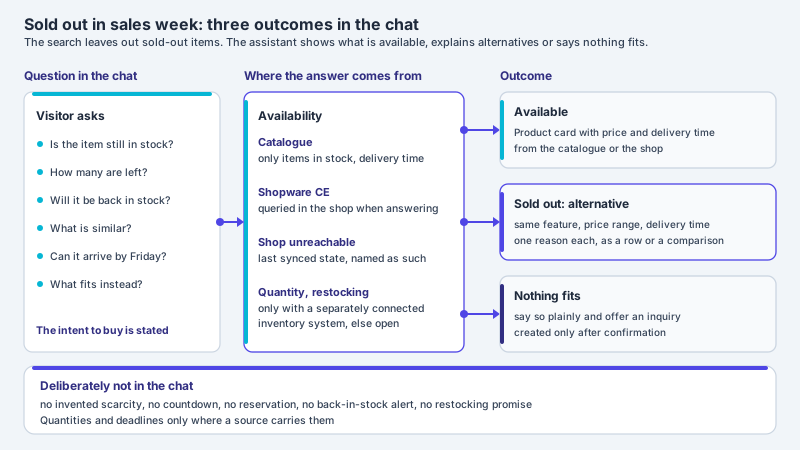
It is important that the cards are created from real catalogue data. The assistant invents neither products nor prices but reads them from the shop and shows only what really exists and is available. That protects against embarrassing mistakes such as an advertised but sold-out item and keeps the statements legally clean. If a variant is out of stock, the assistant can offer an alternative directly instead of letting the visitor run into a dead end. This keeps the conversation moving and ends more often with a filled cart than with a quiet retreat.
-
Single product card
One specific product with image, price and cart button, shown exactly when the visitor asks for it.
-
Recommendation row
Two to four fitting items side by side, curated from the follow-up questions instead of an endless list of results.
-
Direct comparison
Two models side by side with the decisive differences, so the choice becomes easier.
-
Bundle and accessories
Matching accessories or a set as a package that raises the cart value without feeling pushy.
-
Deal and sale card
A reduced item or a running promotion, visible at the right moment instead of in yesterday's newsletter.
-
Popular and fitting
What others chose for this occasion, as a gentle hint that makes the decision easier.
The Cart Moves Into the Chat
When the assistant shows products, the next logical step is that it also puts together a cart from them. That is exactly what a cart assistant does: it adds items, changes quantities, removes positions again, applies a voucher and shows the subtotal, without the visitor jumping back and forth between chat and cart page. The cart is thus no longer a separate station at the end of the journey but a visible part of the conversation. This reduces the number of clicks to completion and keeps the visitor in flow instead of tearing them out of the moment with a page change.
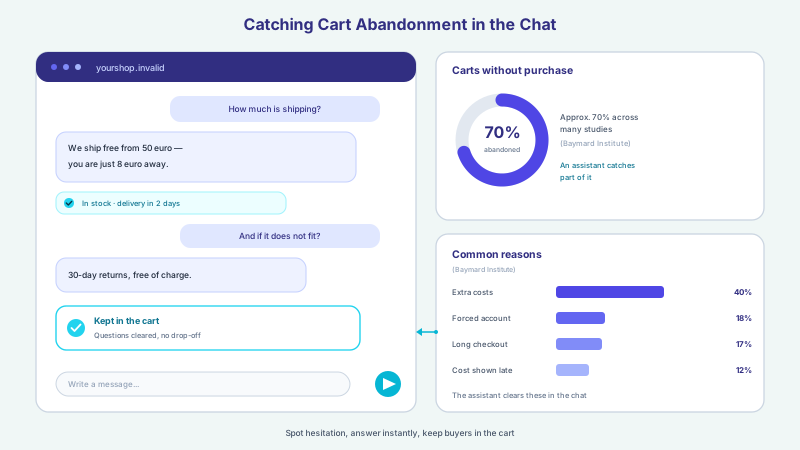
Small, context-aware hints dropped at the right moment are particularly effective. If only eight euro are missing until free shipping, the assistant can say so and at the same time offer a fitting small item that reaches the threshold. If a size in the cart is no longer available, it directly suggests an alternative. In the end there is a cart in the chat, and “Continue” leads into the shop, where payment and legal texts run as usual; for the items to sit in the cart there, your shop needs an integration of its own. So the assistant does not sell past the checkout; the checkout stays in the shop. From our own projects (project experience) it is often exactly these small friction points whose removal makes a large difference.
The cart stays in view
A cart that remains visible in the chat constantly reminds the visitor where they stand and what is still missing. Instead of a forgotten cart on a page no one opens again, the purchase intent stays present until the last step is done or the visitor consciously decides against it.
Addressing Cart Abandoners Deliberately
Cart abandonment is one of the most expensive phenomena in online retail. Around 70 percent (Baymard Institute) of online shopping carts are not carried through to purchase, on average across many analysed studies. Behind this are not fickle customers but concrete, recurring reasons. In a survey of online shoppers in the US, extra costs that are too high, such as shipping, tax and fees, are the most common reason for abandonment apart from mere browsing: 40 percent (Baymard Institute) of respondents have abandoned a purchase for this reason. Being forced to create a customer account was named as a reason by 18 percent (Baymard Institute), a checkout that was too long or too complicated by 17 percent (Baymard Institute). Almost all of these reasons can be addressed earlier when an assistant is present in the conversation. How a chat reaches hesitant buyers before they abandon is described in the article on recovering cart abandonment with chat.
A chat assistant can act at exactly these points before the cart is even abandoned. It states shipping costs and the threshold for free shipping openly in the conversation instead of revealing them at the last step. It points to the guest checkout instead of putting registration before the purchase. It settles product and quantity in the dialogue and assembles a cart in the chat, so no question is left open before the checkout. And if a visitor hesitates or only wants to compare, the assistant summarizes the status and actively offers the next step instead of letting the cart quietly expire in the background. How much room there is in completion is shown by a figure from Baymard: an average large shop can raise its conversion rate by as much as 35 percent (Baymard Institute) through better checkout design alone.
| Common abandonment reason | What happens in a classic checkout | How the assistant counters in the chat |
|---|---|---|
| Extra costs visible too late | Shipping and fees only appear at checkout | Names shipping costs and the free-shipping threshold already in the conversation |
| Forced account | Registration is required before buying | Points to the guest checkout instead of requiring registration |
| Checkout too long | Many steps and fields tire the visitor | Sets product and quantity in the dialogue and assembles a cart in the chat |
| Uncertainty about the product | Open questions stay unanswered | Answers questions on size, material and suitability right at the product card |
| Compare prices, come back later | The visitor leaves the site and forgets the cart | Summarizes the cart and actively offers the next step |
Cross- and Up-Selling in the Dialogue
Cross- and up-selling feel more natural in a conversation than in a rigid you might also like bar at the edge of the page. Because the assistant knows the context, it does not recommend at random but fittingly: the right charging cable for the headphones, the matching memory card for the camera, the shirt that goes with the suit. These recommendations come at the right moment and with a short reason why they fit. That raises the average cart value without the visitor feeling pushed, because the suggestions solve a real need instead of simply selling more.
How much lies in good recommendation can be shown in business terms: companies that excel at personalization generate 40 percent (McKinsey) more revenue from it than average players. The measure is decisive. An assistant that pushes three additional products at every opportunity achieves the opposite and annoys. So the rule is: better one fitting recommendation than five random ones. The assistant can also choose the moment when a suggestion is welcome, for example after the main product is in the cart, and hold the suggestion back when the visitor is in a hurry. This fine control is what separates a helpful salesperson from a pushy one.
Three Scenarios from Everyday Selling
Three typical situations show how the selling chat feels in everyday use. They are kept deliberately general and are based on recurring patterns from advisory conversations, not on a single customer.
First scenario, the gift question. A visitor is looking for a gift but only has a rough budget and no fixed idea. A search box helps little here because they do not know what to search for. The assistant asks two or three follow-up questions about occasion, recipient and price range and then shows two fitting product cards, each with one sentence on why it fits. A clueless search becomes a manageable decision between two good options, and the visitor feels advised instead of left alone.
Second scenario, the size question. In fashion and footwear, uncertainty about fit is a common reason not to order in the first place or to return the goods later. The assistant reads the size chart and availability, answers the question about cut and material right at the product card and, if a size is sold out, directly suggests an available alternative. This lowers the hurdle before the purchase and at the same time reduces the likelihood of a return, because expectations are clarified before the order.
Third scenario, the matching accessory. Anyone buying a technical device often needs accessories but does not know which really fit. After the main product is in the cart, the assistant suggests exactly the compatible accessory, such as the right cable or the fitting memory card, each with a short reason. The cart value rises and the customer avoids the mistaken purchase of an unsuitable part. Such cases can be thought through for almost any assortment, from electronics retail to a fashion shop.
Connecting to Shopware (Community Edition)
For product cards and cart to work, the assistant must be able to read the shop and act in the conversation with permissions. For Shopware in the freely available Community Edition the assistant takes products, variants, prices and availability from the shop, syncs them on a schedule and queries price and availability of a named item when answering; it writes nothing into the shop. In the conversation it can carry out defined actions, such as assembling a cart or applying a voucher. Because it works on the real catalogue, the information shown stays current without content having to be maintained twice. The shop assistant thus fits into an existing Shopware shop instead of replacing it.
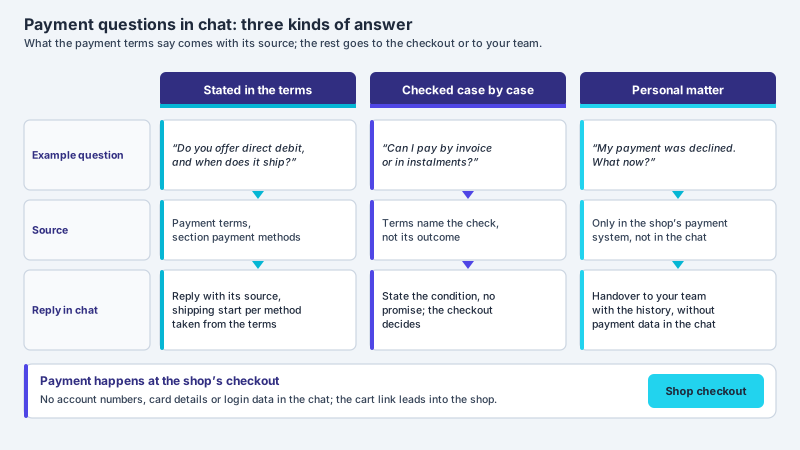
It is important that the assistant does not work past the checkout. The actual purchase, the payment and the legally required steps still run through the shop's regular checkout. The assistant puts together the cart in the chat instead of building its own parallel payment; the shop can take it over through a read-only pickup address if it sets up an integration of its own. That keeps the connection lean and the responsibility where it belongs. Actions that change something, such as applying a voucher, only happen with clear permissions so the assistant only does what is intended. Which actions make sense depends on the shop and is defined in the project.
- Read products, variants, prices and availability directly from the Shopware catalogue
- Show fitting product cards in the chat, from real data instead of advertising copy
- Add items to the chat cart, change quantities and remove positions
- Apply vouchers and promotions with permission and show shipping costs
- Provide the assembled cart with a link into the shop
- Offer an available alternative directly for sold-out variants
Data Protection in a Selling Chat
A chat that advises and sells inevitably processes visitor details, from the question about a product to the data needed for the cart. Data protection is therefore not an add-on but part of the setup. Hosting and storage take place in Germany, together with a data processing agreement, a deletion concept and clear data ownership; the answers are generated by a specialised model provider, also outside the EU on the basis of standard contractual clauses. The assistant does not pass the conversations on and does not use them for external purposes. How this is regulated in detail is set out on the page about privacy and hosting.
Restraint also applies to proactive outreach. The assistant can show a greeting fitting the page or offer help after longer inactivity, but it does not watch visitors without a basis and does not build a hidden profile. For analysis it uses the conversations in aggregated form, not the surveillance of individual people. This keeps the selling chat compatible with the GDPR and lets it act as a service rather than surveillance. Especially in German retail, this trust is a selling point in itself, not an obstacle.
What the Chat Sells Becomes Measurable
A sales channel is only as good as what you learn from it. Conversation analytics evaluate which questions are asked frequently, which products are often shown and added to the chat cart, where conversations break off and where knowledge gaps exist. Concrete improvements emerge from these patterns: a product text that repeatedly triggers follow-up questions is sharpened; a variant that is often searched for but rarely found moves to the front; a recommendation that is never accepted disappears. This way the assistant gets better every month because it builds on real conversations instead of assumptions.
With all the effect, an honest expectation belongs to it. An assistant can err, so it ties its statements to its own catalogue and knowledge data, is meant to hand over to a human in sensitive cases and is continuously evaluated. A fixed increase in revenue or conversion cannot be promised because it depends on assortment, prices, target group and competition. What can be influenced are the factors that demonstrably work: less friction, clear advice at the right moment and fitting recommendations. Because just over two fifths (Statcounter) of page views in Germany came from smartphones in 2025, a chat that bundles advice, product cards and cart on a small screen pays off there in particular. How such an assistant works concretely in an online shop is shown on the corresponding industry page.
Frequent questions
What is a product card in the chat?
A product card is a compact product tile that the assistant shows directly in the conversation, with image, title, price and a button like Add to cart. It is created from the real shop catalogue, so it is clickable and current, and not a static advertising banner. Several cards side by side form a recommendation row, two cards a direct comparison of two products. This way the visitor sees exactly the fitting offer at the moment of their question, without leaving the chat.
How does a chat assistant help against cart abandonment?
Around 70 percent (Baymard Institute) of online shopping carts are abandoned, often because of late-visible extra costs, forced accounts or a checkout that is too long. An assistant acts earlier: it states shipping costs and the free-shipping threshold openly in the conversation, points to the guest checkout and assembles a cart in the chat. If the visitor hesitates, it summarizes the status and actively offers the next step instead of letting the cart quietly expire.
Can the assistant really add products to the cart?
Yes, into a cart in the chat: the cart assistant adds items to it, changes quantities, removes positions, applies vouchers with permission and shows the subtotal, all in the chat without a page change. “Continue” then leads into the shop, where purchase, payment and legal texts run as usual; for the items to sit in the cart there, your shop needs an integration of its own. Actions that change something only happen with clear permissions, so the assistant only does what is intended.
Does this work with Shopware?
Yes, with Shopware in the freely available Community Edition. The assistant takes products, variants, prices and availability from the shop, syncs them on a schedule and writes nothing into the shop; in the conversation it assembles a cart. Because it works on the real catalogue, the information shown stays current without content having to be maintained twice. The assistant fits into an existing shop instead of replacing it, and does not work past the checkout.
Does cross- and up-selling in the chat not become pushy?
That depends on the measure. Because the assistant knows the context, it recommends fittingly rather than at random, such as the right accessory for the main product, with a short reason. You define when and how many additional suggestions it makes and tie them to a recognizable benefit. A fitting recommendation is experienced as service, five random ones as advertising. The assistant can choose the moment and hold suggestions back when the visitor is in a hurry.
Can a specific increase in revenue be promised?
No. A fixed increase in revenue or conversion depends on assortment, prices, target group and competition and cannot be promised. What can be influenced are the factors that demonstrably work: less friction, clear advice at the right moment and fitting recommendations. The assistant ties its statements to its own data, is meant to hand over to a human in sensitive cases and is continuously improved through conversation analytics, so the yield from existing traffic can be raised noticeably.
Ask it yourself, Assistant of this website
Automated assistant